


 视频转换大师
 屏幕录影大师
 视频修复
视频修复
 安全下载
安全下载在您的设备上将 MOV 文件转换为 M4V 的特殊方法
如果你想学习如何将 MOV 转换为 M4V 文件格式,那你来对地方了。本文将为你介绍几款优秀且实用的转换器,用于转换各种文件,尤其是 MOV 转 M4V。此外,你还将了解这两种文件格式之间的差异。如果你想获得更多相关信息,请耐心阅读本文。

第 1 部分:MOV 与 M4V 之间的区别
| 影片 | M4V | |
| 文件名 | 苹果 QuickTime 电影 | iTunes 视频文件 |
| 文件扩展名 | .mov | .m4v |
| 描述 | 称为 .mov 多媒体格式的 MPEG-4 视频容器经常连接到 Apple 的 QuickTime 框架。随着 1991 年 QuickTime 的首次发布,电影文件格式通常被认为是将全长彩色电影引入 Macintosh 的原因。这是在个人计算机和 Microsoft Windows 操作系统具有可比性之前。此电影格式支持分为音频、视频、效果和类似文本的字幕的多个数据序列或轨道。 资源文件以 .mov 结尾。 | M4V 文件扩展名与 MP4 文件扩展名高度相似,由 Apple 专门为在 iTunes 商店中看到的内容创建。 Apple 产品是唯一支持 M4V 的产品。 MP4 和 MOV 视频编解码器可以转换为 M4V 以在 Apple 设备上播放。 M4V 和 MP4 之间的主要区别在于 M4V 提供 DRM 版权保护,它禁止视听内容的版权。计算机需要获得许可才能播放受 DRM 保护的 M4V 文件,它通过登录用于购买视频文件的 iTunes 帐户来实现。为了使文件与非 Apple 设备兼容,如果文件不受 DRM 保护,用户只需将 M4V 文件扩展名重命名为 MP4。 |
| 由开发 | 苹果公司。 | 苹果公司。 |
| 文件类别 | 视频 | 视频 |
| 相关项目 | 电源DVD 苹果 QuickTime 播放器 Roxio 创作者 VLC媒体播放器 | 缩放播放器 媒体播放器经典 KMP播放器 VLC媒体播放器 |
| MIME 类型 | 视频/quicktime | 视频/x-m4v |
第 2 部分:使用 Mac 将 MOV 转换为 M4V 的最佳方式
在 Mac 上如何将 MOV 转换为 M4V?最佳答案就是 Video Converter Ultimate。这款应用程序是你能使用的最出色的转换器之一。你几乎可以在其中添加所有视频格式,因为它支持 100 多种视频文件格式,包括 MP4、FLV、AVI、M4V、MOV、VOB、MTS、SWF 等。此外,它转换 MOV 文件的操作步骤清晰易懂,非常适合非专业用户使用。并且,该转换器不仅支持 Mac,还支持 Windows。由此可见,这款转换器相当可靠。除此之外,你对 MOV 文件还能进行多种操作,而不仅仅是转换。如果你的 MOV 视频有恼人的水印,你可以使用这款应用程序。借助其中的去水印工具,你可以快速去除 MOV 视频中的水印。如果你打算给视频添加一些滤镜,让其在观众眼中更具观赏性,你同样可以依赖这款应用程序。也就是说,使用FVC Video Converter Ultimate,你可以完成多种操作。
功能特色
◆ 转换各种视频格式,如MP4、AVI、FLV、WMV、MKV、VOB、M4V、MOV等。
◆ 使用可用的过滤器和模板创建拼贴画。
◆ 制作音乐视频。
◆ 提供增强视频的编辑工具,如视频速度控制器、增强器、裁剪器、修剪器、旋转器等。
◆ 转换多种图片格式,如BMP、JPG、PNG等。
◆ 提供批量转换。
按照以下基本步骤使用 Video Converter Ultimate Mac 版免费将 MOV 转换为 M4V。
步骤 1:点击下方的下载按钮下载Video Converter Ultimate。安装完成后,启动该应用程序。
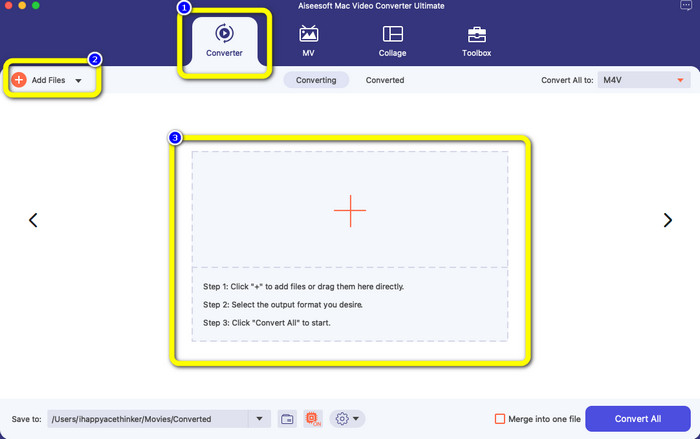
步骤 2:在顶部界面中选择转换器选项。然后点击添加文件按钮或+号添加你的 MOV 文件。你也可以将 MOV 视频文件直接拖放到框中。
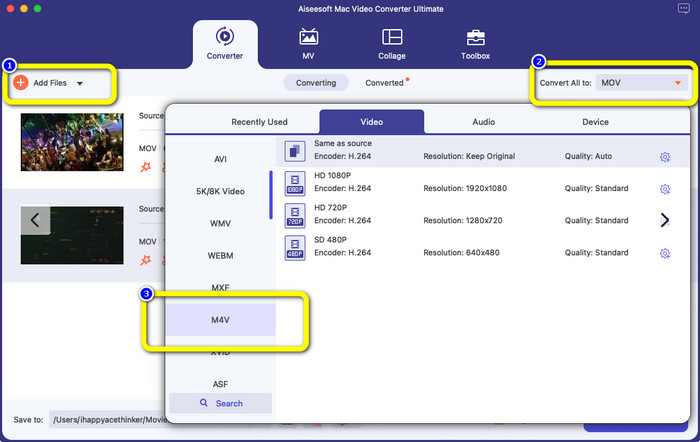
步骤 3:如果你想进行批量转换,还可以继续添加更多文件。点击添加文件按钮。接着,为了将它们转换为 M4V 文件格式,前往全部转换为按钮,然后选择 M4V 文件格式。你还可以选择所需的分辨率。
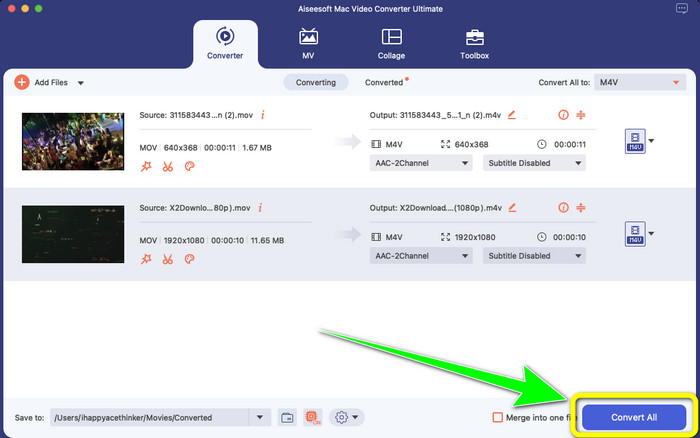
步骤 4:之后,为了保存你的视频,点击全部转换按钮。等待转换过程完成。就这样!你的 MOV 视频已经成功转换为 M4V 文件。
第 3 部分:在 Mac 上将 MOV 转换为 M4V 的 2 种方法
使用 QuickTime
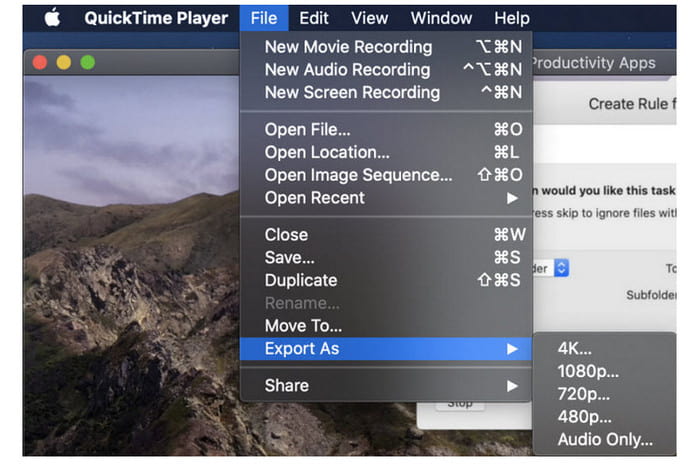
在早期的 Mac 机器上,内置应用程序是 QuickTime。 QuickTime 中的导出选项非常适合将 MOV 视频文件转换为 Mac 上的 M4V 文件,当您需要这样做以便在 iPhone、iPad 或 Apple TV 上播放它们时,这是一个有用的工具。 .mov 视频可以使用导出选项压缩并转换为 480p、720p 或 1080p。在较新版本的 macOS 上,不支持 QuickTime。要获得激活转换功能的注册码,您必须向 Apple 付费。按照使用 QuickTime 将 MOV 转换为 M4V 的步骤进行操作。
步骤 1:在 QuickTime 中打开 MOV 文件。然后在顶部选择文件菜单并选择导出。
步骤 2:在导出菜单下会有多种选项可选,包括 480p、720p、1080p、iPad、iPhone、iPod touch、Apple TV、iTunes 和仅音频(Audio Only)。如果你要为 iPhone、Apple TV 或其他 Apple 设备将 MOV 转换为 M4V,请选择 iPad、iPhone、iPod touch & Apple TV,随后会弹出一个新窗口,让你根据视频的观看设备选择合适的尺寸。
步骤 3:为转换后的视频文件命名。视频文件扩展名应为 .m4v。当一切设置完成后,点击底部的存储按钮。然后设置你希望保存文件的位置。
步骤 4:最后,再次点击存储按钮以导出 .m4v 文件。如果你想在任意时刻停止转换过程,可以点击进度条中的X按钮。它还支持将 AVI 转换为 M4V。
使用 iTunes
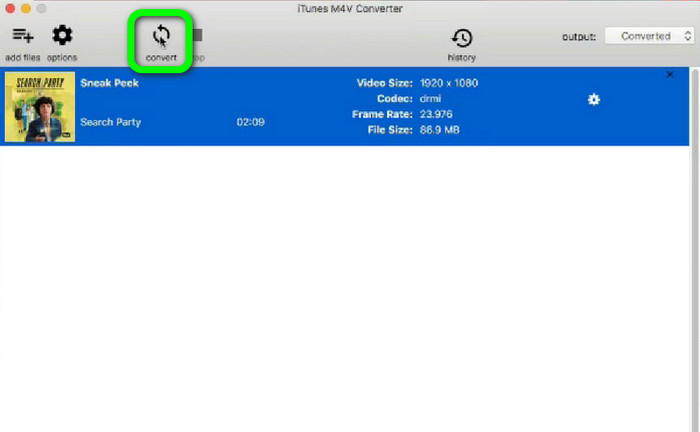
你想使用 iTunes 将 MOV 转换为 M4V 吗?然后,您可以按照下面的详细指南进行操作。 iTunes 是您可以信赖的另一个转换器。但是,它的过程很复杂,选项也很混乱。
步骤 1:打开 iTunes。在资料库中选择影片(Movies),然后添加 MOV 文件。
步骤 2:进入高级菜单,选择为 Mac 转换所选内容。
步骤 3:然后将视频扩展名修改为 M4V。
步骤 4:接着依次进入文件 > 转换。等待转换过程完成,并将视频保存到你的资料库中。
第 4 部分:在线将 MOV 转换为 M4V 的绝佳方式
要在线将 MOV 转换为 M4V,你可以使用 FVC Free Video Converter Online。该转换器可以即时完成文件转换。此外,该软件还允许你一次性转换多个文件。并且,它支持多种视频和音频文件格式,例如 AVI、VOB、MP4、3GP、AAC、AC3、MP3、FLAC 等。你可以按照下面的简单步骤,轻松将 MOV 转换为 M4V。
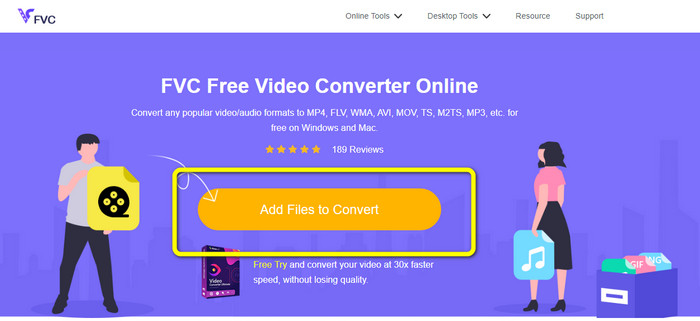
步骤 1:访问 FVC Free Video Converter Online 网站。然后点击添加待转换文件来添加你的 MOV 文件。
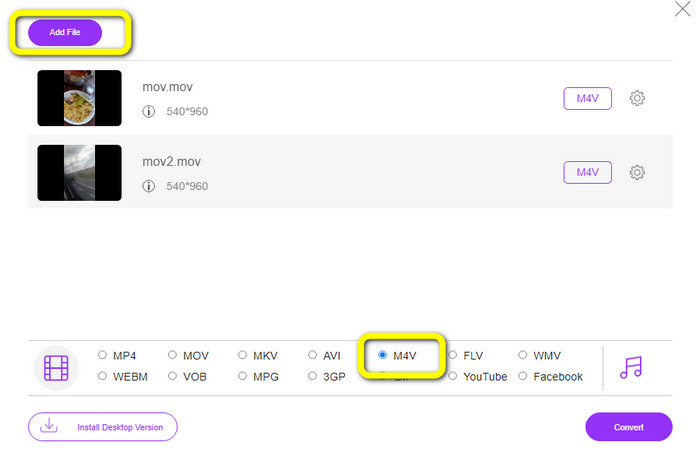
步骤 2:若要添加多个文件,点击添加文件按钮。接着进入格式选项,选择M4V文件格式。
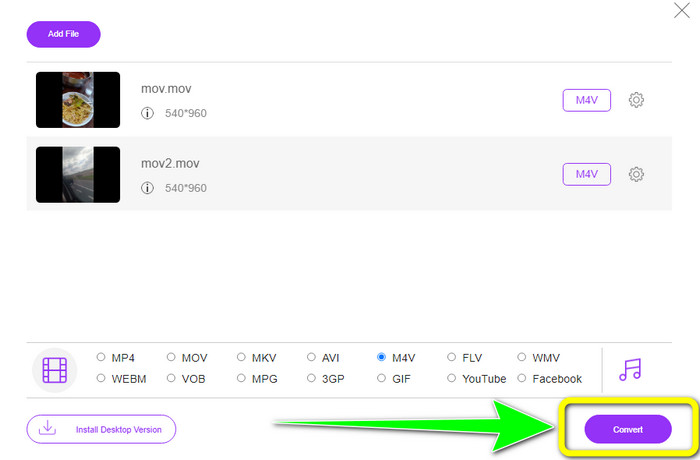
步骤 3:点击转换按钮,将 MOV 转换为 M4V。然后将文件保存到你想要的位置。你也可以使用此工具将 MOV 转换为 MKV。
第 5 部分:有关将 MOV 转换为 M4V 的常见问题解答
MOV 和 M4V 哪个质量更好?
M4V 质量更好。如果您在 iPhone、iPad 或 iPod 等移动设备上观看电影,则首选 M4V 格式,因为几乎所有移动设备都可以播放此格式。与 MOV 文件相比,M4V 文件不应该有任何兼容性问题。
MOV 文件的优点是什么?
MOV 是一种实用的文件格式,因为它可以在一个小空间中存储多个媒体组件,包括音频和视频。它保留了信息,因此您可以在必要时快速修改文件,而不必为重写而烦恼。
为什么MOV这么大?
您使用 iPhone、iPad 或 Mac 拍摄的视频将以 .mov 格式保存。制作 MOV 文件是为了保留相机记录的细节;它们更大,更适合编辑。
结论
根据上述信息,这些都是将 MOV 更改为 M4V文件格式的最佳方法。其中有些使用起来略显复杂,还需要激活代码。如果你想要一种简单的方式来转换文件,可以使用 FVC Free Video Converter Online。
-
 如何轻松地将 MTS 转换为 M4V 的简单方法
 您是否希望将 MTS 文件转换为 M4V 而不会遇到任何麻烦?转到这篇文章。我们提供了您可以遵循的详细程序。
-
 了解如何将 VOB 转换为 M4V [离线和免费]
 是否可以将 VOB 转换为 M4V?通过阅读此指南了解答案,因为您将了解可以尝试立即将 VOB 转换为 M4V 的最佳方法。
-
 了解如何在 Windows 和 Mac 上将 WMV 转换为 M4V
 我们知道您想使用最好的转换器将 WMV 简单地转换为 M4V。在这种情况下,我们将向您展示可以尝试转换文件的最佳方法。
