


 视频转换大师
 屏幕录影大师
 视频修复
视频修复WebM 文件到 MOV 转换过程:您应该知道的轻松方法
在制作和流媒体方面,并非每种视频格式都与每个数字平台兼容。在尝试输入、生成、上传或下载相关文件时,这可能会导致重大问题。例如,Apple 不使用我们过去发展起来的传统浏览器——它有自己的平台,称为 Safari。这就是为什么 Mac 用户并不总是可以通过浏览器访问仅受 Google Chrome、Mozilla Firefox、Opera 和 Microsoft Edge 支持的视频格式的原因。
其中一种就是 WebM 视频,它是一种为 HTML5 提供开放视频压缩的格式。如果你是 Mac 用户,观看这种格式通常需要第三方播放器。不过,如果你希望毫无障碍地播放视频,那么你需要的是 MOV 文件格式,因为它是苹果专为 Apple QuickTime Player 开发的格式。所以,你现在需要做的,就是在 Mac 上将 WebM 转换为 MOV,而本篇文章将为你提供实现这一点的最佳方法。
第 1 部分。概述:WebM 和 MOV
如果您已经接触视频消费和流媒体一段时间了,那么您一定已经使用不同平台观看了大量不同格式的视频。您可能曾经想知道这些文件扩展名代表什么或它们彼此有何不同。当然,您已经尝试在浏览器上播放某个视频,但它不会这样做,说它不受支持。例如,WebM 仅被 Chrome、Firefox 和 Edge 等几种现代浏览器支持,因为它通常使用 HTML5 嵌入到网页中
第 2 部分。 有助于将 WebM 转换为 MOV 的最佳转换器
转换视频文件并没有你想的那么难。虽然有许多软件和程序可以帮到你,但总有其中一款能让你快速又轻松地完成任务。FVC Video Converter Ultimate 是一款可免费下载的软件,省去了你在网上到处寻找转换器的时间。我们就是要把最好的带给你。你完全不必担心要转换的视频格式,因为此软件支持多种格式,而且在转换过程中还为你提供了丰富的视频编辑选项。以下是使用该软件需要遵循的步骤:
步骤 1: 在开始转换之前,你需要先下载软件,可以点击免费下载按钮完成。你可以选择 Windows 版或 Mac 版,本例中请选择 Mac 版。等待 .exe 文件下载完成后,双击打开并开始安装。
步骤 2: 软件安装完成后,启动它,会显示主界面。软件启动后会自动停留在转换器(Converter)标签页,如果没有,请自行点击切换到该标签页。
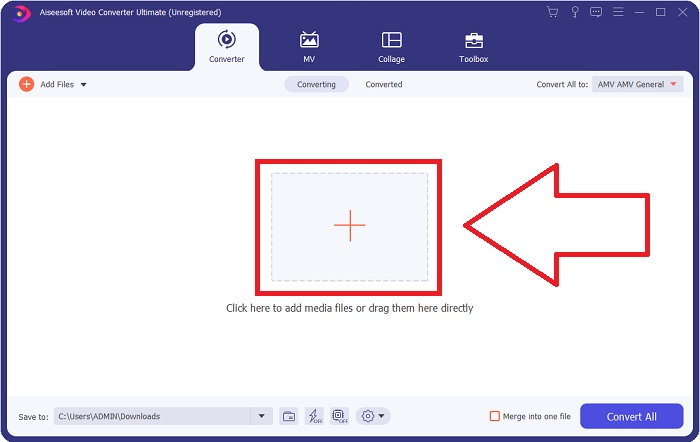
步骤 3: 在界面中间会有一个 + 按钮,点击它即可导入你想要转换的视频文件。你也可以直接将视频拖放到界面中,操作非常简单。
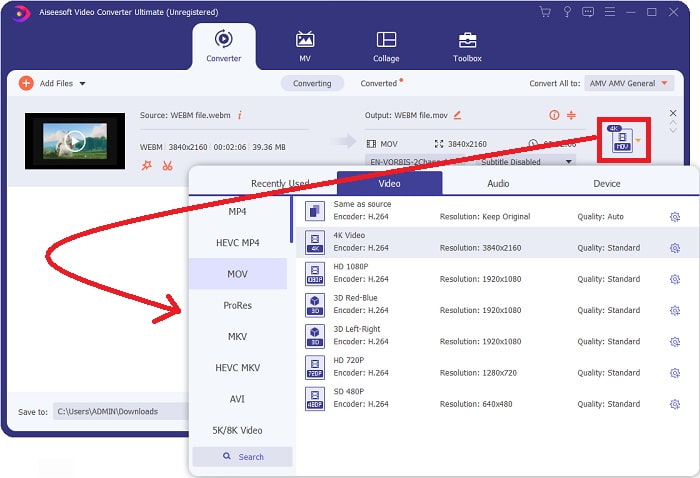
步骤 4: 视频成功导入后,会出现另一个界面。在界面右侧可以看到你当前视频的格式,其旁边有一个下拉箭头,点击即可展开多种选项。你可以选择任意你想要转换成的格式,本例中请选择MOV。你还能在这里选择分辨率和音频质量等选项。若想获得更多设置,点击你所选画质或分辨率旁边的齿轮图标,可根据需求进一步编辑视频。完成设置后点击创建新配置(Create New)以保存更改。
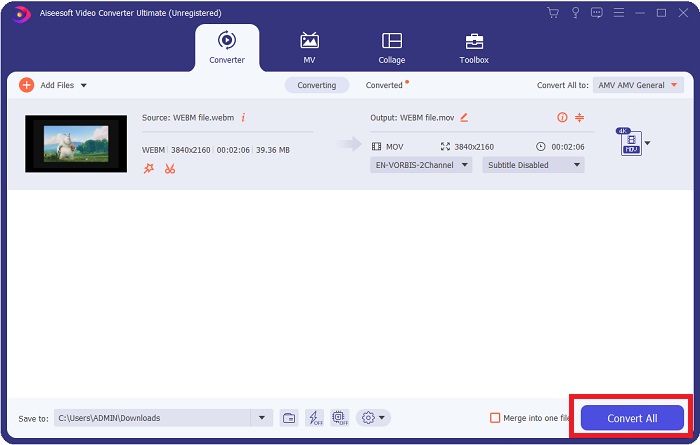
步骤 5: 当你完成并对所有修改感到满意后,在界面右下角找到全部转换(Convert All)按钮并点击,即可开始导出转换后的视频。
第 3 部分。 额外提示:将 WebM 转换为 MOV 的其他在线转换器
方法 1:使用免费转换
如果您不想再下载软件而只想继续进行转换过程,我们可以向您展示此软件的替代方案。这完全是在线完成的,同时它仍然为您提供编辑需求所需的功能。如果您想要一种轻松的方法,这个网络工具是一种方法。
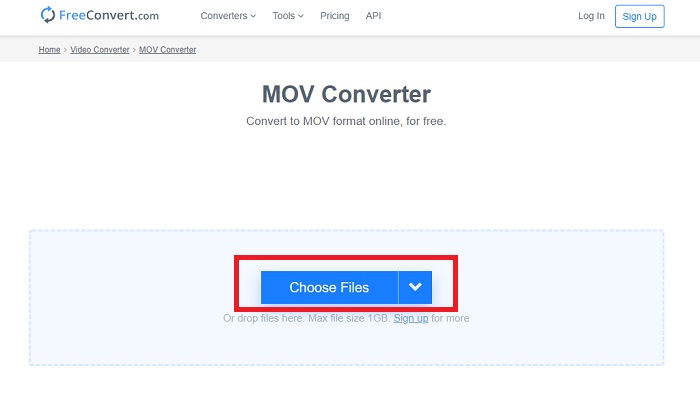
步骤 1: 进入网站主页后,你会看到页面中间有一个选择文件(Choose Files)按钮。点击它导入你想要转换的视频文件。
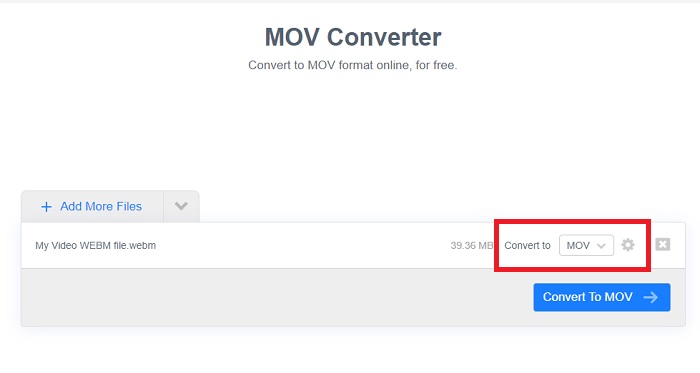
步骤 2: 和软件中的操作类似,你可以在右侧看到视频当前的格式,其旁边有一个下拉箭头。点击箭头,从中选择你希望将视频转换成的格式。若需更多选项,点击齿轮图标即可进一步编辑视频。完成后点击“应用设置(Apply Settings)”按钮以保留你所做的更改。
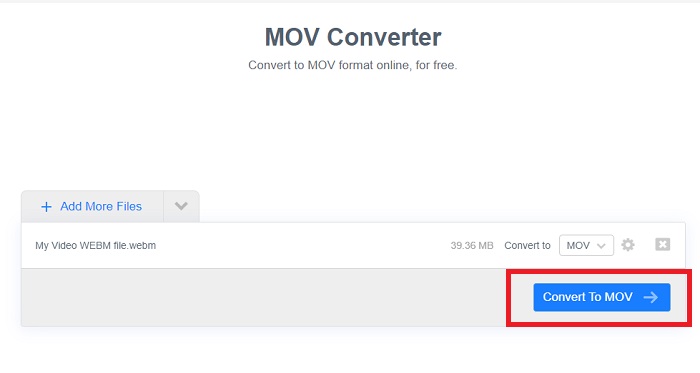
步骤 3: 当你完成所有设置后,点击下方的转换为 MOV(Convert to MOV)按钮开始转换,等待处理完成。然后点击“Download MOV”即可导出转换后的视频。
方法二:使用云转换
当您将 WebM 文件在线转换为 MOV 时,此网络工具为您提供了更多选项。您不仅可以编辑分辨率或音频质量,还可以编辑 fps、字幕等。请按照以下简单步骤使用此在线转换器:
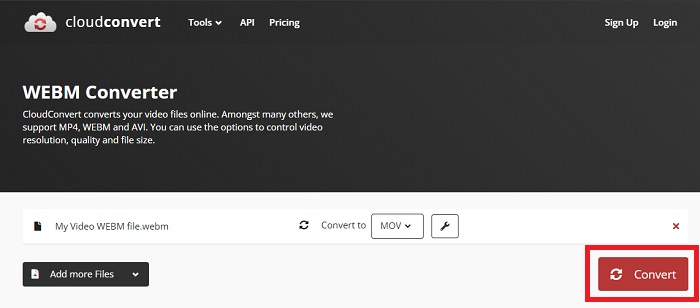
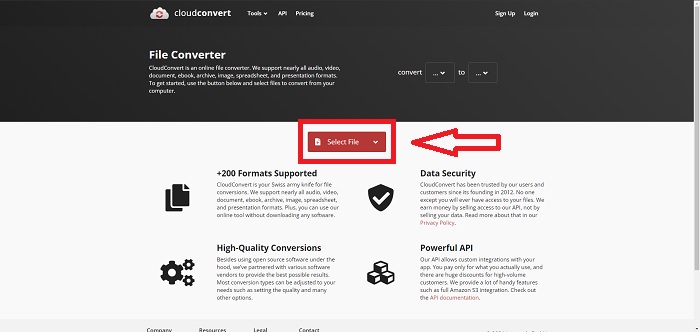
步骤 1: 首先点击页面中间的选择文件(Select File)按钮导入你想转换的视频文件。如果你想同时转换多个文件,点击“Add more Files”添加更多文件。
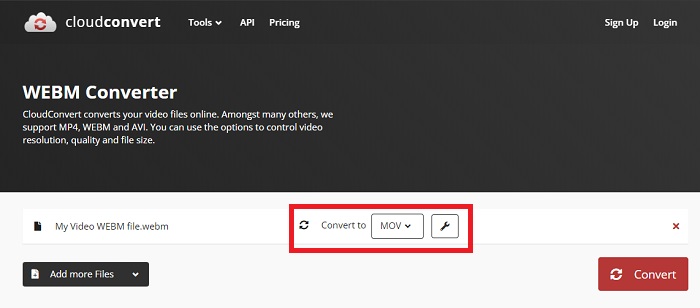
步骤 2: 在文件旁边,通过点击下拉箭头选择你想要转换的视频格式。同时,点击扳手图标可以获得更多选项。在这里,你可以编辑视频及音频的部分设置。完成后点击“OK”保存更改。
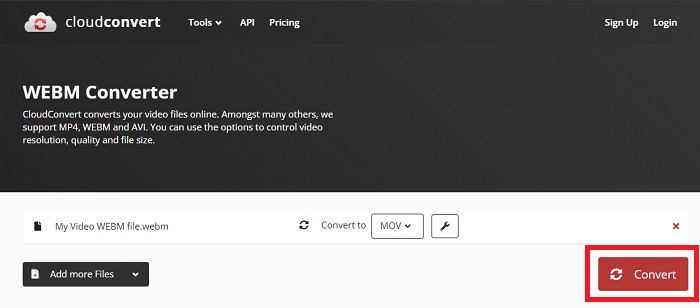
步骤 3: 完成所有编辑后,点击红色高亮的转换(Convert)按钮并等待转换完成。最后,点击绿色高亮的下载(Download)按钮,将已完全转换好的视频导出。
方法 3:使用 ZamZar 转换
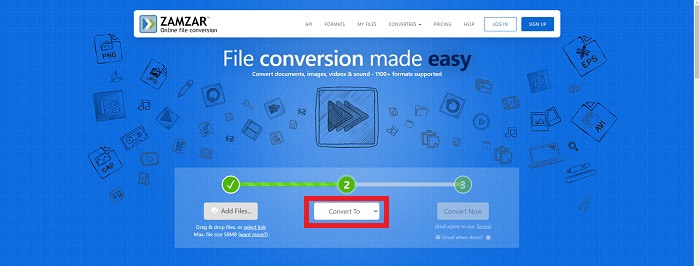
此网络工具为您的视频提供的选项较少,因为它只转换视频和音频格式。但是,它比提到的其他方法更快地完成工作。要使用此在线转换器,请按照提供的步骤操作:
步骤 1: 页面中间只有三个按钮即可完成视频转换。首先点击添加文件(Add files)导入你的视频文件。
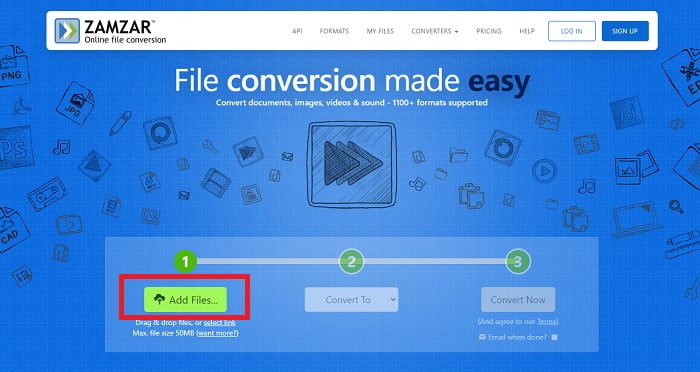
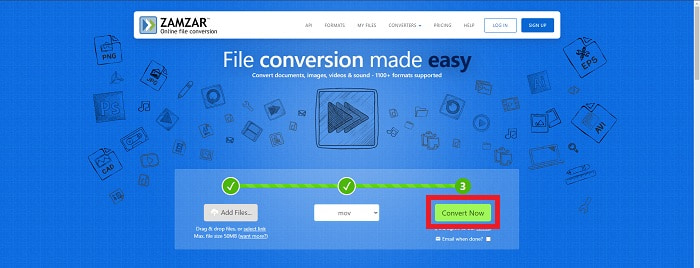
步骤 2: 第二个按钮用于选择你想要的视频和音频格式,本例中请选择 MOV 格式。
步骤 3: 最后,点击第三个也是最后一个按钮立即转换(Convert Now),开始正式转换并等待完成。完成后,点击“Download”即可将视频下载导出到桌面。
第 4 部分。 有关将 WebM 转换为 MOV 的常见问题解答
WebM 格式究竟是什么?
WebM 是一种特定于 Web 的开放媒体文件格式,包括使用 VP8 或 VP9 视频编解码器压缩的视频流、使用 Vorbis 或 Opus 音频编解码器压缩的音频流以及 WebVTT 文本。 WebM 文件结构基于 Matroska 媒体容器。大多数 Web 浏览器都接受 WebM 文件,因为它们有时在 HTML5 网站上用于播放在线电影。例如,YouTube 对其页面上的所有视频都采用 WebM 视频文件格式,范围从 360p 到其他极高的质量。维基媒体和 Skype 是一样的。
如果我不想将其转换为 MOV,我需要哪些媒体播放器来播放 WebM 视频?
如果你不想通过这些转换步骤来播放 WebM 视频,还有另一种替代方案:你可以使用第三方应用程序,也就是所谓的跨平台播放。常见的第三方媒体播放器包括 VLC、KM Player、Media Player Classic、Winamp、jetAudio Basic、Moovidia、Persian 和 XBMC,你可以在它们各自的官网下载安装,用来播放你的 WebM 文件。
MOV是高品质还是低品质?
使用 MOV 文件播放视频质量非常高。 MOV 特别有用,因为它可以保存混合媒体,例如图像、视频和 360 度动画。它还包含所有视频和音频信息。这使得编辑文件变得更加简单。
结论
确实有很多工具可以用来将视频从一种格式转换为另一种格式,无论是通过使用软件还是通过您可以在网上找到的网络工具。但是,它们在提供的选项或便利性方面仍然齐头并进。有些只是完成工作,有些则提供各种选项供您选择。本文重点关注这一点,以帮助您了解应该根据需要使用哪一种。这就是我们最推荐 Video Converter Ultimate 的原因,因为它提供了您可能永远不知道何时需要它的所有附加选项。最好一直有这个软件在你身边,这样你就可以省去每次需要转换器时在网上寻找转换器的麻烦。
-
 如何在不损失文件质量的情况下将 GIF 更改为 WebM 格式
 将您的 Gif 转换为 WebM 视频格式以具有 HTML5 视频标签。依靠下面的这个工具来了解哪一个最适合这项工作。
-
 将 WebM 转换为 MP3 而不损失音质的 3 种方法
 有问题,因为 WebM 文件不能用于播放您保存的音频?然后阅读本文,因为我们通过将 WebM 转换为 MP3 提供了有效的帮助。
-
 3 用于将 WebM 文件转换为 AVI 格式的令人惊叹的软件
 不知道如何将 WebM 转换为 AVI?那么让我们开始阅读这篇文章。正如我们在 WebM 上指定的所有详细信息以及您可以用来转换的三个转换器。
