免费的 WMV 到 MOV 转换器

快速将您的文件转换为其他高质量的格式。
添加文件进行转换

下载桌面版桌面版以批量转换文件。

资源资源 > MOV转换 > WMV 转 MOV

将 WMV 转换为 MOV 的顶级免费且易于使用的转换器,您不容错过

Microsoft Windows Media Audio (WMA) and Microsoft Windows Media Video (WMV) are the compressed audio and video formats developed by Microsoft in the ASF container. As soon as the WMV or WMA files are encoded with Windows Media Video and Windows Media Audio codecs, they are represented with the.asf extension. These two video formats that have been made by Microsoft are available to play only for the chosen video player or can convert for limited software or online converters. But if you are looking for the trusted and reliable converters to convert WMV to MOV, this will be the perfect article for you. Continue reading to know more.

WMV 转 MOV

第 1 部分。 WMV 和 MOV 简介

WMV 文件扩展名代表使用一种或多种 Microsoft 视频压缩格式压缩的 Windows Media Video 文件。例如,一些第三方程序利用它来存储简短的动画,因为它是 Windows 中存储视频的典型格式。虽然在外观上与 Windows Media Video 文件类似,但 Windows Media Audio 文件仅包含音频数据,不包含视频。 WMA 扩展名用于这些文件。

However, QuickTime File Format (QTFF) is a multimedia container file format, and a MOV file is a movie file saved in the QuickTime File Format (QTFF). One or more tracks are stored, each containing different media data (such as video, audio, and text) (subtitles). MOV files are commonly used for storing movies and other video files, and they are easy to find.

第 2 部分。在 Mac 和 Windows 上将 WMV 转换为 MOV 的最佳方法

This article proposes Video Converter Ultimate for Mac users who want to convert WMV to MOV. Both Windows and Mac versions of this software are available for free download. It is software that can be used by a wide range of people because of its user-friendly interface and accessible tools. This software contains a video converter that supports a wide range of video formats and can convert files in less than a minute, unlike other applications and web resources. Additionally, this software has a number of additional features that can help you improve your video even further. Assuming you've read through the description of the software, let's get started:

Step 1. To begin the download, right-click on the Free Download icon provided below. Both Windows and Macintosh machines can run this software. It is possible to install and begin using the software immediately after downloading it by clicking the Start Now option.

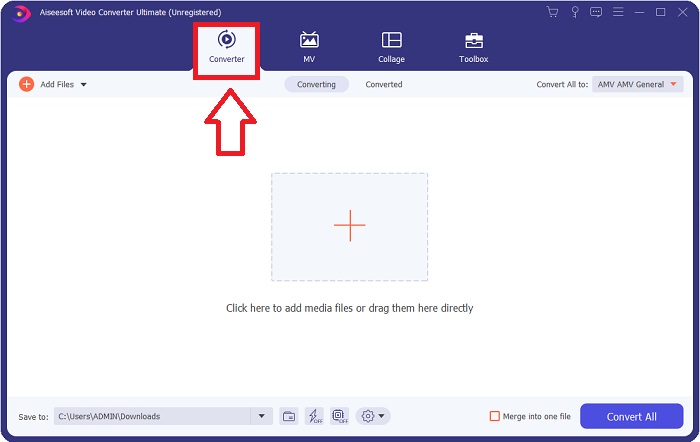
Step 2. After you have downloaded the software, you should launch it. This information will be displayed in a window when the software is opened for the very first time. Enter the video file you want to convert to begin the conversion process.

打开文件视频转换器

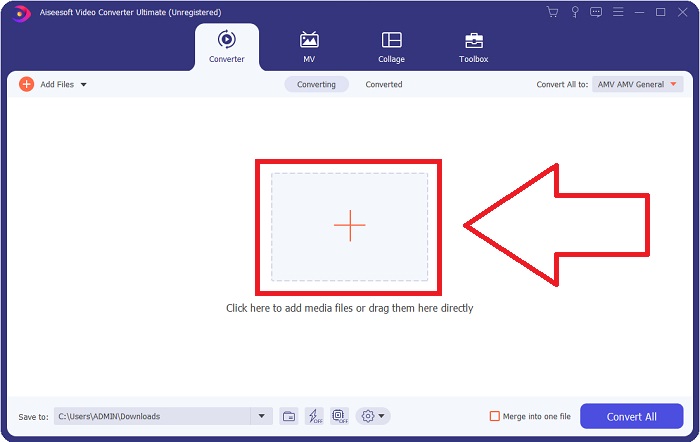
Step 3. Beginning by loading the files you wish to convert into the converter, drag and drop the video file you wish to convert into the + sign to begin the conversion process.

添加要转换的文件

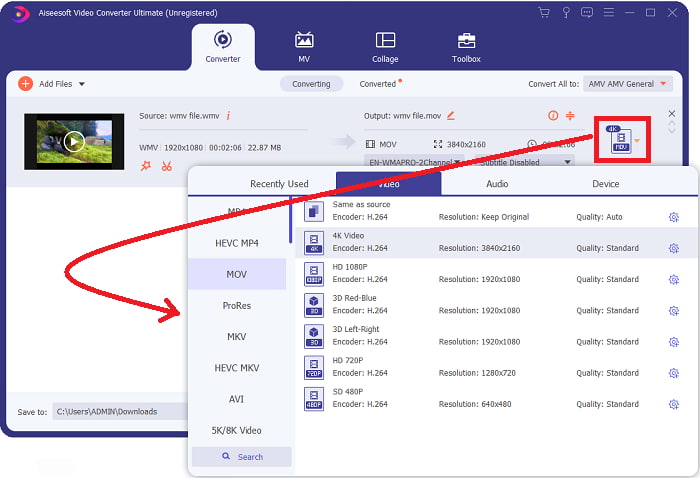
Step 4: An options menu appears in the upper-right area of the screen, from which you can choose a video format to play. Select MOV as the video format from the drop-down selection that appears. It is possible to select from a variety of video quality levels depending on the MOV file you've selected. If your desired video output isn't available, you can adjust the quality settings in Windows. You can adjust the display's frame rate and audio quality by selecting the gear icon in the upper right corner. Use the Create New button to save your changes after you've made them.

工艺转换

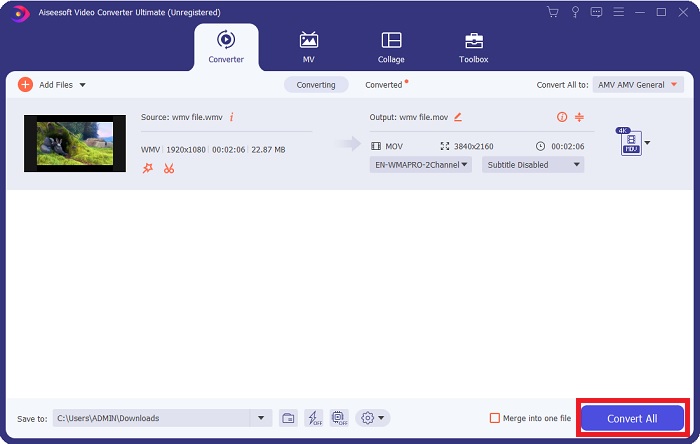
Step 5. When you've finished editing the video and it's ready to be converted, click Convert All to begin the process of transferring the files.

导出文件

第 3 部分。 在 Mac 和 Windows 上将 WMV 转换为 MOV 的其他有效方法

方法 1. 使用免费的在线视频转换器

Using FVC Free Video Converter Online, you may convert a broad variety of multimedia files for free. If you have a high-definition video, you may simply convert it to formats like MP4, FLV, and WMV without sacrificing quality. Without sacrificing quality, it is possible to convert a large number of films or audio files at once. Using this free video conversion tool, users have access to a comprehensive number of editing options, allowing them to fine-tune their films. So, let's get ready to study all the steps:

Step 1: Please click the link to access the FVC converter's website homepage. And start converting your files online.

Step 2: To get the launcher for your computer, click on the Add Files to Convert button to the right of the screen. It will start immediately when you download it again. Open the file in your folder and start the download process again.

添加文件进行转换

下载桌面版以批量转换文件。

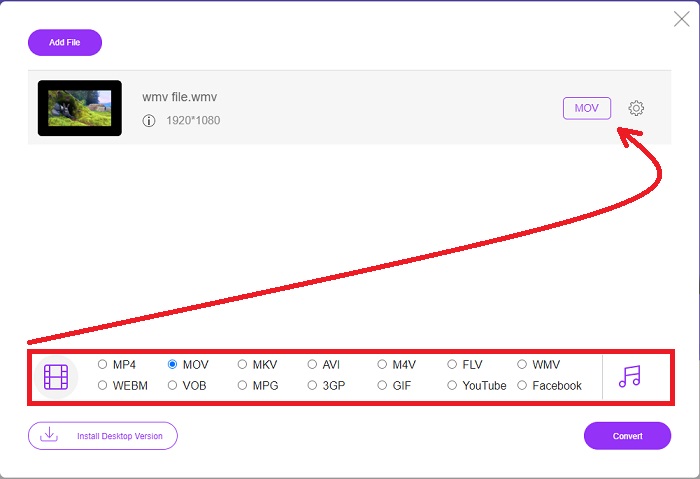
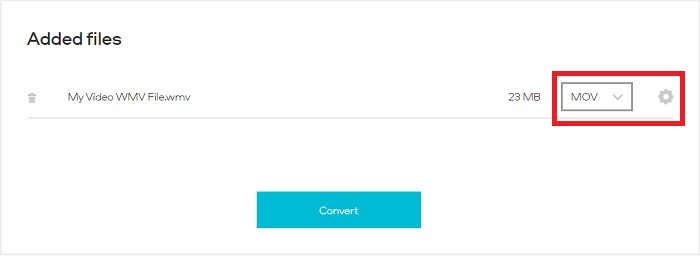
Step 3: To initiate the conversion process before it begins, choose the MOV format below.

可用格式如下

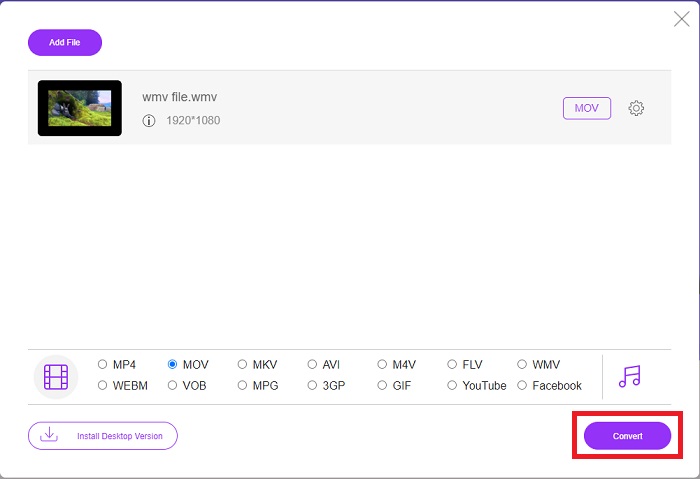
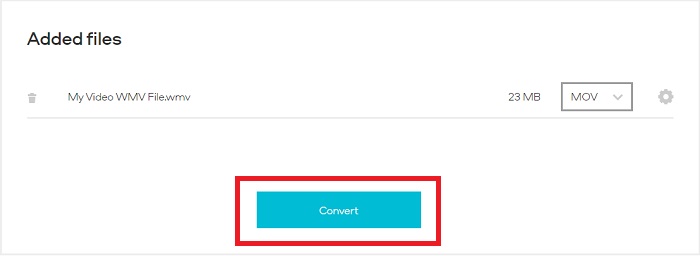
Step 4: When you've decided on a format to convert, click Convert to start the conversion process.

选择后转换

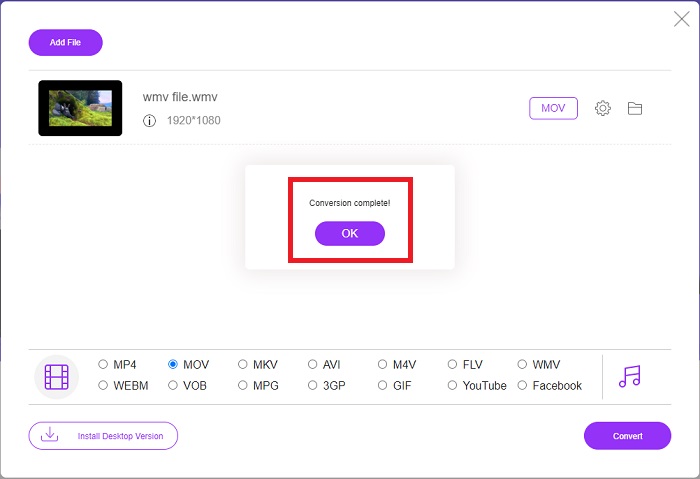
Step 5: After a few minutes, you should see a folder containing the converted file, which you can then open and begin reading.

等待然后观看

方法 2. 使用视频转换器

想找到一个免费的 WMV 到 MOV 转换器?最快的方法是使用网络服务将您的 WMV 文件转换为 MOV 格式。完成视频后,您可以将它们传输到任何设备,并在此在线媒体转换器工具的帮助下稍后欣赏它们!这是它的完成方式。

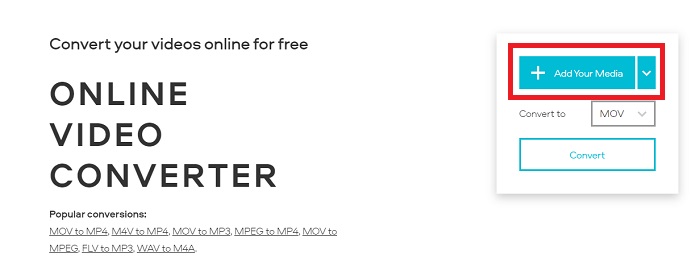
Step 1: By clicking the Add Your Media button, you may import your WMV file from your computer, Dropbox or Google Drive to convert it to MOV.

添加您的媒体转换器

Step 2: Select MOV as the desired output format. Make use of the upgraded settings to improve the overall quality of your video.

选择和升级

Step 3: After all adjustments that have been done. You can now click the Convert button.

单击转换按钮

WMV 与 MOV

WMV 由 Microsoft 制作,是 2000 年代最常见的视频格式之一。它可以在网络上看到,并由 Windows 上的各种媒体播放器播放。它也是 Windows Media Player 的默认视频文件格式。但它最近已被其他格式接管。

影片

MOV 格式可用于存储电影、电视节目、短视频剪辑或家庭电影。它实际上是以 Apple 于 1991 年推出的 QuickTime 文件格式 (QTFF) 保存的。当人们想要保存高质量的视频时,通常会使用 MOV 文件。

第 4 部分。 关于将 WMV 转换为 MOV 的常见问题

MOV 和 WMV 是一样的吗?

MOV 文件采用 MPEG-4 编码与 QuickTime for Windows 一起播放,由 Apple 为 QuickTime Player 开发。除了得到 Facebook 和 YouTube 的支持外,MOV 还可以很好地用于电视观看。 WMV(Windows 媒体查看器)文件在质量和大小上与 MOV(Mozilla 的视频格式)相当。 Microsoft 创建了 WMV 用于 Windows Media Player。

MOV的优缺点是什么?

MOV files are primarily used for editing and not for practical use at all. In addition to QuickTime Player, the format is supported by a small number of multimedia playing applications. Professional video editors take advantage of this advantage. A drawback is the lack of adoption of actual devices.

WMV 还在使用吗?

It was developed by Microsoft and is commonly used in Windows media players. WMV video format WMV files are smaller and more compressible than MP4 files. As a result, online video streaming is a popular application. The iPhone and Mac can run Windows Media Player, which is incompatible with Apple devices.

结论

As shown above, there are a lot of possible converters available to download or to use on the internet anytime. But in terms of efficiency and selecting the best converters, among others, Video Converter Ultimate is what this conclusion is pointing at. With its capability to convert video and audio formats at a fast phase and support a variety of formats for free and it's available for Windows and Mac. What are you waiting for? Download it now!

优秀的

Rating: 4.0 / 5 (based on 144 votes)

免费在线视频转换

Free Convert WMV to MOV Online!

添加文件进行转换