


 视频转换大师
 屏幕录影大师
 视频修复
视频修复
 安全下载
安全下载无缝 M4B 和 MP3 转换:随时随地享受有声读物
借助出色的 MP3 转 M4B 转换器,开启有声书多样化的大门。如果你正在寻找一种毫不费力地扩展有声书库的方式,这里评测的转换器可以帮助你轻松将 MP3 文件转换为 M4B 格式,或将 M4B 转回 MP3。它们可与流行的有声书平台和设备无缝兼容,让你随时随地畅听喜爱的故事。借助用户友好的M4B 转 MP3 转换器,释放你有声书收藏的真正潜力,让整个收听过程更顺畅。即刻开始探索无限可能,在无边界的有声书宇宙中顺滑过渡。

第 1 部分。M4B 与 MP3
在我们深入了解转换过程之前,这里有一个比较表,突出显示了 M4B 和 MP3 格式之间的主要区别:
| M4B | MP3 | |
| 数字版权管理 | 可以受 DRM 保护,限制在特定设备上的使用 | 可以是无 DRM 或受 DRM 保护的,具体取决于文件 |
| 元数据 | 支持用于组织有声读物的大量元数据 | 对基本曲目信息的元数据支持有限 |
| 文件大小 | 由于增强功能,文件通常较大 | 由于压缩率更高,文件更小 |
| 兼容性 | 常用于 iTunes 和 Apple 设备 | 普遍兼容各种设备 |
| 质量 | 提供具有高效压缩的高质量音频 | 取决于比特率的可变质量 |
| 压缩 | 利用高级 AAC(高级音频编码)压缩 | 使用有损压缩算法 |
第 2 部分。 在 Windows 和 Mac 上将 MP3 转换为 M4B 或将 MP3 转换为 M4B
1. Video Converter Ultimate
在视频和音乐转换方面,Video Converter Ultimate 堪称金标准。它支持多种视频和音频文件格式的转换,包括 M4B、MP3、AIFF、OGG、AAC 等。你还可以根据所使用的设备来调整输出格式。软件会自动为你的设备选择最合适的设置和格式。只需几秒钟,你的文件就能在 MP3 与 M4B 之间互相转换。该转换器还支持批量转换,这在处理大量文件或想要将带章节的 M4B 转换为 MP3 时非常有用。下面是一份简单的指南,帮助你使用这款程序。
步骤 1. 获取软件
首先,点击免费下载选项获取程序安装包。然后在电脑上安装该应用并启动。
步骤 2. 开始上传 MP3 或 M4B 文件
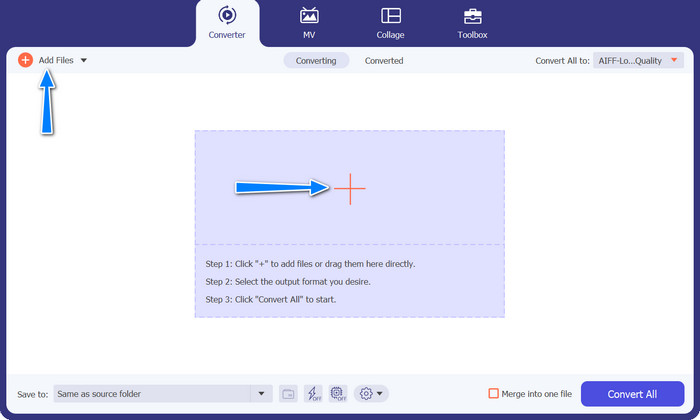
要添加音频文件,请点击主界面的加号按钮或选择添加文件按钮。之后,应会显示音频文件的缩略图。
步骤 3. 选择输出格式
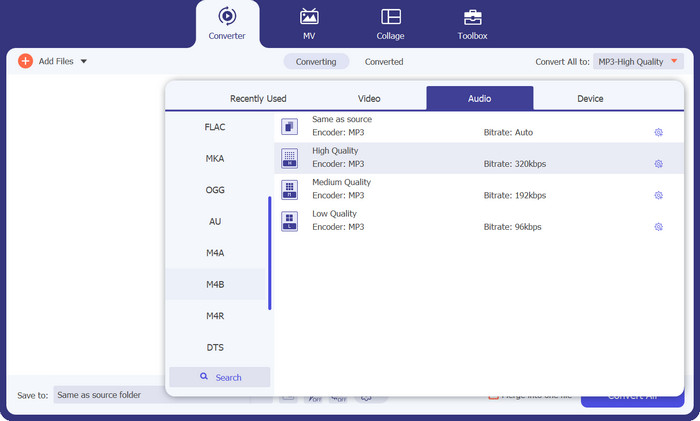
接着,前往配置文件(Profile)选项卡,并进入音频标签。在左侧菜单中找到并选择 M4B 或 MP3 格式。
步骤 4. 开始执行转换流程
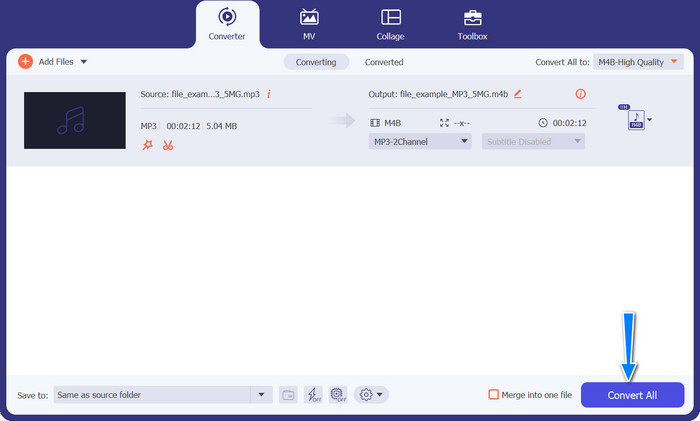
一切设置完成后,你就可以在 M4B 与 MP3 之间互转了。点击右下角的全部转换按钮以启动转换过程。随后进程会立即开始。
优点
- 离线访问。
- 批量转换能力。
- 定制和控制。
缺点
- 功能丰富的工具可能需要付出一定的代价。
2. 免费在线 MP3 转换器
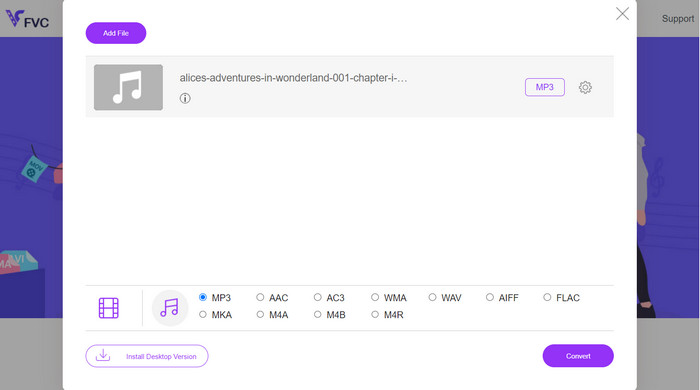
我们建议使用 Free MP3 Converter Online 作为有效的 M4B 到 MP3 转换工具。本网站不收取任何费用或在其网页上展示广告。可以无限制地转换音频和视频文件。不需要注册。这是最有效的在线转换器。以下说明提供了使用该工具免费将 M4B 转换为 MP3 的指导。
步骤 1. 首先,你只需访问该程序的官方网站。你可以使用任意喜欢的浏览器打开该网站。
步骤 2. 点击页面顶部的添加待转换文件按钮,开始上传你的音频文件。如果尚未安装启动器,需要先完成安装。
步骤 3. 然后,选择要输出的文件类型。在音频格式下,勾选AIFF单选按钮。最后一步是点击转换按钮以开始转换。
优点
- 它支持各种文件格式。
- 平台独立。
缺点
- 依赖互联网的程序。
- 安全和隐私风险。
3. iTunes
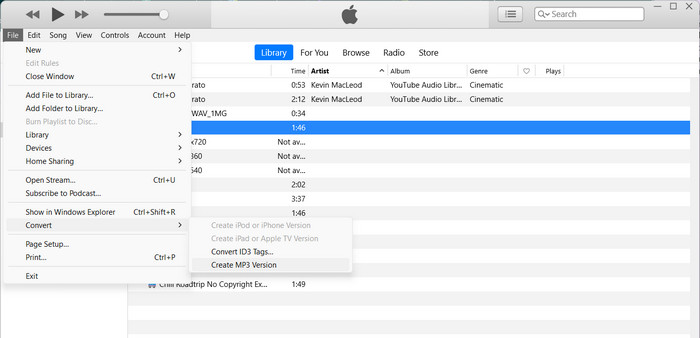
Apple 的 iTunes 是一种流行的音频文件播放器和管理器,支持多种不同的数字格式。如果您拥有 Mac,则可以使用 iTunes 将 M4B 转换为 MP3。以下是了解如何在 iTunes 中将 M4B 转换为 MP3 的一些步骤。
步骤 1. 在电脑上启动 iTunes。然后在 Windows 上打开编辑菜单(或在 Mac 上打开iTunes菜单),选择偏好设置。
步骤 2. 在“偏好设置”窗口中,点击通用标签页,然后点击导入设置按钮。
步骤 3. 会弹出一个新窗口。在使用以下方式导入下拉菜单中选择MP3 编码器。如有需要,你也可以点击设置按钮调整 MP3 的相关参数。完成后,点击确定关闭设置窗口。
步骤 4. 现在前往 iTunes 音乐库,找到你想转换为 MP3 的 M4B 有声书。如果它还未导入 iTunes,可以通过在 Windows 上选择文件菜单(或在 Mac 上选择iTunes菜单),然后点击将文件添加到资料库或将文件夹添加到资料库来添加。
步骤 5. 右键单击(或按住 Control 点击)该有声书,选择创建 MP3 版本。iTunes 将开始把 M4B 文件转换为 MP3 格式。转换后的 MP3 文件会与原始的 M4B 文件一同显示在你的 iTunes 资料库中。
第 3 部分。 在 iOS 和 Android 上将 MP3 转换为 M4B 或将 MP3 转换为 M4B
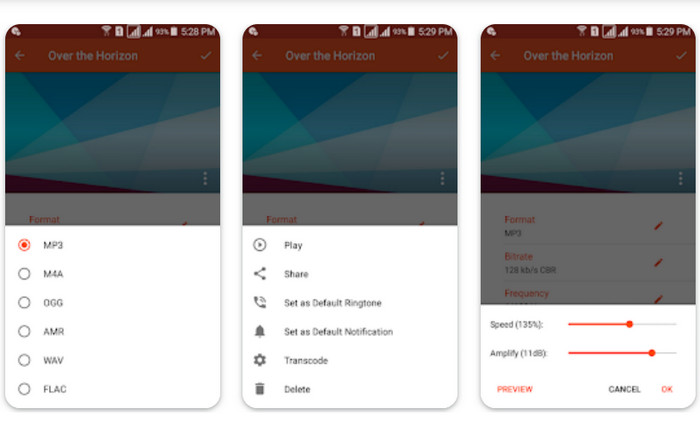
Audio Converter 是一款适用于 iOS 和 Android 设备的流行移动应用程序。它支持 M4B 到 MP3 转换以及其他音频格式。该应用程序允许您导入 M4B 文件,选择 MP3 格式作为输出,并调整比特率和采样率等音频设置。它还提供了用于修剪和合并音频文件的选项。按照以下步骤掌握如何在您的移动设备上使用此 M4B 到 MP3 转换器应用程序。
步骤 1. 启动 Audio Converter。该程序通常提供简洁的界面用于选择和转换音频文件。
步骤 2. 选择要转换为 MP3 的 M4B 文件。程序可能支持从你的设备、本地云存储或其他应用中导入文件。
步骤 3. 选定 M4B 文件后,你会看到输出格式选项。选择MP3作为输出格式。应用可能提供更多自定义设置,例如音质/比特率、采样率、声道设置,甚至裁剪或合并音频文件。如有需要,可自行调整这些设置。
步骤 4. 在选定输出格式并完成相关设置后,开始进行转换。程序会将 M4B 转换为 MP3。
优点
- 修剪、合并或基本编辑功能等额外功能。
- 它提供移动便利。
缺点
- 转换过程可能需要一些时间。
延伸阅读:
PC 和 Mac 上最好的 5 款 M4B 录音软件【免费与付费】
第 4 部分。有关 M4B 和 MP3 转换的常见问题解答
我可以在不损失音频质量的情况下将 M4B 文件转换为 MP3 吗?
从 M4B 等有损格式转换为 MP3 会因压缩而导致音频质量下降。但是,您可以通过在转换过程中调整设置来控制输出质量。
转换后的 MP3 文件会保留原始 M4B 有声读物的章节信息吗?
转换为 MP3 可能会导致 M4B 文件中的章节标记和其他高级功能丢失。 MP3 主要是为单轨音频设计的。
我可以将受 DRM 保护的 M4B 文件转换为 MP3 吗?
由于版权保护措施,将受 DRM 保护的 M4B 文件转换为 MP3 可能会受到限制。确保您拥有任何转换过程的必要权利和权限。
结论
将M4B 转换为 MP3,为有声书发烧友和普通听众都打开了更多可能。无论你选择桌面软件还是移动应用进行转换,都有众多工具可简化操作流程。
-
 可用于将 MP3 批量转换为 M4R 的最佳工具
 正在寻找可以批量将 MP3 文件转换为 iPhone 或 iPad 的 M4R 铃声的转换器?通读文章以发现其中一些最好的文章。
-
 MP3 到 AAC 转换:如何提高音频质量
 轻松将 AAC 转换为 MP3,将 MP3 转换为 AAC!本文指南涵盖了有关这些流行音频格式的所有内容,包括文件大小、质量和兼容性。
-
 FLAC 与 MP3:哪种音频文件格式占主导地位
 这篇文章将比较 FLAC 与 MP3 之间的主要区别。这包括它们的音质、文件大小、兼容性等。
