


 视频转换大师
 屏幕录影大师
 视频修复
视频修复
 安全下载
安全下载领先的 M4A 到 MP3 转换器软件程序:2023 年最佳
您准备好开始谈论 M4A 到 MP3 转换器的迷人世界了吗?好吧,找个座位,准备好让你大吃一惊吧。这些漂亮的工具就像神奇的变形器,可以轻松地将您的 M4A 文件转换为普遍兼容的 MP3 格式。这就像为您的音乐提供了跨设备和平台旅行的护照,确保每个人都可以欣赏您的音乐,而不会出现任何兼容性问题。
所以,无论你是技术娴熟的发烧友,还是只想在任何设备上尽情听歌的普通用户,这些转换器都能帮上忙。准备好潜入精彩纷呈的音频转换世界吧,在这里旋律与节拍跨越边界,自如交织。让我们一起来揭开M4A 转 MP3 转换器的神秘面纱,好吗?

第 1 部分:M4A 到 MP3 转换器的比较
以下是对三种流行的 M4A 到 MP3 转换器的全面比较:Video Converter Ultimate、Free Audio Converter Online 和 File Converter 移动应用程序。
| 视频转换大师 | 免费在线音频转换 | 文件转换器 | |
| 平台 | 视窗/苹果机 | 基于网络的 | 移动设备(iOS/安卓) |
| 使用方便 | 用户友好的界面 | 简单直观 | 用户友好的界面 |
| 转换速度 | 快速 | 取决于互联网速度 | 快速 |
| 支持的输入格式 | M4A、MP3、WAV、FLAC 等 | M4A、MP3、WAV、FLAC 等 | M4A、MP3、WAV、FLAC 等 |
| 输出格式 | 高质量输出 | 取决于互联网速度 | 高质量输出 |
| 批量转换 | 是 | 没有 | 是 |
| 成本 | 付费软件 | 自由 | 具有应用内购买功能的免费增值模式 |
| 可用性 | 提供有限试用版 | 在线提供 | 可在应用商店购买 |
第 2 部分。适用于 Windows 和 Mac 的 M4A 到 MP3 转换器
Video Converter Ultimate 是最出色的 M4A 转 MP3 转换工具之一,能以极高的速度和优异的质量轻松将 M4A 文件转换为 MP3。它的用户友好型界面让转换过程变得非常简单,而且还支持除 M4A 和 MP3 之外的多种音频格式。借助批量转换功能,你可以一次性转换多个文件,大大节省时间。此外,它还提供丰富的创意功能,包括视频转换和视频编辑。
核心功能
◆ GPU 加速:通过GPU 加速技术充分利用计算机显卡的能力。 Video Converter Ultimate 利用 GPU 加速转换过程,显着缩短处理时间并更快地提供结果。
◆ 可定制的设置:通过可定制的设置完全控制您的转换过程。调整比特率、分辨率、帧速率、音频质量等参数,以完全根据您的喜好定制输出。
◆ 媒体播放器和管理器:在Video Converter Ultimate 界面中享受转换后的文件的无缝播放。它包括一个支持各种格式的内置媒体播放器。此外,您还可以轻松管理媒体库、组织文件、创建播放列表以及添加元数据。
◆ 高级编辑工具:除了转换功能外,Video Converter Ultimate 还提供高级编辑工具来增强您的多媒体项目。精确地修剪、裁剪、合并视频并添加效果,将您的创意愿景变为现实。
优点
- 在 M4A 到 MP3 转换期间保留元数据。
- 它保持多通道音频的完整性。
- 它提供了无损转换选项。
- 它提供对比特率和质量设置的广泛控制。
缺点
- 此 M4A MP3 转换器无法消除 DRM 限制。
步骤 1. 启动最佳 M4A 转 MP3 音频转换器
首先,点击下方与你操作系统相对应的免费下载按钮。下载好这款 M4A 转 MP3 转换器后,双击安装包,开始安装流程。
步骤 2. 上传 M4A 音频文件
当软件加载完毕并显示在屏幕上后,点击程序界面中央的加号按钮。然后在电脑目录中找到并选择你要转换为 MP3 的 M4A 文件。
步骤 3. 选择 MP3 作为输出格式
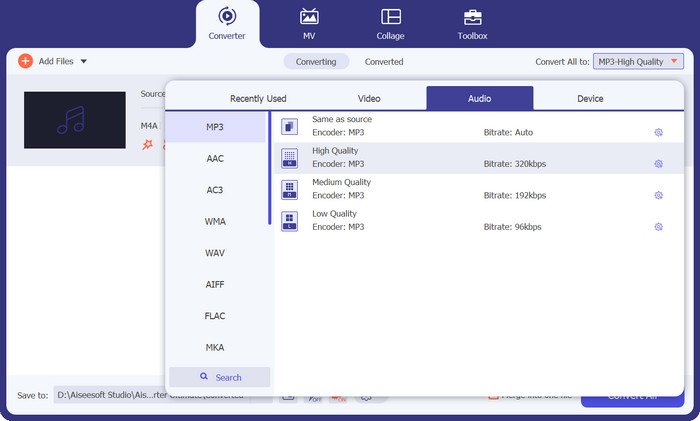
文件加载完成后,前往输出选项卡。接着进入音频面板,选择MP3格式。你还可以通过调整采样率来修改输出音质。
步骤 4. 开始文件转换
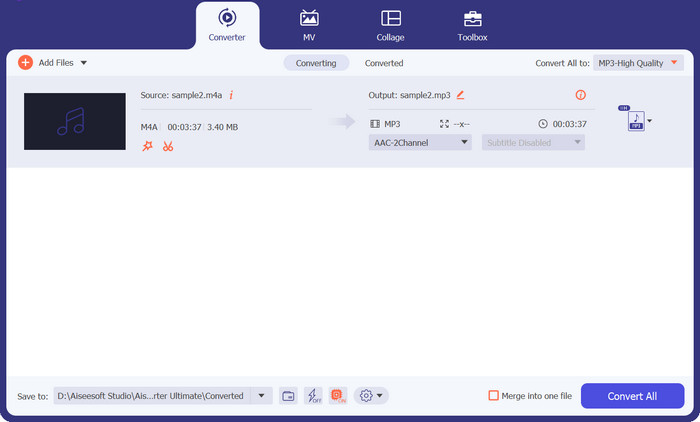
最后,当你确定好所有输出参数后,点击右侧的全部转换按钮。根据音频文件的大小,转换过程可能需要一些时间。转换完成后,你可以点击生成的文件进行试听。
第 3 部分. M4A 到 MP3 在线转换器
这款免费的 M4A 到 MP3 转换器提供可自定义的设置,允许您微调 M4A 到 MP3 的转换。调整比特率、采样率和通道模式等参数,以获得所需的输出质量和文件大小。 Free Audio Converter Online 的批量转换功能可以实时节省时间。您可以一次上传多个 M4A 文件并将它们一次性转换为 MP3,从而无需重复的手动转换。
此外,Free Audio Converter Online 还提供便捷的功能,用于编辑已转换 MP3 文件的 ID3 标签。你可以轻松修改歌曲标题、艺术家名称、专辑信息等内容,确保你的音乐库始终井然有序。
优点
- 它消除了安装软件的需要。
- 它拥有用户友好的界面。
- 这款在线 M4A 到 MP3 转换器优先考虑隐私和安全。
缺点
- 需要稳定的互联网连接。
- 由于服务器容量限制处理速度。
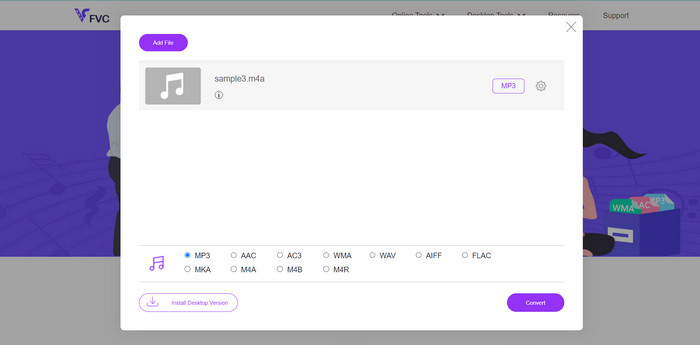
步骤 1. 使用电脑上的任意浏览器访问 Free Video Converter Online 页面。然后点击“Add Files to Convert”按钮,将 M4A 文件上传至在线工具。此操作会打开你的文件浏览器,你可以在其中选择并上传要转换的音频文件。
步骤 2. 现在选择MP3作为最终格式,如果需要,还可以根据个人喜好调整音效。
步骤 3. 最后点击Convert按钮开始转换。等待几秒钟,转换过程就会完成。
第 4 部分:适用于 Android 和 iOS 的 M4A 到 MP3 转换器应用程序
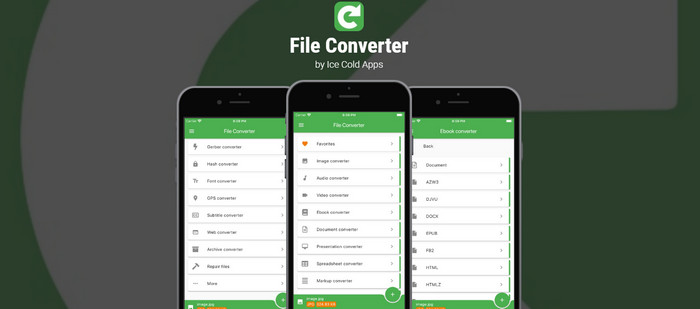
文件转换器是一款功能强大的移动应用程序,将一系列功能带到您的手掌中。使用此应用程序,您可以轻松转换各种文件格式。从文档到图像,从音频文件到视频,文件转换器支持多种格式,让您轻松转换文件。它提供了一个用户友好的界面,简化了转换过程,使所有级别的用户都可以使用它。
此外,文件转换器支持批量转换,使您能够同时转换多个文件。无论您需要转换文件用于工作、娱乐还是个人用途,文件转换器都是一款多功能工具,它可以简化流程并使您能够有效地管理文件。
优点
- 它支持离线转换,无需互联网连接即可进行转换。
- 该应用程序包括文件管理功能。
- 不懂技术的人也可以轻松浏览该应用程序。
缺点
- 它包含广告。
- 复杂的转换需要更长的时间来处理。
步骤 1. 下载并安装
首先,从设备各自的应用程序商店(Android 版 Google Play 商店或 iOS 版 App Store)下载并安装 File Converter 应用程序。然后,打开设备上的文件转换器应用程序以开始转换过程。
步骤 2. 选择 M4A 文件
选择要转换为 MP3 的 M4A 文件。您可以在应用程序中浏览设备的存储空间或文件管理器来查找 M4A 文件。
步骤 3. 选择输出格式
选定 M4A 文件后,系统会提示你选择输出格式。在这里,请选择MP3作为目标输出格式。
步骤 4. 开始转换
在选择好输出格式并调整相关设置后,点击开始转换按钮,启动转换过程。
延伸阅读:
第 5 部分:有关 M4A 到 MP3 转换器的常见问题解答
M4A 到 MP3 转换器能否使我最喜欢的歌曲免于陷入过时的音频格式?
绝对地! M4A 到 MP3 转换器可以帮助您将珍贵的歌曲转换为更广泛支持的格式,以便继续享受。
将 M4A 文件转换为 MP3 是否会提高歌曲中人声的清晰度?
虽然转换本身不会直接增强声音清晰度,但如果原始 M4A 文件具有清晰的声音,MP3 文件可以提供良好的音频质量并保留声音细节。
将 M4A 文件转换为 MP3 会使我的音乐免受耳虫侵害吗?
不幸的是,M4A 到 MP3 的转换并不能防止耳虫。但是,您可能会在转换过程中发现新歌曲,这可能会分散您对朗朗上口的曲调的注意力。
M4A 到 MP3 转换器能否神奇地消除音频文件中的背景噪音?
虽然某些转换器可能提供降噪功能,但转换过程本身并不能消除背景噪声。可能需要专业的音频编辑软件才能有效消除噪音。
M4A 到 MP3 转换器能否在我的耳机中打造虚拟音乐会体验?
M4A 到 MP3 转换器专注于格式转换,并非旨在创建虚拟音乐会体验。但是,您可以使用优质耳机或虚拟环绕声技术来增强您的聆听体验。
结论
总之,M4A 转 MP3 转换器为不同音频格式之间的转换提供了一种实用方案,确保了更好的兼容性与灵活性。虽然它们并不具备什么神奇或超凡的能力,但却大大简化了将 M4A 文件转换为广泛支持的 MP3 格式的过程。它们让用户可以在各种设备上欣赏喜爱的音乐,突破格式限制,提升聆听体验。
-
 如何转换 M4B 和 MP3 以实现有声读物的多功能性
 使用我们可靠的 MP3 和 M4B 转换器,体验在任何平台上享受您喜爱的有声读物的便利。
-
 关于如何将 M4A 转换为 WAV 的指南 [PC 和 Mac]
 通过详细的步骤和您可以选择的不同工具,了解更多有关如何将 M4A 转换为 WAV 的信息。
-
 您应该考虑使用的优秀 MP4 到 MP3 转换器工具
 使用我们顶级的 MP4 到 MP3 转换器释放音频多功能性的力量。体验无缝转换、卓越的音质和闪电般的处理速度。
