


 视频转换大师
 屏幕录影大师
 视频修复
视频修复
 安全下载
安全下载顶级 MP3 到 M4A 转换器:快速简便的音频转换
当你在听那些音质粗糙、无法展现你最爱歌曲魅力的音频时,是否总觉得不够尽兴?现在是时候利用MP3 转 M4A的强大能力,升级你的听觉体验了!通过将音频文件转换为 M4A,你可以释放音乐库的真正潜能,亲耳感受截然不同的音质表现。在本指南中,我们将带你了解 MP3 转 M4A 的优势,并为你推荐最佳转换软件,帮助你顺畅完成整个转换流程。准备好彻底焕新你的音频体验,以前所未有的方式享受你的音乐吧。

第 1 部分。 将 MP3 转换为 M4A 的最佳方法
这里有一些从 MP3 到 M4a 的最佳音频转换器。有一种离线方式,即桌面应用程序,以及另一种在线工具,即基于网络的程序。查看它们以了解更多信息。
1. Video Converter Ultimate
Video Converter Ultimate 是一款功能灵活的软件,提供丰富的音视频转换功能。在将 MP3 转换为 M4A 方面,Video Converter Ultimate 是极佳选择,为用户提供简单直观的音频转换流程。该工具支持多种音频格式,并凭借先进的音频编码技术,确保输出质量上乘。无论你是出于个人还是专业用途需要转换音频文件,Video Converter Ultimate 都能让整个过程变得高效迅速,让你可以把精力放在最重要的事情上——畅享高品质的音频文件。
步骤 1. 获取并安装程序
首先,点击任意一个免费下载按钮,然后按照屏幕上的指示将文件保存到电脑。接着启动程序,先熟悉一下其直观易用的操作界面。
步骤 2. 添加音频文件
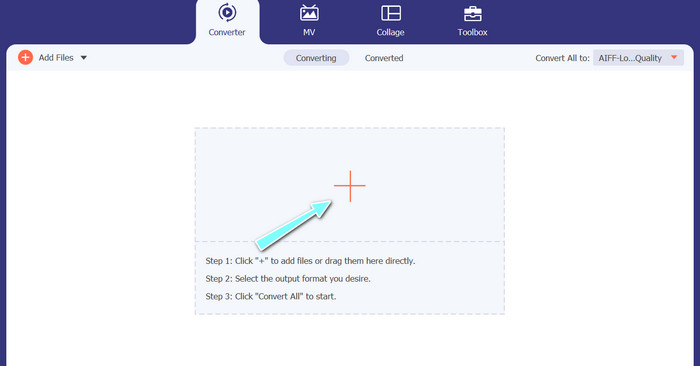
然后,在主界面中点击加号图标,找到你想要转换的音频文件位置进行导入。文件上传后,其预览将显示在界面上。如果你想批量将 MP3 转为 M4A,也可以直接上传一个包含多文件的文件夹。
步骤 3. 选择输出格式
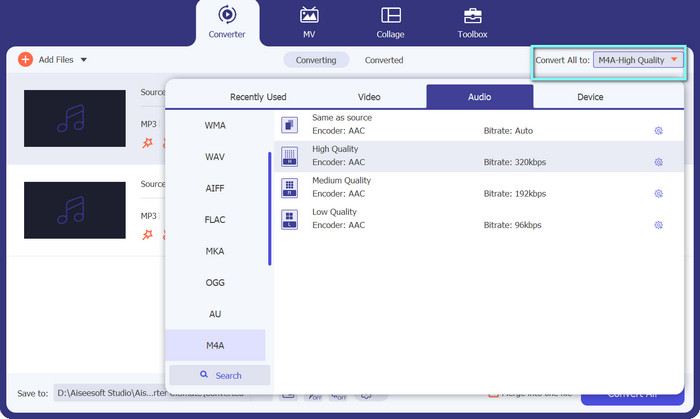
接下来,在工具右上角的配置文件(Profile)菜单中点击音频(Audio)选项卡选择输出格式。你可以在MP3或M4A格式之间进行转换。
步骤 4. 保存输出文件
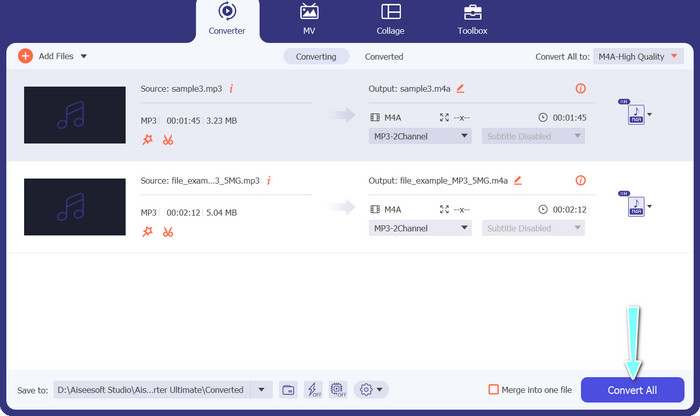
在屏幕底部选择输出文件要保存的目标文件夹。准备就绪后,点击全部转换(Convert All)按钮开始转换。
2. 免费在线视频转换器
电脑空间不够装新软件?别担心,你可以选择使用在线工具,在无需安装程序的情况下完成文件转换。基于网页的 Free Video Converter Online 可以直接在浏览器中进行转换。此外,它支持众多视频和音频格式。更不用说,你还可以通过这款在线工具进行批量转换。除此之外,自定义音频输出效果也是该工具的一大亮点。下面来看看这款 MP3 转 M4A 在线转换器的使用方法。
步骤 1. 要开始使用 Free Video Converter Online,先打开你常用的网页浏览器,直接访问其官方网站。
步骤 2. 然后,点击添加待转换文件(Add Files to Convert)按钮,选择你要转换为 M4A 的 MP3 文件。
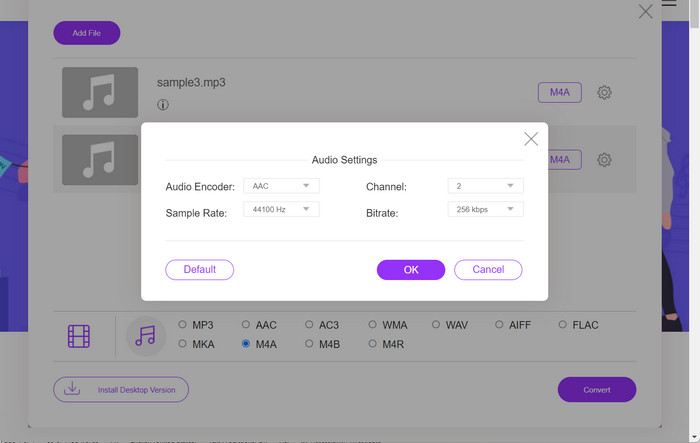
步骤 3. 在音频(Audio)格式选项中,选择M4A作为目标输出格式。你还可以调整 M4A 文件的输出质量,即比特率。
步骤 4. 点击转换(Convert)按钮开始转换过程。以上就是在线将 MP3 转换为 M4A 的方法。
第 2 部分。 在 Windows 上将 MP3 转换为 M4A
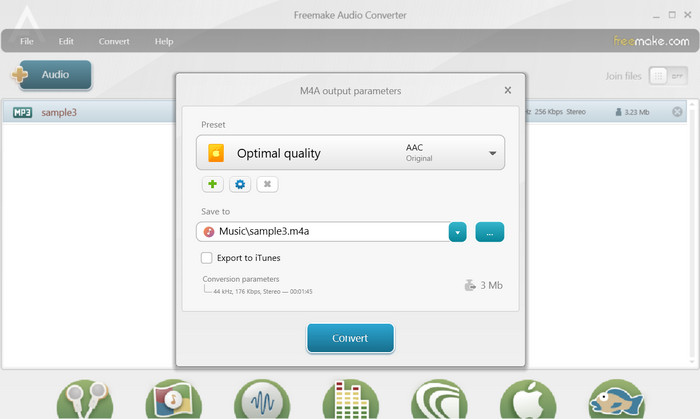
Freemake Audio Converter 是一款免费且易于使用的程序,允许用户将音频文件转换为各种格式,包括 M4A、MP3、WAV 等。凭借其简单的拖放界面,用户可以轻松添加他们的 MP3 文件并将其转换为 M4A,无需任何复杂的设置或配置。该工具还具有一系列自定义选项,允许用户调整比特率和采样率等参数以获得所需的输出质量。总而言之,它是您可以使用的最好的 MP3 到 M4A 转换器之一。
步骤 1. 在你的 Windows 电脑上下载并安装 Freemake Audio Converter。
步骤 2. 启动程序,点击+Audio按钮,将 MP3 文件添加到程序中。
步骤 3. 在程序窗口底部的格式列表中选择M4A。通过下拉菜单选择你想要的输出文件质量。
步骤 4. 选择你希望保存转换后文件的输出文件夹。最后,勾选并点击转换(Convert)按钮以开始转换过程。
第 3 部分。 在 Mac 上将 MP3 转换为 M4A
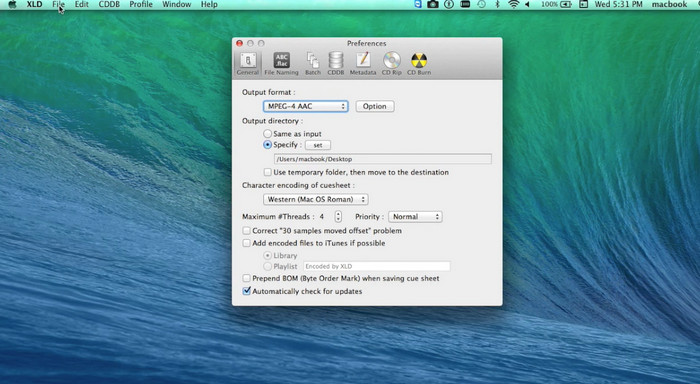
XLD 是一款免费且易于使用的程序,允许 Mac 用户将音频文件转换为各种格式,包括 M4A、MP3、FLAC 等。凭借其简单的拖放界面,用户可以轻松添加他们的 MP3 文件并将其转换为 M4A,无需任何复杂的设置或配置。 XLD 还提供一系列自定义选项,允许用户调整比特率和采样率等参数,以达到所需的输出质量。
步骤 1. 在你的 Mac 电脑上下载并安装 XLD。
步骤 2. 启动程序,点击打开(Open)按钮,将 MP3 文件添加到程序中。
步骤 3. 在程序偏好设置中,从可用格式列表中选择M4A。你可以通过下拉菜单选择所需的输出质量设置。
步骤 4. 接着选择保存转换后文件的输出文件夹。最后点击转换(Convert)按钮开始转换过程。这就是如何在 Mac 上免费将 MP3 转换为 M4A。
第 4 部分。 在 Android 上将 MP3 转换为 M4A
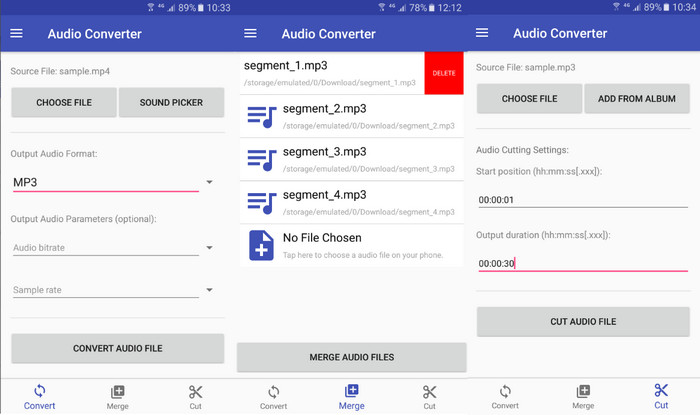
在转换音频文件方面,Online-Convert.com 提供的免费且简单的 Android 软件 Audio Converter 是无与伦比的。用户只需将他们的 MP3 文件拖放到程序的界面中,即可开始向 M4A 的转换过程。可以通过更改音频转换器中的比特率和采样率等设置来调整音频文件的输出质量。以下是在 Android 上将 MP3 更改为 M4A 的步骤:
步骤 1. 从 Google Play 商店在你的 Android 设备上下载并安装 Online-Convert.com 出品的 Audio Converter。启动应用后,点击转换音频(Convert Audio)按钮。
步骤 2. 然后,将MP3设置为输入格式,M4A设置为输出格式。
步骤 3. 现在,点击选择文件(Select Files)按钮,将 MP3 文件添加到应用中。最后,点击开始转换(Start Conversion)按钮启动转换过程。就是这么简单!你现在已经学会了在 Android 上将 MP3 转换为 M4A。
第 5 部分。 在 iOS 上将 MP3 转换为 M4A
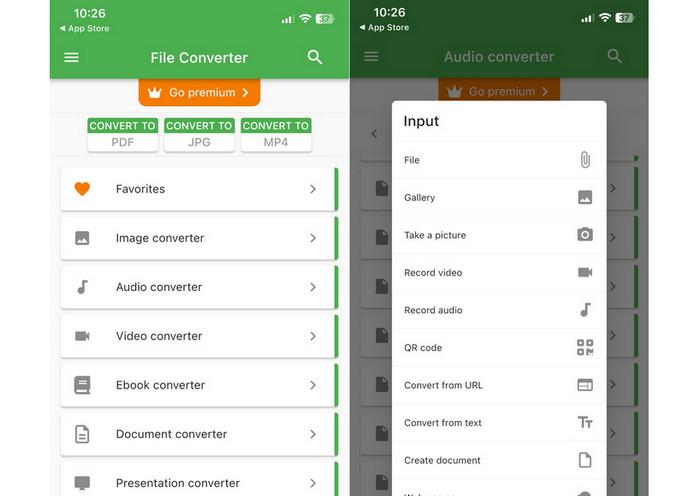
借助 File Converter Free(一款免费且简单的 iOS 软件),可以将音频文件(例如 MP3)转换为更便携且无损的 M4A 格式。其直接的设计使任何人都可以轻松加载 MP3 文件并将其转换为 M4A,而无需摆弄任何设置或设置。
步骤 1. 在 App Store 中搜索并免费下载 File Converter Free。启动程序后,点击音频(Audio)选项卡。
步骤 2. 选择MP3作为输入格式,M4A作为输出格式,对应苹果的 AAC 格式。通过下拉菜单选择所需的输出质量。点击“添加文件(Add File)”按钮将 MP3 导入程序。
步骤 3. 点击转换(Convert)按钮开始转换过程。
第 6 部分。 有关将 MP3 转换为 M4A 的常见问题解答
我可以使用 Windows Media Player 将 MP3 转换为 M4A 吗?
是的,你可以使用 Windows Media Player 将 MP3 转换为 M4A,但由于 Windows Media Player 并不原生支持 M4A 格式,因此需要一些额外步骤。或者,你也可以直接使用一款Windows Media Player 替代播放器来完成。
将 MP3 转换为 M4A 会导致音频质量下降吗?
由于两种格式使用的压缩算法不同,将 MP3 转换为 M4A 可能会导致音频质量略有下降。
我可以将 M4A 转换回 MP3 吗?
是的,许多音频转换程序和工具都支持在需要时将 M4A 转换为 MP3。但需要注意的是,在不同格式之间反复转换可能会导致音质损失。
结论
MP3 转 M4A 对任何希望提升音频文件音质和兼容性的人来说,都是一个非常有价值的过程。按照本文中介绍的步骤和技巧操作,你就可以轻松将 MP3 文件转换为 M4A,并在任何设备上享受高品质的音频体验。
-
 免费和在线|如何在Windows / Mac上将MP4转换为M4A
 如何在线将MP4转换为M4A?我可以从MP4文件中提取音频吗?阅读这篇文章,您将获得有关从MP4转换为M4A的所有答案。
-
 可用于将 MP3 批量转换为 M4R 文件的最佳工具
 正在寻找可以批量将 MP3 文件转换为 iPhone 或 iPad 的 M4R 铃声的转换器?通读文章以发现其中一些最好的文章。
-
 5 个 MP3 切割器,可轻松切割任何音频 [2023 年更新]
 您需要 MP3 切割器来修剪音频吗?在这种情况下,请阅读本文,因为我们提供了您可以依赖的工具,这些工具可以轻松剪切音频。
