


 视频转换大师
 屏幕录影大师
 视频修复
视频修复
 安全下载
安全下载5 个您不想错过的最令人欣喜若狂的 FLV 到 MP4 转换器
Watching movies and playing captured footage on your computers is one of today's most fascinating innovations. In the past years, people couldn’t get over the wonders of FLV format, which allows people to play videos on YouTube and Hulu using a Flash Player plugin. However, FLV halted its fame when Adobe no longer supported this format in 2021. Conversely, there is still good news to play your FLV files when you convert them to a more flexible format like the MP4. In this guidepost, we will cut to the chase and introduce you to the outstanding FLV to MP4 converter in the market.

第 1 部分:FLV 到 MP4 转换器的比较表
在深入了解每个转换器的全面详细信息之前,这里有一个快速指南和对将 FLV 转换为 MP4 的前 5 个转换器的概述。
| FLV 到 MP4 转换器 | 批量转换功能 | 客户支持 |
| 视频转换大师 | 可用的 | 24/7 |
| 免费在线视频转换 | 可用的 | 没有什么 |
| TalkHelper 视频转换器 | 可用的 | 24/7 |
| 易美视频转换器 | 可用的 | 24/7 |
| Veed.IO | 无法使用 | 没有什么 |
第 2 部分. 前 5 个 FLV 到 MP4 转换器
1. Video Converter Ultimate
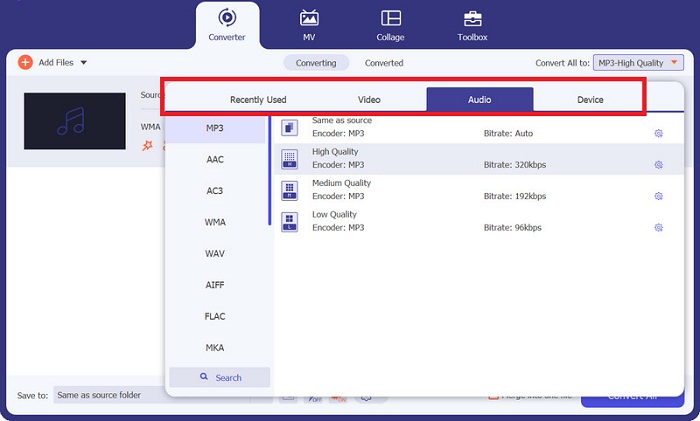
Go greater heights in Video Converter Ultimate as your best FLV to MP4 converter. This tool can be your one-stop solution to convert activities with over 1000+ video and audio output formats like MOV, FLV, WAV, and MP4, and device-specific ones like Samsung, Xbox, and Sony. On top of that, you can modify your FLV video quality, such as the bitrate and resolution, using its Output Parameter editing feature. On the other hand, this program is one of the few tools that utilizes GPU acceleration technology, which is used to make your conversion process speedy and smooth up to 50x.
优点
- 批量转换支持: Video Converter Ultimate 使用户能够一次性将 FLV 文件库转换为 MP4 视频。
- 可用工具箱: 该工具提供了一个工具箱,其中包含多种功能选择,例如 GIF 制作器、视频合并、视频剪切器和视频增强器,可为您的珍贵素材添加额外的效果。
- 未添加水印: 即使使用 Video Converter Ultimate 的免费试用版,您也可以在 14 天内转换无限量的文件,而不会在输出中看到品牌水印。
缺点
- 与 Linux 设备不兼容。
- 免费试用版不提供完整的功能。
2. 免费在线视频转换器
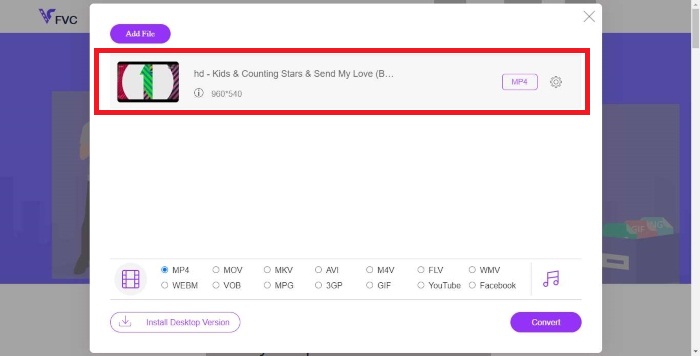
There are moments when installing a program is simply out of your reach. To make conversion activities possible, you can try Free Video Converter Online. This top-notch FLV MP4 converter online contains more than 50 audio and video outputs at your disposal. Besides that, this tool outsmarts other video converters online, for it can support converting footage with up to 300 MB size. Free Video Converter Online is accessible on any platform, including PCs, mobile devices, tablets, and any search engines known today.
优点
- 无弹出广告: 与一些在线转换器不同,该工具具有吸引人的网站设计,用户在使用它时不需要广告拦截器。
- 调整输出参数: 通过在此在线工具的设置中修改质量,完全控制 FLV 到 MP4 的输出。
缺点
- 有限的输出选择: 虽然该工具涵盖所有流行格式,但离线程序可以转换数千种视频格式。
- 无视频编辑器: 该程序仅适用于转换过程。
3.TalkHelper视频转换器
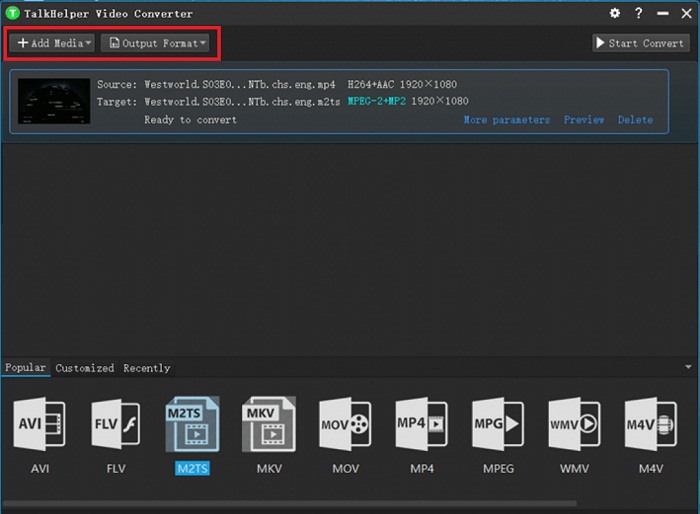
列表中的下一个是 FLV 到 MP4 转换器的免费下载工具 TalkHelper Video Converter。该程序包含一长串输出格式,例如 FLV、AMV、MP4、MOV、MPEG、ASF、DVD、AVI、RMVB、WMV、SWF、3GP 和 M4V。由于其可用的音频转换器,该程序也是单独使用视频中的音频作为配乐的绝佳选择。最重要的是,该程序可以将您的文件从基本分辨率转换为无损质量。
优点
- 调整输出预设: TalkHelper 视频转换器可以改变您的输出质量并进行完全控制。
- 时尚的界面: 该程序采用哑光黑色界面,令人赏心悦目。此外,由于其简单且用户友好的界面,即使是新手用户也可以进行转换。
缺点
- Windows 操作系统限制: 此 FLV 到 MP4 转换器软件仅限于从 Windows 7 到 11 版本开始的 Windows 设备。
4.EaseUS视频转换器
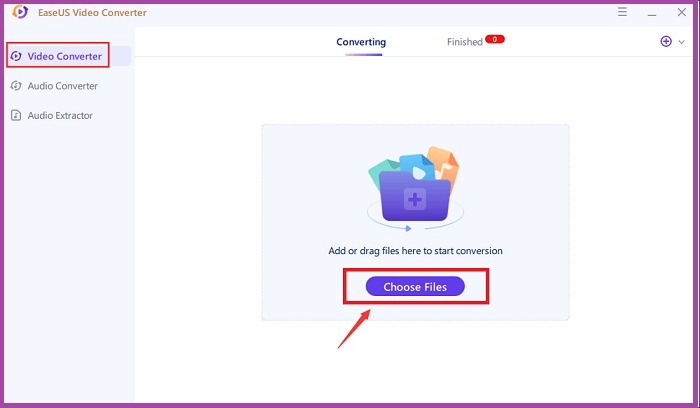
假设您需要将 MP4 转换为 FLV 转换器,该转换器对质量非常重要。 EaseUS Video Converter 会给您留下深刻的印象。该工具以其 1:1 比例转换而闻名,这意味着当您将 FLV 素材转换为 MP4 时,您仍然希望获得与 FLV 素材相同的质量,甚至更好。另一方面,EaseUS 也因其迎合 GIF 制作者和视频压缩器的工具包而闻名。
优点
- GPU加速工具: 使用该工具将 FLV 转换为 MP4 时,速度可保证提高 30 倍。
- 1000 多种可用格式: 长名单并没有结束,您可以选择格式,包括音频、视频和设备制作的格式。
缺点
- 需要高级订阅: 该程序免费试用后,您需要订阅其付费版本。
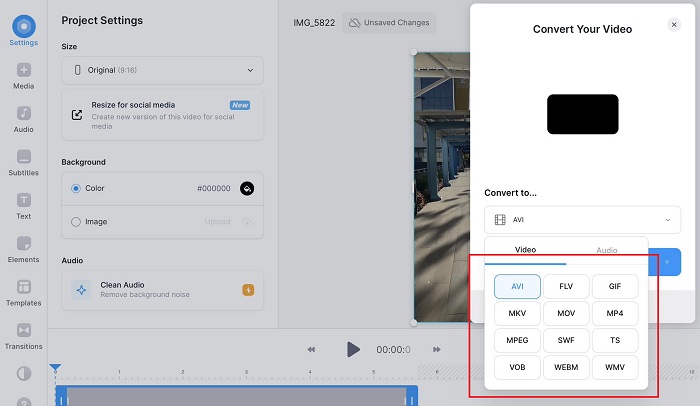
5. 维德.IO
另一个如今继续获得认可的 FLV 到 MP4 转换器应用程序是 Veed.IO。这个工具是一个很好的程序,因为它提供了一个视频编辑器来调整您的 FLV 文件并将它们提升到一个新的水平。除此之外,该工具最适合尝试随时随地探索视频编辑器和转换文件的数字创作者。
优点
- 100% 安全: 在线转换时不必再担心隐私受到侵犯,因为 Veed.IO 被认为是安全可靠的。
- 跨平台工作: 即使使用移动设备,您也可以使用该程序对文件进行转码。
缺点
- 不完全免费: 某些功能(例如视频水印去除器)需要付费。
延伸阅读:
3 Amazing & Proven Methods to Convert FLV to MKV for Free
第 3 部分:FLV 到 MP4 转换器应用程序的常见问题解答
如何播放 FLV 文件?
FLV 文件与 Windows 和 MAC 设备上的本机视频播放器兼容。但是,如果您希望在播放它们时具有 100% 兼容性,您可以尝试 VLC。
FLV 文件是否已过时?
FLV 文件仍在使用,但从实用性角度来看,最好将其转换为更流行的格式。
MP4是否比FLV更好?
绝对是的。 MP4 文件在处理编解码器、兼容性和质量方面优于 FLV。
MP4有什么缺点?
MP4 格式是当今最标准的视频格式。然而,与WAV等无损格式不同,MP4的质量较差。
将 FLV 转换为 MP4 会降低质量吗?
大多数转换器使用 1:1 比例,这意味着当您将 FLV 文件转码为 MP4 时,其质量将相同。但是,其他工具具有输出编辑器功能,可以提高转换器文件的质量。
结论
And that wraps up the walkthrough on the FLV converter to MP4. With this walkthrough, you can try all the mentioned tools and stall in awe of their features and speedy conversion.
-
 [已解决] 如何免费将 FLV 视频转换为动画 GIF 文件
 如果您想从 FLV 视频片段创建 GIF 以便更好地发送,您可以从本文中轻松了解有关 FLV-GIF 文件转换的更多信息。
-
 7 个最佳 MOV 到 MP4 转换器:综合回顾
 正在寻找最好的 MOV 到 MP4 转换器?阅读我们对顶级转换器的全面评论,比较功能、用户友好性、速度和其他方面。
-
 在几分钟内轻松将 MKV 转换为 MP4 的最佳软件
 使用市场上领先的 MKV 到 MP4 转换器将您的 MKV 文件无缝转换为 MP4 格式,以实现跨各种设备的完美兼容性。
