


 视频转换大师
 屏幕录影大师
 视频修复
视频修复
 安全下载
安全下载如何免费将MP4在线转换为WAV
MP4 是人们日常生活中非常常见的一种视频格式,与此同时,WAV 也是一种非常出色的无损音频格式。但有时,你可能想要将 MP4 转换为 WAV,以便在你的设备上收听。这种情况下,你需要的是一款专业的转换器,能够在不损失音质的前提下,从视频中提取出音频部分。
因此,今天我们将详细对比 MP4 和 WAV,并向你介绍几款最佳的MP4 转 WAV 转换器,涵盖在线和离线两种方式。

第1部分。MP4与WAV
老实说,MP4和WAV之间没有什么可比较的。毕竟,它们是在不同情况下使用的两种不同格式,一种用于存储视频,另一种用于保存音频。但它们都是文件类型,并且可以包含数字声音。基于此,下表列出了它们之间的一些差异。
| MP4 | WAV | |
| 包含 | 视频,音频和字幕 | 仅音频 |
| 文件扩展名 | .mp4,.m4a,.m4p,.m4b,.m4r和.m4v | .wav和.wave |
| 由开发 | 国际标准化组织 | IBM和Microsoft |
| 物产 | 压缩且有损(大多数时间) | 无压缩且无损 |
第2部分。最佳MP4到WAV转换器在线
现在,您已经了解了这两种格式的优点。是时候找到一个可以满足您所有转换需求的有用的MP4到WAV转换器了。
在这里,我们向你推荐一款基于网页的转换工具——FVC Free Audio Converter。它可以帮助你轻松地在网上免费将 MP4 视频文件转换为 WAV。这款在线转换器最大的优点是,你可以在任何操作系统上使用它,比如 Windows 和 Mac OS,而无需下载庞大的软件安装包。你只需要一个浏览器和稳定的网络连接,就能轻松把 MV、访谈等 MP4 视频转换为 WAV 文件。
请按照以下步骤操作,您也可以像专业人士一样进行转换。
步骤 1: 点击上方链接访问FVC Free Audio Converter的官方网站。点击Add Files to Convert(添加文件进行转换)按钮,然后根据提示下载并安装一个简单的启动器。
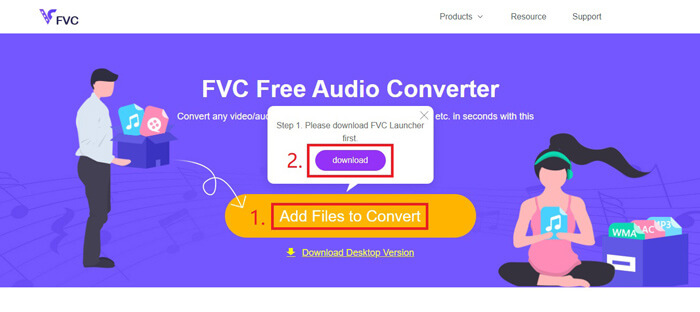
步骤 2: 安装完成后,Open(打开)窗口会立即弹出。此时你可以选择想要转换的 MP4 视频。
步骤 3: 因为你要的是 WAV 文件,所以需要将输出格式修改为WAV。然后点击Convert(转换)并选择一个保存 WAV 文件的目标位置。
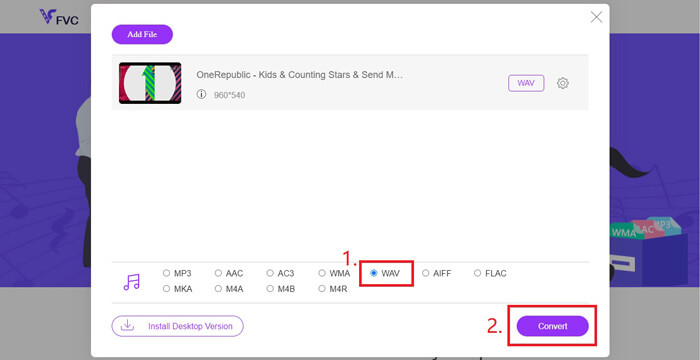
步骤 4: 等待片刻,转换完成后,文件会自动保存到你的电脑中。
第3部分。通过Audacity将MP4转换为WAV
很多人都会问,如何使用 Audacity 将 MP4 转换为 WAV。我们做过一些调查,发现这个方法可能稍微复杂一些,因为如果没有安装可选的FFmpeg库,Audacity 是无法直接打开 MP4 文件的。但好在我们通过使用 Audacity 的录音功能,成功绕过了这个限制。
对于那些不熟悉Audacity的人,它是由志愿者开发的开源和跨平台音频免费软件。通常,它用于编辑和录制多轨音频。要使用Audacity从MP4导出WAV文件,您需要执行以下步骤。
步骤 1: 找到你想要转换的 MP4 视频文件,并使用电脑上的媒体播放器播放。为确保不会遗漏任何内容,请在打开视频后先暂停,然后将进度条拖回到开头。
步骤 2: 现在可以启动 Audacity。首先,将麦克风的录音音量滑块调到0以静音麦克风,然后根据需要调整系统声音的音量。接着点击Record(录音)按钮。
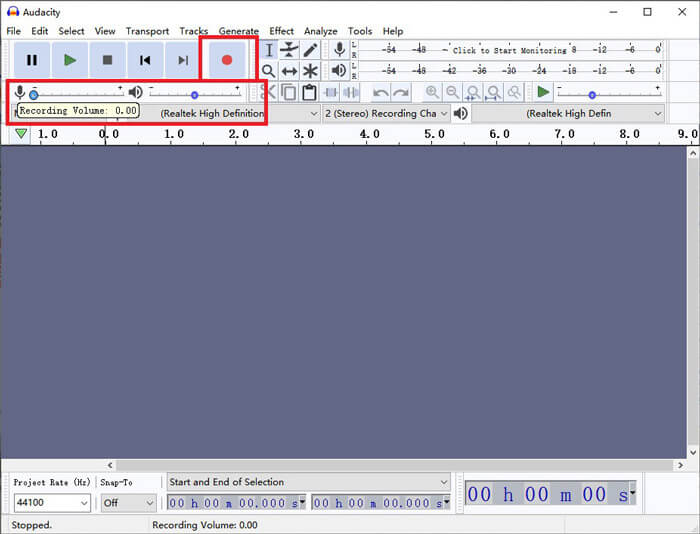
步骤 3: 回到媒体播放器并开始播放 MP4 视频。Audacity 会录制该视频的音频部分。视频播放完毕后,你可以关闭媒体播放器。
步骤 4: 回到 Audacity,点击Stop(停止)图标。之后,在顶部菜单栏中点击File(文件),找到Export(导出),然后选择Export as WAV(导出为 WAV)。
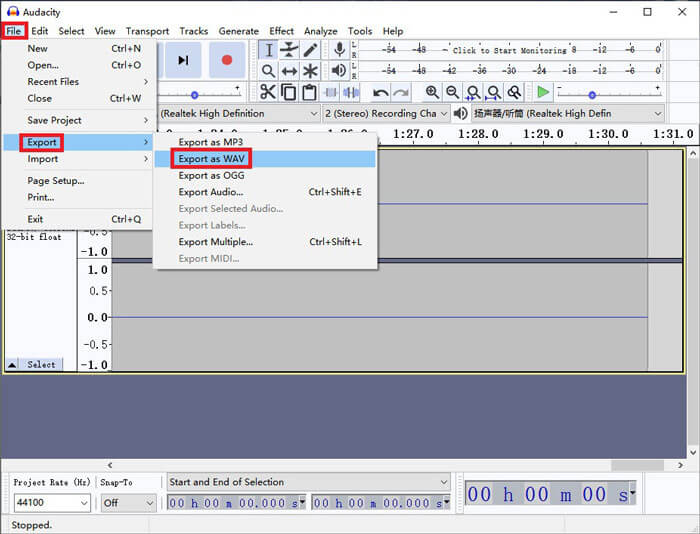
步骤 5: 在将音频文件保存到电脑之前,请为它命名。
第4部分。将MP4转换为WAV的常见问题解答
1.如何在iTunes中将MP4转换为WAV?
打开 iTunes,在顶部菜单栏中找到Edit(编辑),然后选择'Preferences(偏好设置)'。在'通用偏好设置'窗口中,找到Import Settings(导入设置),将Import Using(导入时使用)从AAC Encoder(AAC 编码器)更改为WAV Encoder(WAV 编码器),点击OK。然后右键点击你想要转换的视频文件,选择Create WAV Version(创建 WAV 版本)。
2.如何在Windows Media Player中将MP4转换为WAV?
使用 Windows Media Player 打开 MP4 文件。点击Menu(菜单)图标进入 Windows Media Player 的主页。点击Organize(整理)并选择Options(选项),然后找到Rip Music(翻录音乐)选项卡,将输出格式更改为WAV。你也可以在这里修改音频文件的保存位置。最后点击OK按钮开始将 MP4 转换为 WAV。
3. MP4或WAV哪个更好?
如果你只想比较音质,那么 WAV 显然比 MP4 更好,因为 WAV 格式的音频是未压缩、无损的。不过也正因如此,在包含相同音频内容的情况下,WAV 文件往往会比 MP4 文件大得多。如果你想获得更多关于 MP4 视频格式的信息,那么至少还需要将它与其他视频格式进行对比,比如AVI VS MP4或MOV VS MP4。
结论
加上我们在常见问题中提到的方法,现在你已经掌握了 4 种将 MP4 转换为 WAV的方式。如果你只是想使用一款省时又方便的转换工具来转换音频,那么 FVC Free Audio Converter 就能在不增加额外麻烦的情况下很好地完成这项工作。
如果您觉得这篇文章有帮助,可以与您的朋友分享。随时留下您的意见。
-
 如何在Mac / Windows上将MP4转换为WMV
 这篇文章分享了如何在Mac或Windows上将MP4视频转换为WMV格式。我们还将为您提供多种选择,包括桌面软件和基于Web的在线转换器。准备知道最好的MP4到WMV转换工具了吗?
-
 如何在Windows / Mac / iPhone / Android / Online上将MP4转换为MP3
 如果要从MP4视频中提取MP3音频,则可以查看本文并获得8个解决方案。您可以通过在线和离线方式轻松地在手机或计算机上将MP4转换为MP3。
-
 如何在台式机和在线平台上将WMV转换为MP3
 您可以从FVC Studio中找到任何免费的视频转换器软件。支持任何视频/音频格式,包括MP4,MOV,TS,AVI,WMV,FLAC,MP3等。
