


 视频转换大师
 屏幕录影大师
 视频修复
视频修复
 安全下载
安全下载如何在Mac / Windows上将MP4转换为WMV
Before introducing a suggested list of MP4 to WMV converters, let me ask you something about video formats.
To save digital video data on a computer system, we need to use a file format designed for video. So what kind of video formats do you know? MP4? WMV? FLV? AVI? Well, these truly are commonly used video formats while storing digital video data. But have you ever wondered why are there so many video file formats? What’s the difference between MP4 and WMV?
通常,MP4与市场上几乎所有类型的设备兼容,这意味着您甚至可以在计算机或电话的默认视频播放器上随处播放MP4。但是,如果您使用Windows设备,我相信WMV可以为您提供更好的服务。不仅因为它是由Microsoft开发的,而且因为它可以将HQ视频保存在很小的磁盘空间中。
So today you’re gonna learn how to change a MP4 file to WMV with the best video converters that we recommend.

第1部分。如何免费将MP4在线转换为WMV
除了安装经典的桌面软件外,如今还可以使用基于Web的转换器。尽管很简单,但许多在线转换器在转换过程中速度稍慢。有些甚至会限制您上传的文件的大小和数量,并且不能保证输出视频的质量。
Thus, we here introduce you FVC Free Online Video Converter, a free, fast and efficient video converter which can assist you in converting a bunch of videos or audio losslessly.
As a multifunctional free online MP4 to WMV converter, FVC Video Converter supports almost every type of video formats. You can convert large MP4 files to/from MKV, MOV, WMV, AVI, TS, etc. You can also edit your video according to your need. It is a breeze to adjust video bitrate, sample rate, frame rate, resolution and volume on FVC. And there’s no watermark on your video after converting.
现在您可能会担心,使用所有这些功能,可能很难理解如何操作此转换器。实际上,事实是完全相反的。只需几个步骤,您即可掌握MP4到WMV转换器。
Step 1. Click here to navigate to FVC Free Online Video Converter. Then Click Add Files to Convert to download FVC Launcher first.
下载桌面版以批量转换文件。
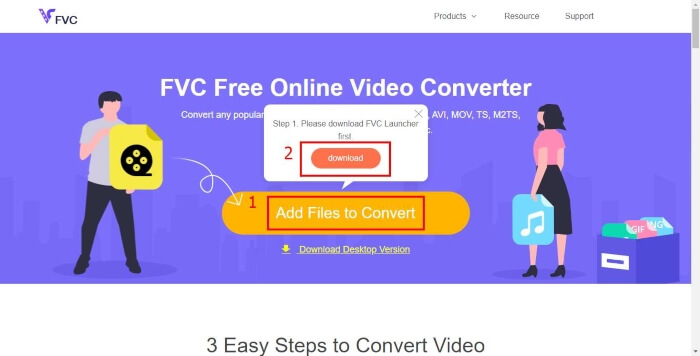
Step 2. After installing the launcher, the Open File window will pop up. Just find the MP4 file you want to change.
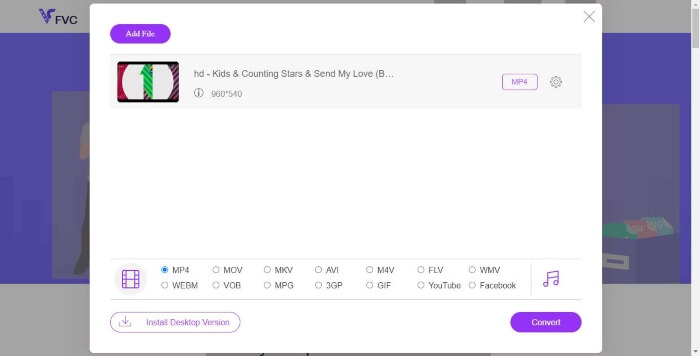
Step 3. Then in the converting page, choose output format WMV. By the way, if you want to change the video parameters, just open the Settings window by clicking the Setting icon. Click the Convert button and pick a destination to store the converted video.
第2部分。使用桌面软件将MP4转换为WMV
1. RealPlayer
RealPlayer has become one of the most popular media player since 1995. It can not only help you easily manage your videos, music and pictures, but convert videos into multiple formats and transfer them to other mobile devices.
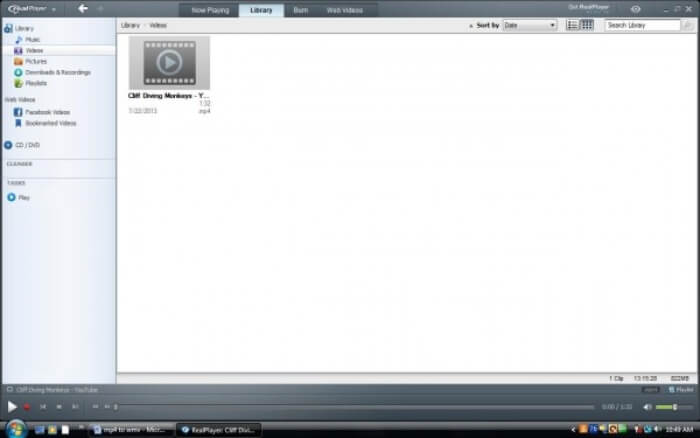
Step 1. If RealPlayer has been installed to your computer, save the MP4 file into the RealPlayer library. Select Library after launching RealPlayer. Find your file in the Video list.
Step 2. Click the file and select the More option from the popup menu. Then select the Convert option.
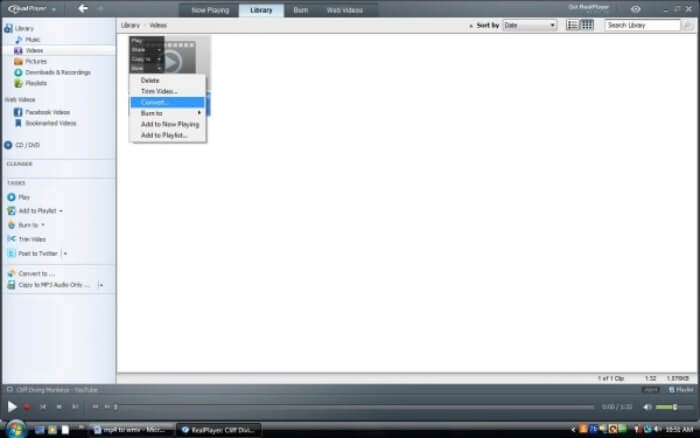
Step 3. Choose WMV from the Select a Device menu and click OK. Now click the Start button. In a few seconds, your video will be in the RealPlayer library.
2. VLC媒体播放器
VLC is an open source, cross-platform player that can play videos in different formats. It also supports file conversion to many popular formats. Follow these steps below to export WMV file from MP4.
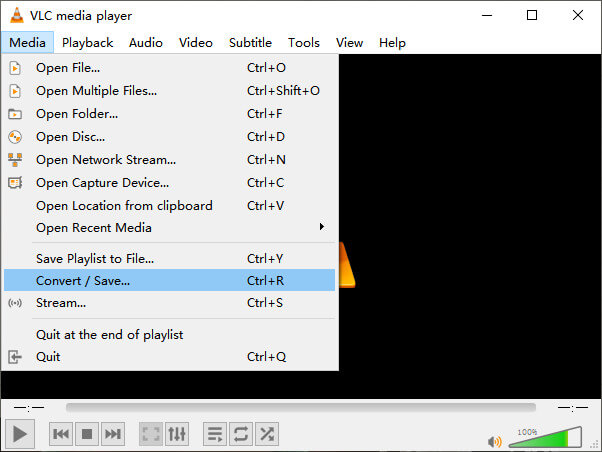
Step 1. Open VLC Media Player and click Convert / Save in the menu of Media.
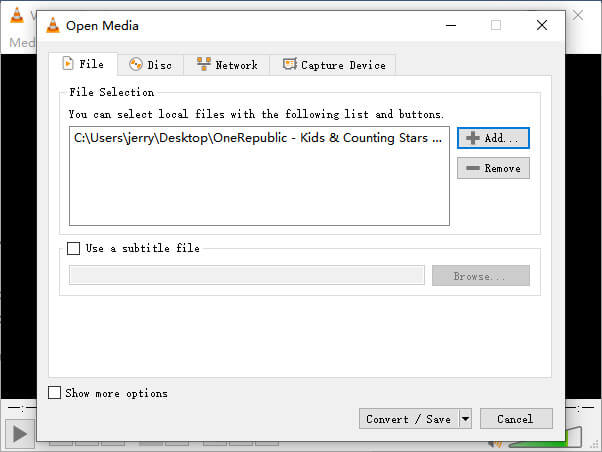
Step 2. Add the file to VLC. Then click the Convert / Save button.
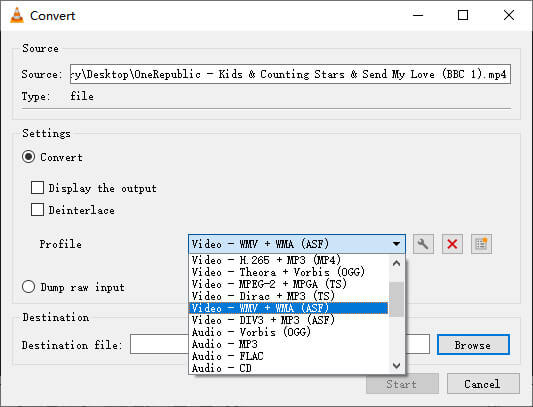
Step 3. Find WMV from Profile and select a folder as the saving destination of the output file. Then click Start.
MP4 与 WMV
第3部分。MP4到WMV转换的常见问题解答
1. Handbrake可以将MP4转换为WMV吗?
After doing a research, unfortunately the latest Handbrake cannot convert MP4 to WMV.It is true that Handbrake supports most common multimedia files. But that’s for input sources. The options for output formats are MP4(.M4V) and MKV.
2.我可以在线免费将超过100MB的MP4文件转换为WMV吗?
It depends. Different free online video converters have different limitations. Some converters like FVC Free Online Video Converter allow you to change over 100MB. But some other converters may charge you for that.
3. Windows Media Player可以将MP4转换为WMV吗?
You can’t convert MP4 file to WMV with Windows Media Player. That’s because it is just a player, not a converter. If you want to convert MP4 to WMV, you should use an efficient video converter.
4.我可以在Mac上播放WMV文件吗?
The built-in video tools on Mac cannot play WMV files. But you have other ways to play WMV videos on MacOS. You can convert WMV to other format that is supported by Mac. Or install Windows Media Player for Mac to play WMV files.
结论
Even though MP4 and WMV both have their similarities, they also have their own characteristics. So you should make decisions in accordance with specific conditions.Hope that after reading this post, the issues of converting MP4 to WMV will no longer be your problem. Next time when you need a WMV file, just follow the guide above and convert the file with ease.
-
 如何在不损失质量的情况下将MP4视频文件转换为GIF动画图像
 寻找将MP4视频转换为GIF动画的最佳方法吗?这是在Photoshop,Windows Movie Maker,在线视频转换器等中执行此操作的详细指南。
-
 如何在不支付一分钱的情况下将FLV视频文件转换为MP4
 本指南共有四种免费方法,可将您的FLV视频文件在Windows 10/8/7 / XP和Mac OS X上转换为MP4格式,因此您可以在任何设备上欣赏视频。
-
 如何在不损失质量的情况下将MOV转换为MP4
 要将MOV(Apple QuickTime电影)文件转换为MP4?这篇文章分享了4种免费方法,可以将您的MOV视频文件转换为Windows 10/8/7 / XP和Mac OS X上的MP4格式。

