


 视频转换大师
 屏幕录影大师
 视频修复
视频修复
 安全下载
安全下载如何通过免费转换器将MXF转换为MP4
当你使用索尼、松下、佳能等专业摄像机录制视频时,视频会以 MXF 格式导出。通过摄像机本机播放这些 MXF 文件没有任何问题。然而,一旦你想在 Windows Movie Maker、iMovie 中编辑 MXF 文件,或在 QuickTime 播放器或安卓手机上播放时,MXF 文件就会出现卡顿。解决办法就是将 MXF 转换为 MP4,MP4 是几乎所有编辑软件和播放器都支持的最流行视频格式。
这就是我们将在本文中分享的内容,即使用免费的MXF转换器将MXF转换为MP4的4种方法。没有任何技能,即使您是初学者也可以做到。

第1部分。如何免费将MXF在线转换为MP4(最简单)
将MXF转换为MP4的最简单方法是使用免费的在线视频转换器。在线上有各种MXF转换器,您无需下载任何转换器即可将MXF转换为MP4。
免费在线视频转换器是一款简单易用的视频转换工具,支持多种视频和音频格式。它可以在 Windows 和 Mac 上免费将 MXF 文件转换为 MP4、FLV、WMA、AVI、MOV、TS、M2TS、MP3 等格式。此外,你还能为输出的 MP4 文件调整视频编码格式、分辨率、采样率等参数。并且它支持批量转换,你可以一次性将多个 MXF 文件转换为 MP4。
步骤1.添加MXF文件
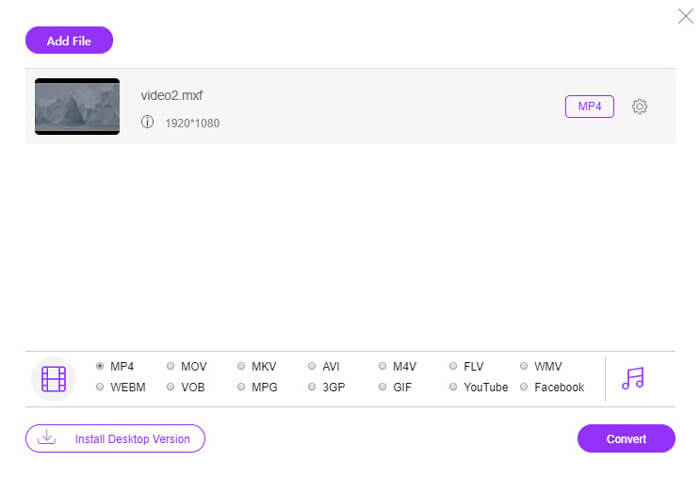
点击添加文件进行转换,随后会弹出一个窗口,提示你下载并安装转换启动器。安装完成后,会出现一个窗口,你可以在其中选择想要转换的 MXF 文件。
步骤2.将MXF转换为MP4
在底部勾选MP4选项,然后点击转换,此时会弹出一个窗口,让你选择保存转换后文件的目标位置。接着程序就会开始将 MXF 转换为 MP4。转换成功后,系统会自动将已转换的 MP4 文件下载到你的电脑上。
如果您不想在线转换MXF文件以保护隐私,则只需移动下一种方法即可在计算机上转换MXF。
第2部分。如何通过计算机上的VLC将MXF转换为MP4
VLC不是免费的媒体播放器,但可以是免费的视频转换器,可以将MXF更改为计算机上的MP4。以下是步骤。
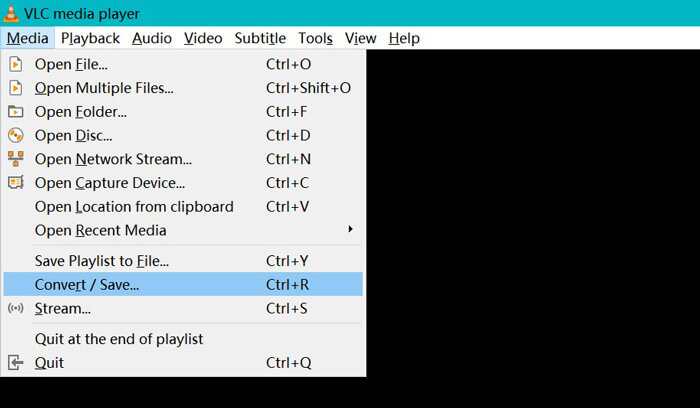
步骤 1:在电脑上免费下载并立即运行 VLC。点击媒体,选择转换/保存。
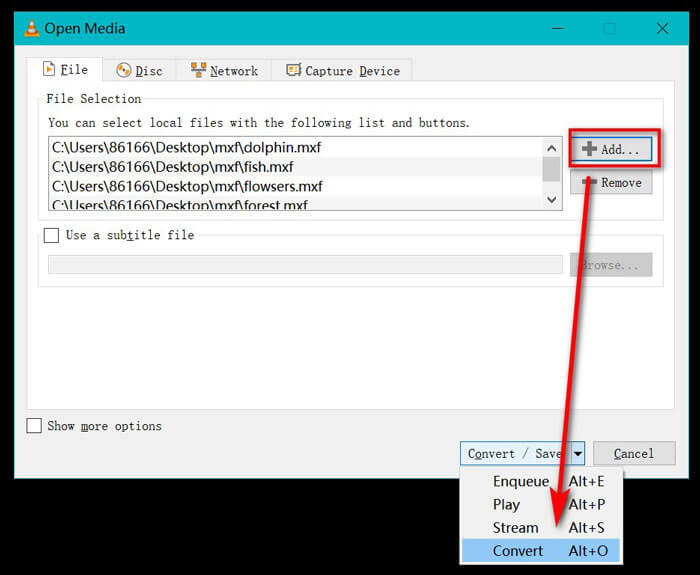
步骤 2:在打开媒体窗口中,点击"添加‘按钮将 MXF 文件导入此程序。之后,从转换/保存的下拉选项中选择转换。
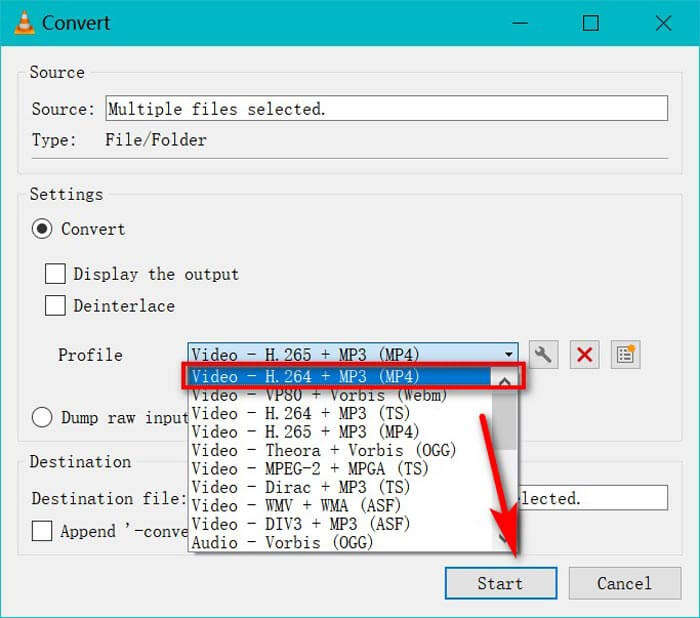
步骤 3:在配置文件的下拉列表中选择 MP4 作为输出格式。
选择目标文件,以设定保存转换后 MP4 文件的位置。
点击开始,即可通过 VLC 将 MXF 转换为 MP4。
但是,通过VLC将MXF转换为MP4会花费更多时间,因为VLC会记录MXF文件并将其保存到MP4中。如果需要MXF转换器,只需移动下一个方法。
第3部分。如何将与HandBrake的MXF转换为MP4的代码
HandBrake是Windows,Mac和Linux上的开源视频转换软件。它可以将最常见的媒体文件和DVD /蓝光光盘转换为H.265,H.264,VP9 / 8,AAC,MP3,FLAC,AC3等编解码器中的MP4和MKV。
现在,让我们免费获得MXF视频转换器,将MXF转换为MP4。
步骤 1:免费下载并运行 HandBrake。默认情况下,HandBrake 启动时会弹出打开源对话框。然后你就可以选择想要转换的 MXF 文件。
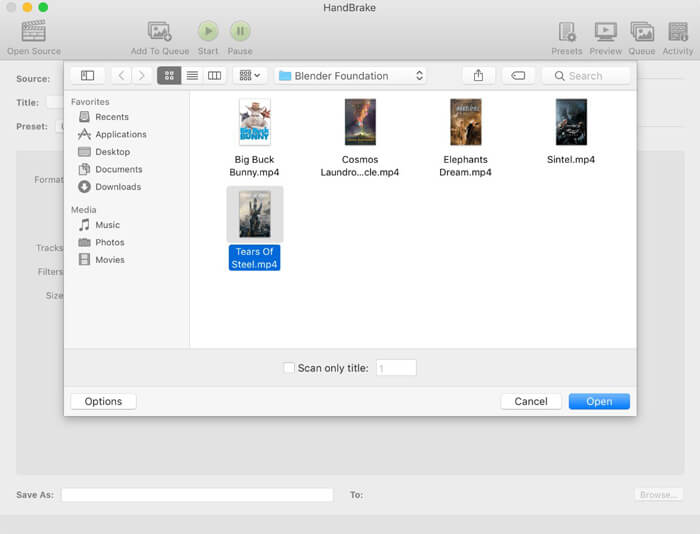
步骤 2:在"格式‘中选择 MP4 文件,并可选地预设视频分辨率、为输出文件添加滤镜效果等。别忘了点击浏览设置保存已转换 MP4 文件的目标位置。
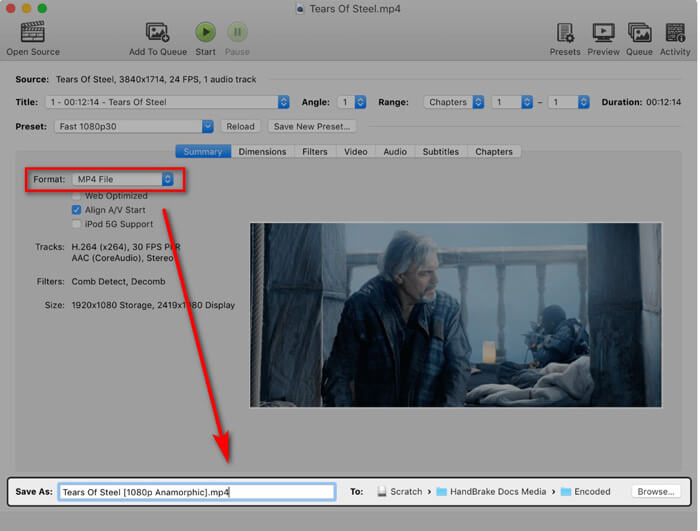
最后,单击顶部的“开始”按钮以开始将MXF文件编码为MP4电影。
您可以在转换过程中找到进度,它会在完成时提醒您。
这就是全部。
第4部分。MXF转换为MP4的常见问题解答
MXF文件格式是什么?
MXF是视频和音频的标准文件格式。它由Sony(OP1a),Panasonic(OP-Atom,OP1b)等摄录机和其他视频记录设备创建。 MXF文件使用的典型示例之一是将广告投放到电视台,以及对广播电视节目进行无带存档。
MXF VS MP4,哪个更好?
MXF和MP4都是容器格式,但是MP4可以包含字幕和图像(视频和音频除外)。至于兼容性,MP4比MXF更受欢迎。作为冗长和冗余的格式,MXF比MOV或MP4更易于修复。根据许可条款,MP4文件具有专利权,而MXF文件是开放标准且无专利权。很难决定哪一种更好,而更好的就是根据您的需求而选择的一种。
我可以使用FFmpeg将MXF转换为MP4吗?
是的你可以。 FFmpeg可以将MXF转换为MP4。您只需要添加代码。但是,该方法对于初学者来说不是一个好的选择。使用FFmpeg将MXF转换为MP4的方法适用于专业人员。
结论
将MXF文件更改为MP4视频可以使您在拥有的设备上观看或编辑MXF文件。您可以使用多种MXF视频转换器进行转换,我们在这里收集了前3名免费MXF到MP4转换器。
您最喜欢哪种方法?
在下面留下您的评论。
-
 如何在不损失质量的情况下将MP4视频文件转换为GIF动画图像
 寻找将MP4视频转换为GIF动画的最佳方法吗?这是在Photoshop,Windows Movie Maker,在线视频转换器等中执行此操作的详细指南。
-
 如何在不支付一分钱的情况下将FLV视频文件转换为MP4
 本指南共有四种免费方法,可将您的FLV视频文件在Windows 10/8/7 / XP和Mac OS X上转换为MP4格式,因此您可以在任何设备上欣赏视频。
-
 如何在Windows / Mac上将M2TS转换为MOV(在线/离线)
 是否需要将M2TS转换为MOV才能在许多播放器和平台上播放视频文件?本文将帮助您找到最佳的在线/离线方法,以在Windows / Mac上将M2TS转换为MOV。
