


 视频转换大师
 屏幕录影大师
 视频修复
视频修复
 安全下载
安全下载如何以3种方式免费将SWF转换为MP4
要将最棘手的视频格式之一 SWF 转换为 MP4,你可以使用这里免费推荐的 3 款SWF 转 MP4 转换器。

SWF 是一种由 Adobe Flash 使用的文件格式,广泛用于多媒体、矢量图形以及通过 ActionScript 的浏览器内容。通过 Adobe Flash Player 打开 SWF 文件非常方便。然而,只有少数插件(如 Adobe Flash Player 和 Adobe Integrated Runtime)可以播放由 Adobe 及其他第三方程序生成的 SWF 文件。若想在更多播放器上播放 SWF 文件,你需要将其转换为 MP4,这种视频格式几乎被所有播放器所支持,也是目前最流行的视频格式。
在尝试了一些不同的方法和应用程序之后,提出了这个免费的前三名列表。
第1部分。免费视频转换器–在PC / Mac上将SWF转换为MP4
SWF作为一种网络格式,它以出色的动画质量和音频编解码器制作而成,可以上传到任何地方。结果,很难找到没有Adobe产品就可以打开或编辑SWF文件的软件。仍然有免费的SWF到MP4转换器。
Free Video Converter 是一款免费的 SWF 文件转换器,可以在 Windows 和 Mac 电脑上将 SWF 文件转换为 MP4、MOV、AVI、WMV、MKV 等格式。

免费FLV到MP4转换
30000次下载- 在PC和Mac上免费将SWF和FLV批量转换为MP4。
- 将SWF转换为H.264,MPEG4等格式的MP4。
- 将SWF转换为其他格式,例如MOV,AVI,MP3,MKV等。
- 导出MP4文件之前,请编辑SWF文件。
优点
- 将SWF批量转换为MP4。
- 支持多种格式。
- 将SWF转换为设备。
缺点
- 编辑功能较弱。
将SWF转换为MP4的步骤非常简单。
步骤 1: 添加 SWF 文件
通过单击上面的下载链接,将免费的SWF文件下载到计算机上的MP4转换软件。立即启动它。
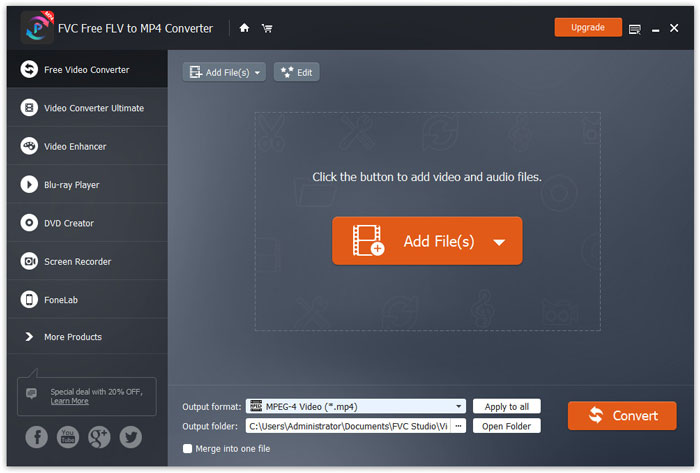
点击 Add Files(s) 按钮,将一个或多个 SWF 文件加载到该程序中。
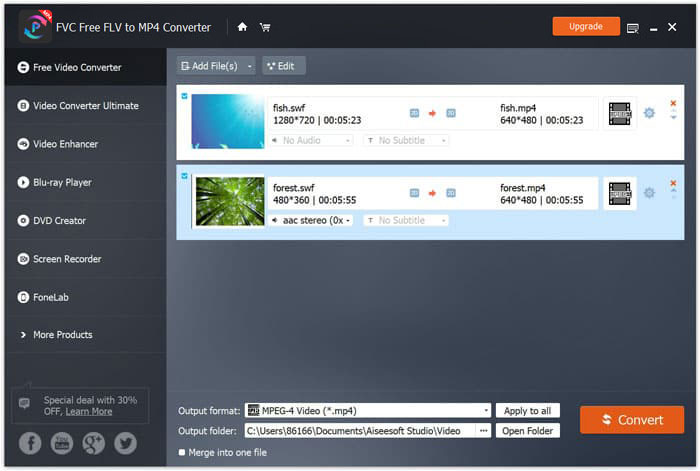
步骤 2: 自定义 MP4
在底部的 Output format 下拉菜单中选择 MP4。此外,它还为你提供了按设备选择格式的选项,例如 PSP、Avid Media Composer、Adobe Premiere、Apple iPhone、Samsung、PS3/4、Xbox 等,这些设备都可以播放转换后的文件。

此外,通过单击MP4输出旁边的齿轮图标,您可以自定义视频编解码器,分辨率,比特率等。
步骤 3: 导出 SWF 为 MP4
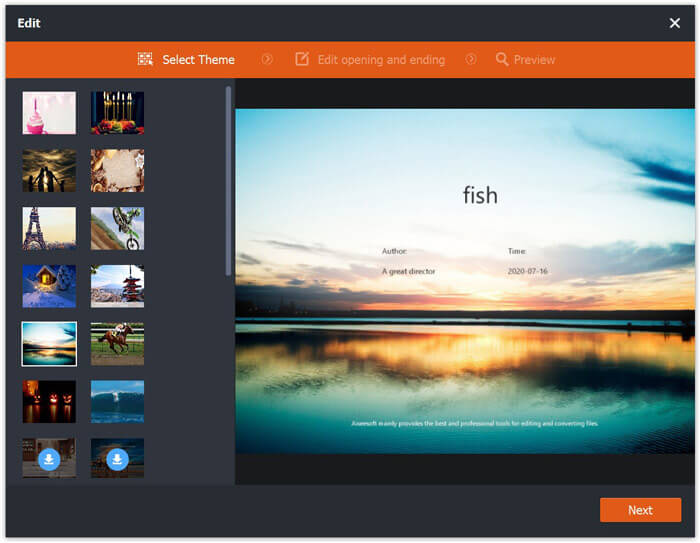
你也可以点击主界面的 Edit 按钮,对 SWF 文件进行编辑,比如添加片头和片尾主题。
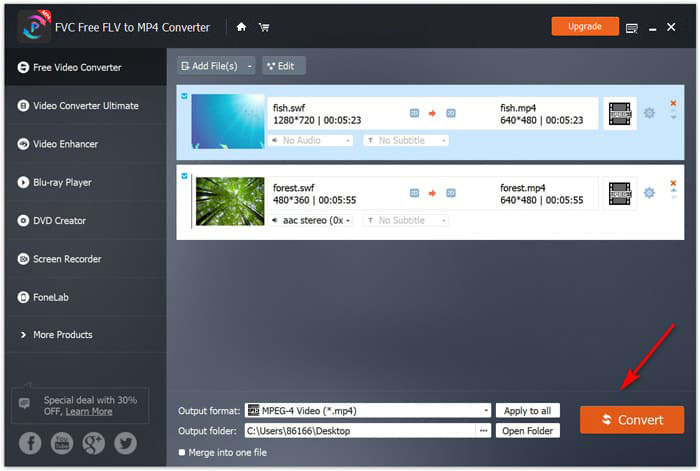
一切设置完成后,在底部选择保存转换后 MP4 文件的目标位置,然后点击右下角的 Convert 按钮,即可将 SWF 文件立即转换成 MP4 视频。
第2部分。免费的在线视频转换器–在线将SWF转换为MP4
不想安装任何软件将SWF转换为MP4吗?只需尝试免费的在线视频转换器。
Free Online Video Converter 是一款在线转换工具,可以通过浏览器将 SWF 转换为 MP4。它能将 SWF 和 FLV 转换为 MP4 及其他常见格式,如 MP4、AVI、MOV 等。此外,它还能从 SWF 文件中提取音频,保留背景音乐。
优点
- 将SWF转换为Facebook和YouTube。
- 创建GIF 从SWF文件。
- 自定义视频分辨率,编解码器等
缺点
- 缺少编辑功能。
这是使用免费的在线视频转换器将SWF转换为MP4的指南。
步骤 1: 在线上传 SWF 文件
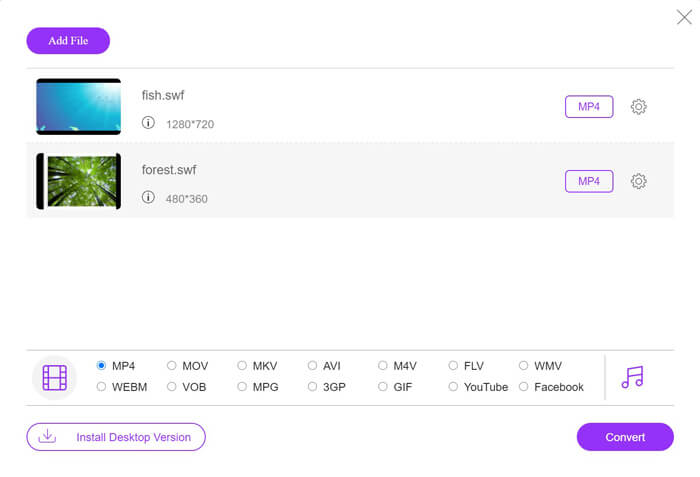
通过浏览器打开这款免费的在线 SWF 转 MP4 转换器。点击 Add Files to Convert 按钮,会弹出提示窗口要求你下载并安装启动器。按要求操作,成功安装后会弹出一个打开文件的窗口,从本地电脑中选择你想转换成 MP4 的 SWF 文件上传到该在线网站。
步骤 2: 选择 MP4
在底部勾选 MP4 复选框。除此之外,它还提供了 AVI、VOB、FLV、M4V、MKV、GIF、YouTube、MP3、WMA 等其他输出格式。MP4 旁边的 Settings 图标可以用来调节编码器、帧率、分辨率、比特率等参数。

步骤 3: 将 SWF 转换为 MP4
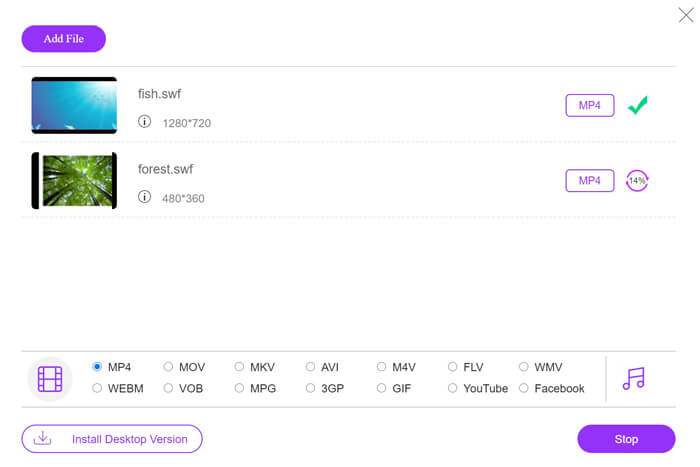
所有设置完成后,点击 Convert 按钮,选择保存已转换 MP4 文件的位置。然后再次点击 Convert 按钮,即可立即将 SWF 转码为 MP4。
第3部分。VLC–在Windows / Mac上将SWF转换为MP4
VLC以播放SWF,FLV,MP4和其他格式的开源媒体播放器而闻名。但是,您可能会错过一些隐藏的功能,将SWF转换为MP4就是其中之一。考虑到它不是为视频转换器设计的,因此VLC将SWF转换为MP4的方式略有不同。
优点
- 将SWF批量转换为MP4。
- 免费将SWF转换为MP4。
缺点
- 不适合用作SWF转换器。
- 转换速度慢。
这个简短的教程向您展示了如何在VLC中将SWF转码为MP4。
步骤 1: 在 VLC 中添加 SWF 文件
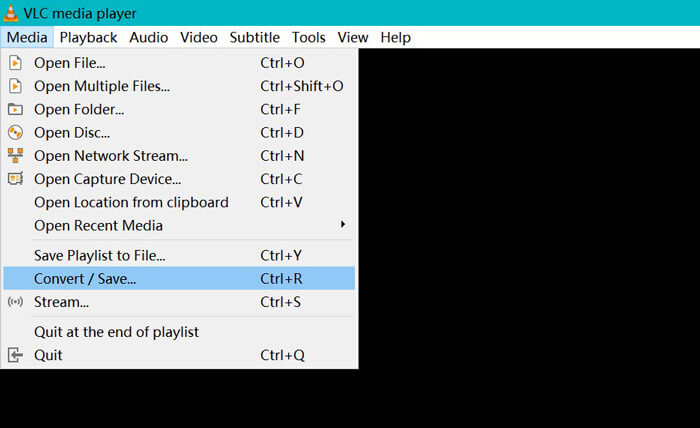
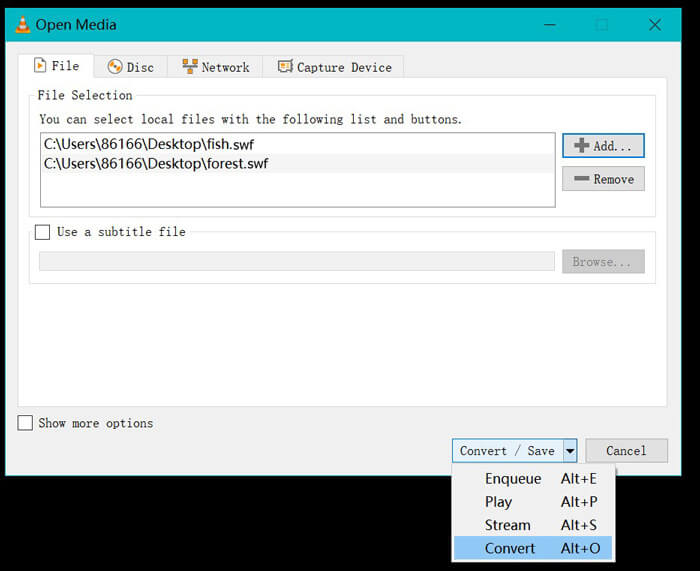
在你的电脑上运行 VLC(Windows、Mac、Linux 或 Chrome 版)。在顶部找到 Media 菜单,并从下拉选项中选择 Convert / Save。
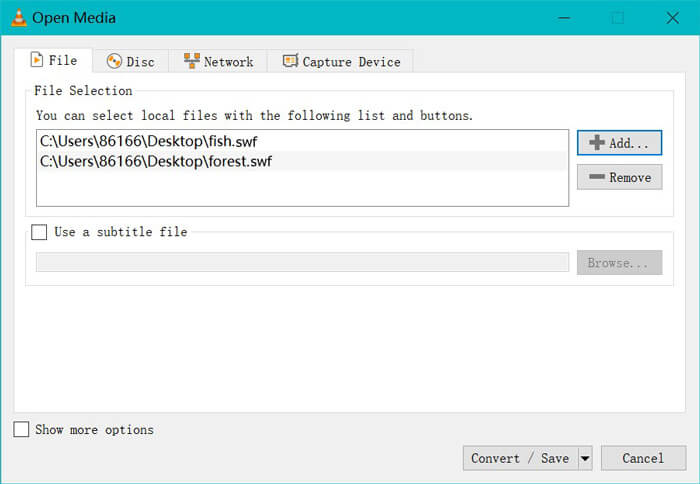
点击右侧的 Add 按钮,将电脑中的 SWF 文件加载进来。
步骤 2: 选择 MP4
在底部 Convert / Save 的下拉列表中选择 Convert。
随后会进入 Convert 转换窗口,在 Profile 的下拉选项中找到并选择 MP4。
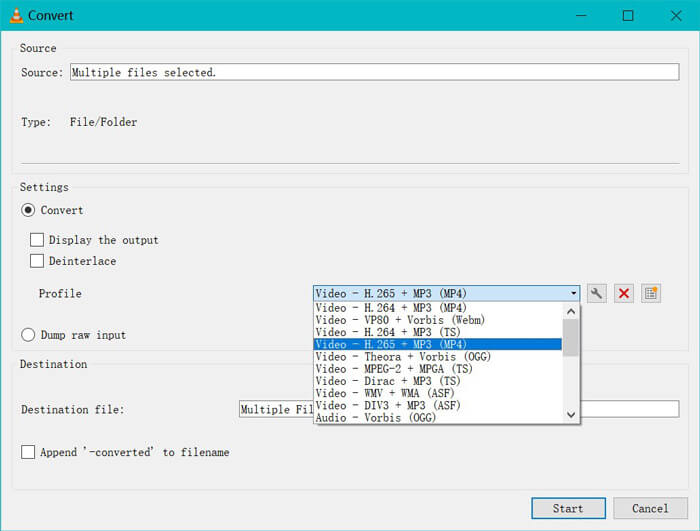
MP4输出旁边的设置图标使您可以调整封装,视频编解码器,音频编解码器和字幕。
步骤 3: 在 VLC 中将 SWF 转换为 MP4
然后选择存储转换后的MP4文件的目标,单击“开始”按钮以开始通过VLC将SWF转换为MP4。
您可以在VLC播放器中找到进度。 VLC转换使用录制功能来完成转换任务,因此转换速度很慢。
第4部分。SWF到MP4的常见问题解答
仍在使用SWF文件吗?
Adobe已正式停止SWF,这表明它将不再受支持或开发。 HTML5视频支持和CSS3动画已取代SWF。
PS3是否支持SWF文件?
是。从固件版本2.71开始,Sony PlayStation Portable控制台可以在Sony的网络浏览器中播放有限的SWF文件。两种PS3都可以通过其Internet浏览器运行SWF文件。
为什么我的Android手机上的VLC不能播放MP4视频?
VLC中的转换功能仅适用于计算机。如果在Android或iOS设备上使用VLC,则不允许将SWF转换为MP4。
结论
这篇文章收集了排名前三的开源SWF到MP4转换器,以便您可以将SWF转换为MP4以便在更多设备上播放。我们还列出了这些免费转换器的优缺点,供您参考。
您最喜欢哪个免费的SWF到MP4转换器?
还是您有更好的建议?
无论哪种方式,请在下面留下您的评论,让我知道。
-
 MOV VS MP4 –哪个更好
 MOV VS MP4,哪个更好?这篇文章讲述了MP4和MOV之间的区别,以便您可以更好地选择用于视频文件。
-
 在Windows / Mac / iPhone / Android /在线上将MP4转换为AVI的7种方法
 想要获得所有免费的方式将AVI转换为MP4视频吗?您不应该错过这篇文章。这是在Windows,Mac,iPhone,Android和在线版本上免费将AVI文件转换为MP4的7种方法。
-
 如何将MTS文件转换为MP4
 不知道如何将MTS文件转换为MP4?在本指南中,您将找到6种免费且简便的方法,可以在Windows或Mac上将MTS格式更改为MP4,而不会降低质量。
