


 视频转换大师
 屏幕录影大师
 视频修复
视频修复
 安全下载
安全下载修正:谷歌驱动器视频无法在 Chrome 上播放
“无法支持此视频。”
“我们正在制作这个视频。请稍后回来查看”
“此视频当前未播放”
当 Google 云端硬盘视频未播放时,可能会出现这些错误消息。也许视频已损坏,或者文件太大而无法加载。但主要原因总是谷歌云端硬盘不支持视频格式,或者chrome视频播放器崩溃。总而言之,原因可能是谷歌云端硬盘或chrome引起的。因此,本文将从这两个方面给出修复 Google Drive 视频无法播放的解决方案。

第 1 部分:如何修复由 Google Drive 引起的 Google Drive 视频无法播放的问题
Google Drive 导致 Google Drive 视频无法播放的主要原因是视频格式的限制。 Google Drive 支持的所有视频格式:
- • WebM 文件(Vp8 视频编解码器、Vorbis 音频编解码器)
- • MPEG4、3GPP 和 MOV 文件 –(h264 和 mpeg4 视频编解码器、AAC 音频编解码器)
- • AVI(MJPEG 视频编解码器和 PCM 音频)
- • MPEG-PS(MPEG2 视频编解码器和 MP2 音频)
- • WMV
- • FLV(Adobe – FLV1 视频编解码器、MP3 音频编解码器)
- • MTS
- • 奥格
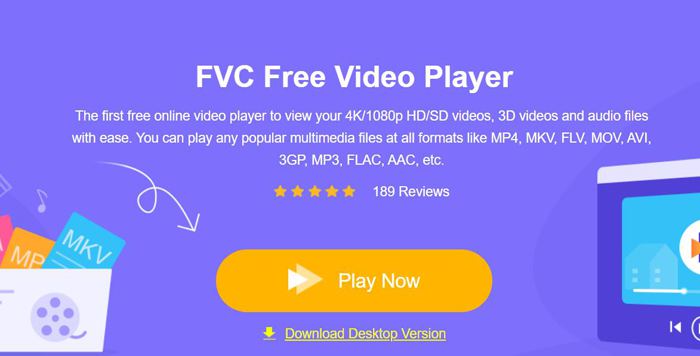
如果你的视频格式不在上面列出的范围内,就需要通过其他视频播放器来播放这些视频。FVC Free Video Player 将是你的最佳选择。它支持任意格式的视频,甚至包括 DVD 和蓝光文件。而且无需下载任何软件或体积庞大的视频文件,就可以直接通过 FVC Free Video Player 在线免费打开在 Google 云端硬盘中无法播放的视频。
步骤 1: 在电脑上打开任意 Chrome 浏览器,进入 FVC Free Video Player 官网。点击 Play Now(立即播放) 按钮安装启动器,然后再次点击该按钮打开视频播放器。接着只需点击 Open Files(打开文件) 按钮,选择你在 Google 云端硬盘中的目标视频。
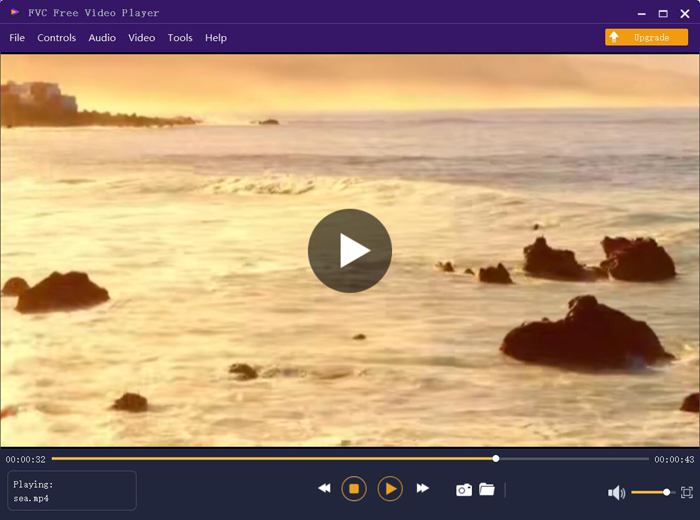
步骤 2: 然后视频就会自动播放,不会出现任何错误或限制。更棒的是,你还可以通过调节音量、播放速度,甚至视频效果来提升观看体验。
第 2 部分:解决 Google Drive 视频无法播放的 5 种其他解决方案
也有一些由chrome引起的问题,您可以尝试以下5种解决方案来处理Google Drive视频无法播放的问题。
1. 更新 Google Chrome 或浏览器播放器
如果其他网站上的视频也无法像Google Drive那样播放,那么很可能是谷歌浏览器或浏览器上的视频播放器没有及时更新。您可以前往 Google Play Store 查看 Google Chrome、HTML 5 Video Player 或 Flash Video Player 的更新信息。
2. 清除浏览器和 Google 云端硬盘的缓存与 Cookie
长期使用谷歌浏览器后,浏览器中肯定会存有大量垃圾文件,播放视频时会造成缓冲。因此,您可以定期清除缓存和 cookie。以下是详细步骤:
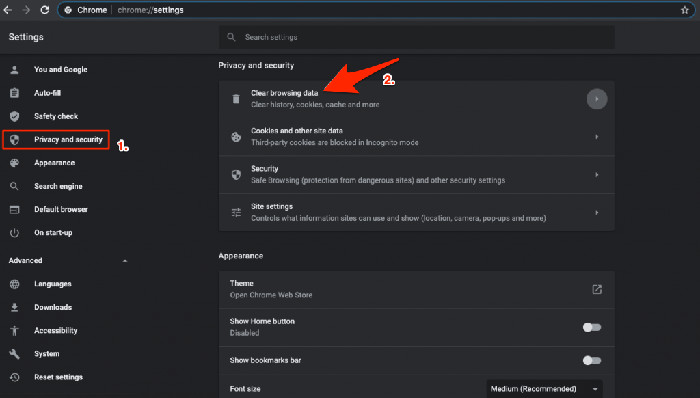
步骤 1: 点击右上角的三点竖排图标,选择 设置(Settings) 选项。然后在左侧栏中点击 隐私设置和安全性(Privacy and security),即可找到 清除浏览数据(Clear browsing data) 选项。
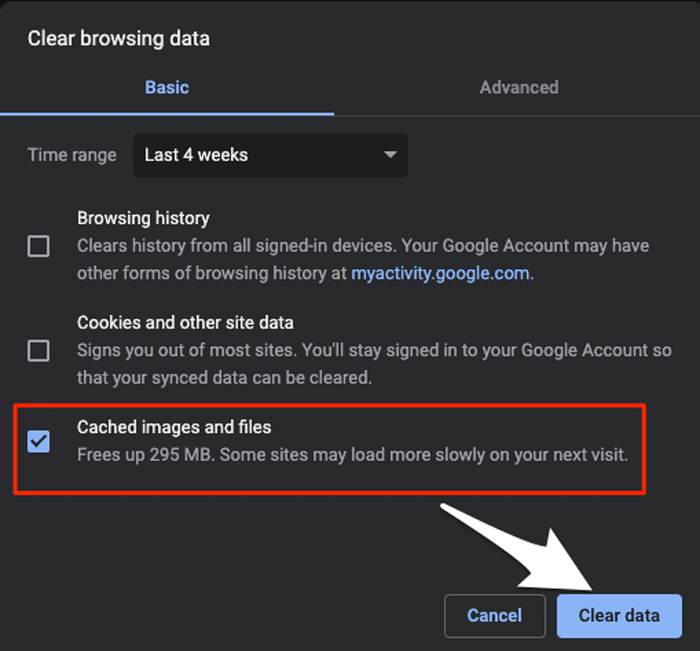
步骤 2: 在弹出的窗口中,勾选 缓存的图片和文件(Cached images and files),然后点击 清除数据(Clear data) 按钮。
3. 启用第三方 Cookie
在 Google Drive 帮助中,有一个关于播放视频的提示:要在 Google Drive 上播放视频,您需要开启第三方 cookie。因此,如果发生 Google Drive 视频无法播放的情况,您可以检查浏览器的 cookie。
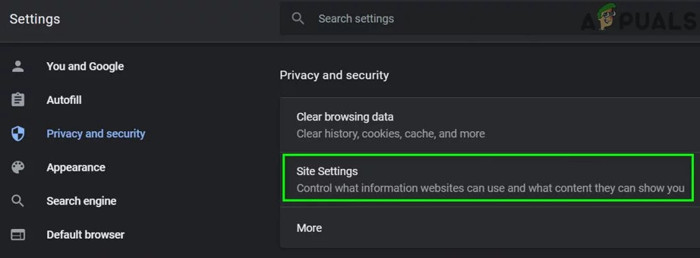
步骤 1: 和解决方案 2 一样,你需要先进入 隐私设置和安全性(Privacy and security) 选项。然后点击 网站设置(Site settings),选择 Cookie 和网站数据(Cookies and site data) 选项。
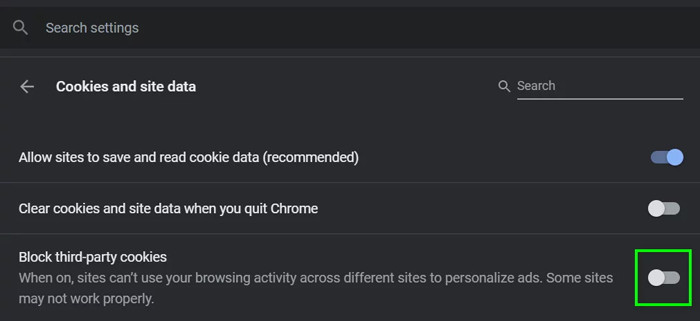
步骤 2: 关闭 阻止第三方 Cookie(Block third-party cookies) 的开关。然后重启 Chrome 和 Google 云端硬盘再尝试播放视频。
4. 禁用部分 Google 扩展程序
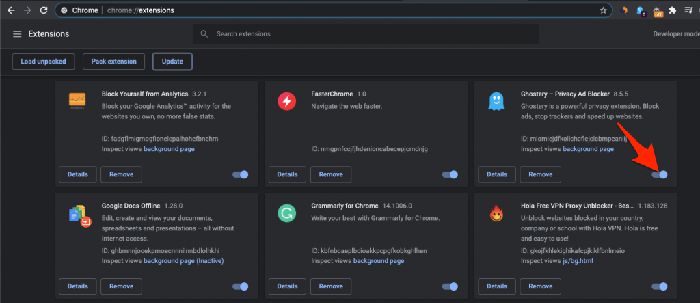
有些 Google 扩展程序用于向浏览器添加额外功能,但有些会阻止程序处理。要检查 Google Drive 视频无法播放是否是由此问题引起的,您应该按照以下步骤关闭所有扩展程序。
步骤:要直接打开 Google 扩展程序管理页面,可以在搜索栏中输入 chrome://extensions。然后点击扩展程序旁边的开关将所有扩展关闭。之后你需要关闭 Chrome 并重新打开,再尝试播放视频。
5. 在新窗口中打开视频
如果上述解决方案不起作用,您可以尝试最后一种方法。在另一个窗口打开视频使chrome重新获取视频信息的同时刷新网络。
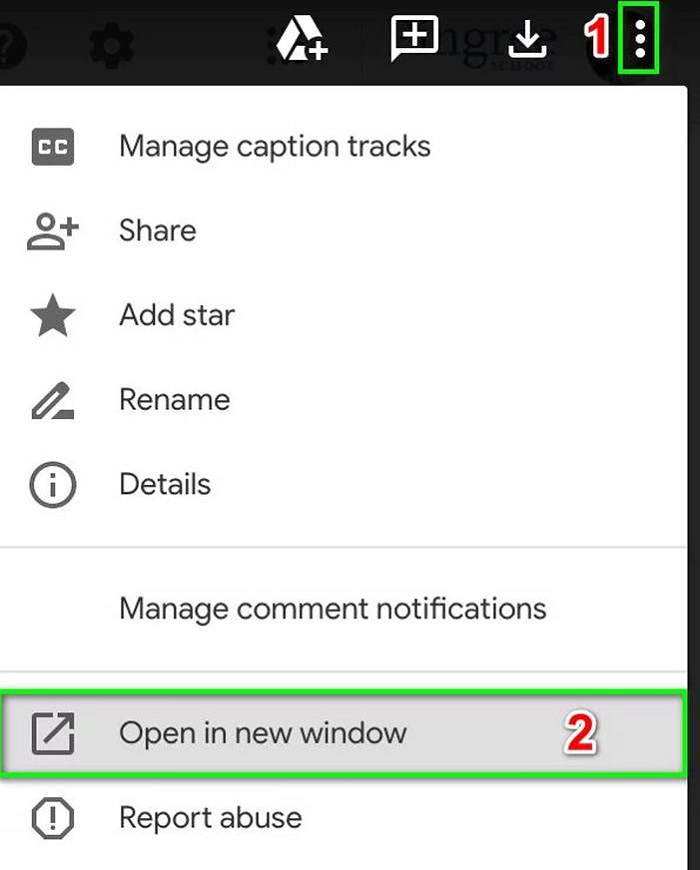
步骤:首先打开 Google 云端硬盘,找到你想播放的视频。然后点击右上角的三点图标,再点击 在新窗口中打开(Open in new window) 选项。
第 3 部分:Google 云端硬盘视频无法播放的常见问题解答
1. 为什么我的 AVI 格式的 Google Drive 视频无法播放?
虽然 Google Drive 支持 AVI 格式,但您应该下载相应的扩展程序。前往 Google Extension 进行搜索和下载。
2. 如何下载无法播放的 Google Drive 视频?
在 Chrome 上打开 Google 云端硬盘并选择我的云端硬盘选项。选择您要下载的所需文件,然后单击右上角的三点图标。然后选择下载选项。
3. 我可以在 Google Drive 上播放 4K 电影吗?
不能。Google 云端硬盘仅支持分辨率最高为 1920x1080p 的视频。不过,你可以尝试使用 FVC 的 4K UHD Player 在线播放 4K 视频。
结论
导致 Google Drive 视频无法播放的原因有很多,并且错误消息总是“无法支持此视频”。这是因为 Google Drive 不支持视频格式。在这种情况下,您需要通过其他专业视频播放器播放视频。您可以尝试在线使用 FVC 免费视频播放器,而无需下载任何第三方软件。
-
 6种经过验证的解决方案,可修复无法在Chrome上播放的视频
 要解决视频无法在Chrome上播放的问题,您需要做的就是阅读我们的问题排查并逐一执行经过验证的解决方案。
-
 5 100%修复无法在iPad上播放的视频的工作解决方案
 您的视频无法在 iPad 上播放?这里有五个解决方案可以帮助您摆脱这个问题,然后您可以轻松地在手机上欣赏您喜欢的视频。
-
 在 Chromebook 2021 上播放 MP4 文件
 您可以在Chromebook上播放视频吗?如何在Chromebook上通过USB播放MP4文件?这篇文章分享了3种在Chromebook上播放MP4的方法。
