


 视频转换大师
 屏幕录影大师
 视频修复
视频修复
 安全下载
安全下载音频编解码器不支持时该怎么办:4 种解决方法
当我尝试用某个播放器观看下载的电影时,会弹出不支持音频编码格式(Audio Codec Not supported)的提示。
如果您是第一次遇到这种情况,可能会感到不知所措。常见的原因可能是音频不兼容、播放器版本过旧、文件损坏等等。
在本文中,我们将带您探索触发机制,并提供 4 种最快捷的解决方案。本文旨在帮助您克服这一障碍,享受流畅的聆听体验。

第 1 部分。音频编解码器不受支持的可能原因
目前有很多常见的音频编解码器。每种编解码器可能对应不同的不支持原因。因此,我们将首先以表格形式向您展示这些编解码器。您可以根据音频文件类型快速找到它们。
| 音频编解码器 | 可能的原因 |
| AAC | 不受旧设备或过时软件的支持 |
| AC3 | 可能需要许可证;并非所有免费播放器都支持它 |
| 数据传输系统 | 移动设备或基本媒体播放器通常不支持 |
| MP3 | 一些旧系统或受地区限制的玩家可能会遇到问题 |
| FLAC | 浏览器或某些内置移动媒体播放器不支持 |
| ALAC | 除非添加编解码器,否则通常不受 Apple 生态系统之外的支持 |
| EAC3 | 可能无法在缺乏杜比认证的设备上运行 |
| 作品 | 对较旧的设备或未更新到现代标准的播放器的支持有限 |
现在我们来梳理一下音频编解码器不支持的可能原因:
• 你正在使用的播放器不支持该音频文件的格式。
有些设备支持 MP3 或 AAC,但不支持 FLAC 或 OGG。
• 系统缺少必要的解码器(codec)组件包。
您的设备或系统可能缺少解码音频文件所需的编解码器。
• 你使用的播放器与该音频编码格式不兼容。
许多播放器的兼容性有限,无法解码其支持范围之外的音频文件。
• 音频文件本身已损坏。
您的音频可能在导出或传输过程中损坏。在这种情况下,任何设备或播放器都无法正常打开它。
现在您已经很好地理解了为什么不支持音频编解码器,下一步就是应用解决方案。
第 2 部分。如何修复不支持的音频编解码器
方法 1. 将音频文件转换为兼容格式
如果你发现当前使用的播放器无法支持音频文件的格式,最直接的解决办法就是将音频文件转换为兼容性更好的格式,例如使用FVC Video Converter Ultimate这一最专业的格式转换器。它支持超过 1,000 种格式,并允许你自由选择输出文件。这款专业的格式转换器支持上千种格式,并且可以由你自由设定输出文件的质量。在这个平台上,你还可以使用到最全面的音频编辑工具,包括裁剪、音量调节、降噪等功能。
FVC Video Converter Ultimate 目前转换速度最高可达 30 倍,并支持批量转换功能。使用它,您的转换过程将更加快捷轻松。
以下是通过转换音频格式来修复不支持的音频编解码器的方法。
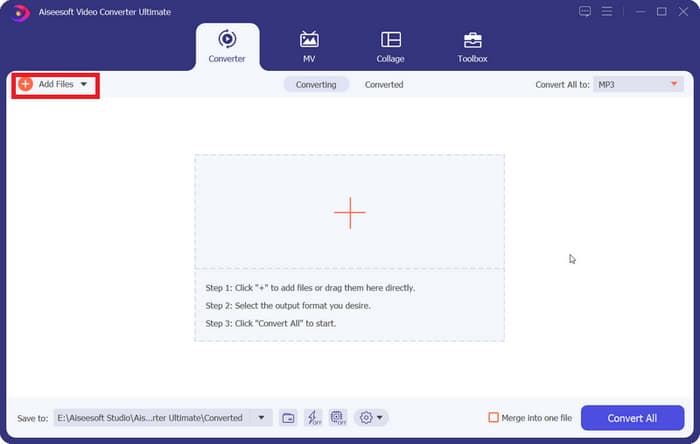
步骤 1:在电脑上下载并安装 FVC Video Converter Ultimate,然后启动软件。点击添加文件(Add Files),上传你想要转换的音频。
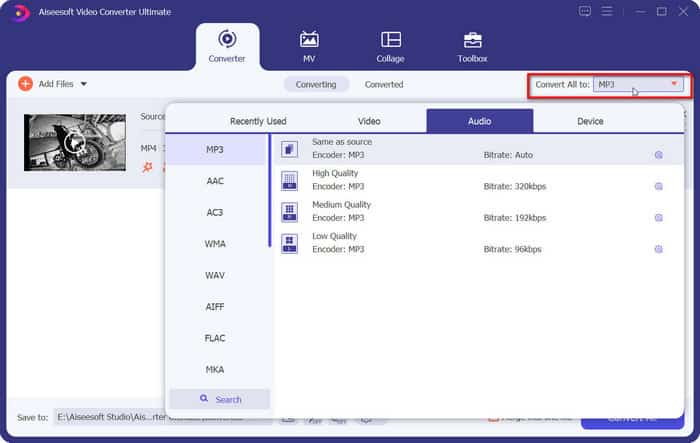
步骤 2:找到全部转换为(Convert All to),展开菜单并选择Audio > MP3。
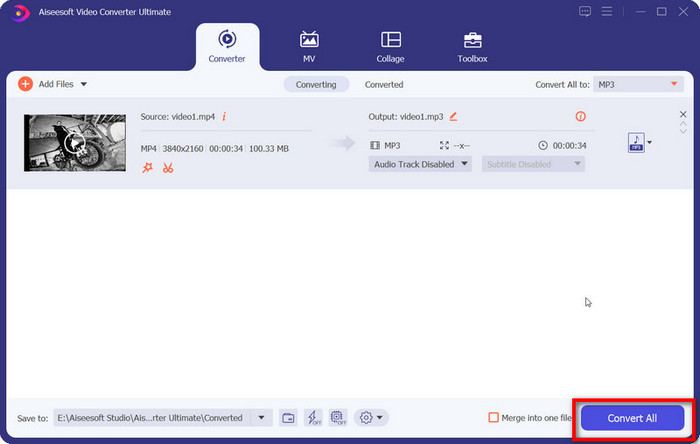
步骤 3:最后,点击全部转换(Convert All),开始转换流程。
方法2.获取缺少的编解码器包
无法播放音频,音频编解码器不支持?如果您当前的设备缺少访问音频文件所需的编解码器,您可以额外安装缺少的编解码器。安装完成后,再次尝试播放音频,一切正常。
本节将以 Windows Media Player 为例,向您展示如何安装缺少的编解码器包。
步骤 1:在电脑上打开 Windows Media Player。
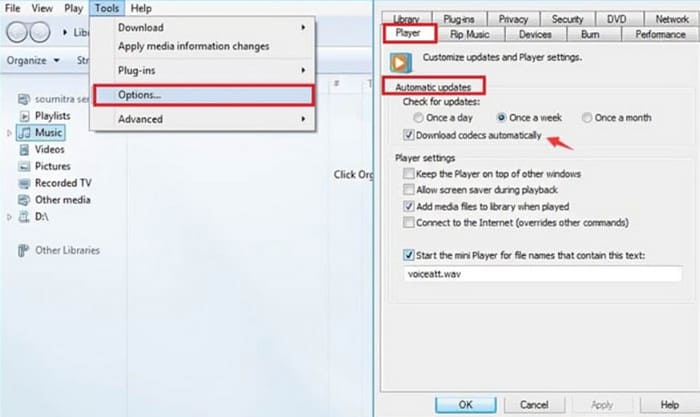
步骤 2:依次选择工具 > 选项。
步骤 3:打开“选项”(Options)窗口后,切换到“播放器”(Player)选项卡。在自动更新(Automatic updates)部分下,勾选每天一次(Once a day)或每周一次(Once a week)。
步骤 4:点击确定(OK)保存更改。
步骤 5:现在,再次尝试播放刚才的音频文件。如果播放器尚未安装所需的编码器,Windows Media Player 会提示你获取相关解码器。
安装完成后,您的音频文件即可正常播放。
方法3.使用兼容性更广泛的播放器
如果您当前使用的多媒体播放器与您的音频文件不兼容,您可能需要切换到一个适应性更强的播放器。市面上许多播放器几乎可以兼容所有常用的视频或音频编解码器,而且无需安装任何额外的插件。
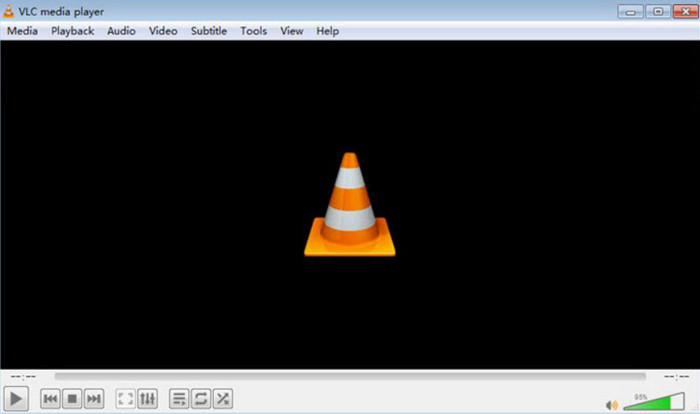
VLC Media Player 以及其最佳替代品——5K Player 和 KMPlayer——都是这类产品中的优秀代表。VLC Media Player 甚至完全免费,还能完成一些简单的格式转换任务。
方法4.修复损坏的音频文件
我检查了一下,发现我的视频中的音频文件没有格式或编码器不兼容的问题。那么,“音频编解码器不支持”是什么意思呢?
此时你需要检查音频文件是否已损坏或数据不完整。传输中断、存储不当等情况都会导致这种问题。但不用担心,我们为你准备了最先进的音视频修复工具——FVC Video Repair。
FVC 视频修复工具可以修复因设备故障、系统崩溃、病毒攻击等原因损坏的视频和音频。处理不受支持的音频编码器对它来说轻而易举。它的修复成功率和效率一流,并且您可以在正式导出修复文件之前预览修复结果,以检查问题是否已解决。
以下是使用 FVC Video Repair 修复损坏文件的方法。
步骤 1:在你的设备上获取并安装 FVC Video Repair。打开软件,点击红色的 “+” 按钮上传损坏的文件,然后点击紫色的 “+” 按钮添加示例文件。
值得注意的是,样本文件必须与损坏的文件具有相同的格式,并且它们最好来自同一设备或平台。
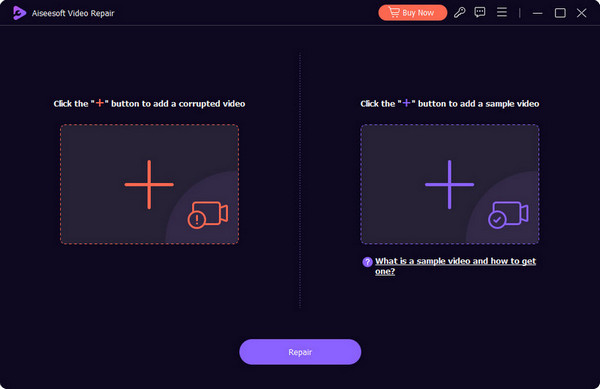
步骤 2:加载完两个文件后,点击修复(Repair)。
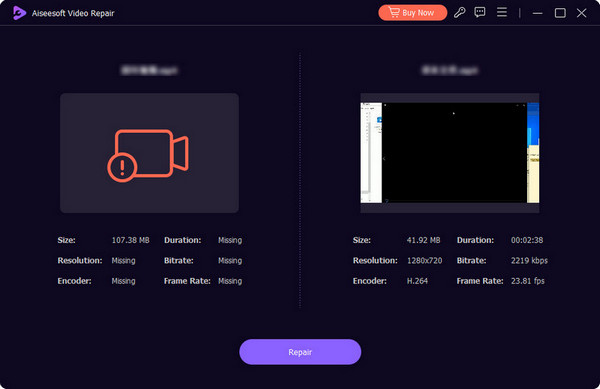
步骤 3.修复过程结束后,点击预览(Preview)查看效果。如果一切正常,点击保存(Save)。
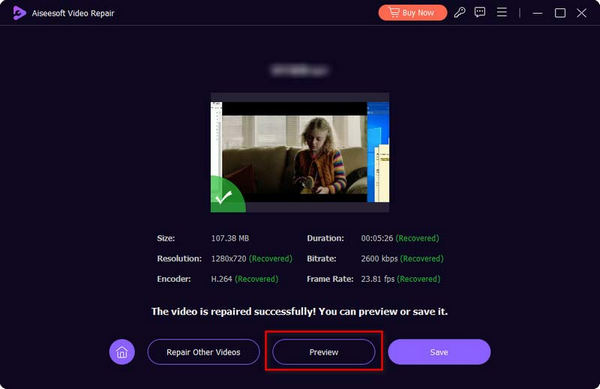
如果遇到音画不同步的问题,也可以交给 FVC Video Repair 来处理。它可以修复音频延迟或音频过快等故障。
第 3 部分。不支持音频编解码器的常见问题解答
如何修复三星手机不支持的音频编解码器?
您可以先检查文件格式是否与您的三星手机或您正在使用的播放器兼容。然后检查编解码器是否适配。如果没有,建议使用专业的转换器来处理音频文件。如果音频本身有问题,则必须先修复它。
如何找到我的音频编解码器?
您可以在多媒体播放器中打开该文件并检查其属性。在“属性”下,通常有一个详细信息选项。在那里您可以找到有关音频编解码器的信息。
哪种音频编解码器最适合 Android?
AAC 可能是 Android 设备上最好的音频编解码器。它在音质和文件大小之间找到了非常好的平衡。这使得 AAC 成为流媒体和移动播放的理想选择。如果您追求更无损的音质,可以尝试 FLAC。
结论
一旦找到原因,音频编码格式不受支持其实并不难解决。你可以使用 FVC Video Converter Ultimate 将音频转换为更通用的格式,或者在设备上安装所需的解码器。如果当前播放器与文件不兼容,不妨直接更换播放器。如果确认音频文件已损坏,也可以尝试我们推荐的修复工具来处理。
不要让视频播放问题影响您的视频观看体验。立即修复它们!
-
 如何在计算机/电话上免费向视频添加音频和音乐
 本文介绍了4种免费的免费向视频添加音频的简便方法。无论您要将哪种音轨添加到视频中,都可以在这里获得满意的结果。
-
 公正的Cinch评论录音机和最佳选择
 Cinch Audio Recorder 是下载音乐的最佳方式。只需从文章中了解有关公正评论和最佳替代方案的更多信息。
-
 如何使用 VLC Media Player 录制音频:完整指南
 在本文中,您将学习如何使用 VLC Media Player 录制音频。本文提供了详细的步骤,并推荐了 VLC 的最佳替代方案之一。
