


 视频转换大师
 屏幕录影大师
 视频修复
视频修复
 安全下载
安全下载[已修复] 修复错误代码 102630 的快速手动指南
在欣赏你最喜欢的视频内容时,是否遇到过错误代码 102630,让你头疼不已?这种感觉就像在娱乐的黄金时刻突然被塞进一道棘手的难题。别担心,我们来帮你!在这篇详尽的指南中,我们不仅会为你提供一个简单有效的解决方案来处理这类视频错误,还会一步步带你完成整个排查过程,确保轻松修复、毫无压力。如果你已经厌倦了为这个数字小故障抓耳挠腮、错过心爱的节目,那就继续往下看,找到能让你放下忧虑的终极解决方法。现在就一起深入了解,和这些视频问题挥手说再见吧!

第 1 部分。错误代码 102630 是什么
错误代码 102630 是在线观看或流式传输时通常出现的错误,会干扰观众。以下是出现此视频错误的可能原因:
网络连接问题。
错误代码 102630 可能表示设备的网络连接存在问题。这可能是由于互联网服务提供商的问题、Wi-Fi 信号弱或不稳定,或网络硬件问题造成的。
服务器或服务不可用。
当您尝试访问的服务器或服务暂时停机或正在维护时,可能会出现此错误。通常,一旦服务器或服务恢复在线,此问题就会自行解决。
软件或系统故障。
潜在原因在于软件或系统本身,其中错误、故障或兼容性问题可能会触发错误代码 102630。这可能是由于配置不正确或文件损坏造成的。
防火墙或安全设置。
错误代码 102630 可能是防火墙或安全设置阻碍与服务器或服务的连接所致。这可能是由于安全配置过于严格或与其他软件或设置发生冲突所致。
超时或请求失败。
客户端和服务器之间的通信中断(表现为超时或请求失败)可能导致错误代码 102630。这可能受到网络速度慢、拥塞或服务器响应问题等因素的影响。
免责声明: 必须强调的是,这些只是一般性的可能原因,错误代码 102630 的具体成因会因所涉及软件或系统的独特属性而有所不同。要找出根本原因,通常需要有针对性的分析,并结合错误出现时的具体使用场景来判断。
第 2 部分。修复错误代码 102630 的快速方法
修复因各种原因(如视频错误代码 102630 等)导致无法播放的损坏视频,可以高效地借助 Video Repair 工具来完成。其中最推荐的是 FVC Video Repair。该工具采用最新的 AI 算法,实现全自动的视频修复流程,同时在 MP4、MOV、3GP 等格式中尽可能保持原有的高分辨率、帧率和码率。它拥有简洁易用的界面、高修复成功率,并提供修复后预览功能,整体操作非常省力。使用方法如下:
步骤 1. 首先,进入其官方网站,点击“免费下载”按钮。
步骤 2. 接着,运行该工具,点击红色加号按钮添加包含 102630 错误代码的视频,再点击蓝色加号按钮添加示例视频。
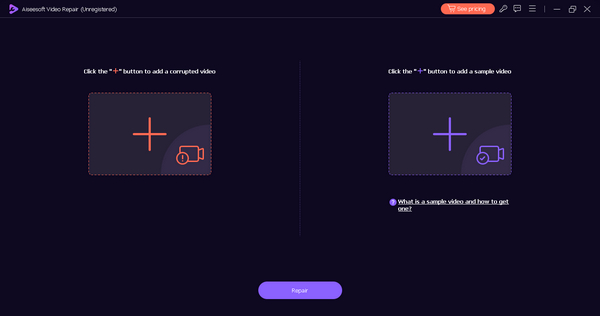
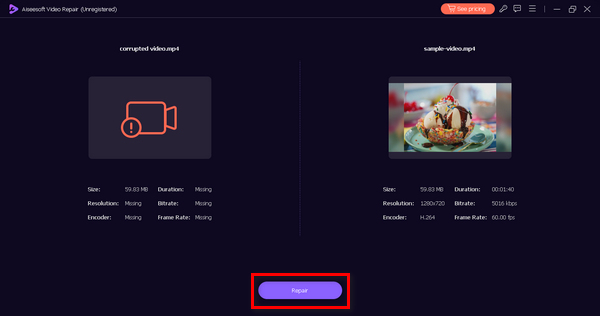
步骤 3. 要开始修复过程,点击Repair(修复)按钮。
步骤 4. 最后,点击Preview(预览)按钮,检查 102630 错误代码是否已成功解决。如果效果令你满意,就可以保存文件。
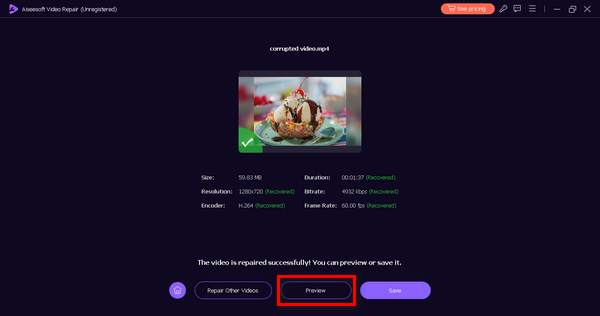
FVC Video Repair 确实是一款多功能工具,可解决任何类型的视频问题。凭借其简单易用的界面,每个人都可以使用它,而无需感到困惑和压力。
第 3 部分。修复错误代码 102630 的手动方法
以下是修复错误代码 102630 的手动方法:
方法 1:检查互联网连接
稳定的互联网连接对于视频流来说非常重要。当连接较弱或不稳定时,可能会出现错误代码 102630。通过检查并确保互联网连接稳定,您可以减少播放过程中出现中断的可能性,从而有效地解决错误。
要解决这个问题,你需要先使用在线网速测试工具检查网络连接情况。如果网速较慢,尝试重启路由器或网络连接,这个简单的步骤往往就能改善状况。你也可以在条件允许的情况下切换到其他网络,以提升观影或直播体验。稳定且高速的网络连接对于避免播放中断至关重要,也有助于解决诸如 错误代码 224002、102630 等问题。不过,如果你的网络连接本身很稳定,而这个错误依然存在,请继续尝试方法二。
方法 2:更新 Web 浏览器
更新您的网络浏览器至关重要,因为新版本通常包含错误修复和改进。这些更新增强了浏览器与各种网站和流媒体服务的兼容性,从而降低了遇到错误代码 102630 等错误的可能性。
要更新您的网络 Chrome 浏览器,请按照以下步骤操作:
步骤 1. 在 Chrome 浏览器中,点击右上角的自定义及控制按钮。
步骤 2. 然后前往帮助。
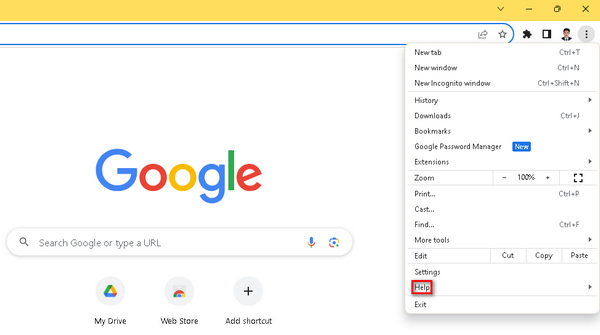
步骤 3. 接着选择关于 Google Chrome。如果有新版本可用,你会看到更新 Google Chrome选项,点击即可,随后按照屏幕提示进行操作。如果没有可用更新,你会看到一个重新启动按钮。
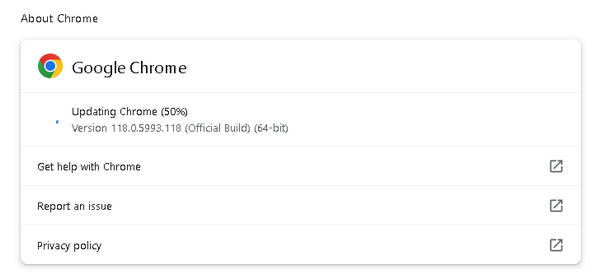
使用过时的浏览器可能会引发兼容性问题,而更新浏览器往往能解决这些问题。同时,这也是修复Chrome 无法播放视频的通用解决方案。因此,每当有更新提示时,及时升级浏览器非常必要。
方法 3:关闭浏览器扩展和附加组件
浏览器扩展和附加组件有时会破坏网站和服务(包括视频流)的正常运行。这些扩展和流媒体平台之间的冲突可能会触发错误代码 102630。通过关闭或禁用浏览器扩展和附加组件,您可以消除潜在的干扰源,促进更流畅的视频播放并解决错误。
在 Chrome 中移除扩展程序的步骤:
步骤 1. 打开 Chrome 浏览器。
步骤 2. 点击自定义及控制按钮,然后找到扩展程序。
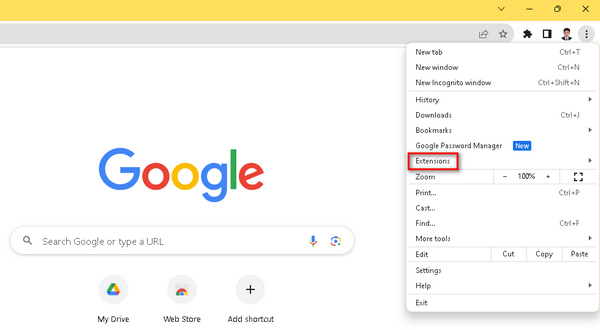
步骤 3. 你会看到扩展和附加组件列表,可以在其中自由选择要删除的项目。
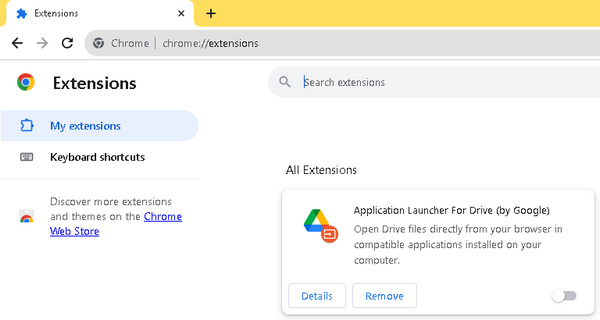
不必要的第三方扩展可能会与视频播放器发生冲突,导致播放中断。处理视频错误代码(如错误代码 102630)时,必须了解这些扩展可能会导致中断。为了增强流媒体体验,您不仅应该更新浏览器,删除任何不必要的扩展也同样重要。
第 4 部分。有关错误代码 102630 的常见问题
iview 上的错误代码 102630 是什么?
iview 上的错误代码 102630 通常表示视频播放问题。此错误可能由于各种因素而出现,例如不稳定的互联网连接、服务器问题或兼容性问题。要解决此问题,请考虑检查您的互联网连接、更新您的浏览器并确保与视图的要求兼容。
为什么我不断收到视频播放错误?
连续的视频播放错误可能由多种问题引起。常见原因包括互联网连接不稳定、浏览器版本过时、视频格式不兼容或与浏览器扩展程序冲突。要解决此问题,请尝试故障排除步骤,例如检查互联网连接、更新浏览器和关闭不必要的浏览器扩展程序。
YouTube 上的错误代码 102630 是什么?
YouTube 上的错误代码 102630 是一种播放错误,可能由于网络问题、浏览器问题或与扩展程序冲突而发生。要解决此问题,请检查您的互联网连接、更新您的浏览器并考虑禁用或更新浏览器扩展程序。此外,确保您的设备符合 YouTube 的系统要求有助于防止出现此错误。
结论
通过本指南,错误代码 102630 的应对方式变得一目了然。从 FVC Video Repair 等自动化修复工具,到多种手动排查方法,用户可以获得一套完整的解决策略。借助这些实用信息与系统化的故障排除流程,本指南帮助用户重获流畅、不中断的数字娱乐体验。
-
 使用这 3 种行之有效的方法修复错误 0xc00d36c4 [2024]
 播放视频时遇到 0xc00d36c4 视频错误代码?按照我们的指南快速解决问题并享受不间断的视频播放。
-
 如何快速有效地修复视频错误代码 224002
 您是否很难找到快速修复错误代码 224002 的最佳解决方案?在本文中了解它们并轻松自行修复它们。
-
 快速有效地修复视频 0xc00d36e5 错误
 尝试播放视频时遇到 0xc00d36e5 错误?了解简单而有效的方法来修复此错误,获得流畅的视频播放体验。
