


 视频转换大师
 屏幕录影大师
 视频修复
视频修复
 安全下载
安全下载轻松将 DVD 转换为 ISO 文件 [快速指南]
DVD 很容易损坏,一旦损坏将无法修复。这是因为 DVD 表面易受划痕和其他物理冲击的影响,这些冲击可能会破坏其中存储的数据。为了获得备份文件,最好的方法是创建 DVD 的 ISO 文件。
ISO 文件是 DVD 的完整数字副本,在一个单一文件中包含所有数据、菜单和文件结构。用户可以轻松访问其中内容,而无需担心因光盘的物理损坏而导致媒体内容永久丢失。基于此,在本文中,你将学习如何轻松将DVD 转换为 ISO,并了解可根据你电脑操作系统选择使用的工具。

| DVD 到 ISO 转换器 | 支持的平台 | 转换速度 | 解密DVD | 使用方便 | 输出质量 |
| AnyMP4 DVD 翻录器 | • Windows • macOS | 非常快 | 是 | 非常简单 | 优秀的 |
| WinX DVD 翻录器白金版 | • Windows • macOS | 快速 | 是 | 简单的 | 好 |
| 磁盘工具 | • macOS | 没有 | 是 | 具有挑战性的 | 好 |
| PowerISO | • Windows • macOS • Linux | 快速 | 是 | 缓和 | 好 |
第 1 部分.将 DVD 转换为 ISO 的最佳方法
将 DVD 转换为 ISO 的最佳方法是使用 AnyMP4 DVD Ripper。AnyMP4 DVD Ripper 可以快速轻松地将实体 DVD 转换为 ISO 镜像文件。它能创建 DVD 的精确数字副本,保留所有原始内容,包括菜单、字幕和音轨,并且您还可以根据需要进行编辑。
主要特点:
1. 支持超过 500 种格式和设备,例如 MP4、MKV、MOV、FLV、AVI 等。
2. 支持所有 DVD 类型,如自制 DVD、商业 DVD、99 标题 DVD 和其他 DVD。
3. 可调节的输出设置,例如编码器、采样率、通道和比特率。
4. 支持任何 DVD 类型,包括自制 DVD、商业 DVD、99 首歌曲或健身 DVD,以及 DVD ISO 和文件夹。
5. 内置 DVD 工具包包括剪辑、裁剪、水印和特效。
将 DVD 先抓取为视频再创建 ISO 的步骤:
步骤 1. 首先,你需要在电脑上下载安装 AnyMP4 DVD Ripper。请注意,该软件同时支持 macOS 和 Windows 系统。
在执行下一步之前,您必须将 DVD 插入计算机的 DVD 驱动器并等待几分钟直到被检测到。
步骤 2. 接着,AnyMP4 DVD Ripper 会自动分析你的 DVD,你可以点击"输出格式"(Output Format)按钮来选择输出格式。
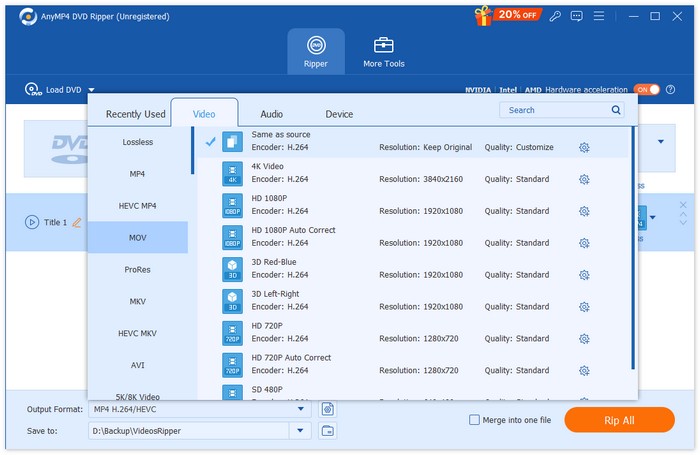
步骤 3. 点击"全部转换"(Rip All),开始将 DVD 转换为 ISO 格式。
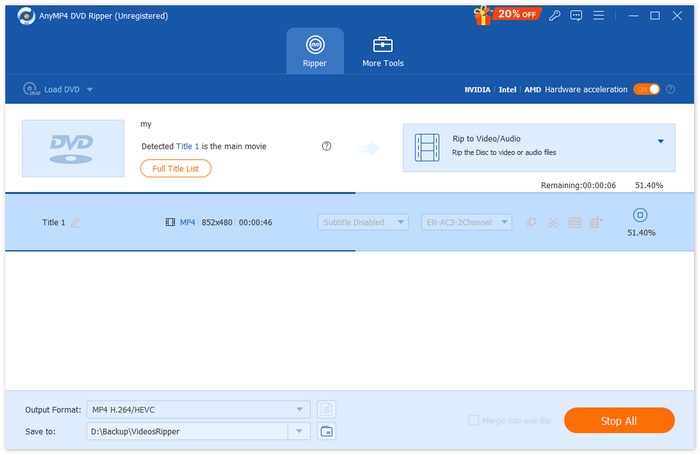
AnyMP4 DVD Ripper 的 DVD 转 ISO 功能提供了一种简单可靠的方式,可以创建 DVD 的精确数字副本。凭借其简洁的界面和快速的处理速度,对于任何希望安全地数字化和管理 DVD 收藏的用户来说,它都是一个便捷的解决方案。
第 2 部分。在 Windows 上将 DVD 转换为 ISO
如果您使用的是 Windows,那么将 DVD 转换为 ISO 的最佳工具是 WinX DVD Ripper Platinum。此工具允许用户从 DVD 中提取媒体内容并将其转换为 ISO 文件,即使是带有复制保护和区域代码的文件。
将 DVD 先抓取为视频再创建 ISO 的步骤:
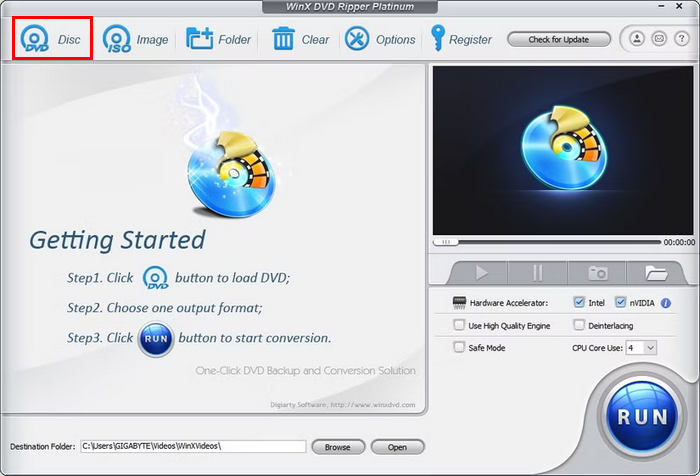
步骤 1. 在你的 WinX DVD Ripper Platinum 中,点击DVD 光盘图标,加载你想要制作成 ISO 文件的 DVD。
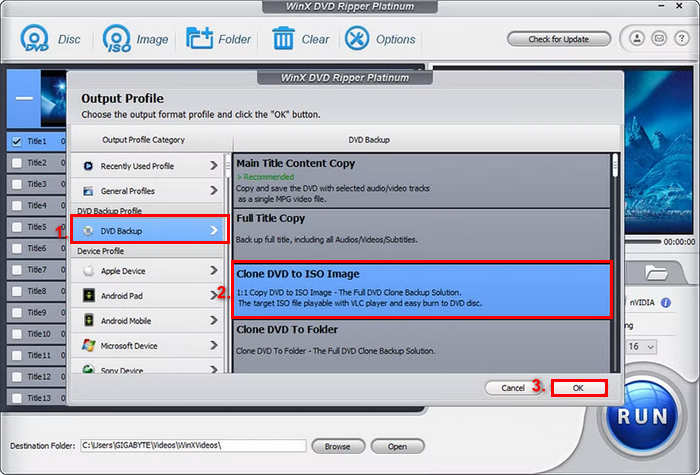
步骤 2. DVD 信息加载完成后,会弹出输出配置文件窗口。在这里,选择输出配置文件,然后选择DVD 备份配置,点击DVD 备份,最后选择克隆 DVD 为 ISO 镜像。
步骤 3. 现在,选择要保存已转换 DVD ISO 镜像文件的文件夹。最后,点击运行按钮,即可开始从 DVD 抓取 ISO 镜像。
虽然该工具可以从 DVD 创建 ISO 文件,但其界面可能会让用户感到复杂难用。此外,要想完整使用这一功能,还需要付费订阅。或者,你也可以尝试使用ISO 播放器来观看。
三、如何在 Mac 上将 DVD 转换为 ISO 文件
当您使用 Mac 时,磁盘工具是将 DVD 转换为 ISO 的最佳选择。此工具是 macOS 的内置应用程序,可帮助用户管理存储设备并创建磁盘映像。其功能之一是将 DVD 转换为 ISO 文件。此功能允许用户创建 DVD 的精确数字备份。
在 Mac 上将 DVD 转换为 ISO 的步骤:
步骤 1. 在 Mac 上,将 DVD 放入光驱中并等待其加载。
步骤 2. 然后,打开“磁盘工具”(Disk Utility),加载完成后,在左侧边栏中找到并选中你的 DVD。
步骤 3. 接着,点击文件选项卡,选择新建映像,然后选择从磁盘名称新建映像。
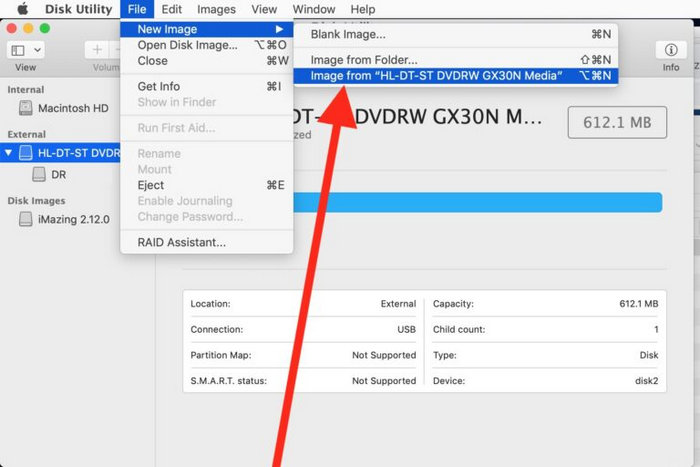
步骤 4. 之后,选择要保存磁盘映像的位置并给其命名,然后点击存储按钮。
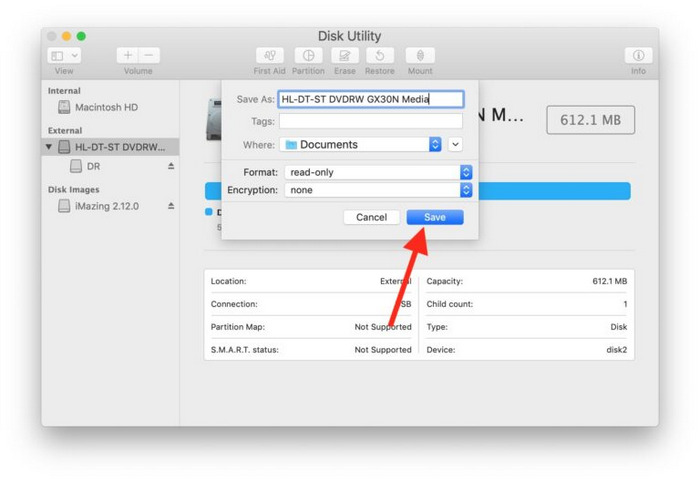
在 Mac 上,此过程会将您的 DVD 转换为 DMG 文件格式,而不是 ISO 文件。为此,您需要使用终端运行特定命令,将 DMG 文件转换为 ISO 文件。
第 4 部分:在 Linux 上将 DVD 转换为 ISO
PowerISO 是一款磁盘映像和镜像处理软件。这款工具允许用户轻松翻录 DVD 并创建 ISO 文件。此外,该应用程序支持多种镜像格式,让用户除了 ISO 格式之外拥有更多选择。
在 Linux 上将 DVD 转换为 ISO 的步骤:
步骤 1. 首先,你需要在设备上安装好相关工具。
步骤 2. 接着运行 PowerISO,点击工具栏上的复制按钮,然后选择制作 CD / DVD / BD 映像文件。
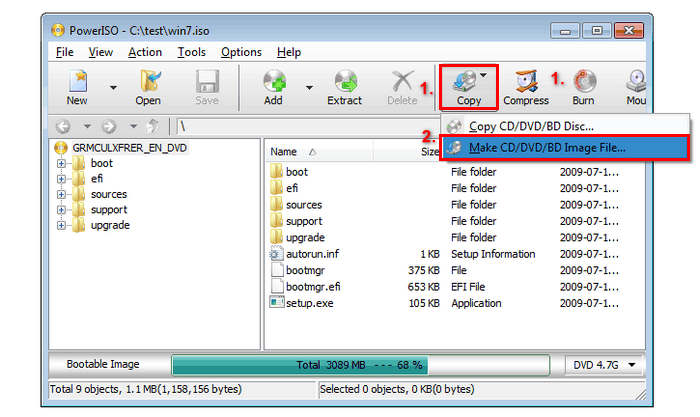
步骤 3. 最后,选择装有要转换光盘的 DVD 驱动器,并将目标文件类型选择为ISO。最后点击确定,即可从所选光盘创建 ISO 文件。
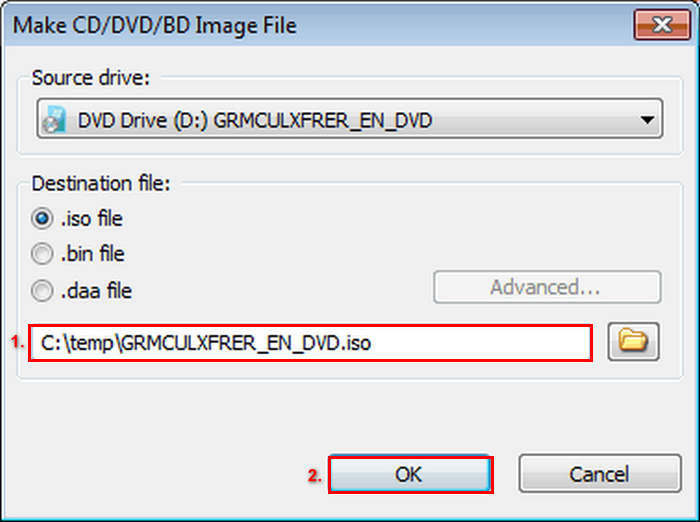
这款 ISO 文件制作工具在将 DVD 转换为 ISO 方面非常出色。转换过程非常简单,步骤也很容易理解。不过,免费版限制了您可以创建的文件大小。
拓展阅读:点击此处查看如何将 ISO 转换为 MP4。
第 5 部分。有关将 DVD 转换为 ISO 的常见问题解答
什么是 ISO 文件?
ISO 文件是 DVD 的完整数字副本,其中包含所有数据、菜单和文件结构。它允许用户无需物理光盘即可访问内容,从而防止潜在的损坏。
我可以将受保护的 DVD 转换为 ISO 吗?
是的。一些 DVD 翻录软件,例如 WinX DVD Ripper Platinum,可以将受版权保护的 DVD 转换为 ISO 文件。但是,并非所有工具都支持此功能,因此选择支持加密的软件至关重要。
除了 ISO 之外,还有什么其他格式最适合翻录 DVD?
除了 ISO 之外,MP4 也是 DVD 翻录的首选,因为它兼容各种设备,压缩效率也很高。推荐使用 FVC 推荐的 Video Converter Ultimate 将 DVD 转换为 MP4,它提供高质量的输出、批量转换和编辑工具。
结论
将DVD 转换为 ISO文件,是保护和保存媒体内容的有效方式,既能防止因光盘物理损坏造成的损失,又能确保访问便捷。通过本文介绍的方法,你可以在 macOS、Windows 或 Linux 系统上轻松从 DVD 创建 ISO 文件。根据你的操作系统选择合适的工具,现在就开始动手,让你喜爱的 DVD 多年后仍然安全易用。
-
 将 DVD 翻录为 AVI:3 款最佳 DVD 翻录软件 [评测]
 想要将 DVD 翻录成 AVI 以便于播放和存储吗?请阅读我们对最佳 DVD 转 AVI 转换器的详细评论,找到最适合您的工具。
-
 [已解决] VLC 无法播放 DVD,如何修复
 VLC 可以播放 DVD 吗?为什么 VLC 不能播放我的 DVD?如何让 VLC 在 Windows 10 上播放 DVD?这篇文章分享了 3 个修复 VLC 不播放 DVD 问题的技巧。
-
 您需要了解的有关DVD播放器格式的所有信息
 这是一份指南,提供有关 DVD 播放器格式的知识,包括如何使用 DVD 播放器格式打开文件以及如何转换为其他格式。
