


 视频转换大师
 屏幕录影大师
 视频修复
视频修复
 安全下载
安全下载Action Screen Recorder 评测:你需要知道的事情
如果你是一名玩家,正在寻找可以记录游戏体验的软件,那么一款可靠且高效的屏幕录制功能就是必需的。如今市面上有众多工具可供选择,要挑出最适合的一款往往需要花费时间。不过,如果你和大多数人一样,想使用 Action Screen Recorder 来录制游戏或电脑屏幕上的任何操作,那你就来对地方了!在本文中,我们将通过查看其核心功能、优缺点以及支持的平台来评测这款工具。此外,你还可以看到我们对该工具的总体评价,以及在它不符合你需求和偏好时,最值得选择的替代方案。让我们开始吧!

第 1 部分。了解动作屏幕录像机
Action Screen Recorder 是一款用于实时捕捉和直播高清游戏画面的软件工具。它提供流畅的录制性能、低资源占用和用户友好的界面。视频直接保存为 MP4 格式,无需转换即可分享。
主要特点:
• 以高达 120fps 的高清速度录制游戏过程。
• 捕获时尽量减少 CPU 和 GPU 的使用。
• 以紧凑的文件大小保存视频,且不会损失质量。
• 直接以 MP4 格式 H.264/AVC 导出录音。
• 为您的录音添加现场麦克风评论。
• 覆盖网络摄像头视频和个人徽标。
• 在 YouTube、Twitch 等平台上进行直播。
• 允许您截取屏幕任何区域的屏幕截图。
优点
- 高达 120fps 的流畅高清录制。
- 录制时 CPU 和 GPU 使用率低。
- 以小文件大小保存视频。
- 保存录制的屏幕时无需转换。
- 内置对直播的支持。
- 易于使用的界面。
缺点
- 仅适用于 Windows。
- 对输出格式的支持有限,因为它仅支持 MP4 和 AVI。
- 一些高级功能在付费版本中被锁定。
Action Screen Recorder 适合所有类型的用户使用。无论你是新手还是高手,这款工具都能很好地满足需求。它的界面易于上手,运行流畅,并且在不牺牲画质的前提下,能有效减小文件体积。通过直接录制 MP4、直播推流、支持摄像头和麦克风,以及手机远程控制等功能,它几乎涵盖了高质量游戏录制所需的一切。
然而,值得注意的是 Action! 仅适用于 Windows,这对于 Mac 或 Linux 用户来说可能是一个大问题。
第 2 部分。动作屏幕录像机定价
Action Screen Recorder 并非免费,但它提供 30 天免费试用。试用结束后,您需要订阅才能继续使用。以下是 Action Screen Recorder 的价格:
个人授权: $29.95
商业授权: $49.95
一次性付款,终身使用。个人许可证适用于非商业用途,商业许可证适用于商业或专业用途。
第 3 部分。如何使用动作屏幕录像机
Action Screen 功能丰富,但使用起来却非常简单,不会让人感到不知所措。为了更好地指导您如何使用它,请按照以下步骤操作:
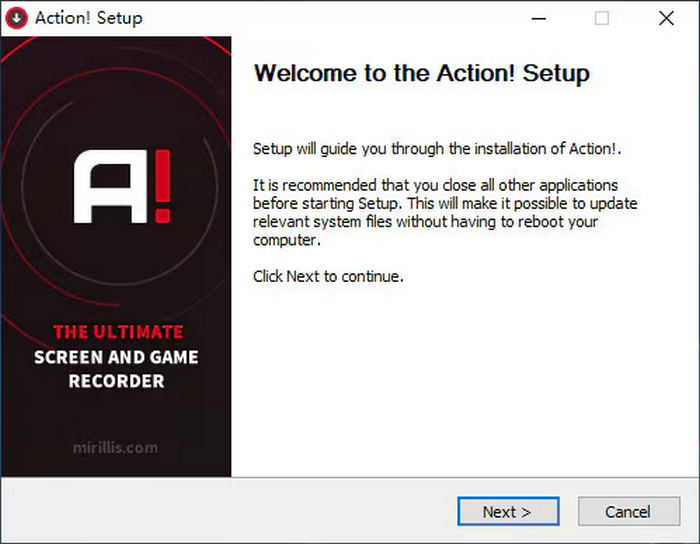
步骤 1。首先,你需要在设备上下载 Action Screen Recorder 工具。请注意,该工具目前仅适用于 Windows 用户。
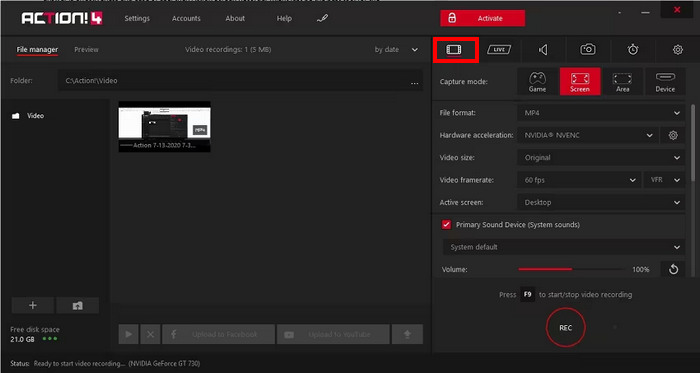
步骤 2。接着,启动程序并点击视频捕获按钮。
步骤 3。之后,设置你的输出格式、视频尺寸、视频帧率和活动屏幕。完成设置后,点击下面的REC按钮,或者直接按 F9 键即可开始录制屏幕。
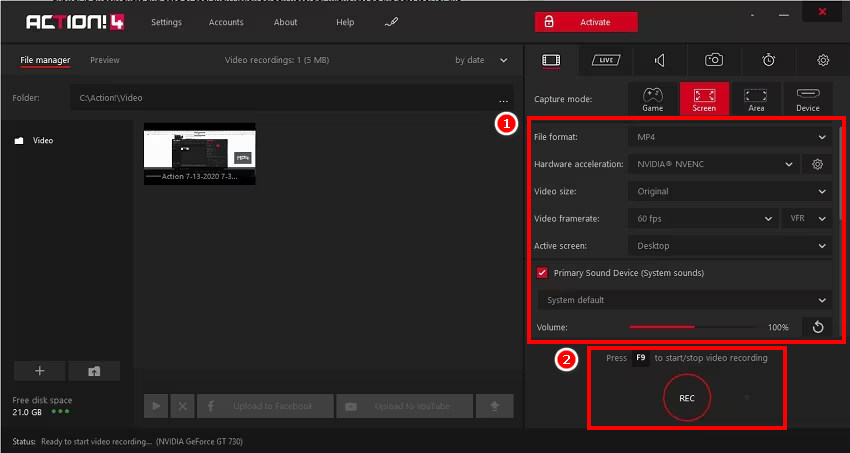
注意: 录制完成后,视频会直接按照你选择的格式保存,你还可以选择将其导出至 YouTube 或其他任意视频网站。
第 4 部分。最佳动作屏幕录像机替代品
如果你在寻找一款功能全面的视频屏幕录制工具,那么 Action Screen 最佳的替代方案就是 FVC Screen Recorder。这是一款集视频与音频录制于一体的工具,可帮助用户轻松录制屏幕和声音。它可以通过多种模式轻松实现高质量录屏,例如全屏、选定窗口或自定义区域。此外,它还能录制系统声音、麦克风输入,或两者同时录制,非常适合需要制作教程、录制在线视频会议、游戏过程以及配音内容的用户。
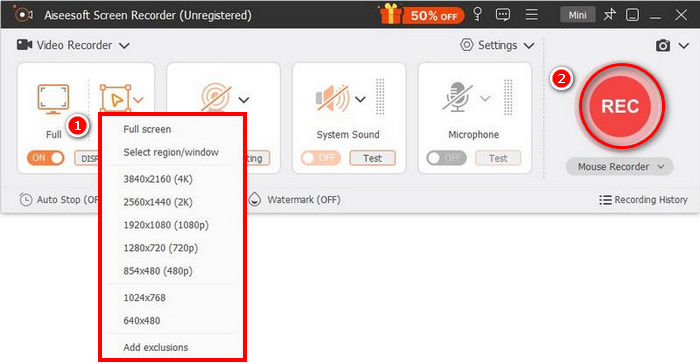
主要特点:
• 允许您录制全屏、选定窗口或自定义区域
• 可以录制系统音频和麦克风声音。
• 录制视频通话、会议、游戏和在线课程
• 允许在录制时添加文本、线条、高亮和形状。
• 支持多种输出格式。
• 录制的视频上没有水印。
• 简单直观的界面。
FVC 屏幕录像机确实是 Action Screen 的最佳选择之一,所以不要错过现在探索这款视频屏幕录像机的机会!
第五部分:关于 Action Screen Recorder 的常见问题
Action Screen Recorder 可以免费使用吗?
遗憾的是,Action Screen 并非免费使用。不过,它提供了 30 天的免费试用期,用户可以在订阅(费用为 $29.95)之前试用并测试该工具。请注意,有些功能即使在 30 天的免费试用期内也无法使用,需要解锁完整版才能使用。
Action Screen Recorder 的系统要求是什么?
Action Screen Recorder 仅支持 Windows 操作系统,包括 Windows Vista、7、8、8.1、10 和 11。为确保流畅运行,您的系统应安装 DirectX 9.0c 或更高版本,以及最新的显卡驱动程序。此外,使用该软件可能需要管理员权限,尤其是在安装过程中或访问高级设置时。
我可以在使用 Action Screen Recorder 录制的同时进行直播吗?
是的。它支持在 YouTube、Twitch 等热门平台上进行直播,同时还能录制屏幕。
Action Screen Recorder 支持哪些文件格式?
Action Screen Recorder 仅支持有限的视频输出格式。与其他视频屏幕录制工具相比,Action 只支持将录制内容导出为 MP4 和 AVI 格式。
Action Screen Recorder 会在录制内容中添加水印吗?
不会。即使在 30 天免费试用期间,Action Screen Recorder 也不会在您的录制内容中添加水印。这使其成为制作清晰专业视频的绝佳选择。
结论
Action Screen Recorder 是一款功能强大且易于使用的高质量屏幕录制工具,尤其适合玩家和内容创作者。其流畅的性能、对直播推流的支持以及轻量级的输出文件,使其成为 Windows 用户值得信赖的选择。尽管它在多平台支持和更多格式兼容性方面略有不足,但对需要高效、无繁琐设置的屏幕录制用户来说,它依然具备很高的实用价值。如果你更看重灵活性,或希望使用免费的选择,那么 FVC Screen Recorder 会是非常值得一试的优秀替代方案。
-
 Adobe Captivate 评论:这是您需要了解的内容
 想必你也想知道 Adobe Captivate 是什么吧?本文将带你了解它是什么、它的用途以及它是否物有所值。
-
 适用于计算机、iOS 和 Android 的 3 款最佳 Facebook 通话记录器
 当您想记录 Facebook 通话以保存有价值的东西时,有很多 Facebook 通话记录器可供选择。在这里,您可以了解 3 种为 PC、iOS 和 Android 录制 Facebook 视频通话的最佳工具。
-
 4个最佳的免费网络启动记录器,以捕获屏幕视频
 是否在寻找无需花一分钱就能在桌面上录制屏幕上活动的最佳方法?这是4种最常用的免费网络启动记录器。
