


 视频转换大师
 屏幕录影大师
 视频修复
视频修复
 安全下载
安全下载Adobe Captivate 在 2025 年还值得购买吗?完整评测
在当今数字时代,对教学视频和交互式培训模块等电子学习素材的需求持续增长。Adobe Captivate 长期以来一直是制作生动、有响应式设计且专业的学习内容的首选工具。但随着技术的发展和新工具的不断涌现,这款工具现在还值得使用吗?在这篇深度评测中,我们将从核心功能、优势与局限到价格,为你全面解析 Adobe Captivate。你还将了解一款可用于录屏的替代工具,帮助你轻松制作教学视频等内容。那么,你还在等什么?让我们开始吧!

第 1 部分:您应该了解的 Adobe Captivate 知识
Adobe Captivate 是一款专业且先进的工具,以其创建交互式、响应式且多媒体丰富的培训内容的能力而闻名。该工具的主要功能是构建用于教育或企业培训的在线课程、视频教程、测验和其他教学材料。换句话说,您可以使用 Adobe Captivate 截取电脑屏幕。
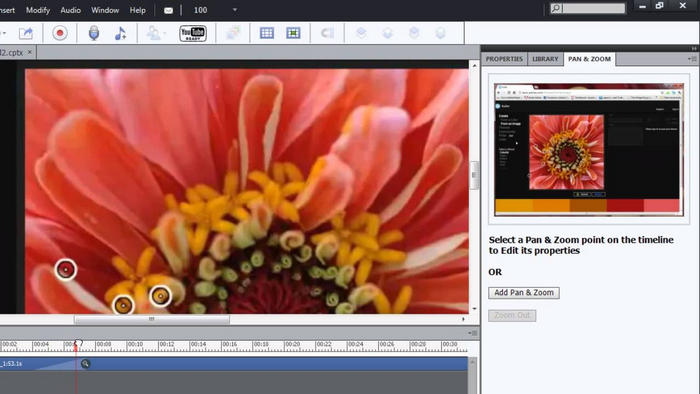
主要特点:
• 记录全屏或屏幕的特定区域。
• 自动生成的文本标题、鼠标路径和点击框。
• 允许在录制期间或录制后进行音频旁白。
• 支持网络摄像头录制画中画教程。
• 允许您在 Captivate 中逐帧编辑录音。
• 将屏幕录像转换为交互式模拟。
• 导出为视频或直接集成到交互式项目中。
优点
- 允许用户选择如何录制他们的屏幕。
- 录音流畅,即使录音时间较长也能很好地工作。
- 您可以在录制时轻松添加画外音或网络摄像头镜头。
- 编辑灵活,可以添加动画、弹出窗口和亮点。
- 内置隐藏式字幕和文本转语音功能,具有辅助功能。
缺点
- 仅有 30 天的免费试用期。
- 在低系统计算机上可能会出现故障和滞后。
- 该界面不适合初学者,需要技术知识。
- 录音能力有限。
结论:
说实话,Adobe Captivate 是一款非常棒的工具,尤其适合创建专业且互动的电子学习内容。它提供了强大的功能,例如响应式设计、测验,以及用于软件演示和教程的高级屏幕录制功能。
然而,它并非最容易使用的工具,尤其对于初学者而言。界面可能相当复杂,可能需要一些时间学习。价格也略高,如果您只想使用基本功能,这可能并不理想。因此,它最适合经验丰富的用户或经常创建培训内容的专业人士。如果您是新手,或者主要需要一款简单的屏幕录像机,那么还有其他更实惠且更适合初学者的选择。
第 2 部分。Adobe Captivate 的价格是多少?
Adobe Captivate 是一款付费软件,提供 30 天免费试用。试用期结束后,您可以完全访问其所有功能,非常适合在购买前进行探索。不过,免费试用期结束后,该软件每月收费 $33.99。其终身价格最高可达 $1099,但请注意,此价格包含定期更新。最后,Adobe 目前不提供一次性购买选项,但偶尔会为学生、教师或机构提供折扣计划。
第 3 部分。Adobe Captivate 值得这个价格吗?
鉴于 Adobe Captivate 的功能,它物有所值,尤其对于经常创建交互式学习内容的教育工作者、教学设计师和企业培训师而言。然而,如果您只是普通用户,只需要它作为讲座或演示的屏幕录制工具,那么它的价格可能不值得,因为其他视频屏幕录制工具也提供相同的功能。因此,在决定它是否物有所值时,请考虑您是否真的需要它的所有功能,是否能适应其复杂的界面,以及它是否在您的预算范围内。
第 4 部分:最佳 Adobe Captivate 替代方案
由于屏幕录制只是 Adobe Captivate 的功能之一,其他视频录屏工具在操作上更直观,也更易上手。FVC Screen Recorder 就是目前众多最佳屏幕录制工具之一。它在高质量录屏方面表现出色,支持多种录制模式,操作简单。此外,它可以录制系统声音、麦克风声音,或两者同时录制,非常适合想要制作教程、录制在线会议、游戏画面以及配音内容的用户。
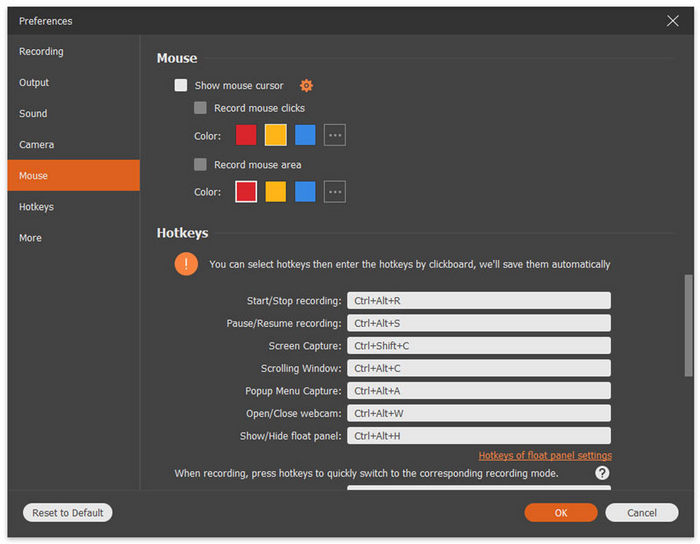
主要特点:
• 允许您录制全屏、选定窗口或自定义区域
• 可以录制系统音频和麦克风声音。
• 录制视频通话、会议、游戏画面和在线课程
• 允许在录制时添加文本、线条、高亮和形状。
• 支持多种输出格式。
• 录制的视频上没有水印。
• 简单直观的界面。
如果您想要 Adobe Captivate 的替代品,FVC 屏幕录像机确实是个不错的选择。它非常易于使用,非常适合所有类型的用户,即使是初学者也能轻松上手。此外,它还提供了一些高级功能,用户可以用来增强屏幕录制效果。
第 5 部分。关于 Adobe Captivate Review 的常见问题解答
Adobe Captivate 主要用于什么?
虽然 Adobe Captivate 包含屏幕录制功能,但这只是冰山一角。该工具是一个著名的学习管理系统,主要用于创建交互式的专业电子学习内容,例如在线课程、软件模拟、视频教程和培训模块。
Adobe Captivate 适合初学者吗?
并非如此。Adobe Captivate 已被众多用户评测,并被描述为界面复杂、学习难度高。然而,它却受到教学设计师和教育工作者等经验丰富的用户的称赞,因为它拥有录制讲座、创建模拟等功能。
Adobe Captivate 可以录制网络摄像头和音频吗?
是的。Adobe Captivate 同时支持网络摄像头录制和音频录制。它允许您在录制屏幕的同时捕捉网络摄像头的画面,非常适合创建画中画教程。您还可以在屏幕录制期间或之后添加语音旁白,从而灵活地呈现内容。这使得 Adobe Captivate 成为创建引人入胜、多媒体丰富的学习材料和教学视频的绝佳工具。
Adobe Captivate 提供免费试用吗?
是的。Adobe Captivate 提供 30 天免费试用,用户可以完全访问所有功能,在决定购买之前先了解其功能。
结论
为应对这个数字时代不断变化的需求,尤其是对便捷获取且具有吸引力的学习材料日益增长的需求,Adobe Captivate 依然是制作交互式和专业电子学习内容的强大工具,非常适合教育工作者、培训师和教学设计师。然而,它复杂的界面和较高的价格可能并不适合初学者或普通用户。因此,如果你正在寻找一款更易用、性价比更高的替代方案,那么你可以尝试的最佳屏幕录制工具就是 FVC Screen Recorder。
-
 Dxtory 评论:这个屏幕录像工具值得吗?
 您对 Dxtory 感兴趣吗?在这篇全面的评测中,我们将重点介绍它的优缺点和整体功能,看看它是否真的值得一试。
-
 行动!屏幕录像机评论–缺点,优点及其最佳替代方案
 Action Screen Recorder 是录制游戏视频所需的软件吗?本文显示了评论及其替代方案。
-
 适用于计算机、iOS 和 Android 的 3 款最佳 Facebook 通话记录器
 当您想记录 Facebook 通话以保存有价值的东西时,有很多 Facebook 通话记录器可供选择。在这里,您可以了解 3 种为 PC、iOS 和 Android 录制 Facebook 视频通话的最佳工具。
