


 视频转换大师
 屏幕录影大师
 视频修复
视频修复
 安全下载
安全下载评测 Debut 屏幕录像软件:你应该购买它吗?
有时候,我们确实需要专业软件来帮助我们记录电脑屏幕上发生的一切。制作操作演示视频时,我们必须先录制操作过程,再添加标注;对于无法下载的在线视频,可以在播放时录屏保存;开网络会议时,也需要做好会议记录。像 Debut Screen Recorder Software 这样的软件,看上去正好符合我们的需求。但它录制的视频质量是否达标?是否支持在录制过程中做标注?想了解这些细节,请阅读这篇Debut Screen Recorder Software 评测。下面就来测试一下,看看这款软件的实际表现如何。

第 1 部分。概览 Debut 视频软件
介绍
Debut 屏幕录像软件是一款由 NCH Software 开发的专业屏幕录像工具。它提供家庭版和专业版两个版本,以满足不同需求的用户。您可以使用它来录制设备的整个屏幕、特定窗口或选定区域。您的网络摄像头也可以用作素材来源。录制时,Debut 屏幕录像软件还支持为视频添加一些特效。
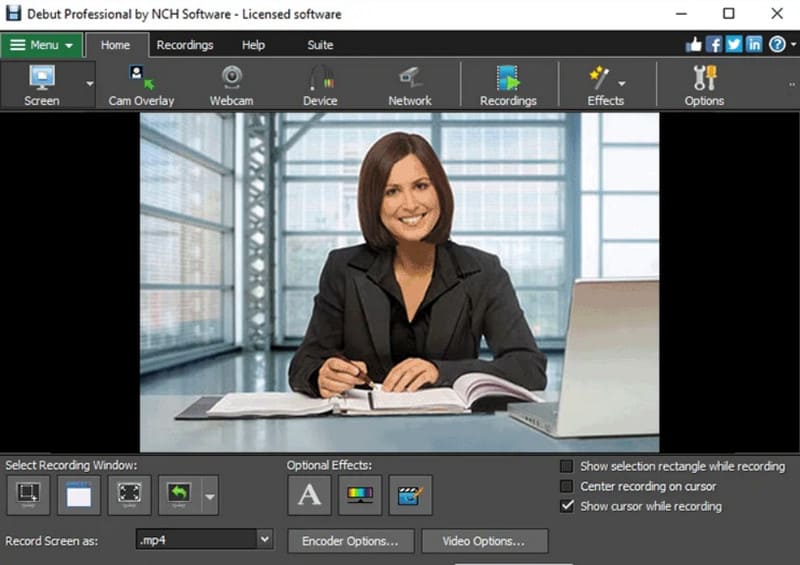
Debut Video Software 看起来就像最常规的视频屏幕录制软件一样。那么它究竟有何独特之处?当前版本存在哪些问题?这些问题对我们影响很大吗?以下是这些问题的答案。
优点
- 同时从多个来源录制视频和音频。
- 支持定时录音。
- 支持多种输出格式选项。
- 个人版可以免费使用。
- 录音设置非常灵活,具有许多个性化功能。
缺点
- 界面非常复杂,按钮很多,对于新手来说不容易掌握。
- 只有升级您的帐户才能解锁视频编辑功能。
- Mac 版本似乎在录制音频方面存在问题。
支持的平台
据 Debut 视频捕捉和屏幕录像软件官方网站提供的信息,该软件现已支持 Windows 和 Mac 电脑。如果您使用的是 Windows,则您的系统版本需要为 Windows 7、8、8.1、10 或 11。如果您是 Mac 用户,请将系统保持在 macOS 10.5 或更高版本。
价钱
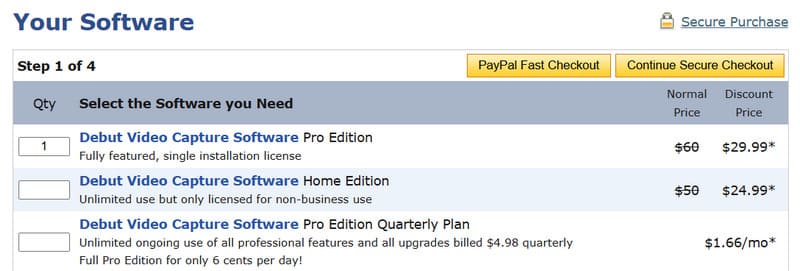
如果您需要将录制内容用于商业用途,或想要解锁 Debut 录制软件的完整视频编辑功能,则需要付费订阅。其开发人员目前提供多种付费方案。
Debut Video Capture Software 专业版(Pro Edition)
该程序售价为$29.99。付费后,您可以在一台设备上登录并使用该程序。
Debut Video Capture Software 家庭版(Home Edition)
此计划价格为$24.99。您可以享受无限制使用,但不得用于商业用途。
Debut Video Capture Software 专业版季度订阅计划(Pro Edition Quarterly Plan)
如果您不想一次性支付过多费用并永久解锁,也可以选择此套餐。您每月只需支付 $1.66,即可获得所有编辑功能的相同访问权限。
来自 3 位用户的评论
仅凭描述很难对它有确切的了解。我们挑选了三位用户的真实评价,来看看大家对 Debut Capture 的看法。
我喜欢录制视频的各种选项。我可以录制 .mp4、.wmv 等格式的视频。不同格式的用途也不同。我的研究工作需要用到视频处理,我可以录制任何屏幕内容为 .wmv 格式用于编程。此外,我还可以录制 .mp3 格式的视频用于任何演示或作业。最棒的是,使用默认麦克风录制语音时,视频没有任何延迟。
我对技术支持的水平非常失望。我的 Debut 产品以前能用,但后来电脑麦克风就无法录制了。这不是电脑的问题,因为我用 Zoom 录制程序录制 Zoom 会议完全没问题。我联系过客服,但他们的回复很冷漠,也没什么帮助。
总的来说,我喜欢这款软件,因为它方便任何人使用。注册过程非常简单,操作也很简单。
第 2 部分。Debut 视频软件的主要功能
让我们以分项的形式快速看一下录像机 Debut 可以为用户做些什么,看看它是否满足您的要求。
从屏幕、网络摄像头、录像机和其他外部设备录制镜头。
捕获整个屏幕、单个窗口或选定的部分内容。
支持AVI、WMV、FLV、MPG、MP4、MOV等输出格式。
录制来自麦克风、系统和扬声器的音频。
提供绿屏效果来替换录制的背景
录制带有图片或纯色的视频,或者仅录制静音屏幕。
在录制的视频上添加光标或水印。
录制的视频直接上传到 YouTube、Vimeo 等。
消除音频噪音并提高整体音质。
第 3 部分:如何使用 Debut 视频软件
下面介绍如何使用 Debut 屏幕录制软件(Screen Recorder)来录制电脑屏幕。
步骤一:在电脑上下载并安装 Debut Screen Recorder Software。进入主界面后,点击Screen,选择你想要录制的屏幕区域。
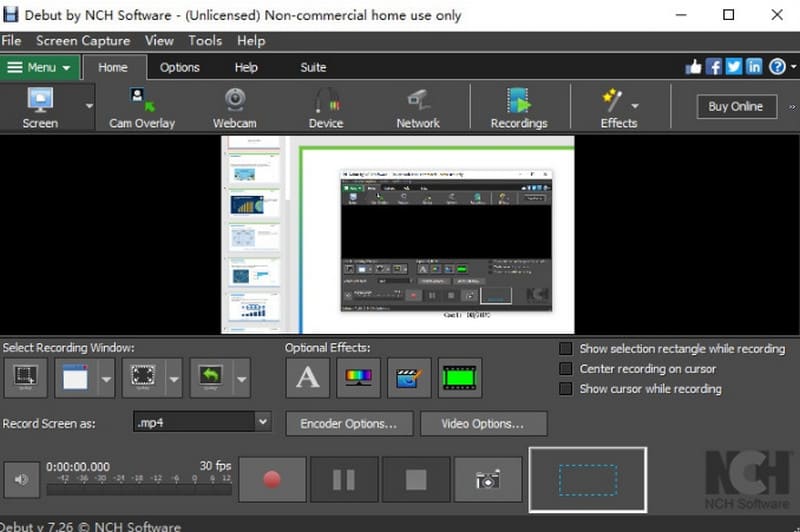
步骤二:在顶部菜单中选择Tools,完成音频及其他相关设置。你还可以在这里添加更多颜色和视频特效。
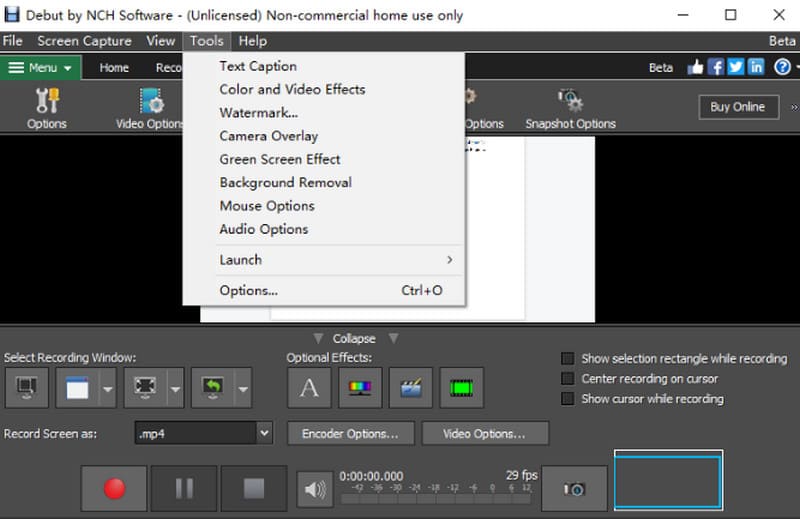
步骤三:你会在屏幕底部看到一个红色的录制按钮。点击它即可开始录制。
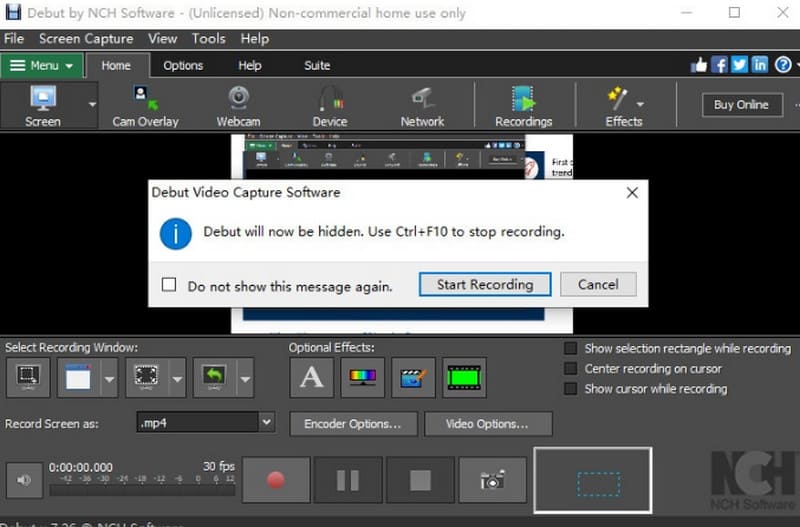
第 4 部分。Debut Screen Recorder 的最佳替代方案
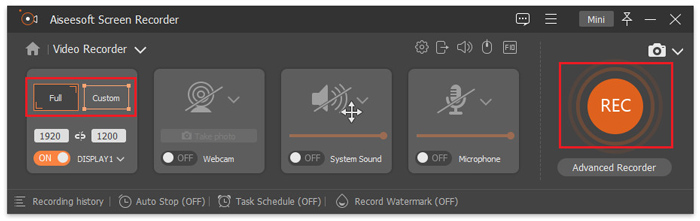
如前文所述,Debut Screen Recorder Software 的用户界面非常复杂,客服几乎起不到作用,这显然大大影响了我们的使用体验。如果你想避免这些问题,我们推荐使用 FVC Screen Recorder,这是 Debut Recorder Software 的最佳替代方案。该程序可以录制屏幕上播放的视频、游戏画面和网络会议,也能录制来自网络摄像头的内容。你可以自由选择使用麦克风声音还是系统声音作为音源。FVC Screen Recorder 最特别的一项功能,是只要将手机与电脑连接,就可以在电脑上录制手机上的内容。
以下是使用 FVC 屏幕录像机录制屏幕的方法。
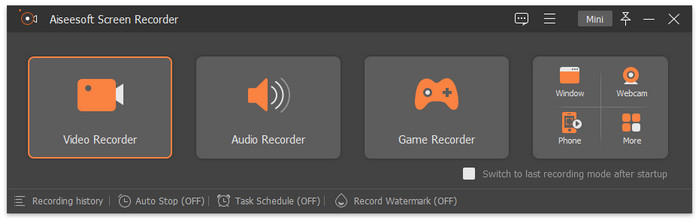
步骤一:在电脑上安装 FVC Screen Recorder,在主界面中点击Video Recorder(视频录制)。
步骤二:选择你想要录制的区域,然后选择音频来源。
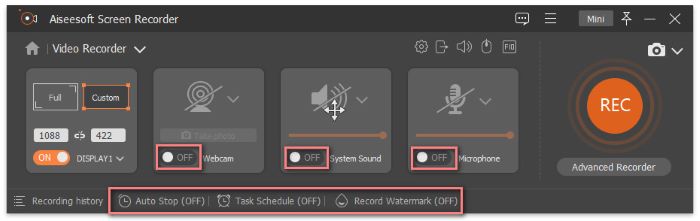
步骤三:最后,点击红色的REC按钮开始录制。
第五部分 Debut 屏幕录像软件评测常见问题解答
Debut 录音软件使用安全吗?
是的,这款视频和音频录制软件被认为是非常安全的。已经证实其中不含任何病毒或恶意数据。
屏幕录制是否违法?
如果你录制的是受版权保护的内容,可能会涉及违法行为。如果你只是录制一些公开的内容,那就没有问题。
如何免费获得 Debut?
Debut 提供免费版本,可用于录制电脑屏幕或网络摄像头。但如果您想将其用于商业用途,则需要付费。
结论
以上就是对Debut Screen Recorder Software的详细评测。我们提供了其功能、价格、适用人群、优点和缺点等完整信息,并附上了简明的使用指南。你还可以通过我们整理的用户评价,大致拼出它的实际使用情况。它最好的替代方案是 FVC Screen Recorder,界面更简洁,技术支持也更加可靠。
-
 快速修复 VLC 媒体播放器无法播放视频(2025 指南)
 您是否正在寻找一种快速简便的方法来修复 VLC Media Player 无法播放视频的问题?本文提供了解决此问题的所有自动和手动解决方案。
-
 VLC中的屏幕截图–如何在VLC Media Player中拍摄快照
 如何在 VLC Media Player 中拍摄快照以及将它们保存在哪里?浏览本文中的 VLC 快照功能及其替代方案。
-
 如何使用VLC Media Player录制带有音频的屏幕视频
 这是有关 VLC 屏幕录制功能的分步指南。您可以从本文中找到详细的过程、故障排除和最佳替代方案。
