


 视频转换大师
 屏幕录影大师
 视频修复
视频修复
 安全下载
安全下载3 款最佳 Facebook 通话录音机 - 如何录制 Facebook 视频通话
如何录制 Facebook 视频通话,以便留住你与朋友和家人之间的珍贵时光?自从 Facebook 推出视频通话功能后,越来越多的用户更愿意通过 Facebook 通话而不是电话来联系他人。但作为社交媒体平台的附加通讯功能,它不像电话那样自带录音功能。此外,其独立应用——Facebook Messenger 也没有内置录音工具。在这种情况下,你可以通过本文中的详细指南,了解 3 款适用于电脑、iOS 设备和 Android 手机的易用Facebook 通话录制工具。

第 1 部分:适用于 Windows/Mac 的最佳在线 Facebook 通话记录器
无需下载任何第三方软件,你可以使用FVC 免费屏幕录像机在线免费录制 Facebook 视频通话。这是一款用户友好的 Facebook 通话录制工具,界面简洁,同时具备你所需的多种功能。
- 1. 通过简单的步骤免费在线录制 Facebook 通话和视频。
- 2. 无损录制音视频,保持高品质视频。
- 3.无水印保护您的所有权。
- 4.录音会自动保存在媒体库中,您可以自由选择删除、下载、分享到SNS。
步骤 1: 在任意浏览器中进入FVC 免费屏幕录像机官网。点击开始录制按钮,在几秒钟内安装启动器,然后再次点击开始录制按钮以启动录制工具。

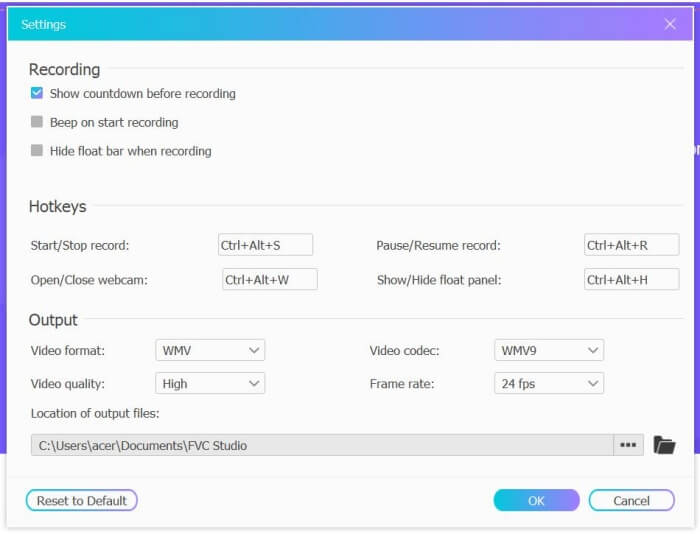
步骤 2: 点击录制区域菜单,选择全屏或自由选定区域。然后打开麦克风和扬声器声音。若需调整视频参数,可点击设置图标,你可以选择 MP4 格式、高质量以及 24 fps 帧率,以保证录制质量。之后点击REC按钮开始录制 Facebook 通话。
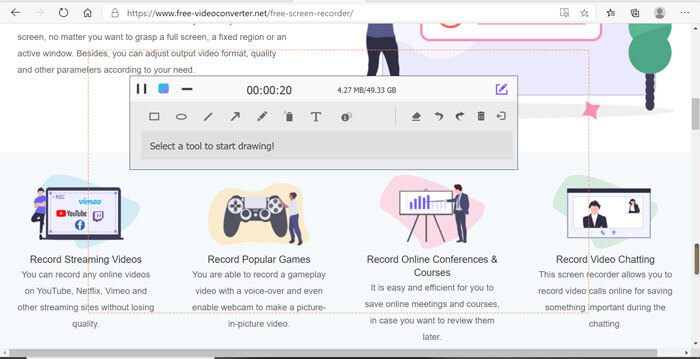
步骤 3: 屏幕上会弹出一个带有多种编辑工具的工具箱。你可以根据需要添加图形、文字和线条。然后点击停止图标,将录制内容保存到云端。你也可以点击鼠标右键,将其下载到电脑本地。
使用这款免费的在线 Facebook 视频通话记录器是计算机用户在线录制 Facebook 视频通话的最佳方式。通过预先调整录音设置,它可以将Facebook通话保存为MP4格式,体积小,质量高。如果您习惯于在手机上拨打 Facebook 电话,请继续阅读本文。
第 2 部分:如何通过默认录音器为 iOS 录制 Facebook 通话
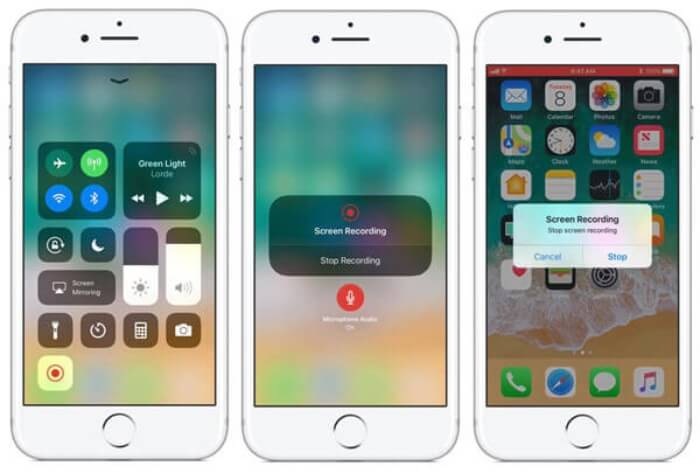
更新后的 iOS 11 或更高版本在你的 iPhone 和 iPad 上有一个新的默认录音机,这是在不下载任何应用程序的情况下捕捉 Facebook 视频通话的最佳选择。在这里,您可以了解如何将 Facebook 通话记录器添加到控制中心的快捷方式以及使用方法。
步骤 1: 在你的 iPhone/iPad 上打开设置,向下滚动选择控制中心选项。接着点击自定控制标签,找到屏幕录制功能。点击加号图标,将该功能添加到控制中心。
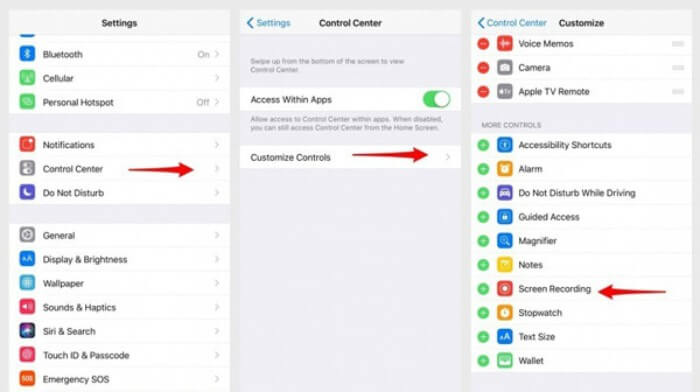
步骤 2: 从手机屏幕顶部向下滑动打开控制中心,你会在底部看到录屏图标。点击屏幕录制图标即可开始录制,你可以选择录制视频画面或仅录制音轨。若要结束录制,点击顶部红色的状态栏,再在弹出的窗口中点击停止选项。
第 3 部分:适用于 Android 的简单 Facebook Messenger Recorder
一些Android手机没有内置录音机,Android有太多Facebook视频通话录音机可供选择。因此,您可以通过以下部分中的详细步骤了解适用于 Android 手机的最佳录音机之一。
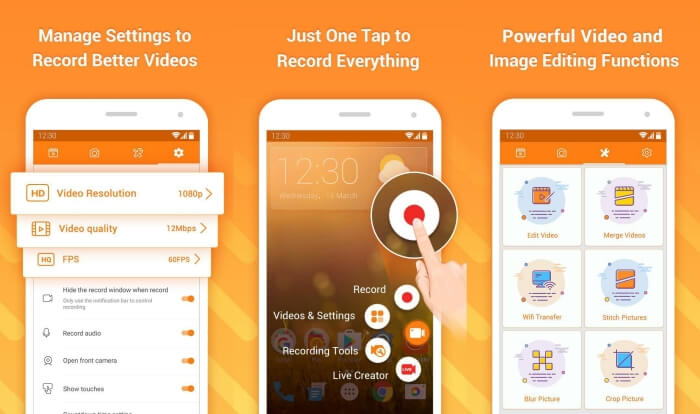
DU Recorder 是一款易于使用的 Android 版 Facebook 通话录制工具,以录制流畅著称。无需 root,任何人都可以通过轻轻一按来录制 Facebook Messenger 通话。
步骤 1: 启动录制应用,你会看到'录制文件'“截图”“编辑工具”和“设置”四个菜单。首先点击设置菜单调整视频参数。为保持高画质,你可以选择 1080p 分辨率和 30 fps 帧率。
步骤 2: 不要关闭录制应用,直接打开 Facebook Messenger。此时你会在屏幕上看到录制图标。点击该图标并选择录制图标即可开始录制屏幕和声音;再次点击即可停止录制。随后,你可以点击编辑图标,对录制内容进行剪辑并添加背景音乐。
你可能还喜欢:
第 4 部分:Facebook 通话记录器的常见问题
1. Facebook 有没有默认的录音机在 PC 上录制视频通话?
不,它没有。因此,您必须依赖其他专业的 Facebook 通话记录器。如果您不想下载其他会占用您计算机存储空间的软件,FVC Free Screen Recorder 是您的最佳选择。
2. 如何在 Facebook Messager App 上开始与朋友聊天?
首先,在您的手机上打开 Facebook Messenger,然后选择您想要与 Facebook 通话的朋友的聊天框。现在您可以看到视频图标,因此您可以单击它开始视频通话。
3. 使用 Facebook Messenger 录音机时,我应该选择什么格式来保存录音?
无论您是在计算机还是手机上使用 Facebook 通话记录器,保存 Facebook 视频通话的最佳格式都是 MP4。它可以节省更多的存储空间,并与所有设备兼容。
结论
以上文章介绍了 3 款Facebook 视频通话录制工具。对于 iPhone、iPad 和部分 Android 手机,你可以直接使用手机自带的录屏功能。否则,你可以在 Google Play 上选择任意一款录制工具,比如 DU Recorder。至于电脑端,FVC 免费屏幕录像机是你录制 Facebook 通话的最佳选择。如果你在使用 Facebook 通话录制工具时遇到其他问题,欢迎在下方留言。
-
 Snagit 2021评论–优点,缺点和最佳选择
 什么是Snagit的最佳替代品?有像Snagit这样的屏幕捕获工具吗?这篇文章将回顾Snagit,并分享Snagit捕获屏幕的最佳替代方法。
-
 在桌面和在线上不容错过的 6 款最佳 WAV 录音机
 我们在本文中分享的最好的 WAV 录音软件具有多种实用功能,可帮助您像专业人士一样捕捉音频和语音。
-
 产生高质量音频的前 4 名免费 AIFF 录音机
 本文讨论 AIFF 以及一些可用于生成高质量 AIFF 格式的最流行工具。
