


 视频转换大师
 屏幕录影大师
 视频修复
视频修复
 安全下载
安全下载WhatsApp录制视频:在电脑/安卓/iPhone上录制的3种方法
WhatsApp 可能是当今最流行的即时通讯应用之一,但它无法直接录制视频通话。无论是工作会议、在线课程,还是与亲朋好友的私密聊天,能够保存这些珍贵瞬间都非常有用。
好消息是?你完全不用错过这些内容。无论你使用什么设备,都有安全且有效的录制 WhatsApp 视频通话的方法。在本指南中,我们将向你介绍三种经过验证的方式,教你如何在电脑(PC)、安卓手机和 iPhone 上录制 WhatsApp 视频通话。无论你是想回放某次视频通话的内容,还是想保留一通重要通话的备份,这里就是你该开始了解的地方。

第一部分:可以直接录制 WhatsApp 视频通话屏幕吗?
如前所述,WhatsApp 没有录制视频通话的功能。这主要是出于隐私和安全方面的考虑。WhatsApp 使用端到端加密,这意味着只有通话中的双方才能看到和听到通话内容。
因此,为了保护您的私人对话安全,该应用不允许直接录制。所以即使您尝试在 WhatsApp 中查找录制按钮,也找不到。该应用不支持视频通话录制。
第二部分:如何在笔记本电脑/Mac/PC 上录制 WhatsApp 视频【免费】
既然你知道无法直接录制 WhatsApp 视频通话,那么实现这一目标的最佳方法是使用屏幕录制工具。
FVC 屏幕录制工具是一款免费且易于上手的屏幕录制软件,可让你在笔记本电脑、Mac 或 PC 上以清晰的画质和音质录制 WhatsApp 视频通话。无论你是要录制重要的在线会议,还是与亲友的私人聊天,FVC 屏幕录制工具都能让操作变得简单。你可以录制整个屏幕,也可以只录制 WhatsApp 通话窗口,调整声音来源,甚至在需要时加入你的摄像头画面。
主要特点:
• 以全屏、选定窗口或自定义区域录制 WhatsApp 视频通话。
• 清晰地录制视频通话、会议和在线聊天。
• 录制时可添加文本、线条、高亮和形状。
• 同时录制系统声音和麦克风声音。
• 以各种视频和音频格式保存录音。
• 以高清画质录制视频。
• 适用于 Windows 和 macOS。
如何在笔记本电脑/Mac/PC上录制WhatsApp视频通话:
步骤 1:在电脑上下载并安装 FVC Screen Recorder。
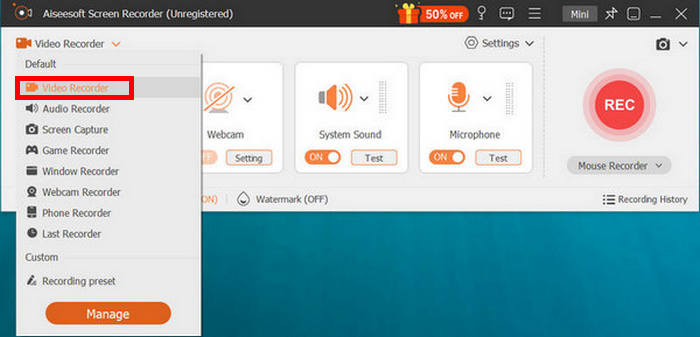
步骤 2:启动程序,点击视频录制,然后打开 WhatsApp,开始发起视频通话。
步骤 3:当 WhatsApp 视频通话已开始并且你已点击视频录制后,就可以调整屏幕的录制区域。选择音频来源,可从系统声音或麦克风中进行设置。
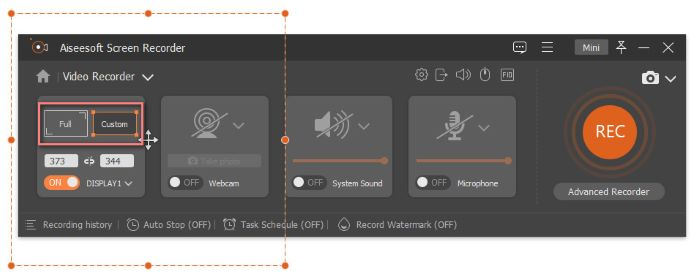
注意:“Duration”(时长)功能可用于设置录制 Telegram 视频通话的固定时长。
步骤 4:如果在视频通话中你已经完成 WhatsApp 视频录制模式,只需点击“停止”按钮即可。
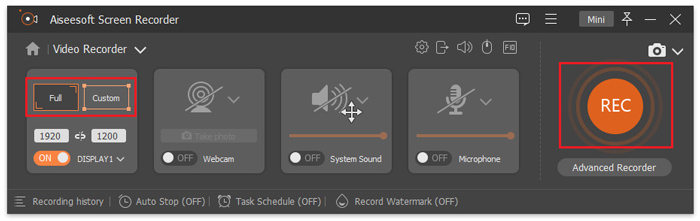
你看,FVC 屏幕录制软件让我们可以轻松录制各种场景,甚至包括 WhatsApp 视频通话。只需点击几下,即可开始录制并保存视频通话。
第三部分:WhatsApp 如何在手机上录制视频
如果你更习惯在手机上进行 WhatsApp 视频通话,也同样可以轻松录制,直接使用设备自带的功能即可。如今 iPhone 和安卓设备都配有屏幕录制工具,只需轻点几下就能录制 WhatsApp 视频通话。
如何在 iPhone 上录制 WhatsApp 视频通话:
步骤 1:打开 iPhone 上的设置应用,进入控制中心,选择自定控制。在其中添加屏幕录制,让它显示在控制中心中。
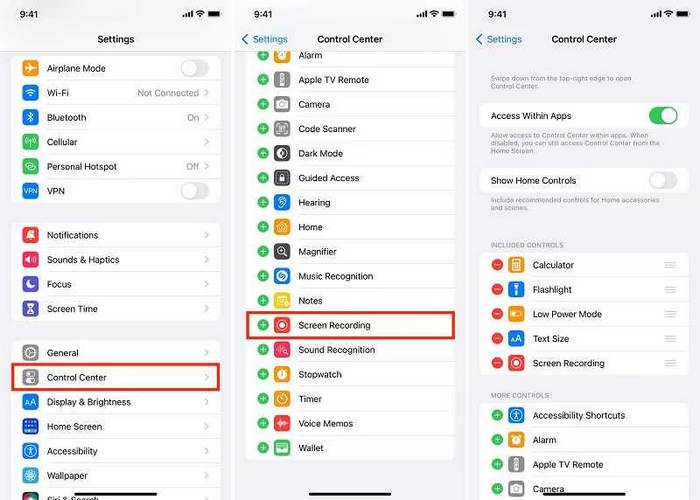
步骤 2:完成后,下滑(或上滑)打开控制中心,点击屏幕录制开始录制。然后打开 WhatsApp,发起你想要录制的视频通话。
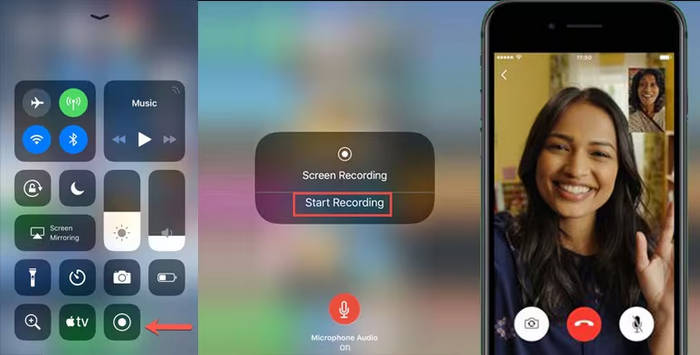
注意:屏幕顶部会出现一条红色状态栏,表示正在录制中。
步骤 3:当你录制完成后,点击红色状态栏并选择停止。录制的视频会自动保存到“照片”应用中。
如何在安卓设备上录制WhatsApp视频通话:
安卓用户可以使用安卓屏幕录制应用。这款应用提供了一种高效便捷的方式来录制安卓设备上的屏幕,包括WhatsApp视频通话。具体操作步骤如下:
步骤 1:首先,你需要下载并安装该应用。完成后,打开这个工具。
步骤 2:设置录制选项。在这里,你可以调整视频尺寸、比特率、时长等参数。
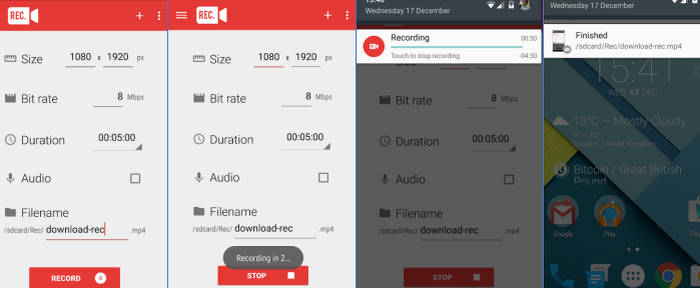
步骤 3:接下来,在你进行 WhatsApp 视频通话时,点击应用中的“录制”按钮,开始录制你的视频通话。
步骤 4:完成后,你可以在安卓手机上找到保存好的视频通话文件。
第四部分:录制 WhatsApp 通话视频时应注意的事项
在录制 WhatsApp 视频通话之前,请记住以下重要事项:
• 录音前务必先征得对方同意。
• 请确保您的设备有足够的存储空间用于录制。
• 请检查您的麦克风和摄像头权限是否已启用。
• 保持网络连接稳定,避免视频或音频质量下降。
• 关闭不必要的应用程序,以防止录制过程中出现卡顿或中断。
• 录制完成后,检查并删除不必要的文件,以保护隐私。
如果你感兴趣,可以点击此处,了解更多关于Facebook 通话录制工具的信息。
第五部分:关于录制 WhatsApp 视频的常见问题
当您录制视频通话时,WhatsApp 会通知其他人吗?
不,WhatsApp 不会在您录制视频通话时发送任何通知或提醒。但是,为了尊重对方的隐私,最好在录制前征得对方的同意。
为什么我无法直接在 WhatsApp 应用内录制视频通话?
WhatsApp 没有内置录音功能,因为它采用端到端加密,确保只有通话参与者才能访问通话内容。这种设计有助于维护所有用户的隐私和数据安全。
为什么我的WhatsApp视频录制没有声音?
如果录音没有声音,可能是因为在 WhatsApp 视频录制过程中麦克风或系统音频未启用。请确保您的录音应用已获得音频访问权限,并在开始通话前打开麦克风。
结论
虽然无法在 WhatsApp 应用内部直接录制视频通话,但正如本篇WhatsApp 视频录制指南所示,你依然可以通过简单有效的方法实现录制。无论你使用的是 PC、Mac、iPhone 还是安卓手机,像 FVC 屏幕录制工具以及各类自带屏幕录制功能,都可以帮助你清晰地录下重要的通话画面和声音。
请记住,务必事先征得对方同意,确保设备已准备就绪,并按照正确的步骤操作,才能获得最佳效果。只要方法正确,您就可以轻松录制 WhatsApp 视频通话。
-
 8 款最佳鼠标记录器,轻松捕捉鼠标光标
 正在寻找一款鼠标记录器来记录你的鼠标移动?这里有 8 款最佳鼠标记录工具,可帮助你提高工作效率和工作流程。
-
 如何使用 VLC 轻松录制屏幕 [完整指南]
 如果您想知道如何使用 VLC 屏幕录制功能录制屏幕,别担心!本文将教您四种像专业人士一样轻松完成屏幕录制的方法。
-
 如何在没有通知的情况下录制 Snapchat 屏幕
 想要在不触发通知的情况下录制 Snapchat 屏幕吗?阅读本指南,看看这里的三种解决方案是否可以轻松解决您的问题。
