


 视频转换大师
 屏幕录影大师
 视频修复
视频修复AVCHD 与 MP4 的区别:您需要了解的一切
Have trouble deciding which one to choose between AVCHD and MP4 for filming or encoding? This is why this post was written: to explain AVCHD vs. MP4. Also, the key differences, pros and cons, and the conversion between these formats are added to help you decide which best suits you. We will also cover file extensions and codecs and how compatible they are with different devices. All of those will be explained as you read the entire content below.

第 1 部分。AVCHD 与 MP4
什么是 AVCHD
高级高清视频编解码器(简称 AVCHD)是一种在摄像机、硬盘、DVD 甚至闪存驱动器上存储高质量视频的特殊方式。这种文件类型由松下和索尼专为摄像机创建,并在 2011 年通过 2.0 版进行了改进。AVCHD 文件就像一个容器,可以容纳和存储不同分辨率的视频,例如清晰的 1080p,以及声音、用于导航视频的菜单、幻灯片甚至字幕。
优点
- 它具有很高的图像质量。
- 它支持高质量视频,甚至 3D。
- 它与蓝光盘格式高度兼容。
缺点
- 与 MP4 相比,即使视频质量相同,它的文件大小也更大。
- 由于大小原因,视频可能会被分成多个文件。
- 在 Mac 上打开 AVCHD 文件很麻烦。
什么是 MP4
另一方面,MP4(代表 MPEG-4 Part 14)是一种用于在计算机上存储视频和音频的常见文件格式。它于 2001 年首次推出,有时还可以包含字幕和图片。与 AVCHD 不同,MP4 允许根据内容使用不同的压缩方法(例如 zip),从而使文件更小。这也意味着 MP4 可以轻松组合常规视频和动画,因为它可以容纳比 AVCHD 等其他格式更多的数据。
优点
- 它是适用于各种平台的通用视频格式。
- 它可以在紧凑的尺寸内包含视频、音频和其他数据。
- 高质量,高压缩。
缺点
- 压缩后可能会丢失信息。
- 从安全角度来看,MP4 文件很容易被分发。
AVCHD 和 MP4 之间的差异
AVCHD 和 MP4 可能都用于视频,但它们是用于不同工作的不同工具。阅读下面的详细信息即可了解这些差异。
File Extension:
MP4 文件的扩展名始终相同,即普通的 .mp4,无论您在哪里找到它们。另一方面,AVCHD 有点棘手。摄像机上录制的 AVCHD 文件通常使用 .mts 扩展名。但是,当您将这些相同的 AVCHD 文件传输到计算机时,它们可能会突然显示不同的扩展名,通常是 .m2ts。因此,AVCHD 的扩展名可能会根据您看到文件的位置而变化。
File Codecs:
这两种视频文件都是视频和声音的存储容器。但是,它们打包内容的方法略有不同。对于音频,MP4 使用一种称为 MPEG-4 AAC 的系统,它类似于一种流行的音乐格式。另一方面,AVCHD 采用 AC-3(也称为杜比数字),通常用于家庭影院。就声音存储而言,MP4 和 AVCHD 之间没有真正的区别。尽管它们使用不同的方法,但两者的音质通常非常相似。
File Compatibility:
就兼容性而言,MP4 比 AVCHD 更胜一筹。它适用于从手机、电脑到平板电脑和电视等大量设备,因此成为流媒体服务的首选格式。另一方面,AVCHD 更适用于蓝光光盘和某些摄像机,而 MP4 几乎是一种几乎人人都能理解的通用格式。您可以轻松地将 AVCHD 视频直接刻录到这些光盘上,以实现高质量播放。
第 2 部分。AVCHD 或 MP4:选择哪一个
当您在 AVCHD 和 MP4 之间做出选择时,请务必考虑您最关心的是什么。如果您想要最好的视频质量和与蓝光的兼容性,AVCHD 是最好的选择。但请记住,AVCHD 文件占用更多空间,可能无法在您的所有设备上播放。另一方面,MP4 仍然提供不错的质量,尽管不如 AVCHD 那么一流。此外,如果您更喜欢较小的文件大小、轻松的共享和跨各种设备的兼容性,那么 MP4 是您的不二之选。
第 3 部分。如何使用在线转换器将 AVCHD 转换为 MP4 或反之亦然
In line with choosing between AVCHD and MP4, we never deny the challenge that it brings. Therefore, if you cannot decide on this selection, then we recommend you interchange them via conversion. Don’t worry because the solution that you can use won’t require you to install software. As long as you use FVC Free Video Converter Online, then you and your files are good to go.
此外,这款在线工具具有用户友好的界面,只需三个步骤即可轻松转换视频。无论您拥有哪种类型的视频或音频文件,FVC 免费视频转换器都可以处理,包括 MP4、FLV、AVI 和 MKV 等流行格式。它还承诺提供安全可靠的转换过程,因此您可以确保您的视频不会在此过程中损坏或丢失任何数据。此外,您不必担心转换后视频中会添加任何烦人的水印。
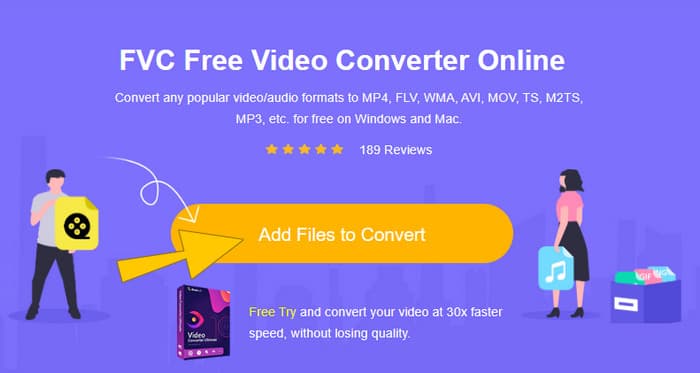
Step 1. The first thing you should do is visit FVC's official website. Once you are there, click the Add Files to Convert button to upload your video file.
Step 2. Then, when the AVCHD videos are loaded, toggle the MP4 among the format selections at the bottom.
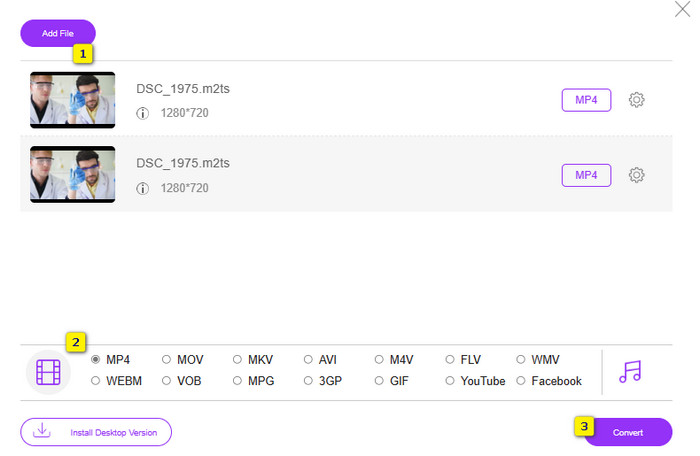
Step 3. Once done, click the Convert button and select a file path for the output, and then the process will begin instantly.
第 4 部分。有关 AVCHD 和 MP4 的常见问题解答
AVCHD 和 MP4 哪个视频质量更好?
在两种视频文件类型中,AVCHD 通常提供更高的视频质量,尤其是在更高的分辨率下。
AVCHD 和 MP4 哪个兼容性更广泛?
Labeled as the universal format, MP4 is much more compatible with most devices and media players. That’s why most people choose to convert AVCHD to MP4 for easier transfer or sharing purposes.
何时应使用 AVCHD?
AVCHD is used when you prioritize the highest possible video quality over lower video resolution and plan to burn it to Blu-ray discs.
结论
For those who are stuck on AVCHD vs. MP4, This guide breaks it down simply. As these are two different video formats, each comes with its own strengths. MP4 is like a space saver, perfect for sharing and storing because the files are smaller. On the other hand, AVCHD is the king of quality, ideal for high-resolution videos, especially if you plan to burn them onto Blu-ray discs.
-
 免费将AVCHD视频压缩为小文件的2种方法
 阅读并获取2种简单的方法来压缩AVCHD视频文件。您可以使用在线和离线视频压缩器在计算机上免费减小AVCHD视频大小。
-
 AVCHD 与 MP4:哪种格式更适合您 [完整评论]
 此功能将告诉您 AVCHD 和 MP4 之间的区别。我们还策划了最好的 5 个 AVCHD 到 MP4 Mac、Windows 和移动设备转换器。
-
 获取最佳MP4播放器以播放具有高视觉质量的MP4文件
 阅读 10 种最新 MP4 视频播放器软件并获取您最好的 MP4 播放器。您可以在 Windows 和 Mac 上流畅地播放 MP4,无延迟。
