


 视频转换大师
 屏幕录影大师
 视频修复
视频修复
 安全下载
安全下载DaVinci Resolve 导出为 MP4 的终极指南
DaVinci Resolve 是一款业界领先的视频编辑器,以其先进的调色和视觉效果功能而闻名。它凭借出色的渲染功能成为许多专业后期制作工作室的首选,确保以最高质量的视频交付。
然而,尽管 DaVinci Resolve 是一款功能强大的工具,但其专业级功能和复杂的导出设置往往会让用户不知所措。如果你曾经在它的导出选项中摸不着头绪,或者导出的文件无法被常见媒体播放器打开,你并不孤单。不过别担心!在本指南中,我们将一步步教你如何将 DaVinci Resolve 导出为 MP4。
让我们深入研究并确保您的视频可以在任何设备上无缝播放!

第 1 部分:如何将 DaVinci Resolve 导出为 MP4
有两种方法可以将 DaVinci Resolve 项目导出为 MP4 文件,每种方法都有各自的优点和注意事项。了解这些方法对于使用 DaVinci Resolve 的任何人来说都至关重要,因为它们可以确保您的最终视频兼容并可在各种设备和平台上播放。
方法 1:直接导出 MP4
使用此方法,您无需浏览高级导出设置。相反,DaVinci Resolve 提供了一个方便的选项,可快速将您的项目直接导出为 MP4 格式。请按照以下步骤操作:
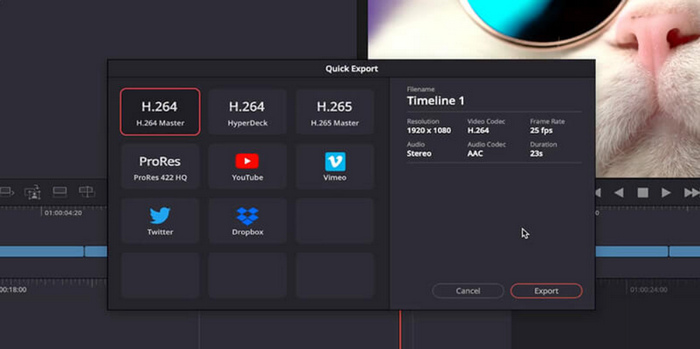
步骤1:点击 DaVinci Resolve 菜单栏中的文件(File)选项卡。
步骤2:在下拉菜单中选择快速导出(Quick Export)。
步骤3:最后,选择你想要保存的位置,并为文件命名。
因此,如果您正在寻找一种快速导出 DaVinci Resolve 视频的方法,并且不需要对输出质量结果进行任何修改和操作,那么这种方法可能非常适合您。但是,这只是为了快速保存文件,并不能保证在其他媒体播放器和平台上播放时的兼容性。
另外,如果你没有订阅 DaVinci Resolve,其导出文件中会带有水印。想要去除 DaVinci Resolve 水印,请查看这篇文章。
方法 2:更改导出设置
同时,通过更改导出设置将 DaVinci Resolve 导出为 MP4 可以实现对最终输出的更大自定义和控制。操作方法如下:
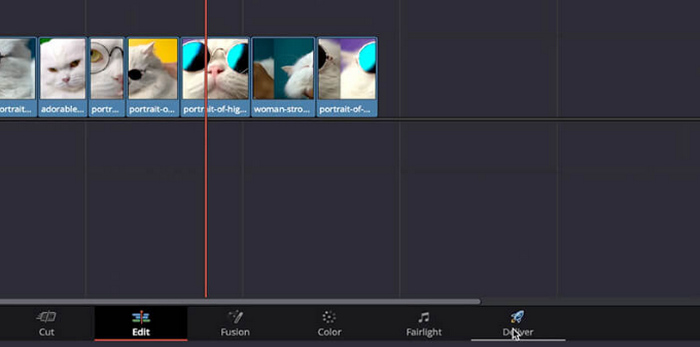
步骤1:首先,移动到屏幕底部并点击输出(Delivery)选项卡。
步骤2:然后点击自定义导出(Custom Export)按钮。在这里输入文件名并选择保存位置。
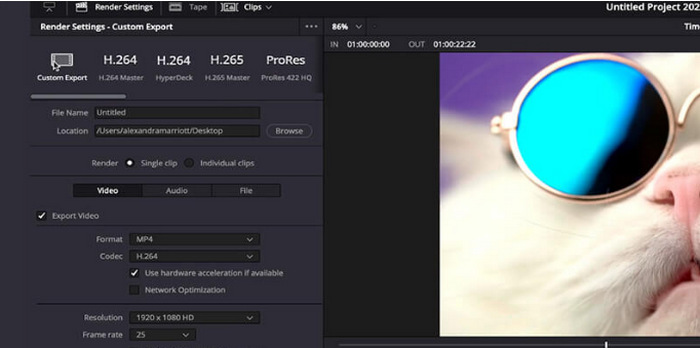
步骤3:接着前往格式(Format)并打开下拉菜单,在格式选项中选择 MP4。
步骤4:在格式设置中,你会看到不同的选项,需要根据自己的需求在 1920 到 4K 分辨率之间进行选择。
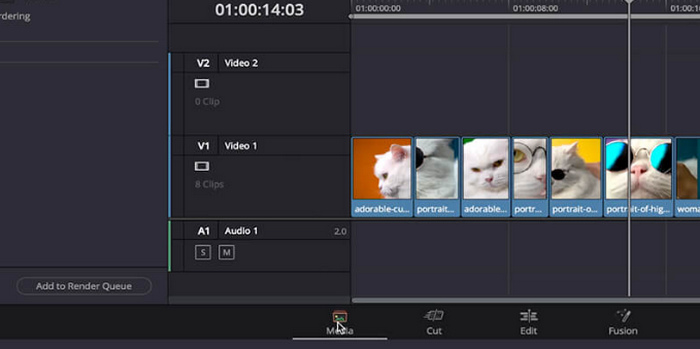
步骤5:之后,如果要更改比特率,请到质量(Quality)部分并点击限制(Restrict)。
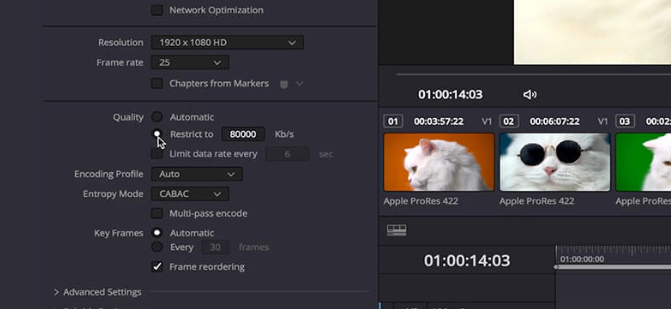
步骤6:然后点击添加到渲染列队(Add Render Queue)。
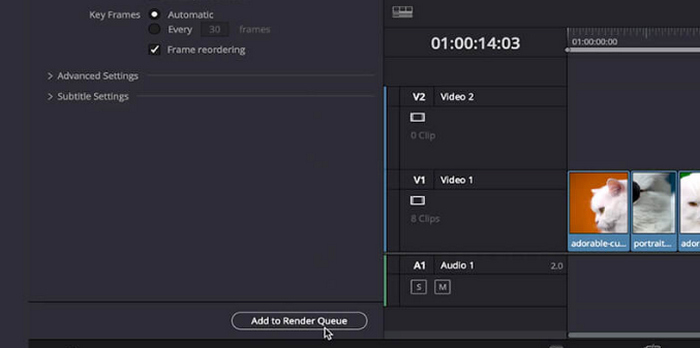
步骤7:最后,点击全部渲染(Render All),你的视频就会开始导出。
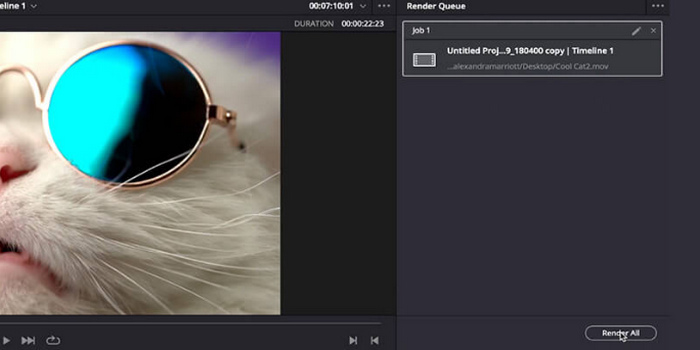
虽然这可能为定制您的项目输出提供很大帮助,但对于刚使用此工具的人来说,这种方法可能有点棘手。
第 2 部分:DaVinci Resolve 无法导出 MP4 时该怎么办
当 DaVinci Resolve 无法成功导出为 MP4 时,最好的解决方法是使用转换工具。FVC 免费在线视频转换器是一款免费的音视频转换工具,用户可以用它将文件转换为所需的输出格式。此外,该工具支持多种格式,包括 MP4,所以如果你需要把 DaVinci 导出的视频转换成其他格式,这个工具就非常适合。并且,你可以将分辨率设置为最高 1080p,在转换过程中以及转换后都能确保无损画质。
步骤1:首先,点击添加文件进行转换(Add Files to Convert)按钮,导入无法导出为 MP4 的 DaVinci Resolve 视频。
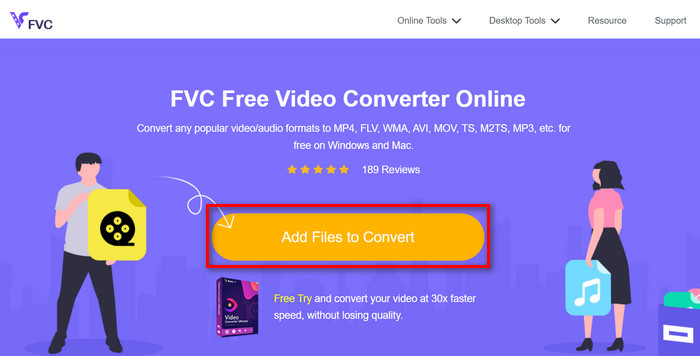
步骤2:接着,在右侧输出下拉选项旁边,选择MP4作为首选输出格式。如果你想手动设置分辨率、视频编码器、比特率等,只需点击输出格式旁边的齿轮(Gear)图标。完成设置后,点击确定(OK)按钮。
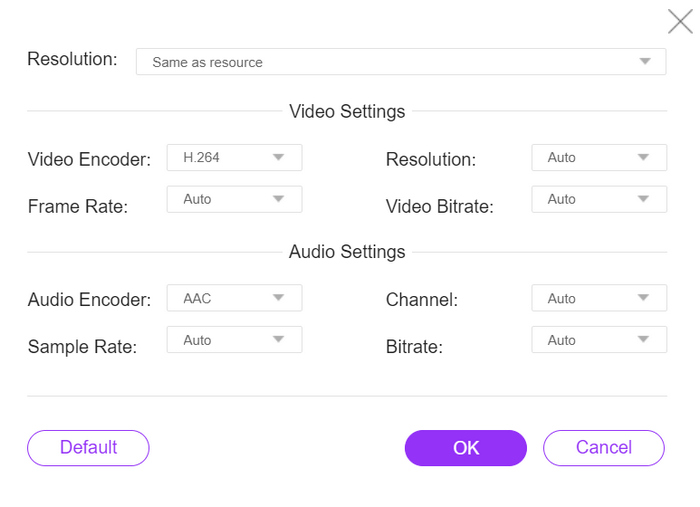
步骤 3。最后,要开始转换过程,只需点击转换按钮。
当 DaVinci Resolve 导出 MP4 不起作用时,FVC 免费在线视频转换器确实是最佳选择。与其他免费转换器工具相比,这款工具确实效果最佳。
第 3 部分:有关将 DaVinci Resolve 导出为 MP4 的常见问题解答
将 DaVinci Resolve 中的视频导出为 MP4 需要多长时间?
导出时间取决于视频长度、分辨率和计算机处理能力等因素。通常,对于较大的项目,将视频从 DaVinci Resolve 导出为 MP4 格式可能需要几分钟到几个小时的时间。
如果我从 DaVinci Resolve 导出的 MP4 文件无法在我的设备上播放,我该怎么办?
如果您在播放导出的 MP4 文件时遇到问题,请尝试使用其他媒体播放器或使用视频转换工具(如 FVC Video Converter Ultimate)将视频文件转换为其他格式。此外,请确保您设备的软件是最新的并且与 MP4 格式兼容。
有没有办法优化 DaVinci Resolve 中的导出设置以加快渲染速度?
是的,您可以在 DaVinci Resolve 中优化导出设置以缩短渲染时间。考虑降低视频分辨率、调整比特率设置并禁用不必要的效果或增强功能以简化导出过程。
我可以将我的 DaVinci Resolve 项目直接导出到社交媒体平台吗?
是的,DaVinci Resolve 内置了与 YouTube 和 Twitter 等热门社交媒体平台的集成功能。选择“快速导出”选项后,您可以选择在导出窗口中直接将视频上传到这些平台,从而节省您的时间和麻烦。
结论
就这样!现在你已经了解了如何将 DaVinci Resolve 导出为 MP4。无论是为了图方便选择快速导出,还是通过调整导出设置来获得更高的自定义程度,你都可以根据需求输出高质量的 MP4 视频。而在少数情况下,如果 DaVinci Resolve 在导出时出现问题,你也已经掌握了使用 FVC 免费在线视频转换器来解决的办法。
你还在等什么?立即遵循本指南!
-
 DaVinci Resolve Speed Editor – 回顾、功能和替代方案
 DaVinci Resolve Speed Editor 是您能找到的最好的视频速度编辑器。阅读本文以了解此工具的功能、价格和替代品。
-
 精彩的 VOB 到 MP4 转换器,您不容错过
 使用强大而有效的程序探索 VOB 到 MP4 的无缝转换。轻松将视频文件从 VOB 格式转换为普遍兼容的 MP4。
-
 2025 年最佳免费 MPG 至 MP4 转换器(深入评测)
 为什么需要将 MPG 更改为 MP4?在这篇文章中找到答案,了解市场上排名靠前的 MPG 到 MP4 转换器。
