


 视频转换大师
 屏幕录影大师
 视频修复
视频修复
 安全下载
安全下载什么是 JPG/JPEG 以及如何将图像转换为 JPG
JPG、PNG 和 GIF 文件格式是当今最流行的格式。在你为网站或社交网络发帖使用图片时,通常会接触到这些文件。必须牢记的是,它们各自拥有不同的功能特性,也就是说每一种格式都有自己独特的特点。不过,在本文中,我们将重点介绍 JPG/JPEG 文件格式。你将了解到它的定义、功能,以及如何打开 JPG/JPEG 文件。此外,你还会学到如何使用在线工具,将图片转换为 JPG/JPEG 格式的最佳方法。

第 1 部分。有关 JPG 或 JPEG 的信息
什么是JPG/JPEG格式
JPG 图像文件格式是压缩图像时的最佳文件。 JPG 是一种受用户欢迎的文件。他们将其用于照片和互联网图形。此外,它也称为 JPEG 或 JPG 文件。 JPEG的全称是Joint Experts Group。这个小组创建了这个流行的图像文件。此外,大多数位图图像的文件扩展名为 .jpg。主要原因是为了减小文件的大小。 JPG 是一种有损格式,压缩太多会影响图像质量。所有程序都可以访问此格式。这样,您就无需考虑如何在不同的程序或设备上打开此文件。它的压缩算法减小了文件的大小。这也是它近来流行的原因之一。这样,在网站上创作故事、分享和发布照片就更从容了。有关其他信息,您可能会遇到网站无法识别 JPEG 文件的情况。例如,一些照片查看器和编辑器只会打开带有 .JPG 文件的图像。您可以做的最好的解决方案是重命名文件扩展名。您可以将 JPEG 文件更改为 JPG 文件。这样,网站就可以识别图像。
此外,JPG 文件具有您需要知道的优点。 JPG 是高分辨率图像。它的高清晰度是该图像文件的一大优势。它支持多达 1600 万种颜色的 24 位颜色。即使在使用某些工具进行高级编辑之后,分辨率仍然非常好。此外,JPG 的尺寸较小。与其他图像文件格式相比,它具有理想的文件大小。即使尺寸较小,也不会影响图像的质量和分辨率。知道了优点之后,还要知道它的缺点,才能有更多的认识。在 JPG 上拍摄时,您必须限制相机的处理器和颜色变化。此文件也不支持分层图像。如果您打算编辑图像并需要一个额外的图层,JPG 不是完美的格式。
第 2 部分。如何打开 JPG/JPEG 文件
如果您在设备上打开 JPG 文件时遇到问题,这部分将为您提供帮助。您想知道如何在 Windows 11、Android 和 iPhone 上打开 JPG 文件吗?您可以按照下面给出的说明进行操作。
对于 Windows 用户
步骤 1: 在键盘上按下 Ctrl + E 打开文件资源管理器。它的图标类似一个带蓝色夹子的文件夹。
步骤 2: 找到左侧的 快速访问 面板,然后转到 下载 选项,查看你保存的 JPG 照片。
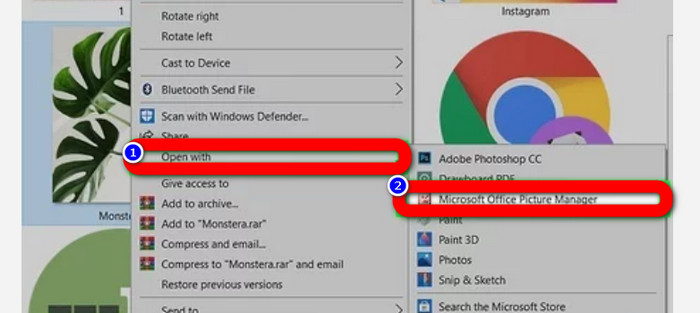
步骤 3: 看到 JPG/JPEG 文件后,可以使用除“照片”之外的其他程序打开。要打开它们,右键单击该照片,点击 打开方式,然后选择相应的程序。
安卓用户
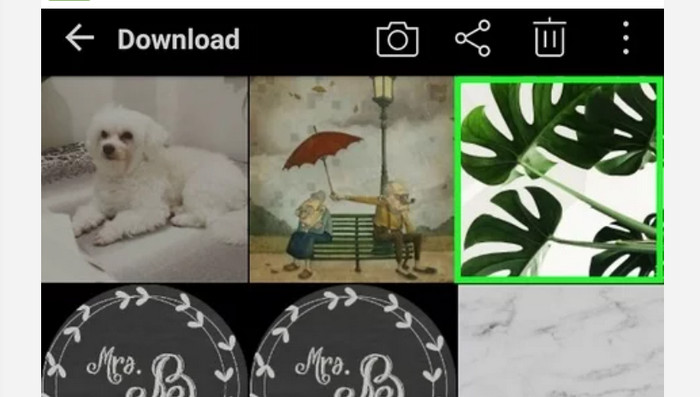
步骤 1: 在你的 Android 设备上打开“图库”应用。
步骤 2: 打开“相机”相册,查看你用手机相机拍摄的照片。手机中还会有其他不同的相册。
步骤 3: 如果你看到很多照片,点选某一张照片,将其以全屏模式打开。这样就可以查看你的 JPG/JPEG 图片。
对于 iPhone 用户
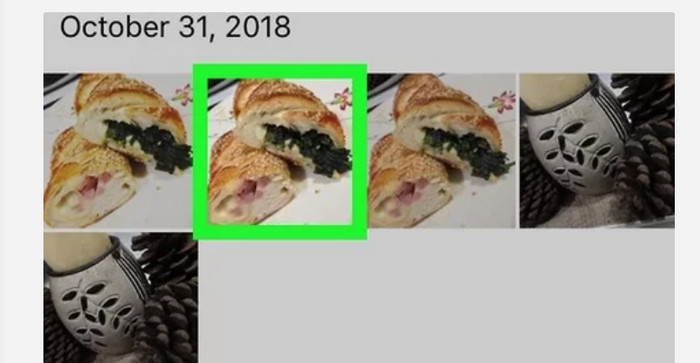
步骤 1: 在 iPhone 上点按 照片 应用。这个应用包含你用相机拍的以及从互联网保存的所有图片。它的图标看起来像一朵彩色的花。
步骤 2: 启动“照片”应用后,你可以看到其中的所有照片。同样地,就像在 Android 手机上那样,你会在应用内看到各种不同的相册。
步骤 3: 点击图片,将其以全屏方式打开,这样可以更清晰地查看图像。除了打开图片之外,你还可以在“照片”应用中编辑照片。应用中有多种图标工具,可以帮助你优化图片效果。
第 3 部分。将图像转换为 JPG 的绝佳方法
FVC Free Image Converter 是一款在线图片转换工具,可以用来将图像转换为 JPG 格式。它能帮助你只需几次点击就完成图片转换。同时,它支持多种输入格式,如 JPG、PNG、GIF、TIFF 等等。因此,即使某些工具或设备无法再打开你的图片,你也不用担心。使用这个在线图片转换器即可将它们转换过来。它还能很好地保留原始照片的优良画质。转换完成后,你几乎看不出原图与转换后文件之间的差别。此外,这款图片转换器操作简单,转换流程清晰易懂,非常适合初学者使用。它还支持批量转换图片,这样你可以一次性转换许多文件。你也可以在多个浏览器上使用这个应用,例如 Google、Safari、Mozilla、Explorer 等。最后,这个应用还能保障每位用户的隐私。在你下载并转换图片之后,该图片转换器会自动删除你的照片。
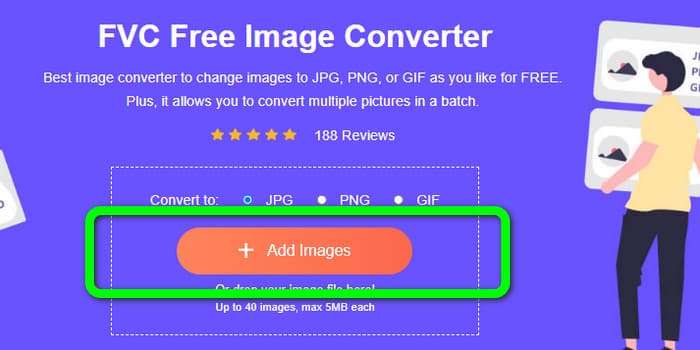
步骤 1: 首先,访问 FVC Free Image Converter 网站。在格式选项中选择 JPG 文件格式。
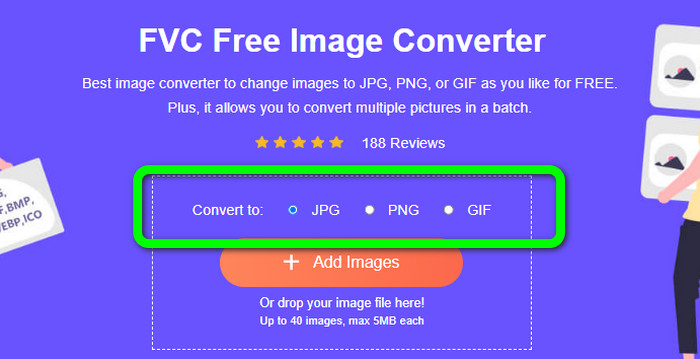
步骤 2: 若要上传你想转换的照片,点击 Add Images 按钮。如果你想进行批量转换,再次点击 Add Images 即可。
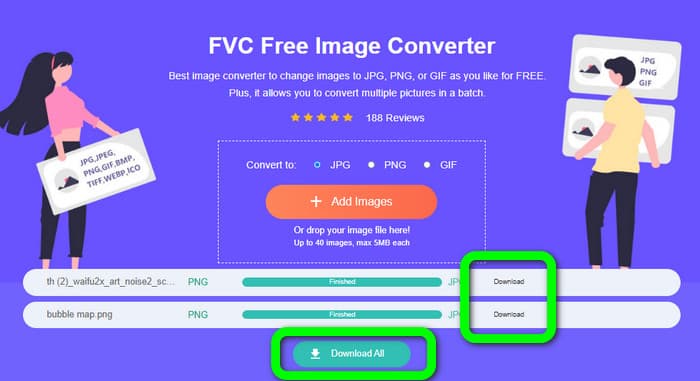
步骤 3: 当转换过程完成后,点击 Download 按钮逐个保存文件。如果你想一次性保存所有文件,请点击 Download All 按钮。
相关:
第 4 部分。关于 JPG/JPEG 文件的常见问题解答
1. 我怎么知道我的照片是不是JPG文件?
您可以右键单击文件夹中的照片。然后,转到“属性”选项。导航到“常规”菜单并查看图像的文件类型。
2. JPEG 压缩图像的效果如何?
很好。全彩照片的未压缩数据为 24 位/像素。最流行的无损压缩方法可以平均压缩此类数据约 2:1。 JPEG 可以实现 10:1 到 20:1 的压缩,而没有明显的损失。它将必要的存储量减少到每个像素 1-2 位。对于小数据,30:1 到 50:1 的压缩率可以减少缺陷。而像存档索引这样的低质量用途可以相对轻松地进行 100:1 压缩。压缩图像 JPEG 的 100:1 比率使用与全色、十分之一比例图像相同的空间量。尽管比缩略图有更多的细节,但它确实如此。
3. 如何在 Photoshop 中打开 JPG 文件?
在您的计算机上启动 Photoshop。转到文件 > 打开选项。文件夹文件将在您的屏幕上弹出。选择 JPG 文件并单击确定。之后,您将在 Photoshop 中看到 JPG 图像文件。
结论
本文向你说明了 JPG/JPEG 的含义,包括它的定义和功能特点。作为额外收获,我们还向你介绍了使用 FVC Free Image Converter 将图片转换为 JPG 格式的最简便方法。那么,你还在等什么?赶紧使用这款工具,将你的图片轻松转换为 JPG 格式吧。
-
 如何在线和离线将图像转换为 JPG 的方法
 您是否出于某种原因要将文件转换为 JPG 格式?那么这篇文章适合你。我们将教您将图像转换为 JPG 的最佳方法
-
 轻松将图像转换为 PNG 格式的有用方法
 您是否正在寻找将图像保存为 PNG 的最佳方式?该指南为您在线和离线将图像转换为 PNG 提供了出色的解决方案
-
 使用 6 种有效的离线和在线方式将 HEIC 转换为 JPG
 您想知道如何将 HEIC 转换为 JPG 吗?在这种情况下,我们添加了 6 种在线和离线方式,您可以使用它们来完全完成和处理此任务。
