


 视频转换大师
 屏幕录影大师
 视频修复
视频修复使用这些免费的 Mac 视频转换器转换任何视频
在为你的 Mac 寻找免费视频转换器时遇到困难了吗?我们非常理解你在众多软件工具和网页版转换器中来回筛选,却发现它们往往只支持特定操作系统时的挫败感。不过别担心,这篇文章将帮你大大简化这个过程。这里为你盘点了 5 款适用于 Mac 的优秀视频转换器,让你可以轻松且免费地转换任意视频。无论你是遇到格式不兼容的问题、需要为不同设备优化视频,还是只是想要一个操作简单的解决方案,我们都已经为你准备好了!还在等什么?继续往下看吧。

第 1 部分。FVC 免费在线视频转换器
FVC Free Video Converter Online 是一款用户友好的在线视频转换网页工具,可以在浏览器中轻松完成视频转换。其简洁的界面让你能够快速上传文件并直接在浏览器中更改格式。而且,它完全免费,非常适合预算有限的用户。尽管它可能缺少一些高级功能,但对于在 Mac 或 Windows 电脑上满足基础需求来说,它能够稳定地保持视频质量。总体而言,FVC Free Video Converter Online 是希望获得简单、免费且无烦恼视频转换体验用户的绝佳选择。其直观的界面、零成本以及不错的输出质量,使它十分适合普通用户以及那些只想要简单视频转换、不想额外安装软件的人群。
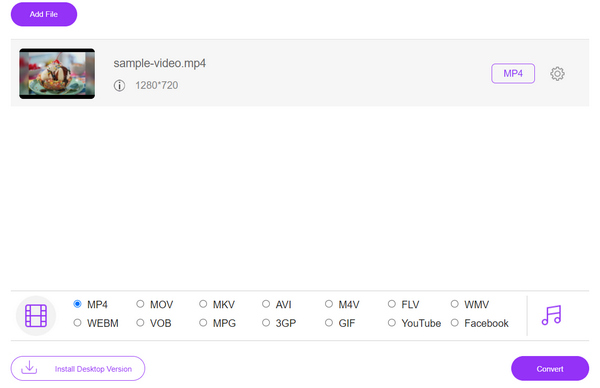
适用人群: 最适合需要快速、直接视频转换且不想安装额外软件的用户。对于偶尔需要转换视频且不要求高级功能或深度自定义的个人用户来说尤其合适。
限制:
◆ 严重依赖互联网连接,不适合离线使用。
第 2 部分。Aiseesoft 免费视频转换器
Aiseesoft Free Video Converter 是一款桌面软件应用程序,专为在 Windows 和 Mac 平台上转换视频而设计。它支持多种流行的输入和输出格式,使用户能够毫不费力地将视频转换为适合各种设备和平台的格式,确保兼容性和最佳播放体验。
此外,它还可以作为Mac 视频编辑器来对文件进行优化和润色;尽管是免费软件,但凭借其高级功能,仍然能与许多付费软件相媲美。最后,虽然它在自定义选项方面并不是最丰富的,但在转换过程中依然能保持不错的视频质量。总体来说,这款工具是寻求零成本、可靠视频转换软件用户的上佳之选。其友好的操作界面、丰富的功能以及对视频质量的良好保持能力,使其不仅适合普通用户,也适合有更具体转换需求的用户。
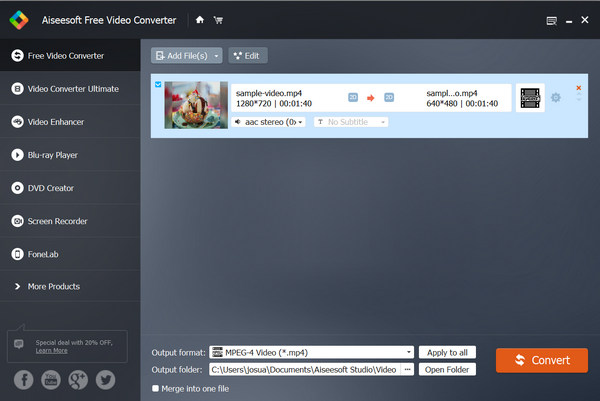
适用人群: 最适合偏爱桌面软件解决方案、并且在格式兼容性和设备优化方面需要更高灵活度的用户。适用于经常需要进行视频转换、并希望拥有一款界面友好且可靠工具的用户。
限制:
◆ 用户在转换软件不支持的不太常见或专有格式时可能会遇到困难。
第 3 部分。FFmepg
FFmpeg 是一个功能强大的命令行工具,支持许多平台,包括 Windows、macOS、Linux、BSD、Solaris、Darwin(Mac OS X、iPhone)。这个多媒体框架以其视频转换功能而闻名。虽然它的界面对某些人来说可能看起来很复杂,但它提供了很好的控制和自定义选项。它是免费使用的,这是一个很大的优点。在视频质量方面,FFmpeg 在保持高标准方面做得非常出色。然而,它的命令行界面对初学者来说可能具有挑战性。总的来说,如果你对一些技术方面很熟悉,并且想要一个具有高级功能的免费工具,那么 FFmpeg 是高质量视频转换的可靠选择。
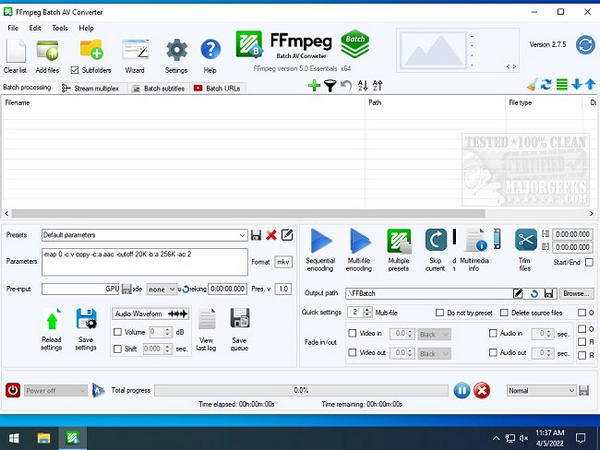
适用人群: 最适合需要对转换过程进行精细控制、并需要处理多种格式的高级用户、开发者或专业人士。由于其命令行特性,它同样非常适合批量处理和自动化任务。
限制:
◆ 命令行界面可能要求用户手动输入命令,这可能会导致转换过程中出现错误或效率低下。
◆ 缺少图形用户界面可能会使用户难以直观地看到转换设置或轻松进行调整。
第 4 部分 HandBrake
HandBrake 是一款广受欢迎的开源视频与音频转码工具,以其简单高效的视频转换能力而著称。该工具支持多个操作系统,包括 Windows、Mac 和 Linux。它提供了用户友好的界面,支持从多种格式转换为现代且兼容性广泛的编码格式,适合既想要可靠视频转换软件的普通用户,也适合爱好者使用。尽管它缺少某些付费软件中的高级功能,但由于其稳定性和易用性,仍深受普通用户和发烧友的青睐。
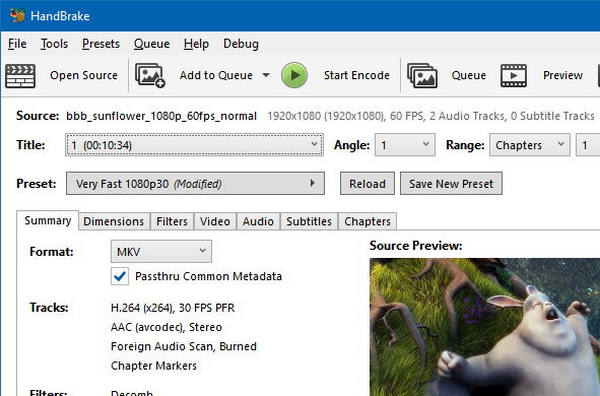
适用人群: 最适合在视频转换中看重简洁、高效和画质的用户。适用于需要将视频转换为可在多种设备或平台上播放、并且希望拥有带有基本自定义选项的友好界面的用户。
限制:
◆ 不频繁的更新和改进可能意味着用户错过可以增强转换过程的新功能或优化。
第 5 部分。FreeConvert.com
FreeConvert.com 是一个在线平台,提供全面的视频转换工具以及各种转换服务。用户可以将视频上传到网站,然后直接从网络浏览器将其转换为不同的格式、分辨率和质量设置。FreeConvert.com 支持多种格式,界面直观,为希望转换视频而无需安装软件的用户提供了便捷的解决方案。
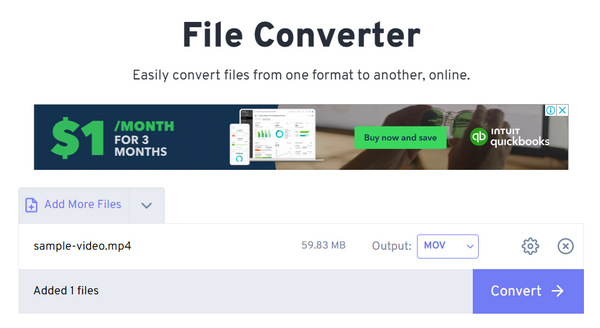
适用人群: 最适合偏好在线工具、并希望在无需安装额外软件的前提下灵活进行视频转换的用户。非常适合偶尔需要转换视频、追求方便和简单解决方案的个人用户。
限制:
◆ 对转换设置的控制有限可能会导致有特定要求的用户无法获得最佳的输出质量。
◆ 免费用户的文件大小限制可能会阻止转换较大的文件,从而限制该工具对某些用户的实用性。
现在,如果您认为没有可以自由使用的 Mac 视频转换器,请再想一想。Mac 用户可以选择众多高质量、免费的视频转换工具,这些工具提供出色的功能和无缝的性能。无论您是想转换视频以兼容设备、优化文件大小还是编辑各种项目的素材,这 5 款顶级免费 Mac 视频转换器都能满足您的需求。从基于 Web 的解决方案到桌面应用程序,每个转换器都提供独特的功能,以满足 Mac 用户的不同需求。
第 6 部分。哪个是 Mac 的最佳免费视频转换器
为了更好地指导您为您的 Mac 设备选择最佳的免费视频转换器,以满足您的需求和偏好,我们根据每种工具支持的操作系统、支持的格式和特定任务的适用性对其进行了比较。
| 产品 | 支持的 macOS | 支持的格式 | 批量处理 | 转换速度 |
| FVC 免费在线视频转换 | 任何基于网络的 | MP4、FLV、WMA、AVI、MOV、TS、M2TS、MP3 等。 | 是 | 超级快,但取决于互联网连接强度。 |
| Aiseesoft 免费视频转换器 | macOS Sonoma、macOS Big Sur、macOS Catalina、macOS Mojave、macOS High Sierra 和 macOS Sierra。 | MP4、MKV、MOV、M4V、WMV、AV 和 FLV、MPG、TS、3GP、FLV、ASF、VOB 等。 | 是 | 超级快。 |
| FFmepg | mac OS X 或更高版本 | MP4、MKV、AVI、WebM、MOV、FLV、H.263、H.264 (AVC)、H.265 (HEVC) | 是 | 平均的。 |
| 手刹 | macOS X 10.13 或更高版本 | MP4 或 M4V、MKV、MOV、MPG 或 MPEG、AVI 和 WMV。 | 是 | 平均的。 |
| FreeConvert.com | 任何基于网络的 | MP4、MOV、MKV 等等。 | 是 | 平均的。 |
在为您的 Mac 选择最佳免费视频转换器时,评估支持的操作系统、格式和是否适合您的特定需求等因素至关重要。每个转换器都具有独特的优势:FVC 免费在线视频转换器快速而直接,Aiseesoft 免费视频转换器提供桌面灵活性,FFmpeg 提供高级功能和控制,Handbrake 强调简单性和质量,而 FreeConvert.com 通过在线平台提供便利。
第 7 部分。有关 Mac 免费视频转换器的常见问题解答
什么是视频转换器?为什么我的 Mac 需要一个视频转换器?
视频转换器是一种多功能且有用的软件工具,可让您将视频文件的格式从一种类型更改为另一种类型。您可能需要 Mac 的视频转换器来确保与不同设备和平台的兼容性、优化文件大小或编辑视频以用于特定目的,例如上传到社交媒体或与朋友分享。
适用于 Mac 的免费视频转换器使用安全吗?
一般来说,信誉良好的 Mac 免费视频转换器是安全的。但是,必须从可信来源(如其官方网站)下载软件,以避免潜在的安全风险或恶意软件。务必阅读用户评论并检查认证,以确保使用免费视频转换器时的安全。
Mac 的免费视频转换器支持哪些视频格式?
嗯,支持的视频格式可能确实因您使用的转换器而异。但是,大多数免费的 Mac 视频转换器都支持 MP4、MOV、AVI、MKV 等流行格式。一些转换器还可能支持不太常见的格式或提供处理特定类型视频的高级功能。
我可以使用 Mac 的免费视频转换器同时转换多个视频吗?
许多免费的 Mac 视频转换器都提供批量转换功能,允许用户同时转换多个视频。此功能可以简化转换大量视频或处理整个视频库的过程。请务必检查所选转换器的功能,看看是否支持批量转换。
Mac 的免费视频转换器会在转换过程中降低视频质量吗?
转换过程中对视频质量的影响可能因一些潜在因素而异,例如使用的设置、输入和输出格式以及特定的转换器软件。通常,信誉良好的 Mac 免费视频转换器会通过高效的编码算法和可自定义的设置尽可能地保持视频质量。但是,检查和调整转换设置以确保文件大小和视频质量之间的平衡以满足您的特定需求至关重要。
结论
总之,在谈到Mac 免费视频转换器时,可选项既丰富又多样。从网页版工具到桌面应用,每种类型都有其独特的功能和优势。无论你追求的是操作简单、进阶控制,还是在线使用的便捷性,总能找到一款免费的视频转换器满足你的需求。通过对比支持的操作系统、格式类型以及在特定任务中的适用性,你就能有针对性地为自己的 Mac 选择最合适的工具。有了这些精选推荐,在 Mac 上进行视频转换不仅完全可行,而且过程轻松高效。准备好优化你的视频转换流程了吗?不妨今天就试试其中一款免费转换器吧!
-
 5 款最佳 FLV 转 MP4 转换器(免费和付费)(2025 条评论)
 请继续阅读这篇文章,了解有关 FLV 和 MP4 文件的更新。此外,我们还策划了最可靠的 FLV 到 MP4 转换器。
-
 利用顶级 GIF 转换器获得卓越体验
 在本文中查找顶级 GIF 转换器。轻松将视频转换为 GIF,并通过动画提升您的内容。
-
 生成电影的最佳 3 个 AI 音频到视频转换器工具
 正在努力寻找 AI 音频到视频转换器吗?这场斗争今天结束了,因为在这篇评论中,我们将为您提供可以使用的最好的人工智能转换器。
