


 视频转换大师
 屏幕录影大师
 视频修复
视频修复在 Mac/Windows/Linux 上将 M4V 转换为 MKV 且不损失质量的 3 种有效方法
我需要打开我在 iTunes 上下载的 M4V 视频。知道如何在 Mac 上将 M4V 转换为 MKV,然后在我的电视上使用它吗?
这种问题很普遍,尤其是在 iTunes 下载的 M4V 视频上,因为这种格式受苹果 FairPlay 策略保护,是加了 DRM 的。因此,如果不先转换,你无法在其他设备上立即播放 .m4v 视频。本文将为你介绍几款可用并且能成功转换 M4V 格式的转换器。事不宜迟,现在就来学习在 Mac 或 Windows 上高效地将 M4V 转换为 MKV 的方法。

第 1 部分。在 Mac 和 Windows 上将 iTunes M4V 转换为 MKV [最受欢迎]
市面上有很多可以免费下载的免费 M4V 转 MKV 转换器,其中之一就是 FVC Video Converter Ultimate。但与其他转换器相比,这款终极工具的转换效率更高,因为它具备闪电般的转换速度、无限量文件上传转换,以及直观易用的界面。这款终极转换器是不是让你很惊讶?或者你想更深入了解它?那么,下面就是你在入手这款转换器后会看到的一些核心功能。

FVC Video Converter Ultimate
2,999,368+ 次下载- 它可以将多个 iTunes M4V 转换为 MKV 或 200 多种媒体格式,如 MOV、AVI、MP4 等。
- 通过超快速转换,您的 M4V 转换过程瞬间完成
- 高级编辑功能可让您的视频更加出色。
- 在工具箱下设置压缩、调整大小、GIF 制作器等惊人的功能。
所有这些功能都可以在一个工具上使用,这不是很神奇吗?让我们不要再浪费时间,按照以下步骤确定此工具如何有效地将您的 iTunes M4V 转换为 MKV。
步骤 1. 首先,点击下方下载按钮,将这款终极转换器下载安装到你的电脑中。选择你当前使用的平台,按照安装向导进行操作,然后点击“立即开始”继续。请记住,你需要先熟悉该工具的界面,以避免在使用时遇到困难。
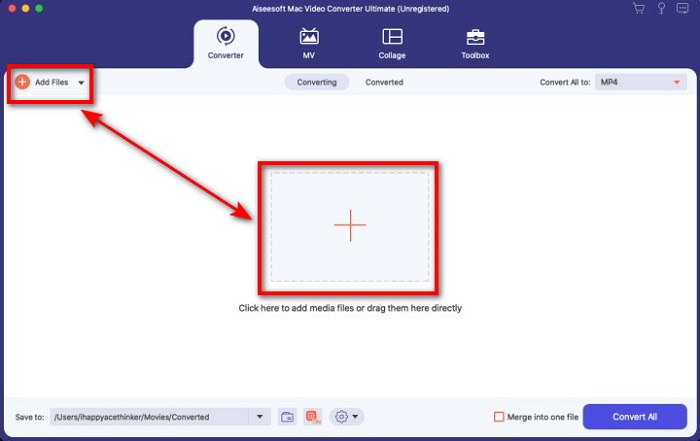
步骤 2. 在界面上点击 添加文件(Add Files) 或 + 按钮上传 M4V 文件。随后电脑文件夹会在屏幕上打开,浏览并选择 .m4v 文件,然后点击 打开(Open)。
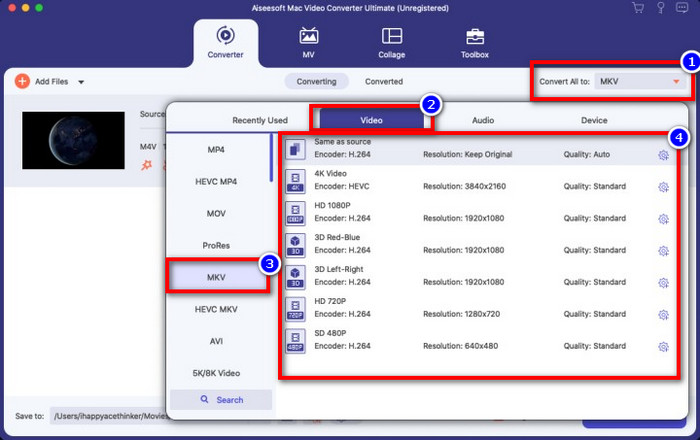
步骤 3. 在 转换全部为(Convert All to) 下方选择 MKV 格式,并点击。
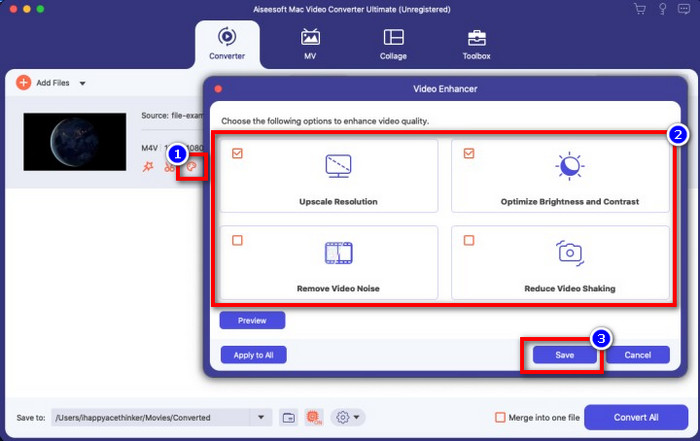
可选项. 到目前为止,它的转换效果无疑已经非常出色。但你是否知道,这款工具还提供视频增强功能?如果你点击 增强视频(enhance video) 选项,会弹出一个对话框;勾选你想要在视频中改进的项目(box),然后点击 保存(Save) 应用设置。
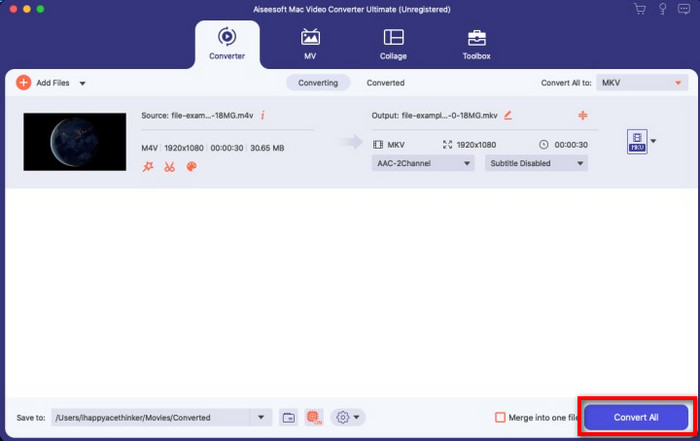
步骤 4. 点击 全部转换(Convert All) 按钮后,转换将在短时间内开始并完成。好了,现在你的视频文件扩展名已经变成 .mkv。
第 2 部分。 在线将 M4V 转换为 MKV
不想花钱转换 M4V 文件,而是想在线将 M4V 转换为 MKV?如果是这样,FVC Free Video Converter Online 是一款在线转换器,即使在网页端也能保证你的转换过程高效。这款转换器可以在无需购买或下载安装软件的情况下完成转换任务。同时,它没有广告,也无需注册即可使用。尽管该转换器是免费的,但其功能只专注于格式转换。不像那款终极工具,它并不提供大而全、丰富多样的高级功能。不过,如果你需要在线转换 M4V 文件,就使用这个转换器,并按照下面的步骤进行操作。
步骤 1. 请点击此链接打开 FVC Free Video Converter Online。
步骤 2. 点击 添加待转换文件(Add Files to Convert) 选项,启动并上传你需要转换的 M4V 文件。
下载桌面版以批量转换文件。
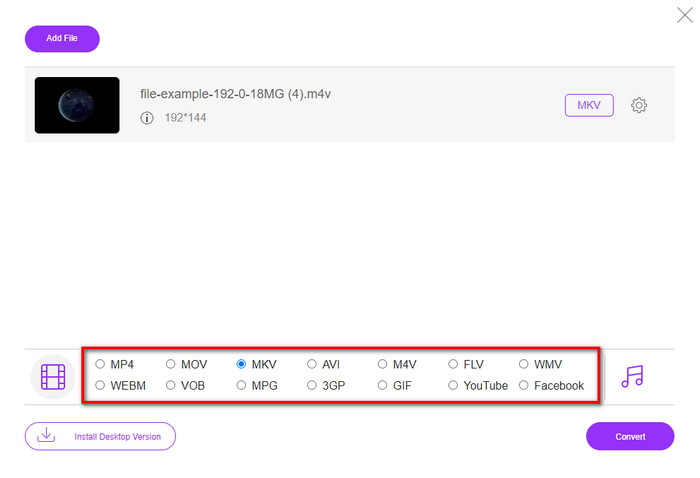
步骤 3. 在下方选择 MKV 格式,或其他你想要的输出格式。
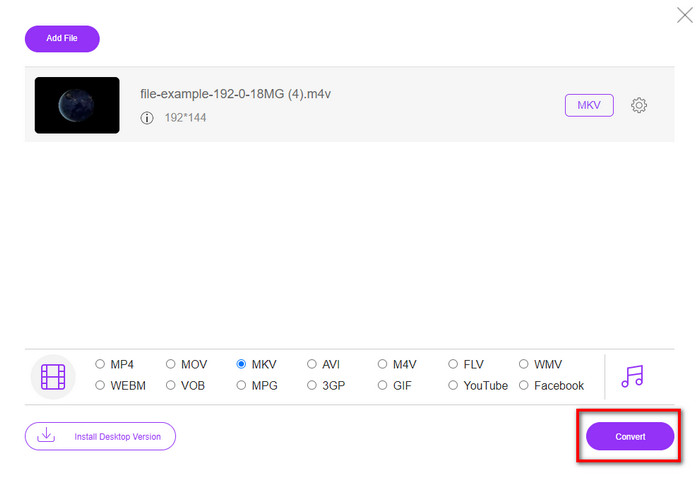
步骤 4. 点击 转换(Convert) 按钮开始转换过程。
第 3 部分。免费将 M4V 转换为 MKV
Handbrake 也能像前文介绍的其他转换器一样,提供快速高效的转换过程。不过,这款工具支持的格式相对有限,也就是说,你在输出格式上的选择会少一些。但如果你仍然想在 Handbrake 中将 M4V 转换为 MKV,可以按照下面的步骤操作。
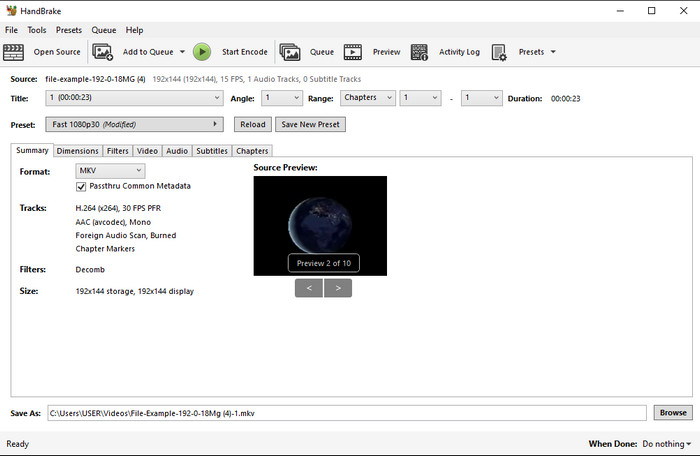
步骤 1. 在电脑上下载 Handbrake。通过拖拽的方式将 .m4v 文件放入界面中进行上传。你也可以点击 文件(File),在电脑文件夹中找到该文件,然后点击 打开(Open)。
步骤 2. 点击 格式(Format),选择 MKV。
步骤 3. 点击 开始编码(Start Encode),就会开始转换过程。
第 4 部分。 M4V 和 MKV 之间有什么异同
在我们比较 M4V 和 MKV 之前,让我们弄清楚这两种格式之间的相似之处。 M4V 和 MKV 都是媒体内容和元素的容器。此外,众所周知,这两种格式可以存储最佳视频质量之一,例如高清视频或 4k。而且它们对于包含元数据等元素也很大。此外,下面的后续细节是两种格式之间的区别。
M4V 与 MP4 格式非常相似;但是,这种格式受 DRM 复制保护,这意味着您不能随意使用它。但并非所有 M4V 文件都有 Apple 保护,因为一些可下载的 M4V 具有未经授权的许可证,因此请确保您在 iTunes 上下载 .m4v 文件以避免感染您系统的恶意病毒。虽然格式有限制,但您仍然可以在多个媒体播放器上使用此格式来观看您在 iTunes 上下载的视频。此外,如果您在 Mac 上需要受保护的设计,这种格式是最佳选择。
相反,MKV 特定于在一个文件中包含多个媒体内容和元素。此功能仅在 MKV 上可用,因为此格式可以免费使用,并且比 M4V 更灵活。此外,在 Mac 或 Windows 上将 M4V 更改为 MKV 的原因有很多,其中之一就是使视频文件不受限制。
M4V 与 MKV
第 5 部分。关于 M4V 到 MKV 转换的常见问题解答
哪个更适合编辑,M4V 还是 MOV?
这两种格式都是苹果的格式之一,所以你会发现 M4V 和 MOV 之间并没有太大差别。不过,MOV 在视频剪辑方面更胜一筹,因为这种格式通常包含一系列的视频回放数据,是专业剪辑的理想选择。你也许会想:是不是应该把 M4V 转成 MOV 来方便剪辑?如果是这样,请点击此链接,详细了解如何将 M4V 转换为 MOV 及其相关知识。
M4V 和 MP4 一样吗?
M4V 和 MP4 在结构感和视频质量上非常一致。但由于 Apple Plays 的保护,M4V 的支持范围很小,您不能只播放视频或在 .m4v 扩展名中进行编辑。
支持 M4V 的媒体播放器有哪些?
由于受到 DRM 保护,支持这种格式的媒体播放器并不多。所以如果你在找一款 MKV 播放器,很可能要花大量时间去下载、测试,非常耗时。不过,如果你阅读这篇文章,就可以下载或使用可在各个平台上使用的 5 大 MKV 媒体播放器。
结论
文中介绍的这三款工具,只要按照步骤操作,一定能为你带来理想的转换效果。虽然这些转换器有很多共通之处,但彼此之间也存在不少差异。如果你认真阅读了上面的内容,就能对这三款工具有相当深入的了解。假如你想一次性完成高质量转换,又希望整个过程高效流畅,我们会推荐使用 FVC Video Converter Ultimate。听起来难以置信?确实如此,那就把它下载到你的电脑上亲自试试吧。
-
 M4V到MP3转换器–从M4V文件提取MP3的4种最佳方法
 如果您想轻松地从M4V视频中提取MP3音频,则可以了解有关4种最佳M4V到MP3转换器的更多信息,以从文章中获取所需的音频文件。
-
 [指南] 如何在 Windows/Mac 上将 M4V 视频转换为动画 GIF
 如果您想从您最喜欢的 M4V 视频制作动画 GIF 文件,您可以了解 2 种简单有效的方法,使用自定义设置将 M4V 视频转换为 GIF。
-
 3 视频转换器程序用于在 Mac 上将 iTunes M4V 转换为 AVI
 不知道如何将 MKV 转换为 AVI 格式?随着我们继续阅读本文,我们将了解可以帮助您转换此文件格式的 3 种工具。

