


 视频转换大师
 屏幕录影大师
 视频修复
视频修复


2 种轻松无损地将 M4V 转换为 WMV 的简单方法
一些公司有视频压缩格式。 Apple 和 Microsoft 已开发出专用于其媒体播放器的视频文件。因此,当人们从 Apple iTunes Store 下载或购买 M4V 文件并希望与朋友或家人使用 PC 共享这些文件时,最好先将 M4V 转换为 WMV。因此,我们为您提供了独一无二的转换器,可以快速、高效且非常轻松地完成这项工作。

第 1 部分。如何在 Mac 和 Window 上轻松地将 M4V 转换为 WMV
Free Video Converter Ultimate is a simple yet effective video converter from FVC Studio. Your Windows or Mac computer allows you to convert video and audio files. Furthermore, the video formats supported by this video conversion are diverse and include the most widely used ones – it supports popular MP4, FLV, M4V, WMV, TS, M2TS, iPhone/Android files. This software uses HEVC technology, so you would not need to worry about the quality for high-quality converting. Speaking of quality, it is also 4K UHD supported. To use this, here are the simple steps you need to follow:
Step 1: Download the .exe file by clicking the Free Download button below according to your operating system, for Windows or Mac. Once you finish downloading, open it and start installing the software. After that, run the software ahead.
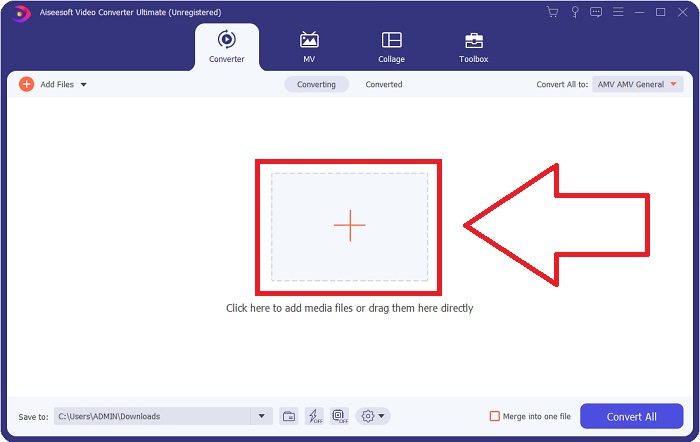
Step 2: A window will open, and there will be an interface with a + button in the middle. You have to click on it to import the video file you wish to convert. Or you can drag and drop the file with ease.
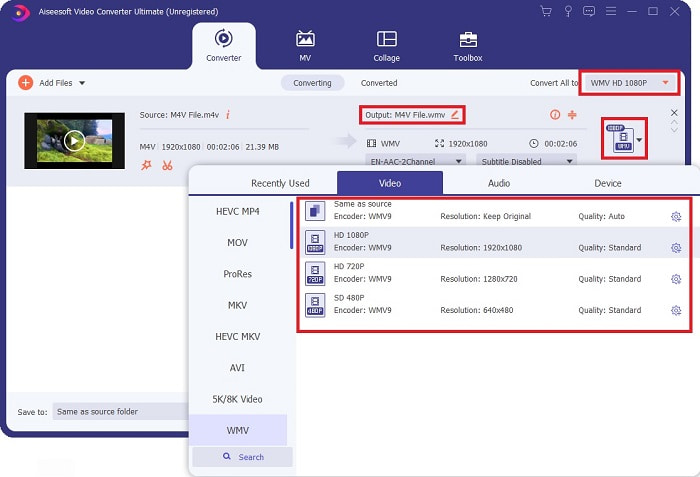
Step 3: You will see the file you imported on the interface. On its right, it shows the current format of the video is. Click on it, and it will show all the available formats you have to choose. In this case, scroll down and find the WMV or just type it in the search bar for a faster approach. Moreover, all the video qualities are available to choose from on the right side of the tab. You can select whichever you prefer.
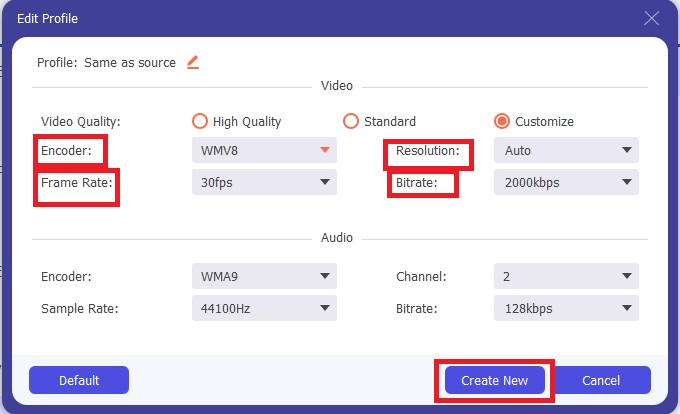
Step 4: In addition to the said quality selection, you can further edit the outcome of your video by clicking on the gear icon on the right side of the video quality you chose. It will show you all the possible adjustments, including the frame rate, resolution, bitrate, sample rate, encoder, and many more. Just click the Create New button to save the changes made.
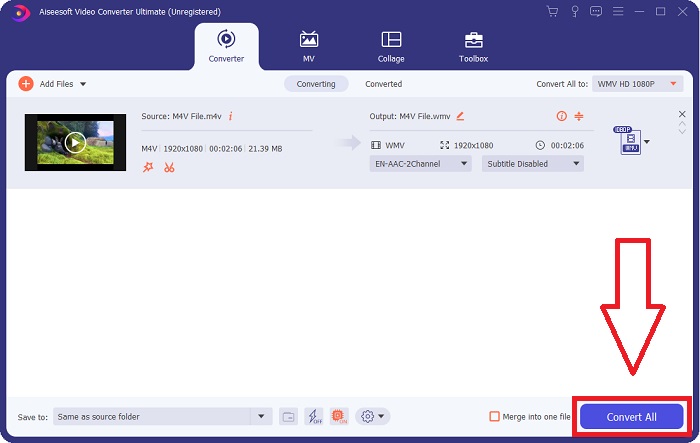
Step 5: To finish the conversion process, click the Convert All button found on the bottom right corner of the tab, wait for it to finish, and then you will get your converted file.
第 2 部分。如何使用手刹将 M4V 转换为 WMV
Handbrake 是一种流行的免费转换程序,可在 Windows、Mac 和 Linux 平台上运行。用户可以将任何格式的视频从 DVD 和蓝光源上传到这个开源转码器,以转换为 WMV。得益于用户友好的界面,转换过程既快速又简单。按照这些简单的说明使用手刹将 M4V 转换为 WMV。
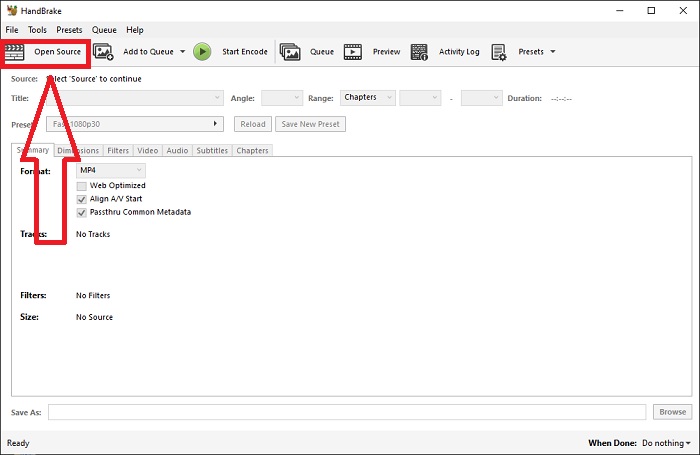
Step 1: Start the Handbrake application on your computer. Click the Open Source button on the main screen to browse and add WMV files converted. You may also just drag and drop the videos into the interface.
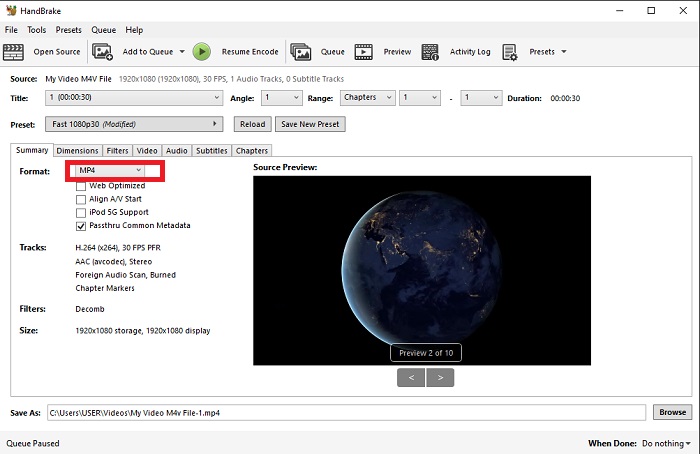
Step 2: The newly inserted file will show in the Source area. Then, choose WMV as the desired output format from the Format drop-down option on the Summary tab. Filters, video codecs, and other file properties may be tweaked if necessary.
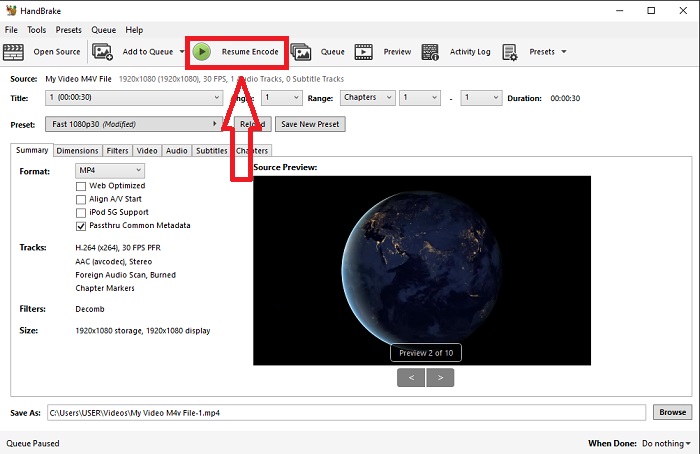
Step 3: Choose the output file name and location on your PC under the Destination section. Finally, click on the Start Encode button to convert the M4V file to WMV.
第 3 部分。 另一个将 M4V 在线转换为 WMV 的有用工具
作为免费的互联网工具,FVC Free Video Converter 非常方便。 MP4、MOV、MKV、AVI、M4V、FLV、WMV、WEBM、VOB、MPG、3GP、GIF 和 YouTube 和 Facebook 批准的视频格式都是它支持的类型。此外,这款免费的在线视频转换器还可以转换音频文件,让您可以将视频或音乐转换为 MP3、AAC、AC3、WMA、WAF、FLAC 和其他格式。 FVC 免费视频转换器还允许您在开始转换之前指定文件。您可以更改视频的分辨率、帧速率和视频比特率,以及音频的通道、采样率和比特率。
Step 1: Click this link to go to the online tool itself. First, you have to download a launcher quickly. You can do this by clicking the Add Files to Convert button found in the middle of the page. This step will allow you to import your files.
Step 2: Click on the said button again to finally upload the video. You will know the upload is successful once all the presented formats are in the interface. From there, select WMV among the others.
Step 3: You can find a gear icon on the right for the additional options in the software. Click on it, and it will allow you to make changes to the video and audio settings in terms of resolution, frame rate, and others alike. Once done, click OK and then the Convert button to finish the conversion process.
相关内容:
第 4 部分。有关 M4V 和 WMV 的扩展知识
有关您可能需要的有关这两种格式的其他信息,您可以阅读我们在下面提供的内容:
M4V 是 Apple 创建的文件格式。它与 MP4 文件格式极为相似,只是 M4V 文件可能具有 Apple 的 Fairplay DRM 保护。 M4V 格式可以在从 iTunes 商店获取的视频资料中找到。如果 M4V 文件启用了 DRM,则用于购买文件的 iTunes 帐户必须在播放它的机器上获得授权。
另一方面,WMV 文件是由 Microsoft 创建的通常包含音频的视频文件。在 Mac 和 PC 平台上,用户可以使用多个视频播放器播放这些文件。某些 WMV 文件中可能包含数字版权管理 (DRM) 保护,以防止用户制作从在线零售商处购买的文件的非法副本。
| M4V | WMV | |
| 文件扩展名 | .m4v | .wmv |
| 开发者 | 苹果公司。 | 微软 |
| 支持计划 | ◆ 媒体播放器经典 ◆ VLC 媒体播放器 ◆ KMPlayer ◆ 缩放播放器 | ◆ VLC 媒体播放器 ◆ MPlayer ◆ 媒体播放器经典 ◆ 视窗媒体播放器 |
第 5 部分。 关于转换 M4V 和 WMV 的常见问题
M4V 质量比 MP4 高吗?
我们现在知道,在对 M4V MP4 进行并排比较后,MP4 和 M4V 之间没有根本区别。从 M4V 视频文件中去除 DRM 保护后,MP4 和 M4V 视频文件是相同的。
手刹会删除 DRM 吗?
它是一个用于查看使用内容加扰系统 (CSS) 加密的 DVD 的库,该方法被免费播放器软件广泛用于解密受保护的光盘。它与 Windows、macOS、Linux 和各种操作系统兼容。 HandBrake 能够有效地从 DVD 中删除 DRM 并对其进行翻录。
WMV 的最佳用途是什么?
Microsoft 创建了广泛用于 Windows 媒体播放器的 WMV 视频格式。 WMV 文件比 MP4 文件更小,压缩程度更高。这就是为什么它在流媒体互联网视频中很受欢迎。
结论
不可否认,有很多方法可以将 M4V 转换为 WMV,但只有少数可以在进一步调整一些规范的同时做到这一点。这就是我们推荐 Video Converter Ultimate 的原因,因为只要您需要转换器,它就会在您身边。如果时间不允许安装该软件,则始终可以使用其在线版本。因此,请帮助我们使用 FVC Video Converter Ultimate 帮助您提供最佳的视频编辑体验。
-
 免费|将MP4转换为WMV而不损失质量的3种最佳方法
 这篇文章分享了如何在Mac或Windows上将MP4视频转换为WMV格式。我们还将为您提供多种选择,包括桌面软件和基于Web的在线转换器。准备知道最好的MP4到WMV转换工具了吗?
-
 在Windows和Mac上将FLV转换为WMV的3种方法
 正在寻找在 PC 或 Mac 上将 FLV 转换为 WMV 而不会降低质量的最佳方法?您很幸运,因为我们在这里分享了三种轻松完成工作的方法。
-
 如何在 Windows/Mac 上将 GIF 转换为 WMV 的简单指南
 您想知道如何将 GIF 转换为 WMV 格式吗?然后关注这篇文章,因为它展示了您可以选择的不同解决方案。

