


 视频转换大师
 屏幕录影大师
 视频修复
视频修复
 安全下载
安全下载如何使用顶级转换器将 MPG 转换为 3GP
你是否正在寻找在 Windows 和 Mac 上将 MPG 文件转换为 3GP 文件的方法?不用再发愁了,因为我们已经为你准备好了方案。本文将告诉你如何轻松地把 MPG 文件转换成 3GP 文件,并且在网上和离线环境下免费下载 MPG 转 3GP 转换器。所以请放松地看下去,你会在通读本文后收获很多。

第 1 部分。 为什么将 MPG 转换为 3GP 文件格式
假设您想在第三代移动设备上播放 MPG 文件。但是,第三代移动设备不支持 MPG 文件格式。因此,要在 3G 设备上播放 MPG 文件,您必须将其转换为 3G 设备支持的文件格式。在这种情况下,您必须将 MPG 文件转换为 3GP 文件格式。
第 2 部分。使用 FVC Video Converter Ultimate 轻松将您的 MPG 转换为 3GP 文件
FVC Video Converter Ultimate 是您可以在网络上找到的性能最佳的离线转换器之一。此转换器适用于所有跨媒体平台,包括 Windows 和 Mac。它还支持超过 1000 多种格式,如 MPG、3GP、AVI、MP4、MOV、WMA、MP3 等等。此外,如果您正在寻找可以进行批量转换的转换器,那么此工具适合您,因为该转换器可以将多种文件格式合并为一个。阅读下面的说明以了解有关此转换器可以做什么的更多信息。

FVC Video Converter Ultimate
5,689,200+ 次下载- 适用于所有已知媒体平台,包括 Windows 和 Mac。
- 它具有令人难以置信的功能,例如编辑、增强和压缩文件。
- 它有一个 GIF 和 3D 制作器,可以制作专业的输出。
- 它具有超快的转换过程,可以最终快速转换您的文件。
- 它支持几乎所有文件格式,包括 MPG、3GP、MOV、AVI、MP4、TS、M4V 等。
下面是使用 FVC Video Converter Ultimate 将 MPG 转换为 3GP 的步骤:
步骤 1. 首先,点击下面的 Download(下载)按钮,下载适用于 Windows 或 Mac 的转换器。
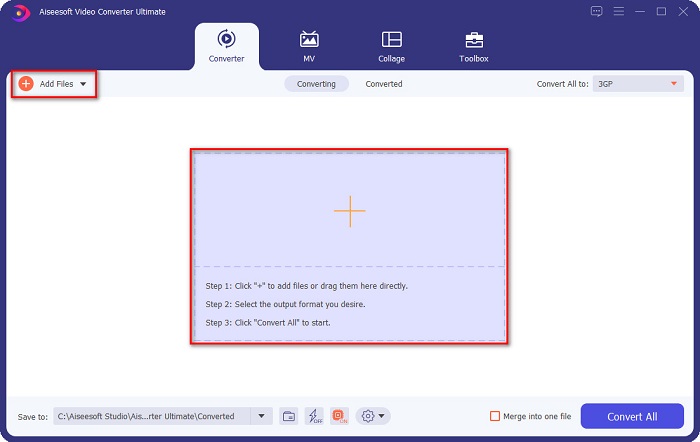
步骤 2. 在初始界面上,点击 Add Files(添加文件)按钮或 + 号按钮,把你的 MPG 文件添加到队列中。
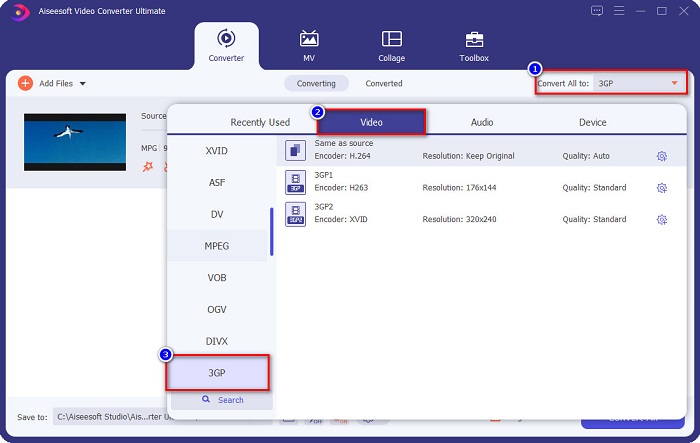
步骤 3. 上传文件后,点击 Convert All to(全部转换为)按钮,然后选择 3GP 作为输出格式。
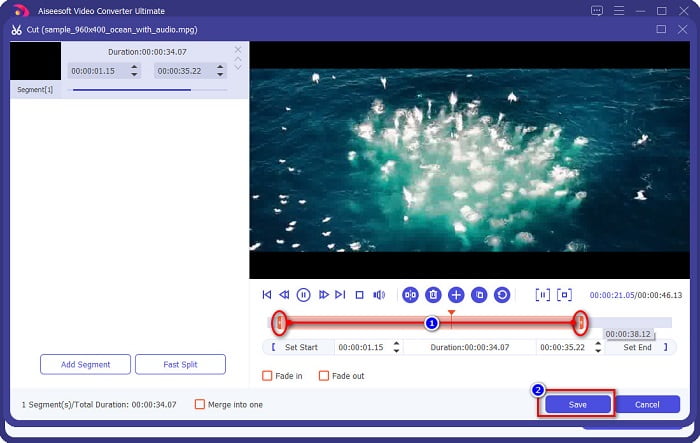
可选:如果你想裁剪视频长度,点击 scissor(剪刀)按钮,然后调节 play-in 和 play-out 控制条至你想要的视频时长,接着点击 Save(保存)。如果你不想剪辑视频,就直接进行下一步。
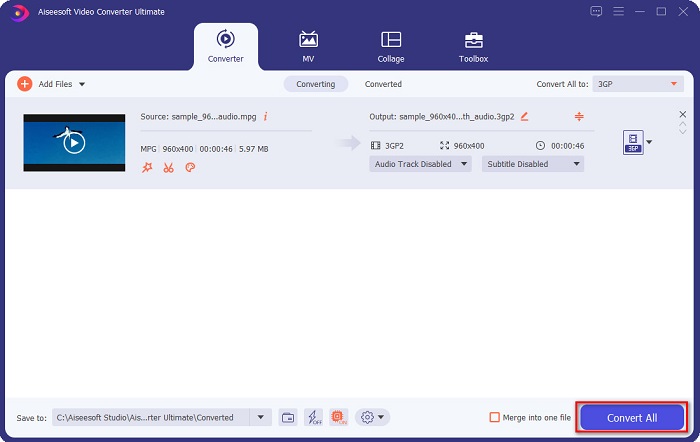
步骤 4. 最后,点击 Convert All(全部转换)按钮,将 MPG 文件转换为 3GP 格式。稍等几秒就完成了!你的 MPG 文件现在已经成功转换为 3GP 文件。
第 3 部分。您必须尝试的神奇 MPG 到 3GP 在线转换器
在转换方面,在线工具更方便,因为您不需要下载任何东西。如果您正在寻找可以在线将 MPG 转换为 3GP 且可访问的在线转换器,我们为您提供最佳解决方案。
FVC免费在线视频转换器
FVC Free Online Video Converter 是一款可以将 MPG 转换为 3GP 的在线视频转换器。它支持转换多种格式,如 MPG、3GP、FLV、WMA、WMV、MP4 等。此外,它还拥有易于上手的图形界面,非常适合初学者使用。而且,与其他在线转换工具不同的是,它没有恼人的广告打扰你。
请按照以下简单步骤使用 FVC 免费在线视频转换器进行转换。
步骤 1. 在浏览器中搜索 FVC Free Online Video Converter,或者点击此链接直接进入其网页。
步骤 2. 接着,在软件的首个界面点击 Add Files(添加文件)按钮。此时会弹出电脑文件窗口,选择你想要转换的 MPG 文件。
下载桌面版以批量转换文件。
步骤 3. 上传 MPG 文件后,在软件第二个界面下方选择你想要的输出格式,点击 3GP 作为输出格式。
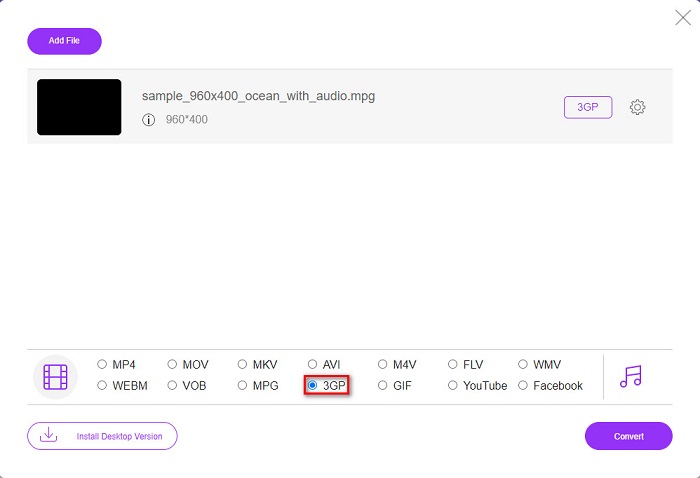
如果你想修改视频分辨率,点击 Gear(齿轮)按钮,在那里可以调节视频分辨率、视频和音频比特率等参数。如果你不想更改这些设置,就直接进入下一步。
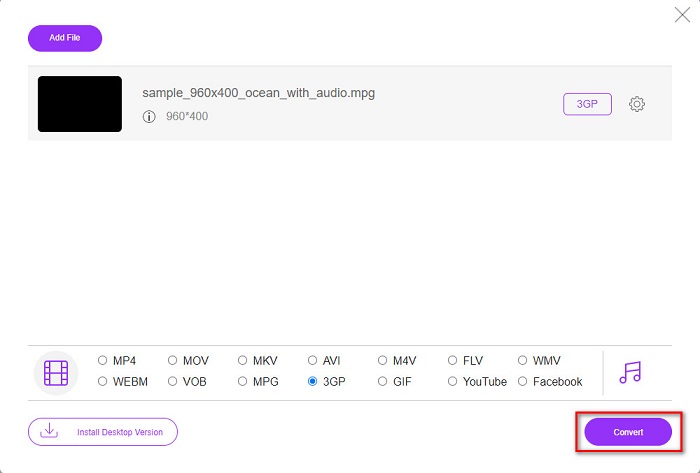
步骤 4. 要开始将 MPG 转换为 3GP,点击 Convert(转换)按钮。
DocsPal
另一款值得尝试的转换器是 DocsPal。它是一款免费的在线文件转换工具,几乎可以转换所有常见文件格式。它的界面也很简洁,十分适合新手使用。不过,这个工具依赖网络连接,因此如果你的网速较慢,转换过程可能会变慢。
使用 DocsPal 将 MPG 转换为 3GP 的步骤:
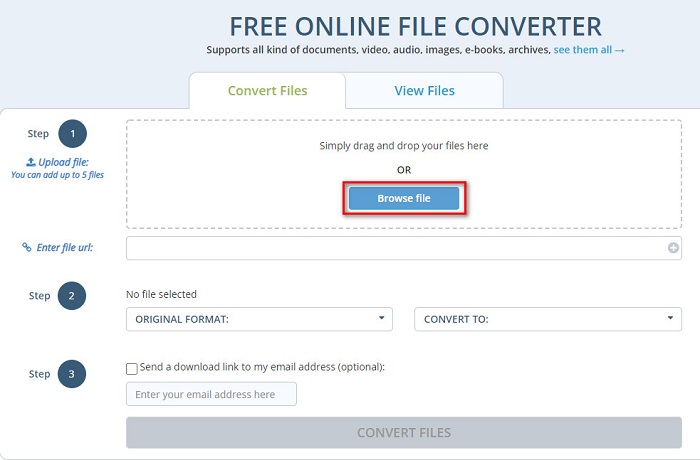
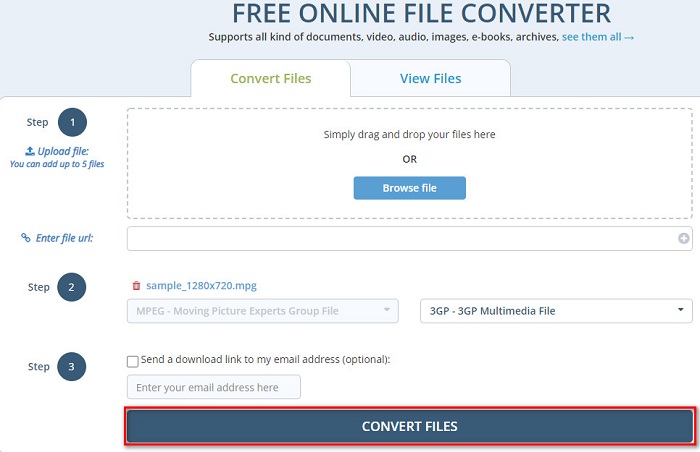
步骤 1. 在浏览器中搜索 DocsPal,然后会进入其网页。在软件的首个界面中,点击 Browse Files(浏览文件)按钮,选择你的 MPG 文件进行上传。
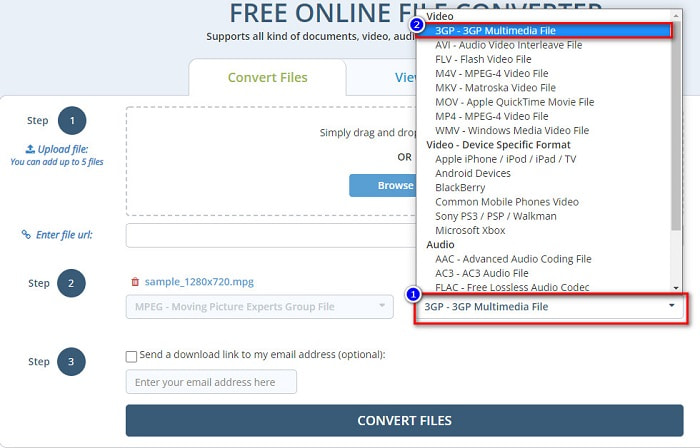
步骤 2. 点击 drop-down(下拉)按钮,选择你需要的输出格式。
步骤 3. 最后,点击 Convert Files(转换文件)按钮,将 MPG 文件转换为 3GP 格式。
使用这些易于使用的转换器可以方便地将 MPG 转换为 3GP 文件格式。那你还在等什么?立即免费试用!
Part 4. 更多关于 MPG 和 3GP 的知识
MPG 文件格式是 Internet 上分发的最常见的文件格式之一。许多人使用它是因为它可以让您比任何其他格式更快地流式传输和下载。它使用 MPEG-1 和 MPEG-2 压缩器来快速流式传输和下载。此外,它可以将视频、音频和元数据存储到一个文件中。几乎所有的媒体播放器都可以播放这种类型的文件。
相比之下,3GP 文件是第三代设备支持的文件格式。它包含用于有损数据压缩的 H.263 和 H.264 编解码器。此外,这种类型的文件比其他文件格式具有更小的文件大小。
MPG 与 3GP
MPG 由运动图像专家组 (MPEG) 制作,是一种常见的数字视频格式,用于存储视频、音频和元数据信息。在创建用于在 Internet 上共享的电影时,它非常有用。 MPG 中的这些文件通常包含 MPEG-1 或 MPEG-2 视频/音频压缩。
第三代合作伙伴计划 (3GPP) 产生了 3GP/3GPP 格式作为多媒体容器格式。它实际上是基于 ISO 媒体文件格式。我们经常用它来保存在3G手机和网络之间传输的视频/音频流。
第 5 部分。有关将 MPG 转换为 3GP 的常见问题解答
可以压缩 MPG 文件吗?
当然可以。有很多工具都可以帮助你压缩 MPG 格式文件。阅读这篇文章,了解八款最好用的视频压缩工具。
将 MPG 转换为 3GP 会破坏视频质量吗?
不会。将 MPG 文件转换为 3GP 文件不会破坏您的视频质量。但是,在转换为 3GP 文件时,您的文件可能会更小。
QuickTime 播放器是否支持 MPG?
是的。 QuickTime 播放器支持 MPG 文件格式。因此,您可以在 QuickTime 播放器上播放您的 MPG 文件,而无需使用其他工具。
结论
本文向您展示了免费将 MPG 转换为 3GP 的最佳方法。现在取决于您将使用哪种转换器。但是,如果您想以极快的速度进行转换并使用独特的功能,FVC Video Converter Ultimate 是适合您的工具。还是有疑问?立即尝试,享受使用其特殊和独特的功能。
-
 如何在不损失质量的情况下将 MPG 转换为 FLV [已证明]
 您必须在此媒体播放器上观看您喜爱的电影,但它不支持 MPG。尝试使用本文介绍的这些转换器将 MPG 文件转换为 FLV。
-
 2 个终极 MPG 转换器,可免费将 MPG 转换为 WMV
 您想免费将 MPG 转换为 WMV 吗?在这种情况下,您很幸运,因为我们发现您可以使用两种工具来转换 MPG 文件。
-
 快速将 MPG 转换为 MP4 的 3 种最佳方法
 想要将您的 MPG 转换为 MP4 文件格式?在本文中,我们为您列出了最好和最快的 MPG 转换器!

