


 视频转换大师
 屏幕录影大师
 视频修复
视频修复MPG转AVI需要注意的细节
一般来说,MPG 文件是一种典型的视频文件,它采用由“动态图像专家组”(MPEG,Moving Picture Experts Group)制定并标准化的数字视频格式。它在一个交错的单一文件中同时存储视频、音频和元数据。人们通常会使用 MPG 文件来制作通过互联网传输的影片。如果你不了解或从未接触过任何支持或可以将MPG 转换为 AVI的转换工具,这类视频格式就不太容易转换。继续阅读本文,你将进一步了解实现所需转换过程时应该掌握的细节以及可供选择的方案。
第 1 部分。 MPG 和 AVI - 概述
MPEG 是一种由动态图像专家组(Moving Picture Experts Group)开发的视频文件格式,这个组织同时也制定了 MP3 和 MP4 等格式。根据具体用途不同,MPEG 会采用 MPEG-1 或 MPEG-2 文件压缩方式。
为了在不大幅牺牲画质的前提下,将 VHS 级别的原始视频和 CD 级音乐压缩到每秒 1.5 兆比特的码率,人们制定了 MPEG-1 标准。因此,它已成为当今世界上最流行、兼容性最广的视频/音频格式之一。MPEG-1 的视频数据通常以每秒 30 帧(fps)的帧率传输,分辨率大约为 352×240 像素。
然而,在 Windows 电脑中,AVI 是默认的视频格式。作为一种多媒体容器格式,AVI 可以结合多种编码器(codec),如 DivX 或 XviD,将音频和视频存储在一起。与 AVI 文件相比,许多其他视频格式,如 MPEG 和 MOV,往往采用更少的压缩,从而占用更多的存储空间。也可以创建完全不压缩的 AVI 文件。由于这类文件属于无损格式,体积会非常庞大——每分钟视频约 2–3 GB。无论你打开或保存该文件多少次,无损文件都能保持其原有质量。其额外优势在于播放时不必另行安装编解码器(codec)。
第 2 部分。将 MPG 转换为 AVI 的最有效软件
如果你曾经想过如何免费将 MPG 视频文件转换为 AVI,那么本文推荐给你的这款全新且优秀的软件正是你要找的工具。Video Converter Ultimate 是一款可在 Windows 和 Mac 上免费下载的软件,它将 MPG 文件转换为 AVI 的速度,比在线转换网站要快得多。除了这两种视频格式之外,该软件还支持多种其他格式供你选择。之所以称其为最佳工具,是因为使用它可以获得高质量的输出效果。既然你已经对这款软件的功能有了初步了解,那就准备好,一起来看看它的具体操作步骤:
步骤 1. 首先,点击下方提供的免费下载按钮。下载完成后,你可以选择在 Windows 或 Mac 上安装该软件。软件安装到电脑桌面后,点击立即开始按钮即可开始使用。
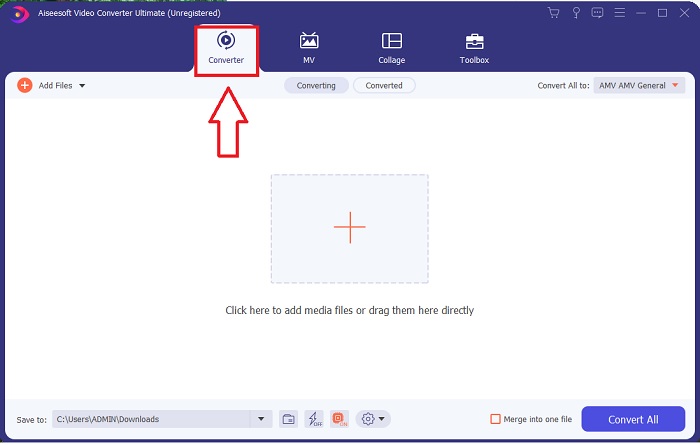
步骤 2. 打开刚刚下载的软件。首次打开时,你会看到一个带有转换器界面的窗口。你将在这里开始对视频进行转码处理。
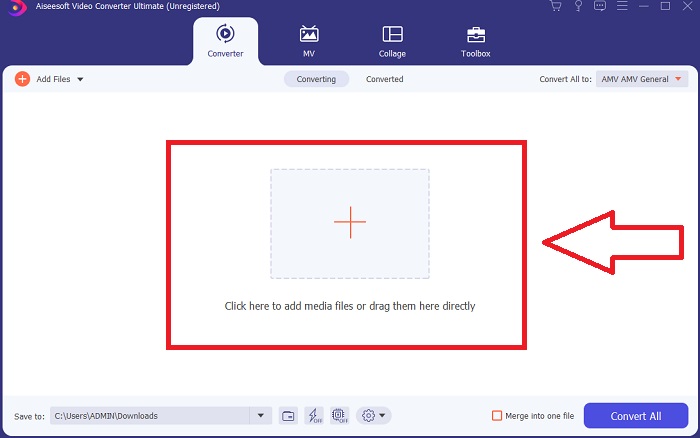
步骤 3. 你可以通过将文件导入软件来开始转换过程。只需将要转换的视频拖拽到加号图标上,即可开始视频转换。
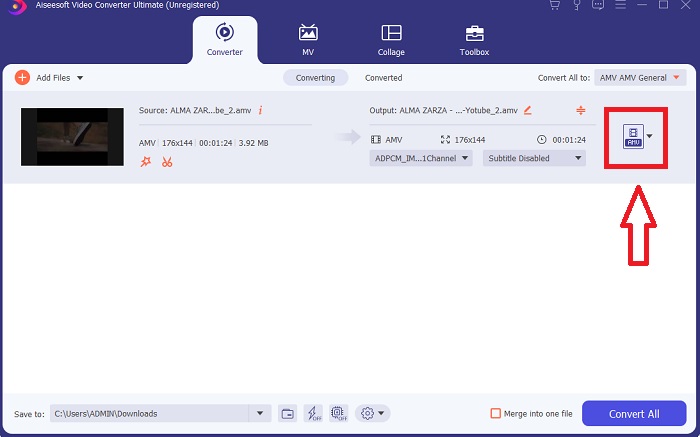
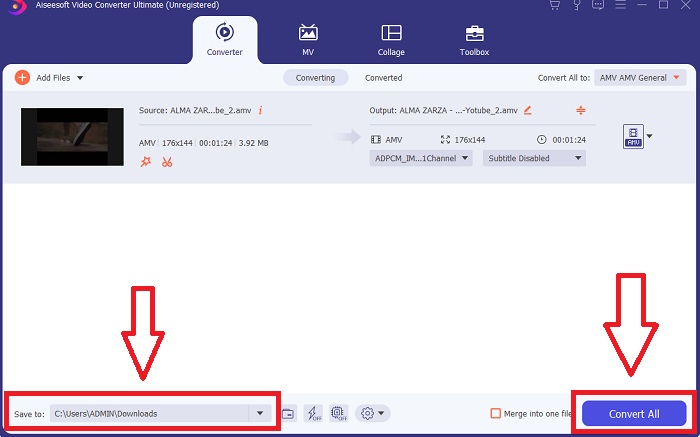
步骤 4. 在某个视频格式上点击右键,然后选择保存到或保存到外部存储。在下拉选项中搜索并选择 AVI 文件类型。选定 AVI 视频格式后,你会看到多种视频质量设置。如果没有你期望的输出质量,可以自行调整参数。点击齿轮图标可更改显示分辨率、帧率以及音频质量。完成设置后,点击创建新配置按钮保存修改。
步骤 5. 当你编辑好选定的视频并确认可以导出时,点击全部转换,即可将视频转换并导出到电脑。
第 3 部分。快速提示:您应该考虑的其他有效工具
方法 1. 使用 CloudConvert
CloudConvert 是一个在线视频转换器。此在线转换器还支持 MP4、WEBM 和 AVI 等格式。您可以选择视频的质量、分辨率和文件大小。如果您正在考虑如何在此在线工具中将 MPG 转换为 AVI,以下是有关如何使用它的步骤:
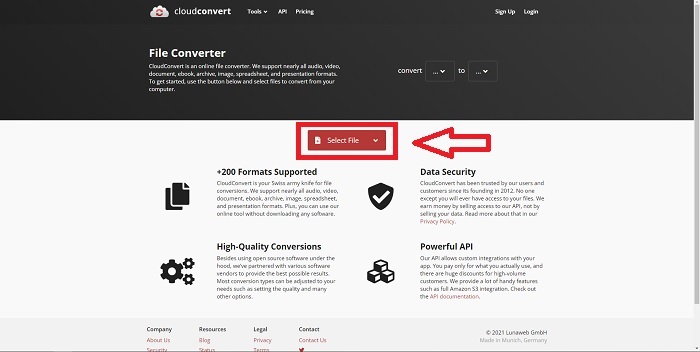
步骤 1. 点击选择文件,从电脑上传文件。
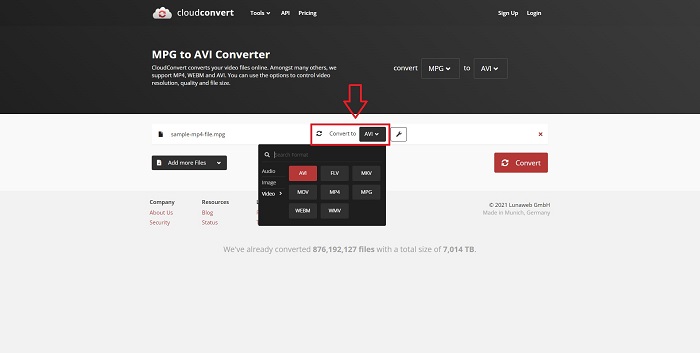
步骤 2. 接着,通过点击扳手图标旁边的格式区域,选择你希望将文件转换成的目标格式。你还可以选择添加更多文件进行批量转换。
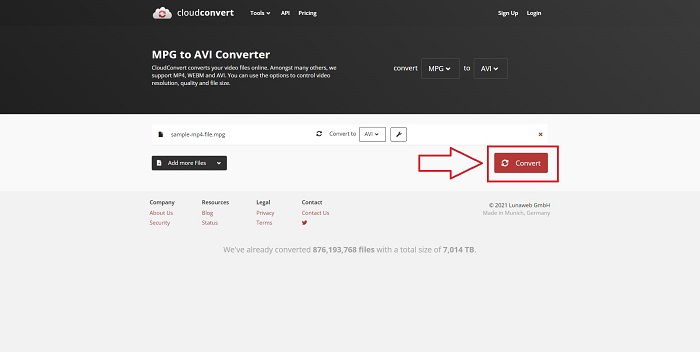
步骤 3. 点击转换,开始转换你上传的所有文件。
方法 2. 使用 Zamzar
Zamzar 是一种基于 Web 的文件转换工具。无需下载任何软件,即可以多种格式进行转换。 Zamzar 可以通过输入 URL 或上传一个或多个文件(只要它们都采用相同格式)将文件从一种格式转换为另一种格式,例如 Adobe PDF 到 Microsoft Word 文档。为了获得有关此在线工具的知识,以下是为您提供的步骤:
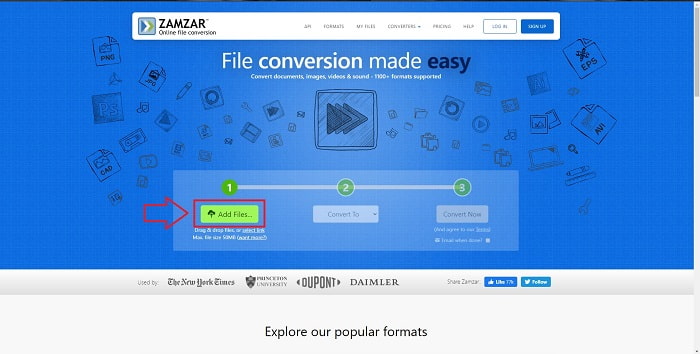
步骤 1. 在任意搜索引擎中搜索 Zamzar。进入该网站后,在界面中点击添加文件上传文件。
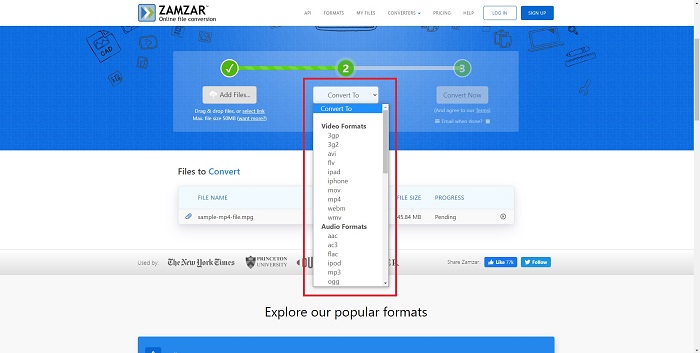
步骤 2. 然后,选择你想要转换成的目标格式。点击转换为即可查看此在线工具支持的全部格式。
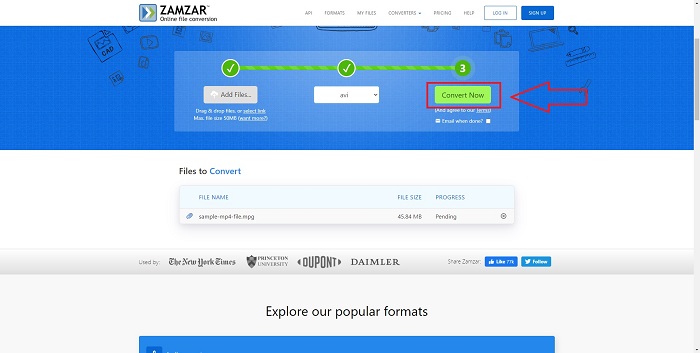
步骤 3. 点击立即转换,开始转换文件。
第 4 部分。 有关 MPG 和 AVI 的常见问题解答
AVI 还是 MPG 更好?
可以使用 AVI 文件进行存储,而使用 MPEG 文件完成视频录制。 AVI略优于MPEG;但是,如果要使用 MPEG 格式,则您需要刻录 DVD 视频。 Microsoft Windows 为响应 Apple 的 MOV 文件格式而开发了 AVI 文件格式,而Moving Picture Group 开发了 MPG 格式。
AVI的优缺点是什么?
与其他文件格式相比,AVI 文件如果不压缩可能会非常大。您必须愿意放弃一些磁盘空间以换取 AVI 文件的好处,否则您将无法存储尽可能多的文件。如果您在线压缩 AVI 文件超过某个点,视频质量将因此下降。
AVI 和 MPG 哪个更小?
在互联网环境下,文件越大,下载所需时间就越长。因此,即使会造成一定程度的画质损失,将影片编码为更小的文件体积也是合理的选择。在播放方面,AVI 仍然比 MPG 更受青睐,因为有更多的机顶盒播放器支持播放 AVI 文件而非 MPG 文件。如果你想在电脑上播放 MPG 文件,可以点击这里进一步了解。
结论
总的来说,Video Converter Ultimate 是你在上述所有在线 MPG 转 AVI 转换工具之外,更应该优先考虑使用的最佳转换软件。它可免费使用,而且转换速度比在线转换工具更快。同时,它支持的格式种类非常多,并且能提供高质量的视频输出。除此之外,可以说没有理由不选择这款软件。
-
 如何在Windows,Mac,在线上免费将MPEG转换为MP4文件
 阅读并获取3种免费方法,将MPEG转换为计算机上的MP4文件。您可以使用在线和桌面视频转换器轻松地将MPEG转换为MP4格式。
-
 [2025] 如何将 MPEG 转换为 MP3 的最佳工具和简便方法
 本文主要讨论如何使用列表中最可靠的工具将 MPEG 视频转换为 MP3。
-
 在 PC 和 Mac 上将 MOV 转换为 AVI 的 4 种有效方法 [2025]
 您想知道网络上最好的 MOV 到 AVI 转换器是什么吗?以及为什么 FVC Ultimate Video Converter 可能适合您。
