


 视频转换大师
 屏幕录影大师
 视频修复
视频修复
 安全下载
安全下载了解如何方便地将 SWF 转换为 M4V
对于 Shockwave Flash 播放器,Adobe 开发了传统的 SWF 文件格式。由于速度和安全问题,很多浏览器不再支持 Flash,iOS 设备也一直不支持,现在很少使用 SWF 文件格式。您可以做的最佳解决方案是将 SWF 文件转换为其他格式,如 M4V。在这种情况下,我们将向您展示将 SWF 转换为 M4V 的最佳方法。此外,我们将向您介绍一些可以在线和离线使用的应用程序,因此您可以选择自己喜欢的转换器。快来阅读本指南以获取更多知识。

第 1 部分:在 Mac 和 Windows 上将 SWF 转换为 M4V 的最佳方法
如果您是 Windows 和 Mac 用户,则可以使用 FVC Video Converter Ultimate 将 SWF 转换为 M4V。这个可下载的工具可以轻松转换多种文件格式,包括 FLV、MOV、WMV、MP4、AVI、MTS、MPEG、VOB 等。此外,此转换器允许您在单个进程中转换多个文件,这非常棒,尤其是当您要转换多个文件时。此外,此工具的转换过程是其他转换器无法比拟的。它转换文件的速度比平均速度快 30 倍。此外,Video Converter Ultimate 提供您可以享受的各种功能。如果您拥有 SWF 视频文件并想在其上添加水印,则可以使用此应用程序。此应用程序提供视频水印功能,可将水印添加到您的 SWF 视频中。
功能特色
◆ 转换100 多种视频文件格式,如M4V、MP4、SWF、MTS、MOV、VOB、FLV、AVI、WMV 等。
◆ 使用免费的现成模板和过滤器创建拼贴画。
◆ 转换100 多种视频文件格式,如M4V、MP4、SWF、MTS、MOV、VOB、FLV、AVI、WMV 等。
◆ 提供音乐视频制作器。
◆ 提供视频增强器、色彩校正、修剪器等编辑工具。
◆ 转换图片文件格式,包括JPG、PNG、WEBP等。
◆ 提供视频和音频压缩器。
您可以使用下面的简单方法使用带有 Mac 版本的 FVC Video Converter Ultimate 将 SWF 转换为 M4V。
步骤 1: 点击“下载”按钮,在 Mac 上下载 FVC Video Converter Ultimate,然后启动该程序。
步骤 2: 在界面上选择转换器选项,并点击 + 图标添加你想要转换的 SWF 视频文件。你也可以将视频文件直接拖拽到框中。
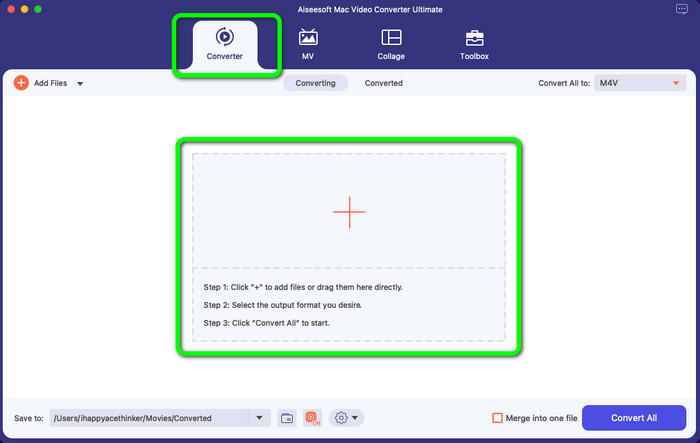
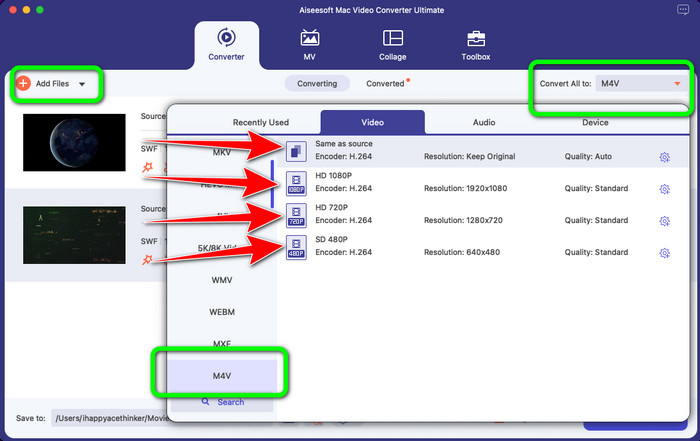
步骤 3: 如果你还想转换更多文件,可以点击界面左上方的添加文件按钮继续添加。然后点击全部转换为按钮,展开格式选项,并选择 M4V 文件格式。你也可以选择你偏好的画质。
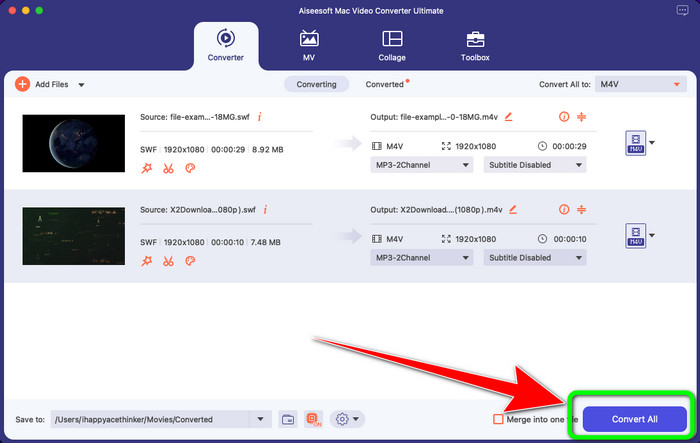
步骤 4: 如果已经完成所有文件输出格式的设置,点击转换按钮。等待快速转换过程完成后,将视频保存到你想要的位置。
如果您想编辑视频,例如调整颜色,我们提供了简单的步骤。
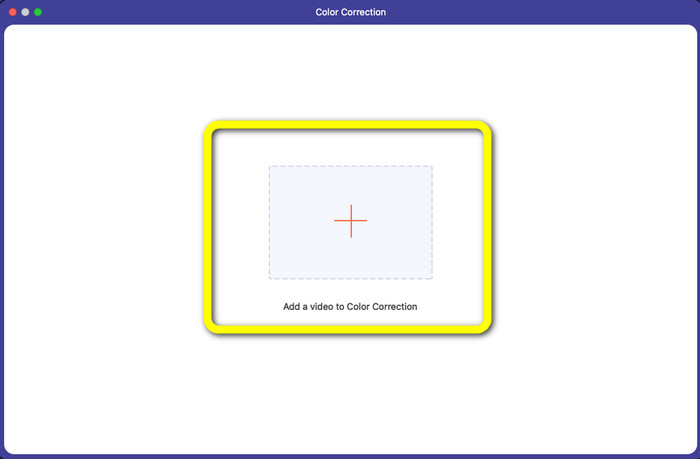
步骤 1: 选择工具箱选项并点击颜色校正工具。
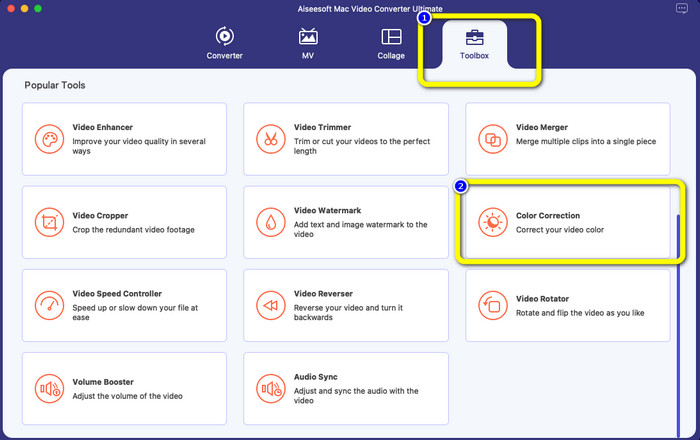
步骤 2: 点击颜色校正工具后,点击加号图标,添加你想编辑的视频文件。
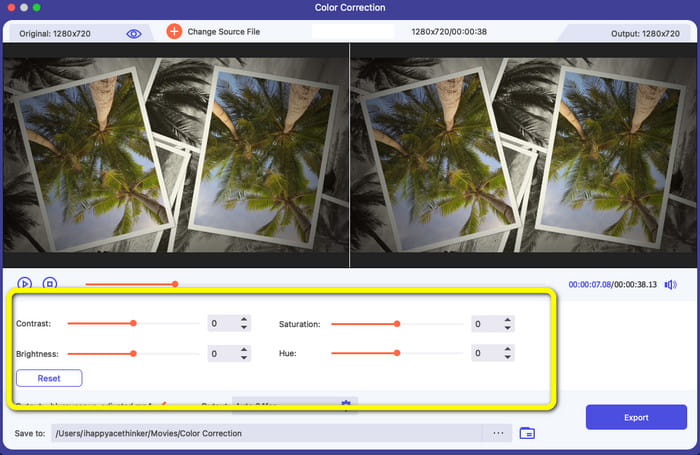
步骤 3: 现在你可以调节视频的亮度、饱和度、对比度和色调。根据你的喜好来调整颜色。
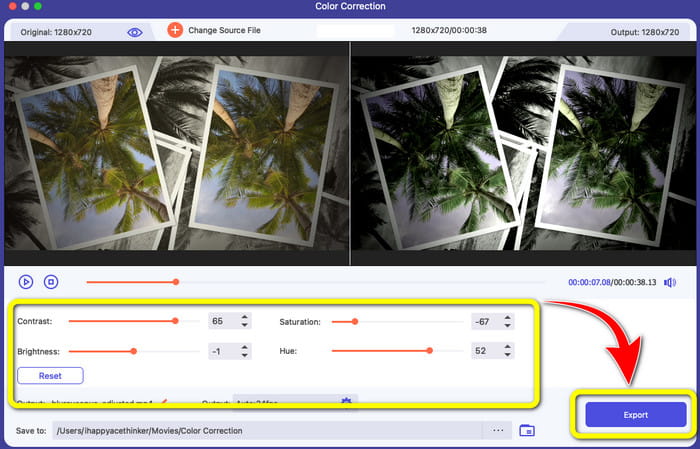
步骤 4: 最后,当你完成视频颜色的调整后,点击导出按钮保存你编辑好的视频。
第 2 部分:在线将 SWF 转换为 M4V 的出色过程
FVC Free Video Converter Online 是一款可以在线将 SWF 转换为 M4V 的工具。它支持包括 MP4、FLV、MKV、MOV、M4V、MTS、TS、M2TS、WMV、ASF、VOB、MP3、AAC 等在内的大多数常见音视频格式进行转换。你的高清视频可以在几秒内转换为 MP4、FLV 等热门格式且不会丢失画质。借助其批量转换功能,你可以无损转换多个视频或音频文件。此工具最大的优点是,你可以根据需要自定义视频的比特率、帧率、采样率和分辨率。
功能特色
◆ 转换多种视频文件格式,如FLV、AVI、MP4、M4V、SWF、TS等。
◆ 编辑视频的帧率、比特率和分辨率。
◆ 提供批量转换过程。
◆ 转换MP3、M4A、AAC、WMA、WAV等音频格式。
以下是使用 FVC Free Video Converter Online 将 SWF 转换为 M4V 的简单步骤。
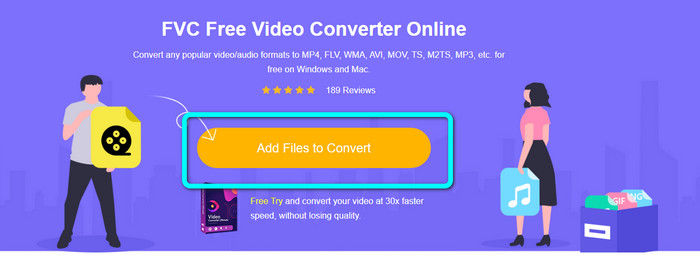
步骤 1: 访问 FVC Free Video Converter Online 网站,点击添加文件进行转换按钮上传你的 SWF 视频文件。
步骤 2: 如果你想更改视频的比特率、帧率和分辨率,点击界面右侧的设置图标,然后点击确定。
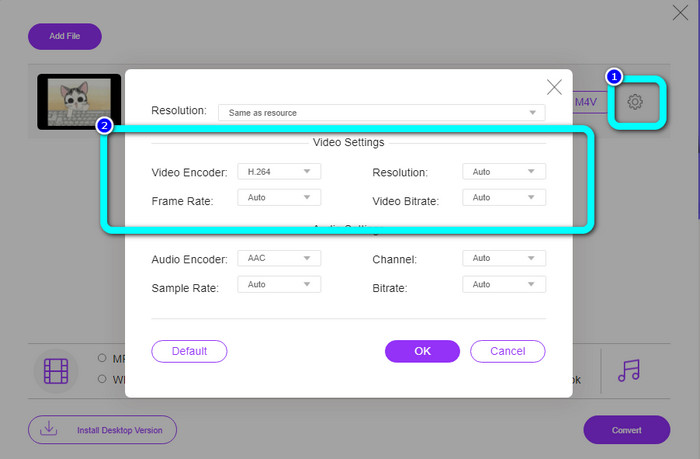
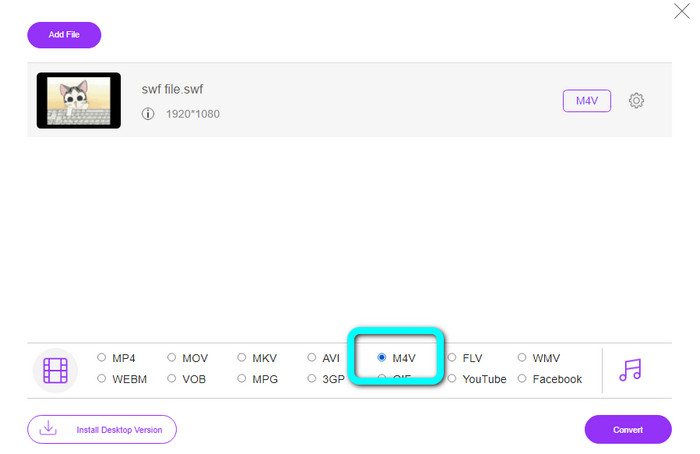
步骤 3: 之后,你就可以在界面下方的格式选项中选择M4V 文件格式。
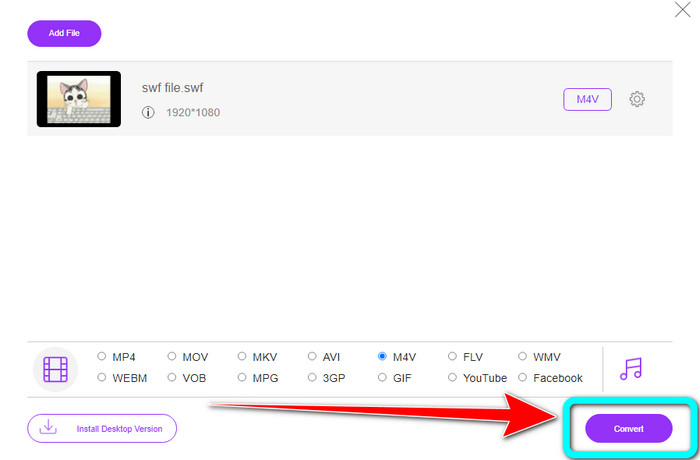
步骤 4: 点击转换按钮。文件夹窗口会出现在屏幕上,选择你想保存视频的位置,然后点击确定。
延伸阅读
在 Windows 和 Mac 上播放 Flash 视频文件的 8 大 SWF 播放器
5 款最佳免费 SWF 转 AVI 转换器【网页端 & 桌面端】
第 3 部分:SWF 与 M4V
| SWF | M4V | |
| 文件扩展名 | SWF | .M4V |
| 描述 | 称为 SWF(小型 Web 格式/ShockWave 格式)的数字 Adobe Flash 文件类型用于保存基于矢量的动画、音频文件和视频。它通常用于广播互联网媒体;视频游戏通常在浏览器中玩。不幸的是,Adobe 刚刚宣布他们将在 2020 年底之前停止支持 Flash 格式,因为它存在缺陷,包括性能不佳和缺乏安全性。 | 苹果公司开发了 M4V 数字视频容器格式。它的格式与众所周知的 MP4 非常相似。但是,M4V 文件可能包含 DRM。如今,允许对大量音频和视频数据进行多路复用的 M4V 是 iTunes Store 上可用视频的主要视频格式。 |
| 由开发 | Adobe 系统公司 | 苹果公司。 |
| 相关项目 | Adobe Flash Professional CC Adobe Flash 播放器 Adobe Dreamweaver CC GOM播放器 | 缩放播放器 媒体播放器经典 KMP播放器 VLC媒体播放器 |
| MIME 类型 | 应用程序/vnd.adobe.flash 电影 | 视频/x-m4v |
第 4 部分:有关将 SWF 转换为 M4V 的常见问题解答
1、SWF文件是做什么用的?
可以在 SWF 文件(一种 Adobe Flash 文件类型)中找到视频和基于矢量的动画。 Small Web Format 是 SWF 的完整首字母缩写词,但它也被称为 ShockWave 格式。
2、FLA和SWF有什么区别?
这两者之间的区别在于它们的用途。正在生成的 Flash 文件的扩展名为 FLA。它包括完成的 Flash 文件所需的数据(图像、音频和其他组件)。相反,SWF(Small Web Format)是准备发布的完整文件。
3.SWF文件有音频吗?
是的。 SWF 格式用于保存矢量图形和动画,但它也可以保存其他类型的数据,如文本、视频和声音。此文件经常用于制作动画、玩游戏以及网站上的视频和音频。
结论
以上是强烈推荐用来将 SWF 转换为 M4V 的应用程序。FVC Video Converter Ultimate 和 FVC Free Video Converter Online 相较其他转换器优势明显,提供更多实用功能,帮助你提升视频效果。
-
 如何将M4V文件压缩为较小的尺寸(免费和在线)
 如果您正在寻找一种简单的方法来减小 M4V 文件的大小,您应该来阅读这篇文章。在这里,我们将与您分享最简单的压缩 M4V 文件的方法
-
 如何免费将 SWF 文件转换为 MKV 文件 [已解决]
 您是否正在寻找将 SWF 文件转换为 MKV 文件的方法?由本文提供,我们将解决可以快速转换的终极转换器
-
 立即将 MPEG 转换为 M4V 的有用程序
 我们列出了两个将 MPEG 转换为 M4V 的出色应用程序。查看他们的基本步骤。然后选择您喜欢的将 MPEG 转换为 M4V 的过程。
