


 视频转换大师
 屏幕录影大师
 视频修复
视频修复
 安全下载
安全下载快速轻松地将 TS 转换为 MKV,实现最佳播放兼容性
在数字时代,转换视频文件格式是一个常见需求。如果你想将TS 文件转换为 MKV 格式,那你就来对地方了。在这篇详细指南中,我们将深入解析这一转换过程的细节,并为你提供将 TS 文件高效转换为 MKV 格式的方法。无论你是资深影迷、专业视频剪辑师,还是仅仅希望提升媒体播放兼容性的人,让我们一起走进格式转换的世界,在探索 TS 转 MKV 的过程中,为你的视频收藏开启全新的可能性。

第 1 部分. TS MKV 转换器比较
下面的比较表显示了下面要审查的五个程序的主要功能和差异:
| 方面 | 视频转换大师 | Freemake视频转换器 | 手刹 | 免费视频转换器终极版 | 在线转换 |
| 定制选项 | 广泛的 | 有限的 | 广泛的 | 有限的 | 广泛的 |
| 视频编辑 | 是 | 是 | 基本的 | 基本的 | 基本的 |
| 离线/在线 | 离线 | 离线 | 离线 | 线上 | 线上 |
| 技术支援 | 是 | 是 | 社区支持 | 没有 | 社区支持有限 |
第 2 部分. 前 5 名 TS MKV 转换器
如果您对一种选择不满意,那么,我们为您准备了很多选择。我们收集了离线和在线工具,用于将 TS 转换为 MKV 文件。请查看下面的内容以了解更多信息。
1. Video Converter Ultimate
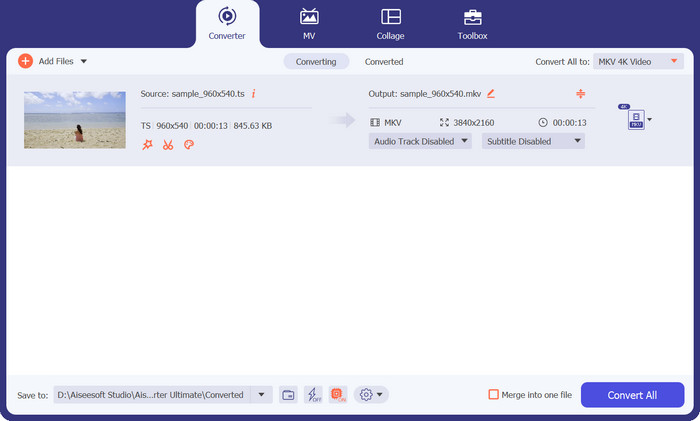
Video Converter Ultimate 是你进行 TS 转 MKV 以及 MKV 转 TS 的一体化解决方案。在瞬息万变的数字媒体世界中,拥有一个可靠高效的视频转换工具至关重要。幸运的是,我们有这款功能强大的软件,可以为你的视频转换需求带来多样性与便捷性。通过使用该程序,你可以获得大量旨在简化转换流程的功能。这个工具拥有直观的用户界面,即便是不具备丰富技术背景的用户,也能快速上手、轻松完成操作。
该应用程序的与众不同之处在于它在处理各种视频格式方面的稳健性。它不仅支持 TS 和 MKV,还支持多种其他流行的视频格式,确保与您多样化的媒体库兼容。这意味着您可以轻松地将 TS 文件转换为 MKV 或将 MKV 文件转换为 TS,同时保持视频的原始质量。
优点
- 性能稳定可靠,转换过程顺利。
- 利用先进的算法实现快速转换。
- 它允许用户同时转换多个文件。
缺点
- 它有一个有限的试用版,具有受限的功能或时间限制。
- 可能需要大量的系统资源。
2.Freemake视频转换器
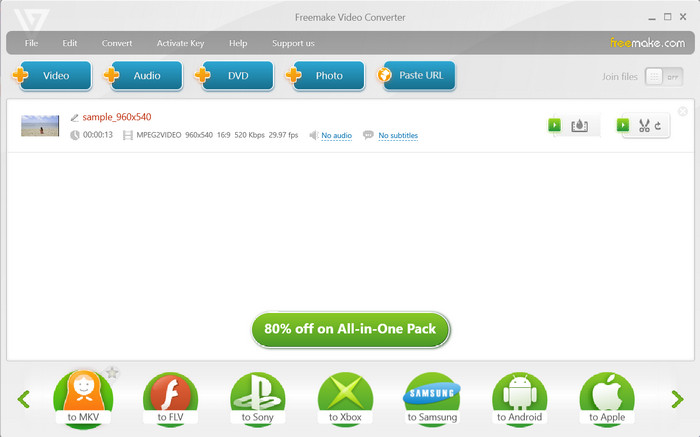
Freemake Video Converter 是一款全面的 TS 到 MKV 转换器,提供广泛的自定义选项。您可以微调各种视频参数,包括分辨率、比特率、帧速率等,以确保转换后的视频达到所需的质量和文件大小。这种灵活性使您可以根据您的具体要求和偏好来优化输出。详细了解该工具的优缺点,以便您在选择它来将 TS 转换为 MKV 时做出明智的决定。
优点
- 从 URL 转换音频和视频文件。
- 它提供了基本的编辑工具。
- 它支持 DVD 刻录。
缺点
- 仅 1 周免费试用。
- 免费版本的功能有限。
3.手刹
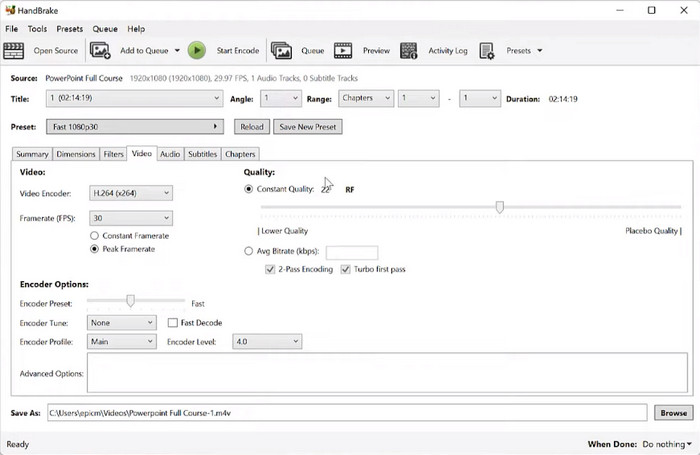
HandBrake 提供可增强您的视频体验的高级功能。该软件允许您应用滤镜、添加字幕、调整音轨,甚至执行基本的视频编辑任务,例如裁剪和修剪。借助这些多功能工具,您可以在转换过程之前或之后个性化和优化您的视频。此外,此 TS 到 MKV 转换器支持批量转换,使您能够同时处理多个文件。
优点
- 免费下载和使用。
- 它支持大量的输入和输出格式。
- 它提供了广泛的定制选项。
缺点
- 高级功能和设置对于用户来说有一个学习曲线。
- 它不提供官方技术支持。
4.免费在线视频转换器
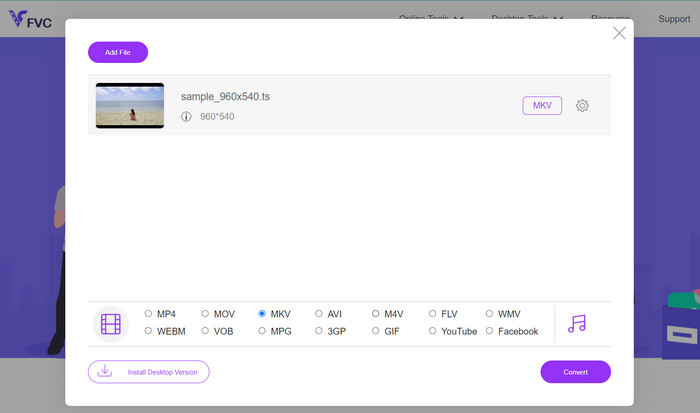
Free Video Converter Online 是一个实用而高效的在线工具,用于将 TS 转换为 MKV 或将 MKV 转换为 TS。无论你是在外出途中,还是更偏好基于网页的解决方案,FVC Free Video Converter Online 都能为你提供一个用户友好的平台,让你无需安装软件即可实现流畅的视频格式转换。作为一款在线工具,你可以在任何浏览器中方便地访问它,而不必为下载或安装软件而烦恼。这一特性使得该工具成为偏好轻量化、便携式解决方案用户的理想选择。
优点
- 可直接从网络浏览器访问。
- 简单直观的界面。
- 用户可以自定义视频设置。
缺点
- 上传文件和处理转换需要互联网连接。
- 整体性能取决于服务器的容量和负载。
5. 在线转换
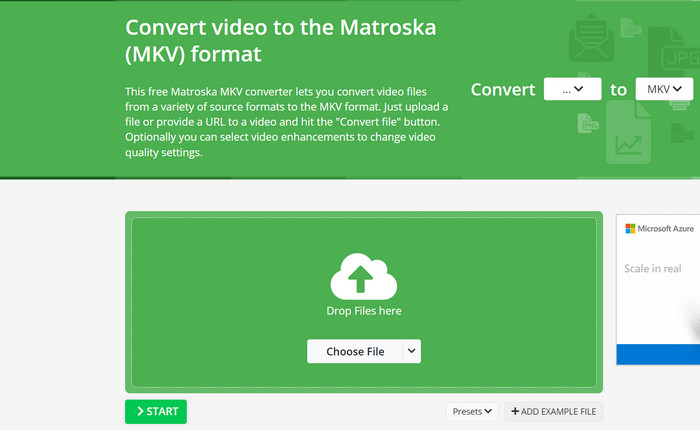
在在线视频转换方面,Online-Convert 作为一个多功能且可靠的平台脱颖而出,它简化了将 TS 转换为 MKV 或 MKV 转换为 TS 的过程。 TS 到 MKV 转换器提供了一个用户友好的界面,您可以轻松地从本地存储上传 TS 或 MKV 文件,甚至从云存储服务导入它们。您可以选择自定义各种转换设置,例如视频编解码器、分辨率、比特率等,确保输出满足您的特定要求和偏好。
优点
- 它支持多种视频格式。
- 该工具支持云存储集成。
- 它利用强大的服务器来有效地处理转换。
缺点
- 文件大小和持续时间限制。
- 有限的高级编辑。
延伸阅读:
【已解决】如何在保持原始画质的前提下将 MTS 转换为 MKV
第 3 部分:TS 与 MKV
下面的比较表提供了 TS 和 MKV 格式的功能和特性的总体概述。对特定编解码器和功能的实际功能和支持可能会有所不同,具体取决于所使用的各个实现和媒体播放器。
| 特征 | TS(传输流) | MKV(马特罗斯卡) |
| 容器格式 | MPEG-2 传输流 | 马特罗斯卡 |
| 视频编解码器 | MPEG-2、H.264、H.265 (HEVC)、AVS 等 | H.264、H.265 (HEVC)、VP9、AV1 等 |
| 音频编解码器 | MPEG-1 音频层 II、AAC、AC-3、DTS 等 | AAC、AC-3、DTS、FLAC、MP3、Opus、Vorbis 等 |
| 文件大小 | 与 MKV 相比,文件大小更大 | 与 TS 相比文件更小 |
| 流媒体能力 | 专为直播和广播应用而设计 | 支持流式传输,但不如 TS 常用 |
第 4 部分. 有关 TS MKV 转换器的常见问题解答
转换后的 MKV 文件与我的媒体播放器或设备兼容吗?
MKV 受到媒体播放器和设备的广泛支持,但始终建议检查特定播放器或设备的兼容性,以确保其可以处理 MKV 文件。
如果需要,我可以将 MKV 转换回 TS 吗?
是的,您可以使用类似的视频转换工具或支持 MKV 到 TS 转换的转换器将 MKV 转换回 TS。
我可以将加密或受保护的 TS 文件转换为 MKV 吗?
这取决于所使用的加密或保护方法。大多数情况下,转换工具无法绕过加密或保护,您可能需要在将 TS 文件转换为 MKV 之前删除加密或保护。
结论
将TS 转换为 MKV 格式可以带来多方面的优势,包括更小的文件体积、更好的兼容性,以及对字幕和元数据等附加功能的支持。市面上有多种软件和在线转换工具可用于完成这一转换过程,它们各自拥有不同的功能特点、优点和局限。
-
 4种经过验证的将TS转换为台式机/在线FLV的方法
 默认情况下,您无法在计算机或手机上打开 TS。观看视频文件的唯一方法是使用我们的具体指南将 TS 转换为 FLV 或其他格式。
-
 TS 转 GIF:如何将 TS 文件转换为 GIF 动画
 在这篇文章的帮助下,了解如何将 TS 文件更改为 GIF 格式。下面的列表显示了关于 TS 和 GIF 以及如何将 TS 转换为 GIF 的不同想法。
-
 将 MXF 转换为 MKV 的前 4 大最佳解决方案 [已解决]
 了解这四种轻松在线和离线将 MXF 转换为 MKV 的好方法。这篇文章中包含的应用程序可以帮助您轻松转换文件。
