


 视频转换大师
 屏幕录影大师
 视频修复
视频修复轻松将 VOB 转换为 3GP 的出色方法 [最佳转换器]
想在你的第三代设备上播放 VOB 文件却无法实现?那么最好的解决方案就是将 VOB 文件转换为 3GP 文件。3GP 文件是 3G 设备所支持的格式。因此,如果你正在寻找将 VOB 文件解码成 3GP 的最佳方式,本文或许正适合你。我们为你提供了最简单、最实用的VOB 转 3GP方法。

第 1 部分。如何使用 FVC Video Converter Ultimate 进行转换
FVC Video Converter Ultimate 是目前网络上性能最出色的转换器之一。这款免费的离线转换工具支持多种文件格式的转换,包括 VOB、3GP、MP4、MKV、MOV、AVI、FLV 在内的 1000 多种格式。它还允许你裁剪视频长度,并可添加特效以提升视频质量。此外,如果你想合并多个文件,该转换器还支持批量转换。因此,如果你想轻松将 VOB 转换为 3GP,请继续阅读下文详细介绍并免费下载使用。

FVC Video Converter Ultimate
5,689,200+ 次下载- 可以转换网络上可用的 1000 多种文件格式。
- 可以批量转换多种文件格式。
- 它具有超快的转换过程和硬件加速。
- 它具有高级编辑功能,可以剪切、添加字幕和为文件添加水印。
- 适用于所有媒体平台,如 Windows 和 Mac。
以下是如何使用 FVC Video Converter Ultimate 将 VOB 转换为 3GP 的步骤:
步骤 1. 首先,点击 Windows 或 Mac 版本的下载按钮下载安装包。然后按照安装向导完成安装,并启动程序。
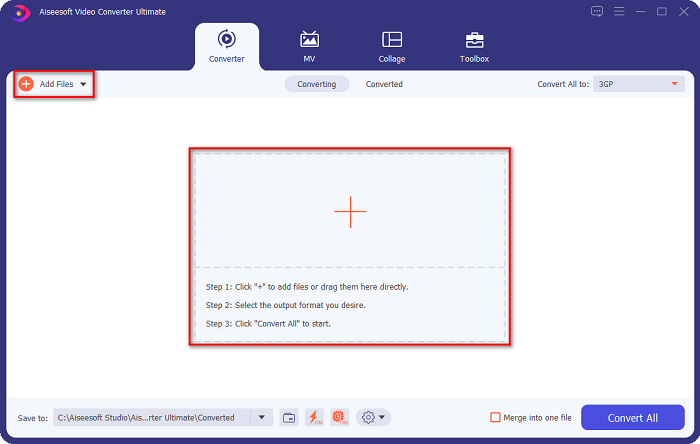
步骤 2. 点击添加文件按钮或+号按钮。此时会弹出电脑文件窗口,选择你的VOB文件,将其添加到转换队列。
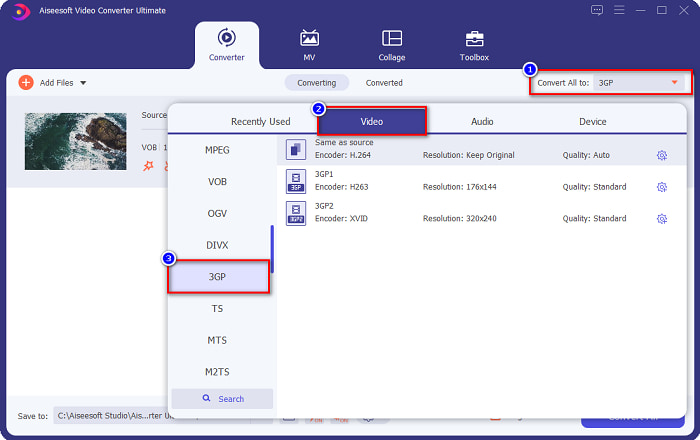
步骤 3. 第三步,点击全部转换为按钮,选择你想要的输出格式。点击3GP,然后进入下一步。
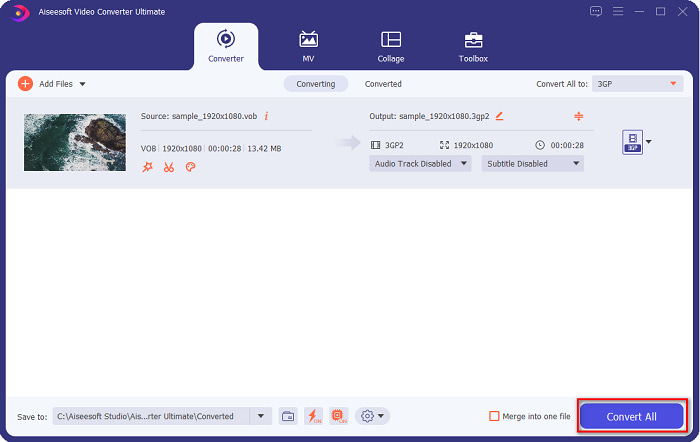
步骤 4. 选择好目标输出格式后,点击全部转换按钮开始转换。稍等几秒钟即可。只需以上几个简单步骤,你就能轻松将 VOB 文件转换为 3GP。
第 2 部分。如何免费在线将 VOB 转换为 3GP
如果您想在不下载的情况下将您的 VOB 文件转换为 3GP 文件,您可以使用网络上提供的在线转换器。使用在线转换器的便利性和效率无疑是好的。因此,我们提供了两种将 VOB 文件转换为 3GP 文件格式的方法。
文件专业信息
FileProInfo 是一款在线转换器,拥有易于上手的图形界面,对初学者非常友好。它几乎支持互联网上所有常见的文件格式。不过,这类在线转换器往往会包含许多干扰性的广告。即便如此,仍有很多人选择使用该工具。
步骤 1. 在浏览器中搜索 FileProInfo,进入其网页。在软件主界面上点击选择 VOB 文件按钮,选择你的 VOB 文件进行上传。

步骤 2. 接着,在单词to旁边的框中,选择你想要的输出文件格式。

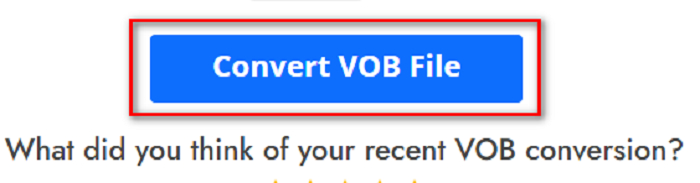
步骤 3. 最后,点击软件界面底部的转换 VOB 文件按钮,然后等待转换完成。
就是这样!您可以毫不费力地将您的 VOB 文件转换为 3GP。
转换365
Convert365 是一款在线 VOB 转 3GP 转换工具,可将大多数常见格式进行转换,包括 VOB、3GP、AVI、MOV、MP4、MPEG 等。如果你在寻找一款能够对音量进行归一化处理的在线转换器,这个工具就具备此功能。但由于它是在线工具,转换速度会受网络影响,可能出现转换较慢的情况。接下来,请按照下列步骤使用 Convert365 将 VOB 文件转换为 3GP。
步骤 1. 在浏览器中搜索Convert365,进入页面后点击添加文件按钮,当弹出电脑文件窗口时选择你的 VOB 文件。

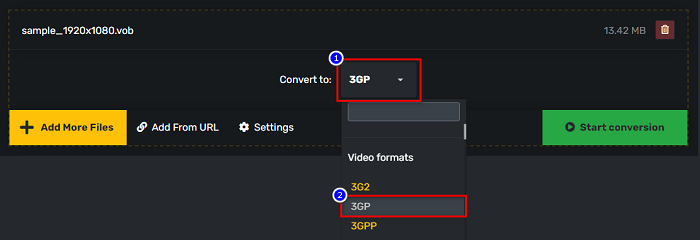
步骤 2. 然后,在转换为旁边的下拉按钮中,选择你需要的输出格式,点击3GP文件格式。
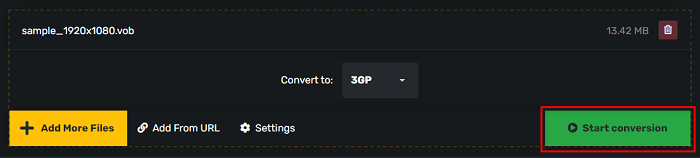
步骤 3. 最后点击开始转换。 按钮将您的 VOB 转换为 3GP 文件。
第 3 部分。我应该使用哪个 VOB 到 3GP 转换器
在选择将 VOB 转换为 3GP 的最佳转换器时,您必须始终考虑速度、它支持的文件以及转换器功能的独特性。我们建议在上面显示的最佳在线和离线转换器中使用离线工具 FVC Video Converter Ultimate。该转换器提供了许多其他转换器所没有的独特功能,例如 GIF 创建器 3D 制作器、水印去除器等等。
此外,即使它可以提供类似专业的输出,它也具有易于使用的界面,因此您不会很难使用它。
第 4 部分。关于 VOB 和 3GP 的更多信息
VOB 或视频对象是 DVD 使用的一种文件容器格式。它包含视频、音频、字幕和菜单内容。这种类型的文件有限制和复制限制,以保护它们不被直接复制。相比之下,3GP 文件是只能在第三代移动设备上播放的文件格式。这些文件格式由第三代合作伙伴计划 (3GPP) 开发。此外,与 VOB 文件相比,此类文件仅包含较小的文件大小,因为它们是为共享到 3G 设备而制作的。 3GP可以存储3G手机常用的视频和音频文件。
第 5 部分。关于将 VOB 转换为 3GP 的常见问题解答
你可以在 macOS 上玩 3GP 吗?
在 macOS 上几乎无法直接播放 3GP 文件,尤其是在新版的 QuickTime 中。不过,你可以将 3GP 文件转换成 macOS 支持的格式,例如 MOV。若想了解更多关于将 3GP 文件转换为 MOV 的内容,请点击此链接。
将 VOB 转换为 3GP 会影响文件的质量吗?
绝对没错。将 VOB 转换为 3GP 时,文件大小会受到影响。由于 3GP 仅包含视频和音频文件并且文件大小较小,因此您的 VOB 文件的文件大小会更小。
3GP 文件格式是通用文件吗?
不幸的是,现在 3GP 文件格式并不常见,因为现在 3G 手机越来越少。如今,移动用户最常用的文件是 MP4 文件格式。
结论
由于我们提供了在 Windows 和 Mac 上将 VOB 转换为 MOV 的最佳和最容易使用的转换器,我们得出结论,FVC Video Converter Ultimate 是所提供的在线和离线转换器工具中最好的选择。它不仅具有独特的尝试功能,还提供高速转换。对此转换器仍有疑问,立即下载并尝试最好的 VOB 到 3GP 转换器。
-
 将 VOB 转换为 FLV 的最佳方法 [包括免费和在线]
 想要将 VOB 文件转换为 FLV 文件?您可以使用桌面或在线转换器轻松完成任务。阅读本指南并了解如何轻松快速地将 VOB 转换为 FLV。
-
 3 个方便的转换器可用于将 VOB 文件更改为 AVI 格式 [2021]
 由于不支持播放 VOB 文件而遇到问题?然后让我们尝试使用下面介绍的 3 种方式进行转换,每个转换器都有详细的步骤。
-
 用于将 VOB 转换为 MOV 的优秀方法
 在线视频下载很方便,但是如果视频是VOB格式的,而你的播放器不支持怎么办?这篇文章将教你如何将 VOB 转换为 MOV。
