


 视频转换大师
 屏幕录影大师
 视频修复
视频修复
 安全下载
安全下载您可以尝试将 WebM 转换为 3GP 的前 3 种方法
WebM is supported by almost all browsers like Google Chrome, Microsoft Edge, Mozilla Firefox, Opera, and more. However, there are times when you can’t play your WebM file on some devices like phones. To play your video on other devices, you must download online or offline converters to convert your WebM file to other formats. Fortunately, this article will introduce some most effortless ways to convert WebM to 3GP using some tested software.

第 1 部分:在 Windows 和 Mac 上将 WebM 转换为 3GP 的有效方法
This article is meant for you if you want a WebM to 3GP converter using your Windows and Mac. Video Converter Ultimate is the best software you can use. This application lets you convert many files, such as FLV, MKV, DIVX, XVID, MT2S, MTS, M4V, AVI, MP4, and 1000+ more. In addition, you don't have to worry about the conversion process because you can convert files 30x faster than other converters. You can also download this great application for free.
此外,此应用程序转换文件的方法并不复杂,因为它具有友好的界面和简单的方法,非常适合所有用户。除了转换之外,您还可以使用更多工具,例如增强视频、制作音乐视频、创建拼贴画、更改文件大小等等。
功能特色
◆ 非常适合制作拼贴画。
◆ 个性化和定制GIF。
◆ 改变视频的速度。
◆ 能够改变视频的文件大小
◆ 可以压缩音频文件。
优点
- 非常适合 Windows 和 Mac 用户。
- 它有一个快速的转换过程。
- 支持MP4、M4V、DIVX、FLV、MKV、3GP、SWF等1000+格式。
- 具有友好的用户界面,适合初学者。
- 可以轻松添加和删除不必要的元素,如水印、徽标、签名等。
缺点
- 付费购买专业版即可使用所有强大功能。
Step 1: Download the Video Converter Ultimate using your Windows or Mac by clicking the Download button below. Install it on your device and run the software.
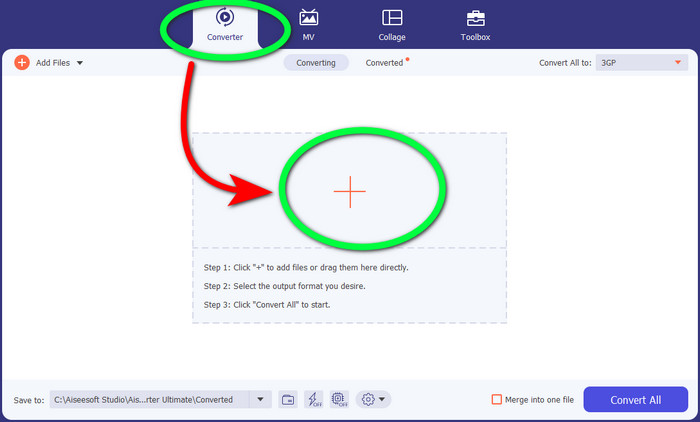
Step 2: When you see the four options on the upper part of the interface, select the Converter panel and click the + sign to upload the WebM video file.
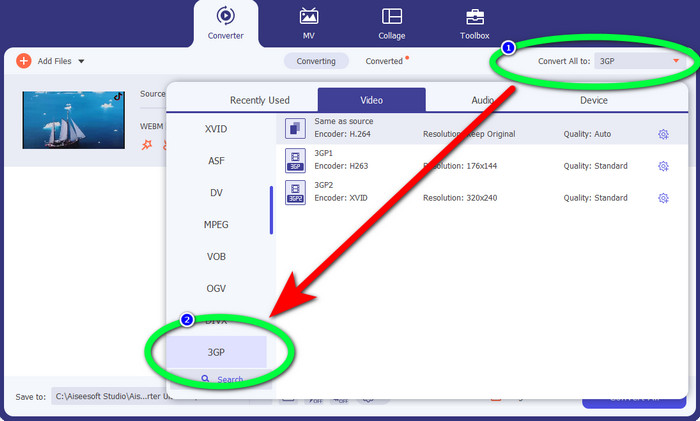
Step 3: After uploading the WebM video file, click the Convert all to option and choose the 3GP file.
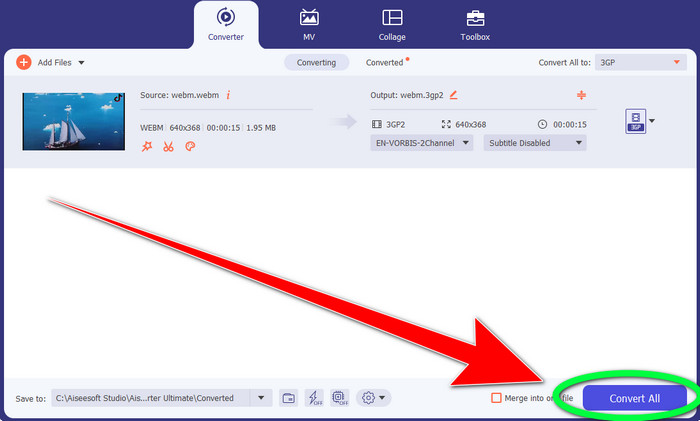
Step 4: When you are done changing the file format from WebM to 3GP, click the Convert button.
第 2 部分:在线将 WebM 转换为 3GP 的简单方法
在线使用 FVC 免费视频转换器
Do you want to use a free video converter online? Then, the online tool you can use for free is FVC Free Video Converter Online. This online application lets you convert WebM to 3GP easily. It only has three (3) basic steps, so you won’t get confused when converting different files. Also, this free converter is accessible on both Windows and Mac. It also converts various files, like MP4, AVI, M4V, MKV, WMA, MP3, and more. In addition, you can convert your file quickly because it has a fast conversion speed, so you don’t need to wait longer to convert another file. If you are interested in converting your WebM to 3GP using FVC Free Video Converter Online, use the simple steps below.
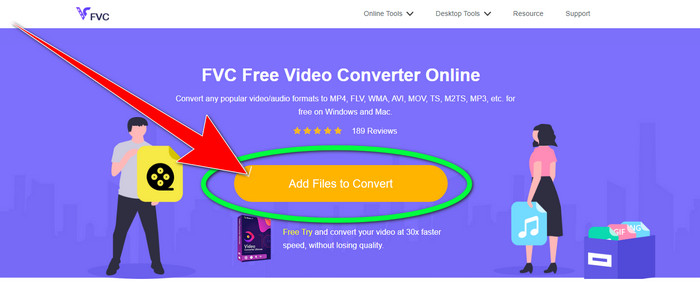
Step 1: Visit the FVC Free Video Converter Online. Click the color orange in the middle to add your WebM video file.
Step 2: Next, select the 3GP file as your chosen format. You will see the format options at the lower part of the interface.
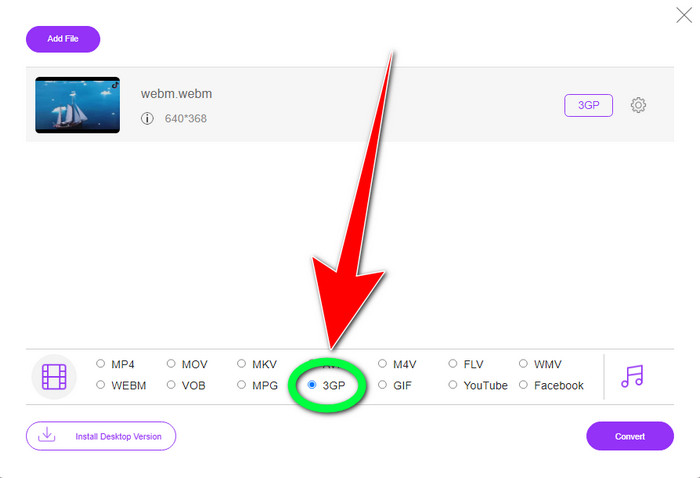
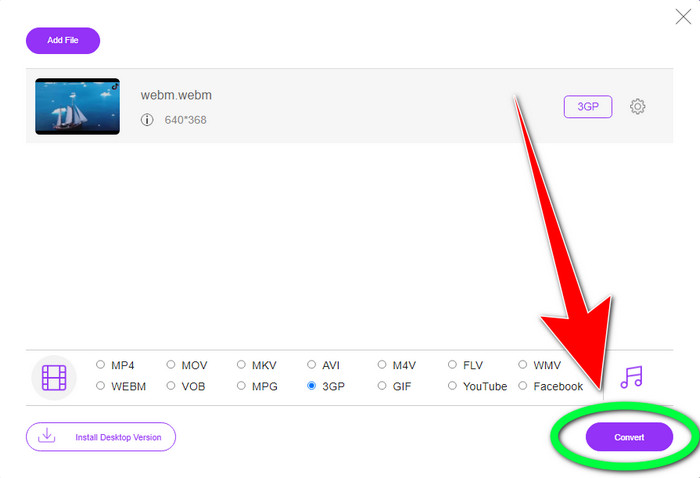
Step 3: After you choose the 3GP file format, you can already click the Convert button to save your video. This tool also enables you to convert WebM to DIVX.
使用转换
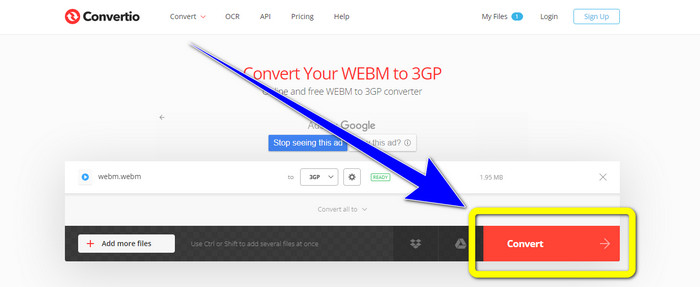
如果您仍在寻找另一个 WebM 到 3GP 的在线转换器,那么 Convertio 就是您要找的工具。它还具有转换文件的简单步骤。此外,您可以将文件转换为 37 种不同的视频文件格式,包括 HEVC、MPG、M4V、MKV、WMV、MP4、MOV、AVI 等。Convertio 不仅限于转换视频格式。您还可以转换不同的音频、图像和文档格式。
但是,100Mb 是此在线应用程序使用免费版本的最大文件大小。您必须获得付费版本才能拥有无限的文件大小并享受更多功能。但是,购买订阅是昂贵的。如果要使用 Convertio 将 WebM 文件转换为 3GP,请按照以下步骤操作。
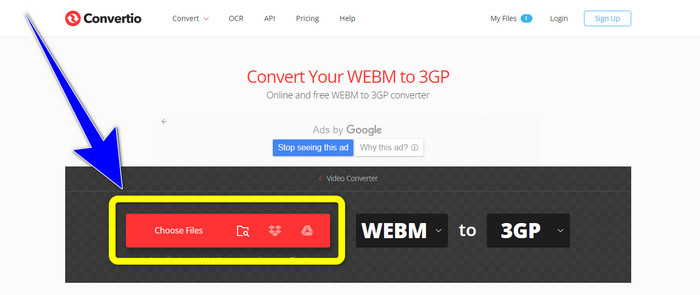
Step 1: Proceed to the Convertio website and press the Choose files button to add your WebM video file.
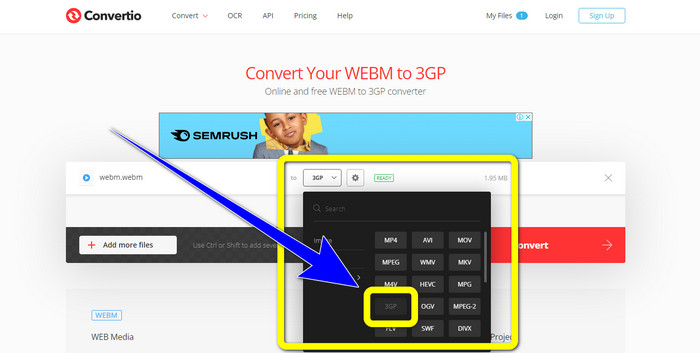
Step 2: After you have already added your WebM video file in Convertio, select the format options and the 3GP file format.
Step 3: For your last step, you can click the Convert button to convert your file. Then, save your final file on your computer for the conversion process. Click here to learn how to convert MPG to 3GP.
第 3 部分:关于 WebM 和 3GP 的信息
WEBM
With VP8 video and Vorbis audio compression, WebM is an open media container. The WebM format is commonly used to add media to web pages and is supported by all web browsers, including Opera, Mozilla Firefox, and Google Chrome. It offers good video playing quality and data compression characteristics. WebM video embedding occurs without hiccups or mistakes on website pages. The WebM format is intended to compete with the h.264 standards. Google is the owner of the extension's copyright.
3GP
For GSM-based, or Global System for Mobile Communications phones, the Third Generation Partnership Project created the 3GP multimedia container in 1998. The container is perfect for mobile phones because it uses less data, bandwidth, and storage. It is a common container for MMS files (Multimedia Messaging Service).
第 4 部分:关于将 WebM 转换为 3GP 的常见问题解答
我可以使用哪些最好的离线和在线转换器将 WebM 转换为 3GP?
Here are the tested and reliable applications to convert WebM to 3GP and different files.
1. FVC Free Video Converter Online
2. Video Converter Ultimate
3. Convertio
4. HitPaw Video Converter
5. Online Convert Free
6. AnyMP4 Video Converter Ultimate
7. OnlineConvert
3GP是好的视频格式吗?
对于 3G 网络电话,3GP 格式非常出色,因为它是专门为设备创建的。但是,就便携式媒体播放器或台式机上的流媒体而言,MP4 等格式更好,因为它可以支持比 3GP 更高分辨率的视频。
3GP的分辨率是多少?
3GP 视频有两种分辨率:第一种是 176x144,适用于所有支持 3G 格式的手机。另一个分辨率是 320x240,适用于宽屏手机、PSP、MP4 播放器和 iPad 触摸屏。
结论
In this article, we can conclude that there are many ways to convert WebM to 3GP. If you want the best way to convert video files online, use FVC Free Video Converter Online. Then, if you are looking for downloadable software, use Video Converter Ultimate. They are both reliable at converting various video formats.
-
 WebM 到 FLV 转换器免费在 Web 和桌面上的最佳选择
 在您的智能手机上播放 WebM 文件是否有同样的问题?然后花5分钟阅读这篇文章,了解如何将WebM转换为FLV。
-
 您不能错过的前 3 名最佳 WebM 到 WMV 转换器
 正在寻找将 WebM 文件转换为 WMV 文件的方法?我们尝试了当今市场上一些著名的转换器,并从中挑选出最好的和最容易使用的。
-
 您必须用来快速转换的最佳 WebM 到 MKV 转换器
 您是否正在寻找将 WebM 转换为 MKV 文件的方法?本文介绍了最好的 WebM 到 MKV 转换器供您尝试。
