如何为保存到桌面的视频添加字幕

Subtitles are the best way to translate dialogues of other countries into your native language to a text. This is created for those who don't understand the dialogues of the actor or actresses. Also, they improve the overall engagement of the audience to the film, series, and movies as well. But in some cases, the video you download has no subtitles or has a separate file for it. So, the best way to add subtitles to videos is presented in this article. So, keep on reading this write-up as we provide steps on how to insert your subtitles and what are the different tools you can use.

为视频添加字幕

第 1 部分。您可以用来为视频添加字幕的 4 种最佳工具

1. Video Converter Ultimate(Windows 和 Mac)

Did you know that you can add subtitles to Video Converter Ultimate? This phenomenal converter has a lot of different features that keep us amaze every time. The overall performance of this software is phenomenal in the line of converting files, editing, making, adding and more. But for now, we will now be going to explain how to add subtitles to a video on a perfect sequence of text. In addition, this tool supports all of the subtitle formats you can use to add it to your video. So, without any more delays, let's proceed on how to add the subtitles by following this step provided only for you below.

5 Easy Steps on How to Add Subtitles on your Video with the Video Converter Ultimate

Step 1. Download the software into your Windows or Mac drive. Next, install it and do the quick set-up then click finish.

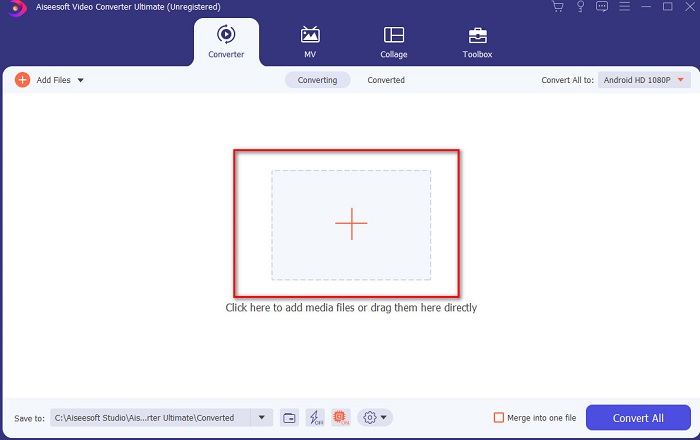
Step 2. Launch the tool, and click the plus button at the middle of the interface. Then locate the video on the folder and click Open.

在界面中间添加按钮

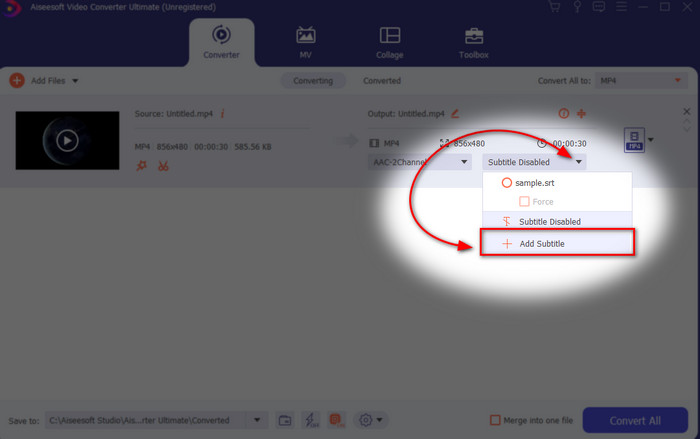
Step 3. On the interface, click the drop-down button for Subtitle and click Add Subtitle. Select the subtitle file on the file folder and click open.

单击字幕的下拉按钮

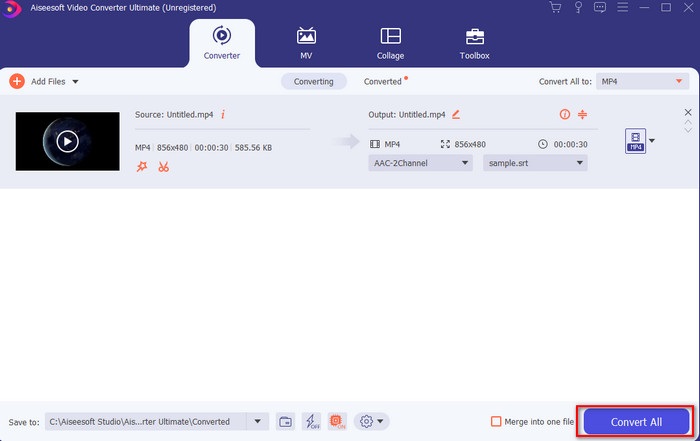
Step 4. After you add the subtitle you can now export it by clicking the Convert All.

添加字幕导出

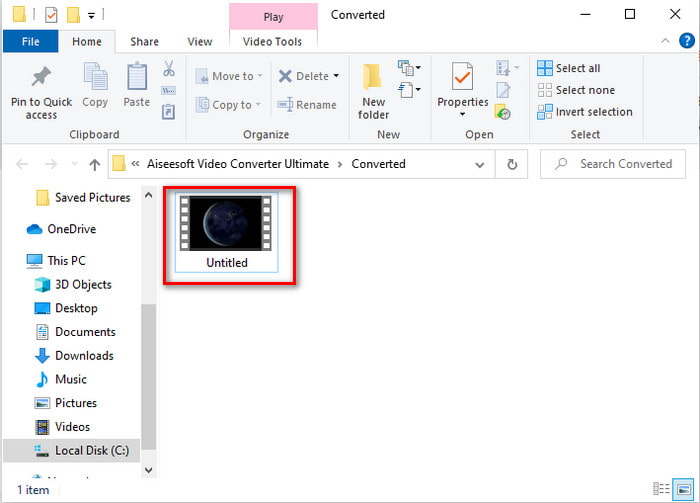
Step 5. The file explorer will pop up next to your screen with the video file that has a subtitle on it. Hit the file to watch and read the subtitle without delays.

在你的屏幕旁边弹出

相关内容:

How to Join MXF Files

How to Cut and Merge Songs Online

2. iMovie (Mac & iPhone)

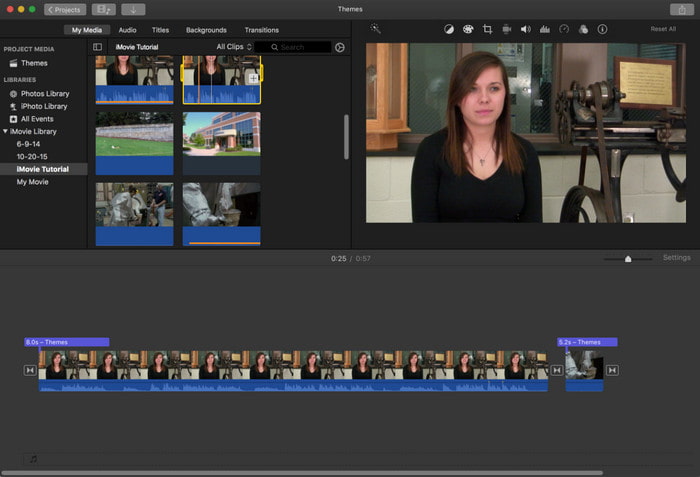
我电影

One of the best tools Apple can offer to their users, so adding subtitles to a video on iMovie is easy and free. This default tool is the best in editing and more on Mac, so adding subtitles here is easy as it is. But you can't use SRT subtitle format and add it to your video because this format is not supported by the iMovie. However, the overall performance of this Mac default editor is great to be used by anyone who is on a tight budget. Also, this tool offers a premium version that supports a lot of editing features you can use.

3. Adobe Premiere Pro(Windows 和 Mac)

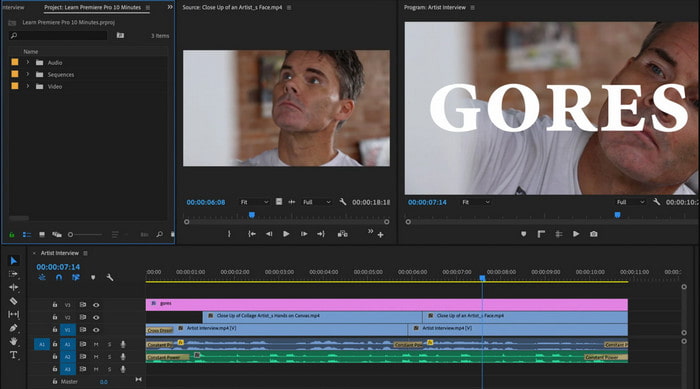
Adobe Premier Pro

Adobe Premiere Pro offers the best editing features used by professionals in the editing industry. Also, this tool can add SRT subtitle format unlike on iMovie you can't. Moreover, this tool supports almost all of the subtitle formats you can use. Although the tool seems flawless, the price of it is enormous and if you just want to add subtitles to video on Adobe Premiere Pro this is an okay choice but not the best. Especially if you are on a tight budget and don't want to spend a lot. Also, if you are a beginner this is not the best choice because you will need a lot of time to study it first.

4. Clideo(在线)

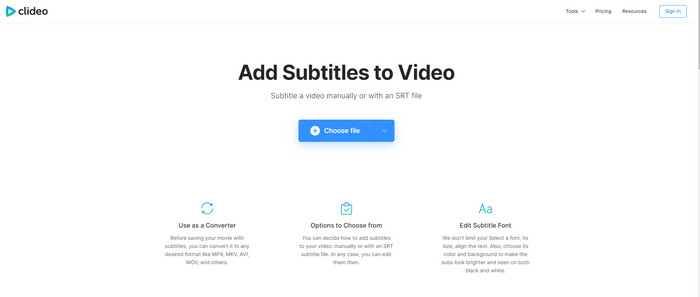
Clideo 字幕

Clideo supports editing features you can use for free if you have an internet connection. This tool can be used in all devices as long as you have a browser. Although the tool is flexible the subtitle format it supports is only .srt. So, if your subtitle is not in the format of SRT then you must manually do it here which is a bit of a hassle for you. Also, the process of adding the video here will depend on your internet. With that being said, if you have a slow internet then expect a lot of time waiting than adding subtitles to video online.

第 2 部分。 有关在视频上添加字幕的常见问题解答

有哪些不同类型的字幕格式?

在网络上,有很多不同的字幕格式,但您已经遇到的最常用的格式是 SRT、WEBVTT 和 SBV 字幕格式。因为这些是您可以轻松使用的最佳且灵活的格式,但还有 SSA、TTML、DFXB、TXT 等。虽然它们工作得很好,但提到的第一种字幕格式是您可以使用的最好的格式。

字幕和字幕的主要区别是什么?

尽管它们使用相同的格式,但字幕和副标题之间仍然存在主要差异。首先,视频中包含字幕,将演员的口语翻译成观众的语言。这最常用于那些可以听到音频但无法理解他们在说什么的人。虽然制作字幕是为了描述正在发生的事情,并通过声音效果等文字来描述。这些是为那些可以观看视频但听不清音频或耳聋的人设计的。

配音与低音;哪一个更好?

其他一些观众更喜欢配音而不是低音,而其他观众则相反。尽管它们是将媒体更好地翻译给观众的有力方式。配音和字幕有很多区别,例如字幕是音频的翻译版本,然后是视频上的文字。而配音则是被阅读困难的观众使用。因此,他们没有阅读上下文,而是使用配音来更好地专注于他们正在观看的内容。因此,这始终取决于您更喜欢使用哪个,如果您可以在观看字幕的同时设法阅读是最好的,但是如果您想对视频本身进行激光聚焦,则使用配音..

结论

Finally, we now understand and learn how to add subtitle files to your video permanently. As we make your searching easier and present different solutions for you to use. Still, it is undeniable that the Video Converter Ultimate is the best choice on the list. Because it supports all of the subtitle formats for you to use. So, instead of a huge amount of money to the other tool that has the same function or even better than the other tool. Then why don't you acquire it first and try it for yourself? To know what we are talking about.

优秀的

Rating: 4.1 / 5 (based on 123 votes)