


 视频转换大师
 屏幕录影大师
 视频修复
视频修复
 安全下载
安全下载100%将M4V文件大小从GB压缩为MB的免费方法
M4V文件格式类似于MP4,是Apple生产的出色视频容器。您可以在几乎所有流行的播放器上播放M4V文件,例如iTunes,QuickTime,VLC Media Player,RealPlayer等。但是有时候,您可能会发现M4V视频太大而无法存储或共享。在这种情况下,您需要减小文件的大小。
如果你还不知道如何压缩 M4V 文件,可以尝试下面这些方法。

第1部分。如何免费在线压缩M4V
如前所述,在YouTube,Facebook,Instagram或其他流媒体网站上编辑和共享大型视频文件可能有点困难。因为这些网站通常对您上传的视频有严格的大小限制。此外,大文件可能会占用您的计算机,磁盘驱动器,电话,闪存驱动器,存储卡等上的大量空间。
因此,当你有一个体积较大的 M4V 文件时,最好使用专业的视频压缩工具来缩小文件大小。如果你正在寻找一款免费的程序,不妨试试 FVC Free Video Compressor。它完全免费使用。更重要的是,它是一款在线压缩工具,这意味着你无需在电脑上安装庞大的软件,就可以将任意视频压缩到理想大小。
您可以在任何主流浏览器(例如Google Chrome,Mozilla Firefox和Microsoft Edge)上使用它。并且不会在压缩视频中添加水印。您甚至可以欣赏高画质的视频。
以下是有关如何在线压缩大型M4V文件的步骤。
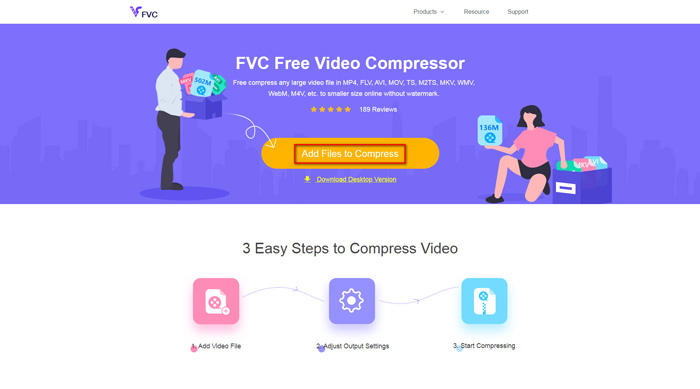
步骤 1: 在浏览器中进入 FVC Free Video Compressor 的官网。你会在横幅区域看到一个添加文件进行压缩按钮。点击它并按照提示在电脑上下载并安装 FVC 启动器。
步骤 2: 之后,选择你想要压缩的 M4V 文件。然后你可以拖动 大小 选项后面的滑块,轻松调整并找到你想要的精确文件大小。你也可以根据需要分别修改分辨率和比特率。
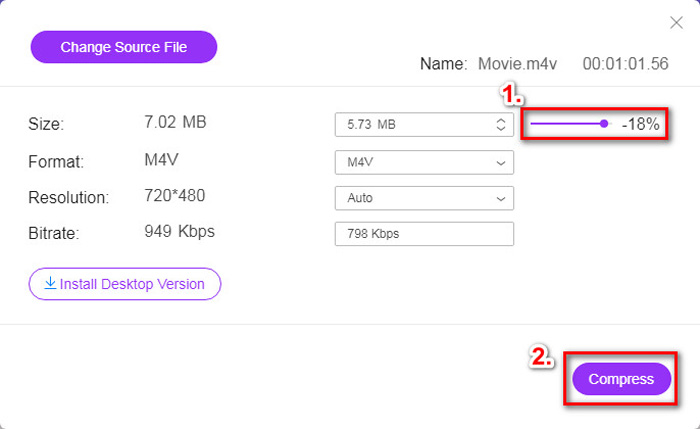
步骤 3: 如果你想把 M4V 压缩并转换为 MP4,那么在这里应将输出格式设置为 MP4。如果不需要转换格式,可以直接点击右下角的压缩。选择一个文件夹用于保存压缩后的视频,等待几秒钟即可获得你想要的视频。
第2部分。如何在Mac / Windows上减小M4V文件的大小
由于 M4V 是苹果开发的一种格式,你也可以使用苹果自带的播放器 QuickTime Player 在 Mac 上压缩 M4V 文件。此外,QuickTime Player 也提供了适用于 PC 用户的 Windows 版本。但需要注意的是,Windows 最新版本是 2016 年发布的 QuickTime 7.7.9。如果你想要的是一款更新的程序,可以尝试能够处理 4K 视频的 FVC Free Video Compressor。
无论如何,请按照以下步骤在QuickTime中减小M4V文件的大小。
步骤 1: 使用 QuickTime 打开需要压缩的 M4V 文件。
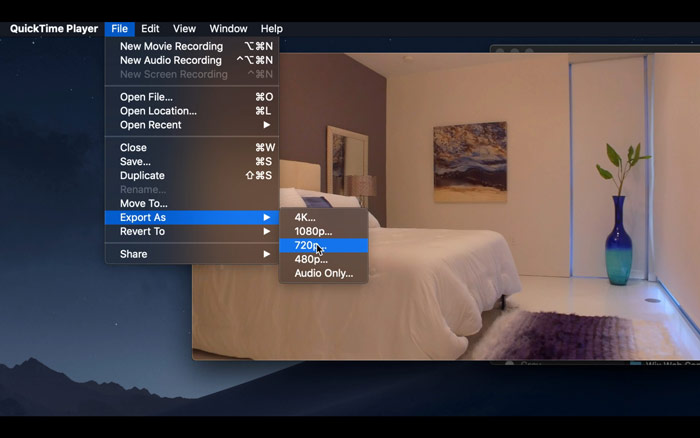
步骤 2: 在左上角找到文件菜单,点击并在列表中找到导出为选项。然后选择一个比原视频分辨率更低的选项来压缩视频。毕竟我们并不是要增加文件大小。
步骤 3: 如果你不打算修改保存路径,可以直接点击保存。请耐心等待视频导出完成。
第3部分。压缩M4V的常见问题解答
1.我可以将M4V重命名为MP4吗?
不可以,如果你的意思是仅通过把文件后缀名改成 .mp4 来把 M4V 转成 MP4,这是行不通的,因为它们的编码并不相同。你需要依靠更专业的工具来将 M4V 转换为 MP4。
2. YouTube是否接受M4V格式?
可悲的是,YouTube仅支持有限数量的不包含M4V的文件格式。因此,如果您要将M4V视频上传到YouTube,则应将其转换为YouTube支持的格式,例如MP4。
3.如何将多个M4V视频合并为一个?
如果你有多个 M4V 视频文件需要合并成一个,可以尝试使用 FVC Free Online Video Merger 来合并多个视频文件。
结论
现在你已经掌握了两种简单且免费的压缩 M4V 文件的方法。如果你是 Mac 用户,可以用 QuickTime Player 来减小视频体积。但如果你对 QuickTime 提供的固定分辨率不满意,或者你使用的是 Windows 电脑,那就可以试试 FVC Free Video Compressor。
-
 M4V到MP3转换器–从M4V文件提取MP3的4种最佳方法
 如果您想轻松地从M4V视频中提取MP3音频,则可以了解有关4种最佳M4V到MP3转换器的更多信息,以从文章中获取所需的音频文件。
-
 在电话/计算机上免费将QuickTime电影转换为MP4的4种方法
 阅读并获得4种在手机或计算机上免费将QuickTime转换为MP4视频的方法。您可以轻松地在Windows / Mac / iPhone / Android /在线上将文件格式从MOV更改为MP4。
-
 4个最佳MP4到M4V转换器,轻松将MP4视频转换成M4V
 当您需要将MP4更改为M4V文件时,应该从本文中了解有关两种格式之间差异的更多详细信息,以及最佳的MP4到M4V转换器。
