


 视频转换大师
 屏幕录影大师
 视频修复
视频修复
 安全下载
安全下载如何在线压缩WhatsApp的视频(100MB / 500MB / 1GB…)
为什么你无法在 WhatsApp 中发送视频?这是因为你的视频太大了。所有 WhatsApp 媒体文件的最大大小为16MB。也就是说,你单个视频的大小不能超过 16MB。
可以增加WhatsApp视频限制吗?好吧,答案是否定的。您可以在WhatsApp中发送多个视频。但是每个视频文件必须小于16MB。在此期间,您需要在线压缩视频以使用WhatsApp解决该问题。

有3种免费方法可以在线压缩WhatsApp的视频。在Windows,Mac,iPhone和Android上,您可以将视频大小减小到小于16MB。即使您想为WhatsApp压缩1GB甚至更大的视频,也可以在这里获得完美的解决方案。
第1部分:如何为WhatsApp批量压缩大型视频
FVC Free Video Compressor 应该是你进行 WhatsApp 视频压缩的首选工具。你可以免费压缩任意大视频文件,使其完美符合 WhatsApp 的文件大小限制。可调节的目标文件大小滑块和多种视频参数设置,让压缩 WhatsApp 视频更加轻松。
此外,你还可以直接将视频压缩并转换为 WhatsApp 支持的格式。WhatsApp 只支持发送MP4、MOV 和MKV 格式的视频。如果你想发送 AVI 或其他格式的视频,需要在此更改视频格式。这是你心目中的最佳视频压缩工具吗?下面是它的主要功能。
1.将任何视频压缩到WhatsApp视频限制,而不会损失质量。
2.没有最大视频大小限制。
3.批量压缩WhatsApp的视频。
4.视频压缩速度提高30倍。
5.将视频转换为WhatsApp视频格式。
6.调整视频分辨率配置文件以缩小视频大小。
7.安全,干净和直观的界面。
步骤 1: 访问 FVC Free Video Compressor 的在线网站。第一次使用该在线视频压缩工具时,点击Add Files to Compress(添加要压缩的文件)并安装其启动器。然后选择并导入你体积较大的视频文件。

步骤 2: 使用Size(大小)旁边的滑块控制输出视频的大小。你也可以点击Up 和Down 图标来调节适合 WhatsApp 的视频大小。
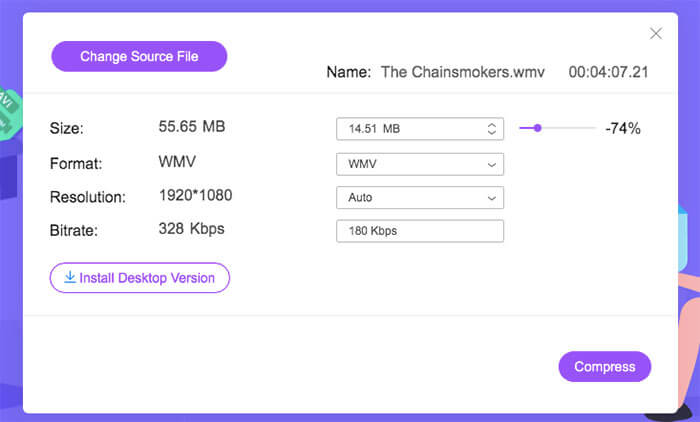
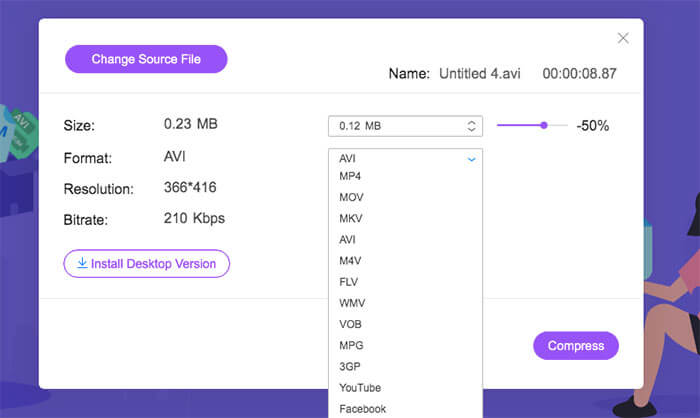
步骤 3: 若要转换为 WhatsApp 兼容格式,展开Format(格式)列表并选择输出格式。此外,你还可以调节视频分辨率。
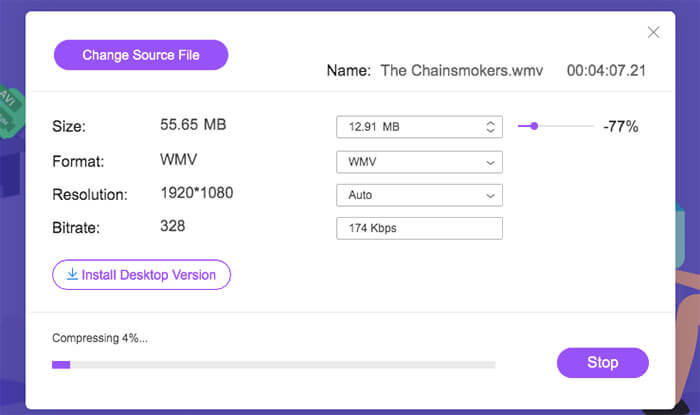
步骤 4: 点击Compress(压缩)并设置目标文件夹。最后,点击Open(打开),即可在线压缩适用于 WhatsApp 的视频。
第2部分:如何通过在线转换为WhatsApp压缩视频大小
Online-convert是一个免费的视频转换器和压缩器,您可以尝试。对于未注册的用户,您一次最多只能压缩5个视频。视频文件的总大小不得超过100MB。如果要为WhatsApp压缩100MB视频,可以按照以下段落所示进行操作。
步骤 1: 在浏览器中打开 Online-convert。你可以直接进入其convert for WhatsApp(转换为 WhatsApp)专区。
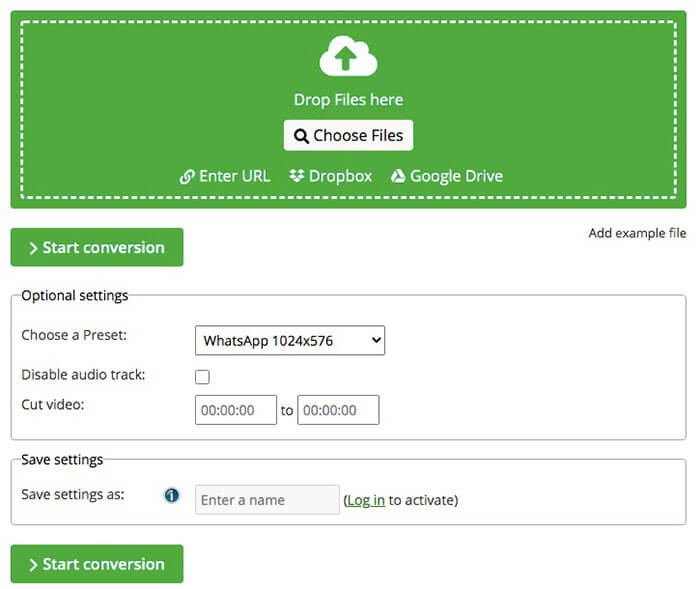
步骤 2: 从本地硬盘、URL、Dropbox 或 Google Drive 导入源视频。
步骤 3: 在Optional settings(可选设置)部分中,为 WhatsApp 选择一个预设。
步骤 4: 使用其视频裁剪工具剪掉不需要的视频片段。
步骤 5: 选择Start conversion(开始转换),即可在线压缩适用于 WhatsApp 的视频。
如果你想压缩 MP4 视频,可以查看详情。
第3部分:如何使用Clideo为WhatsApp压缩视频
Clideo能够减少云存储空间和本地文件中的视频文件大小。您可以免费将最大500MB的视频压缩为WhatsApp文件大小。此外,您还可以在Clideo中将视频转换为WhatsApp格式。但是,在线上传和压缩WhatsApp的视频大小需要几分钟。
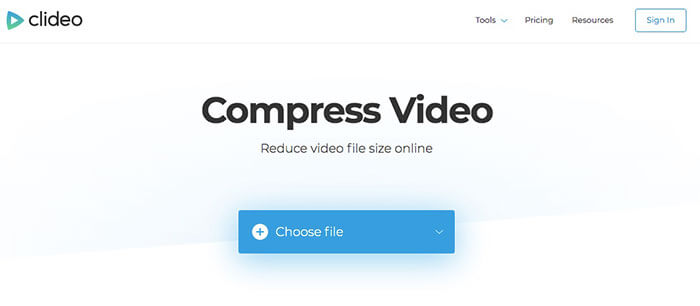
步骤 1: 打开 Clideo 在线视频尺寸调整工具。点击Choose file(选择文件)并导入你的视频。
步骤 2: 等待片刻,完成所选视频的上传。
步骤 3: 调整相关参数并查看预览窗口。你可以看到实时效果。
步骤 4: 如果视频体积已经减小,你就可以下载该视频并顺利通过 WhatsApp 发送。
第4部分:WhatsApp在线压缩视频的常见问题解答
是否可以为WhatsApp压缩4GB视频文件?
是。只要确保您的视频与最大文件大小限制不符即可。由于速度提高了30倍,您可以在短时间内成功地在线免费为WhatsApp进行压缩和转换视频。
您可以将1GB的视频压缩到10MB,以通过WhatsApp发送吗?
可以。你可以使用 FVC Free Video Compressor 中的Size(大小)滑块灵活减小视频体积。视频压缩比例可在 1% 到 99% 之间调节。
WhatsApp是否会降低视频质量?
不会。WhatsApp不会压缩您发送的视频的视频质量。您可以获得与原始文件相同的视频质量。
这是3种在线压缩WhatsApp视频文件的成熟方法。您可以减小视频大小并更改WhatsApp视频共享的视频格式。如果您的视频文件小于100MB,则可以选择任何免费的视频压缩器。对于压缩小于500MB的视频,Clideo和FVC Free Video Compressor是不错的选择。如果您的原始视频大于500MB,1GB或更多,则FVC Free Video Compressor是您最好的视频压缩器。
所有这些免费的视频压缩器都是免费的且易于使用。您可以选择任何一个为WhatsApp压缩视频。移动和桌面用户均可免费缩小大型视频文件。因此,您可以轻松地在Mac,Windows,iPhone和Android上为WhatsApp压缩视频。
-
 快速将MP4转换为VOB的3种免费方法
 如何在Windows PC和Mac上将MP4转换为VOB?为了解决这个问题,本文将分享3种最好的方法来帮助您将MP4免费转换为VOB。
-
 如何在线剪切和合并歌曲——您应该知道的 4 种最佳方法
 当您想在线剪切和合并歌曲以创建一段音乐时,您可以从文章中详细了解 4 种最佳在线工具来剪辑歌曲和合并文件。
-
 如何免费将MP4转换为MPEG
 这篇文章是将MP4转换为MPEG的分步指南。您可以根据需要使用前4个免费视频转换器将MP4更改为MPEG-1或MPEG-2。
