


 视频转换大师
 屏幕录影大师
 视频修复
视频修复
 安全下载
安全下载有效去除视频上的 Powtoon 水印的提示和技巧
你是否曾经制作出完美的动画作品,但在导出时,Powtoon 却自动加上了水印?如果你使用的是该应用的免费版本,这种情况就非常常见。水印是不是破坏了你的视频效果?别再担心了!你可以通过我们在这里介绍的不同方法来学习如何去除 Powtoon 水印。

部分 1. 如何在没有订阅的情况下删除 Powtoon 水印 [编辑选择]
FVC Video Converter Ultimate不仅仅是一个完整的视频解决方案,你还能在 Windows 或 Mac 上下载它,用来去除 Powtoon 的水印。即使你之前从未处理过视频水印,也依然可以在这里轻松上手。方便又高效,正是 FVC 希望你在使用这款软件时获得的体验,而他们也确实做得很好。所以,如果你想体验如何去除水印,可以按我们下面列出的步骤一步步操作。
使用 FVC Video Converter Ultimate 去除 Powtoon 水印的步骤:
步骤 1. 点击下方的下载按钮,在 Windows 或 Mac 上获取这款功能强大的视频编辑软件。下载完成后,安装软件,完成快速设置,然后启动软件。
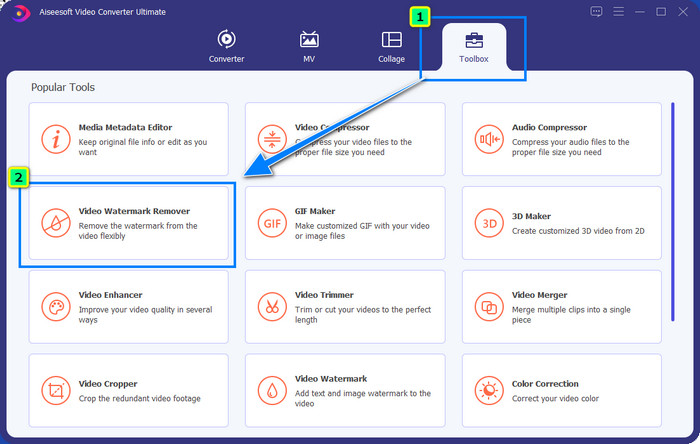
步骤 2. 在工具箱中,点击视频水印去除器,用它来去除 Powtoon 添加到你已编辑视频上的水印。
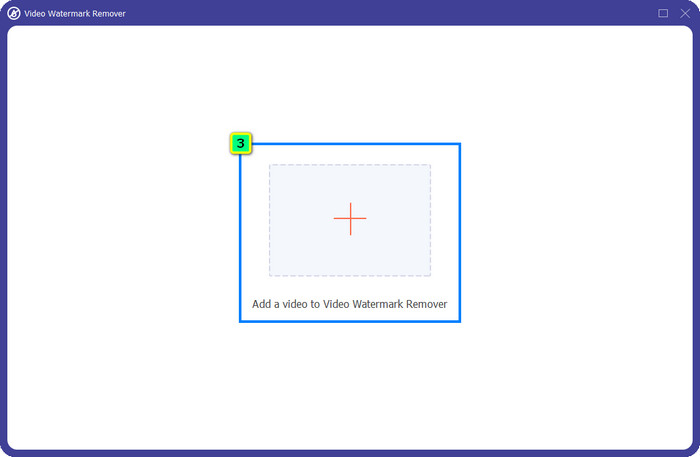
步骤 3. 点击+图标上传你想编辑的视频,在弹出的文件夹中选择视频文件,然后点击打开。
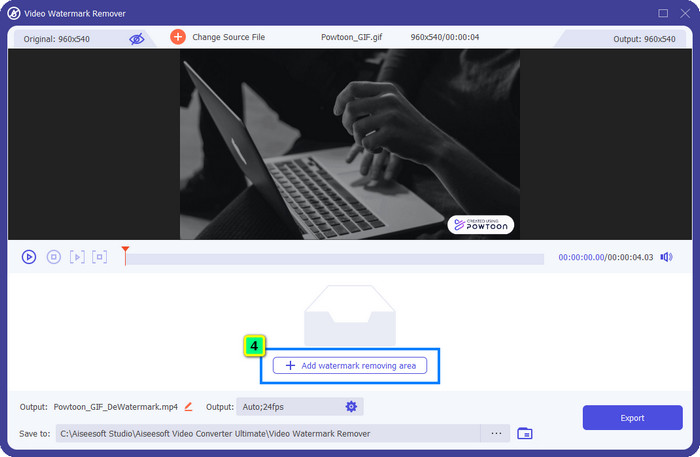
步骤 4. 点击添加去水印区域,然后将选框移动到水印所在位置;你可以根据需要调整选框大小和位置。
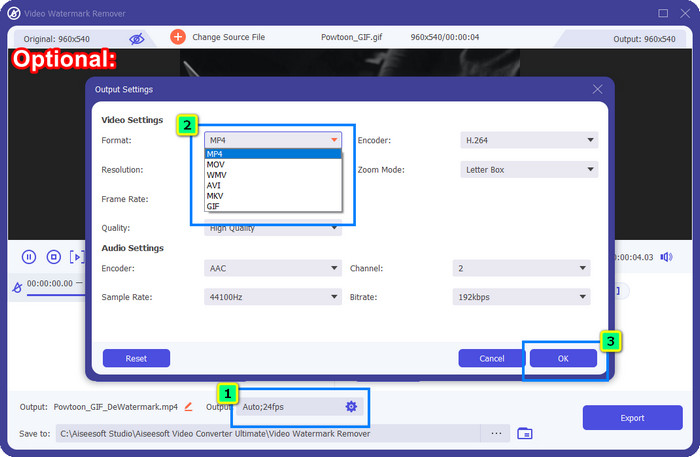
可选步骤: 想把最终成品保存为其他格式?点击输出中的格式选项,选择你想要的新视频格式。你还可以调整其他视频和音频参数,然后点击确定保存更改。
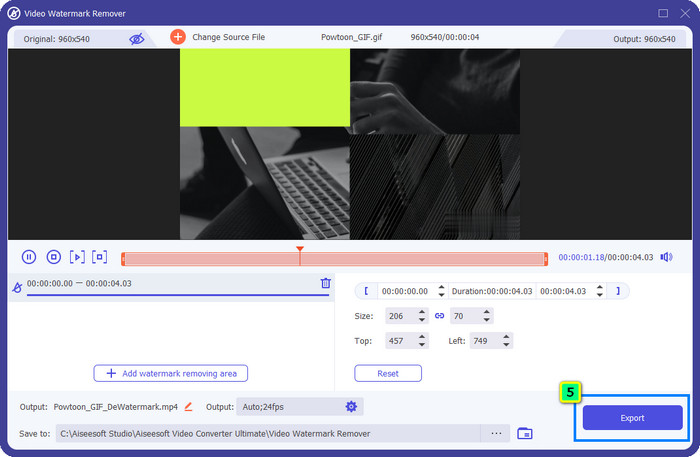
步骤 5. 点击导出按钮,将去除水印后的视频下载到本地。
部分 2. 如何使用订阅删除 Powtoon 水印 [基于计划]
Powtoon 有水印吗?是的,当您使用免费版本时,它确实会添加水印。但如果您购买 Pro 或 Pro+,您可以导出不带水印的最终输出。因此,如果您想知道如何购买软件来欣赏您编辑的无水印视频,请按照以下步骤操作。
如何购买 Powtoon Pro 和 Pro+ 计划的步骤:
步骤 1. 打开 Powtoon 官方网站并点击价格,查看专业版的价格方案。
步骤 2. 选择你偏好的套餐,Pro 或 Pro+,然后点击购买方案。
步骤 3. 填写所需的账单信息,继续选择付款方式,然后点击安全付款完成购买。
部分 3。 如何免费在线删除 Powtoon 水印 [网络服务]
1. Media.io - Watermark Remover
Media.io - Watermark Remover可以免费去除 Powtoon 水印。它可以在任意网页浏览器中使用,也就是说,你无需下载安装即可使用该工具。尽管该水印去除功能是免费的,但你仍然需要有稳定且较快的网络连接才能顺畅使用。与我们前面介绍的第一款去水印工具相比,它在上传与下载时会花费更长时间。尽管如此,这款软件仍然是很不错的选择,如果你想知道怎么用它操作,可参考以下步骤。
使用 Media.io 去除 Powtoon 水印的步骤:
步骤 1. 打开该网页,点击选择文件添加你想去除水印的视频。根据你的网络情况,上传过程可能会比较耗时,请耐心等待加载完成。
步骤 2. 点击添加区域,并将去水印区域放置到水印所在的位置。
步骤 3. 点击“导出”即可将编辑好的 Powtoon 视频保存到本地,如此简单。
2. Kapwing
Kapwing是另一款专业的在线工具,它可以通过裁剪的方式去除视频上的水印。此外,它还提供了其他视频编辑功能,帮助你制作出几乎能与 Powtoon 媲美的精彩视频。与我们前面提到的其它去水印方案不同,这款软件是通过裁剪掉带有水印的区域来处理,因此会改变视频的画面尺寸。如果你不介意剪掉一部分画面,可以按照下列步骤来去除 Powtoon 水印。
使用 Kapwing 裁剪去除 Powtoon 水印的步骤:
步骤 1. 在浏览器中搜索并打开该工具。
步骤 2. 点击添加媒体,导入你想在此处进行裁剪的视频。
步骤 3. 添加素材后,点击裁剪,根据你偏好的画面大小调整裁剪比例。
步骤 4. 如果对最终效果满意,点击完成裁剪以保存输出。
第 4 部分。有关如何删除 Powtoon 水印的常见问题解答
在 Powtoon 上提高视频分辨率的最佳平台是什么?
有成千上万种方法可以提升 Powtoon 视频的分辨率,但有些方法并不能达到你的预期效果。所以,与其盲目尝试,不如把繁琐的工作交给我们,你只需花几分钟读完这篇文章即可。从中挑选出最适合你需求的8 款视频分辨率转换工具之一即可。
如何在视频中添加水印?
给视频添加水印的最佳方式是借助专业软件来完成,不管是文字、Logo、图章、日期时间等都可以。如果你有空,不妨了解一下在不同平台上如何轻松给视频添加水印。
为什么 Powtoon 贵?
Powtoon 之所以变得昂贵,是因为它提供的动画编辑是您在其他视频编辑器上无法拥有的,无论是在线还是离线。它也在旅途中,因此您无需安装启动器即可开始使用它。然而,它的价格对于许多人来说是无法承受的。尝试使用最好的视频编辑器替代品 FVC Video Converter Ultimate,而不是使用 Powtoon 免费版本并带有水印。它提供了许多您一定会喜欢使用的特性和功能。
结论
你是可以在没有水印的情况下从 Powtoon 导出视频的,但前提是你需要购买付费套餐,才能保存没有任何水印的编辑成品。不想花钱买套餐?那就试试我们文中介绍的在线去水印工具吧。网络状态不理想?那么我们更建议你使用FVC Video Converter Ultimate,以更快速、专业的方式去除视频上的水印。与成千上万款软件相比,FVC 视频编辑器在去除视频中各种元素方面提供了极其出色的解决方案。你还能借助该软件提供的众多功能与选项,对视频进行进一步调节与优化。
-
 使用简单的步骤轻松从 PDF 中删除水印
 按照这些简单的步骤从 PDF 中删除水印。了解如何使用这些神奇的工具轻松地从 PDF 文件中删除水印。
-
 从毕业照片中去除水印的简单方法
 想知道去除毕业照水印的最佳方法吗?通过阅读本文,您将能够知道如何轻松去除毕业照片上的水印。
-
 如何使用 Final Cut Pro 从视频中删除水印 [完整指南]
 视频上的水印有问题吗?不多说了,因为我们提供了有关如何使用 Final Cut Pro 从视频中删除水印的教程。
