


 视频转换大师
 屏幕录影大师
 视频修复
视频修复
 安全下载
安全下载如何在 PC、iPhone 和在线上编辑视频亮度
你是否拍摄过视频,却因为光线不好而对结果不满意?视频的光线会直接影响我们的观影体验。因此,在视频的明暗之间找到完美的平衡至关重要。假设你有一个视频,并且出于某些原因想要调整它的亮度,我们可以帮到你。在本篇指南中,我们提供了几种可行的方法。学习如何轻松且专业地调整视频亮度。
第 1 部分:调整视频亮度的最佳方法
Video Converter Ultimate 是一款适用于 Windows 和 Mac 的多功能视频转换与编辑解决方案。除了其将媒体文件进行格式转换这一主要功能外,Video Converter Ultimate 还内置了一个工具箱套件。它拥有二十多种视频编辑工具,其中就包括“颜色校正”功能。颜色校正功能允许你编辑视频的亮度、对比度、饱和度和色调,以获得理想的输出效果。在调整完必要的视频效果后,你还可以在保存前配置视频参数设置。你可以将视频另存为全新格式,例如 MP4、MOV、WMV、AVI、MKV 和 GIF。为确保视频仍然保持良好画质,它还提供了以 4K 分辨率保存视频的选项。
步骤 1. 在电脑上下载工具
首先,在电脑上免费下载 Video Converter Ultimate。完成安装后,启动该程序。
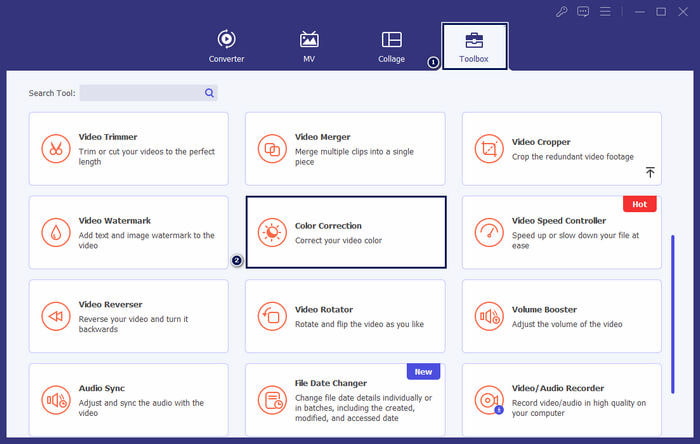
步骤 2. 前往“工具箱”选项卡
在工具主界面顶部菜单栏中选择工具箱选项。然后在其中查找并选择颜色校正工具。
步骤 3. 添加视频
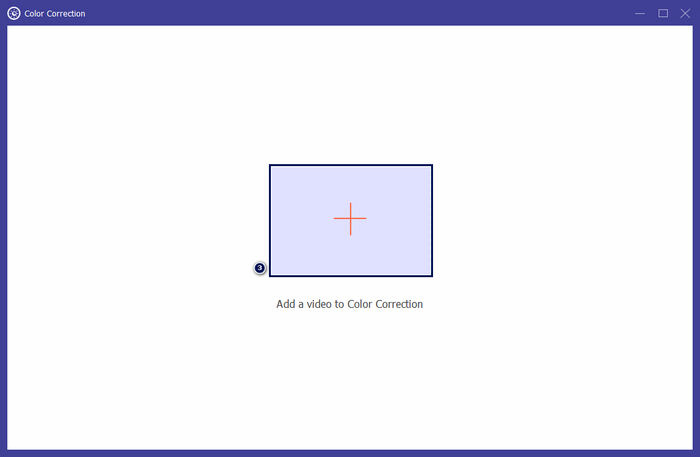
在弹出的窗口中,点击+按钮,添加你想要调整亮度的视频。
步骤 4. 调整视频亮度
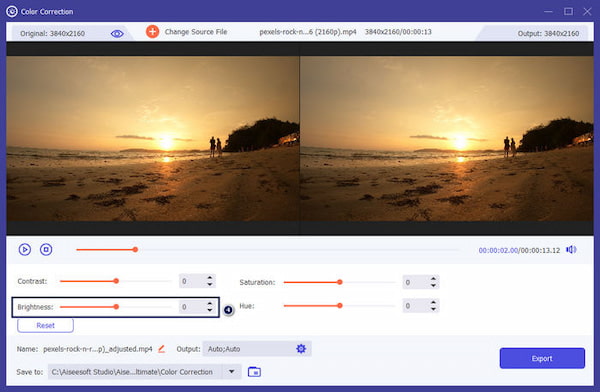
在亮度部分拖动滑块,直到呈现出你满意的效果。你也可以选择性地修改其他视频效果,例如对比度、饱和度和色调。完成后,点击导出保存你的作品。
对于寻求调整视频亮度的简单解决方案的用户来说,Video Converter Ultimate 是一个可行的解决方案。它是一个完整的程序,包含您编辑所需的一切。探索该工具将为您提供更多选项来满足您的编辑需求。
第2部分.在线调整视频亮度
Kapwing 是一款基于浏览器的视频编辑工具,可让用户执行各种视频编辑任务。它允许您在线调整视频亮度和其他视频效果,而无需下载软件。 Kapwing 提供各种工具和功能来满足您的编辑需求,包括修剪、裁剪、添加文本等。
步骤 1. 使用浏览器访问 Kapwing 官方网站。
步骤 2. 点击Add Media,添加你想调整亮度的视频。
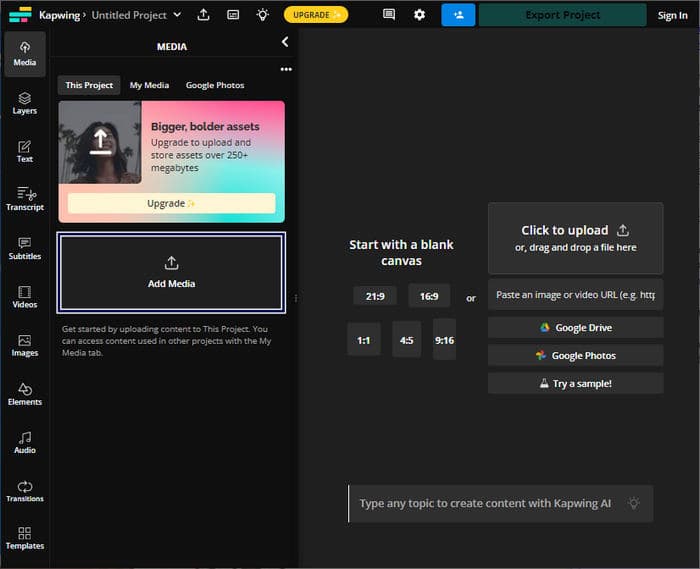
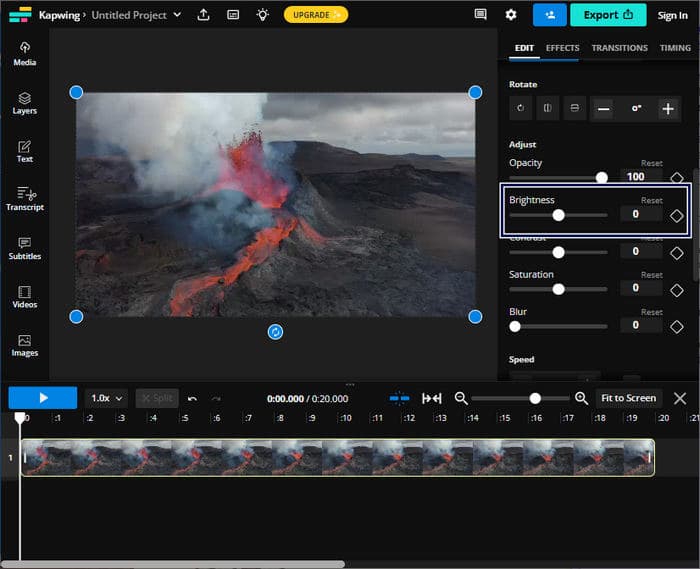
步骤 3. 将已上传的视频拖入时间轴,然后点击该视频以显示相关工具。
步骤 4. 在右侧面板中调整Brightness(亮度)滑块。
步骤 5. 调整完视频亮度后,点击Export Project导出并保存文件。
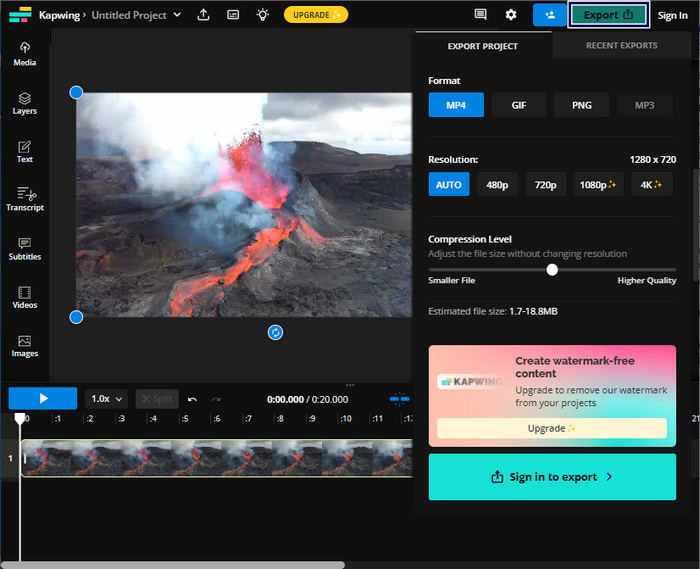
Kapwing 是调整视频亮度的首选,无需在计算机上下载软件。由于它是一个在线平台,因此不需要用户进行任何下载。但是,它不允许您使用免费版本使用高级功能。
第 3 部分:在 iPhone 上调整视频亮度
照片应用程序是在 iPhone 上调整视频亮度的便捷选项。它允许您进行基本的视频调整,而无需第三方应用程序。这个内置工具可以方便地快速调整以增强或调暗视频中的灯光。编辑后,编辑后的视频将保留在照片库中,以便轻松访问和共享。
步骤 1. 在 iPhone 上找到并打开“照片”应用。
步骤 2. 找到你想要调整的那段视频,并点按打开。
步骤 3. 在右上角点按编辑按钮。
步骤 4. 点按调整按钮,然后找到亮度选项。
步骤 5. 拖动参数滑块,直到获得理想的光线效果。
步骤 6. 完成亮度调整后,点按完成。
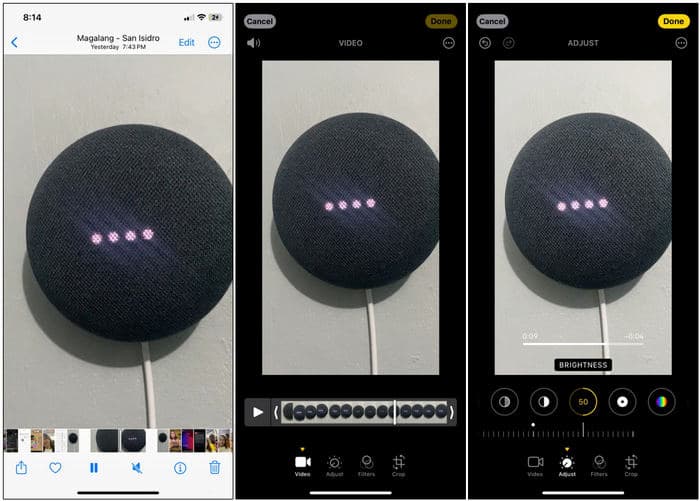
iPhone 上的照片应用程序是进行基本视频亮度调整的便捷选项。但是,如果您需要高级视频编辑功能,则可能需要使用第三方视频编辑应用程序。
第 4 部分:使用 Premiere Pro 调整视频亮度
Premiere Pro 是一个视频编辑平台,提供用于视频编辑、色彩校正和视觉效果的高级工具。当您在 Premiere Pro 中调整视频亮度时,您可以控制曝光、增强素材的外观并纠正照明问题。它提供对亮度和其他视频元素的细粒度控制。
步骤 1. 启动 Premiere Pro 并导入你要调整的视频。在项目面板中选择从剪辑新建序列,以创建与该剪辑设置匹配的序列。
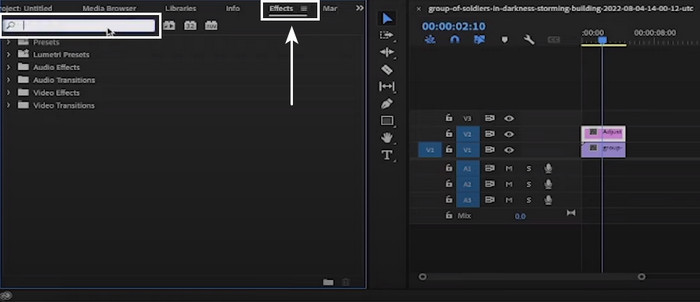
步骤 2. 在效果面板中搜索Lumetri Color。将Lumetri Color效果拖入时间轴面板中的视频剪辑上。
步骤 3. 在效果控件面板中,点击基本校正旁边的箭头展开选项。使用曝光滑块来增加或降低视频的亮度。
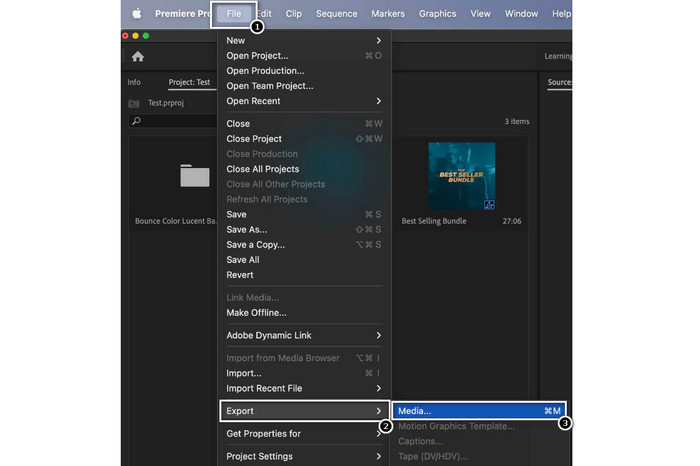
步骤 4. 调整完成后,依次进入文件菜单,然后选择导出,再选择媒体,并配置导出设置。
Premiere Pro 是一款著名的视频亮度调整工具,并提供各种专业编辑工具。请注意,Premiere Pro 对于初学者来说可能很复杂,并且可能需要一些时间来熟悉它。
延伸阅读:
第 5 部分. 有关如何调整视频亮度的常见问题解答
如何在 After Effects 中更改视频的亮度和对比度?
在 Adobe After Effects 中,您可以通过将亮度和对比度效果应用到视频图层来调整视频的亮度和对比度。此效果允许您控制亮度和对比度参数,以获得所需的视频外观。
如何增强 iPhone 上的暗视频效果?
您可以使用“照片”应用来增强 iPhone 上的暗视频。在“照片”应用中打开视频剪辑,点击“编辑”,然后选择“灯光”图标。您可以从那里自定义曝光、高光和阴影以使视频变亮。
为什么视频比照片暗?
由于捕获和处理方式的差异,视频通常比照片显得更暗。与照片相比,视频的帧速率较低,每帧的曝光时间较长。它可能会导致每帧捕获的光线减少,从而导致镜头变暗。
结论
综上所述,利用文中介绍的工具和技巧,调整视频亮度已经变得相当简单。你现在已经掌握了提升视频画面质量的基本思路,同时也能纠正曝光问题,更有效地传达想要表达的氛围或信息。无论你是使用专业级软件进行精细控制、使用手机应用进行快速调整,还是借助在线编辑平台图方便,修改视频亮度这一流程都是视频制作中必不可少的一环。
-
 在不到一分钟内增亮视频的有效解决方案
 通过学习如何使用最佳的视频增亮程序使黑暗视频可见,不再与黑暗视频作斗争。请继续阅读。
-
 视频色彩校正调色板的背后是什么?终极指南
 解锁视频色彩校正的秘密!本指南揭示了视频色彩校正调色板背后的工具、流程和技术。
-
 视频过滤器:使用桌面上的过滤器和效果增强您的视频
 最好的视频滤镜是什么?如何添加视频滤镜?您所有的问题都将在这篇文章中找到答案。你在等什么?单击此。
