


 视频转换大师
 屏幕录影大师
 视频修复
视频修复学习使用 Premiere Pro 通过 2 个 Premiere 替代方案加速视频
Premiere Pro 是由 Adobe 开发的高端专业视频编辑软件之一,其性能也获得了众多使用者的称赞。事实上,我们将教你如何借助这款工具来加速你的视频,这样你就不需要一开始就经历大量繁琐的设置或其他操作。现在,就让我们来教你如何在 Premiere Pro 中加速视频,以及有哪些可替代它的方案。

第 1 部分。如何在 Premiere Pro 中加速视频
你会想购买并使用的顶级视频编辑器就是 Adobe Premiere Pro。这款工具是专业用户绝对会喜欢的全能型软件,因为它可以轻松应对高强度的剪辑工作,非常适合专业级创作。如果你想要令人印象深刻的成品,那就必须学会使用这款工具。不过,学习 Premiere Pro 会非常耗费时间,所以如果你是个忙碌的人,它应该是你最后的选择。但如果你渴望学习并且有充足的空闲时间,那你一定要试试它。
此外,如果您想使用此工具,则必须花费大量资金,因为与其他视频编辑工具相比,它确实非常昂贵。所以现在,如果您想了解如何使用 Adobe Premiere Pro cc 2018 或更高版本来加速视频,请按照以下简化步骤操作。
如何在 Adobe Premiere Pro 中加速视频的步骤:
步骤 1. 在 Adobe 官方网站购买并下载 Premiere Pro。然后启动软件,开始进行视频加速。
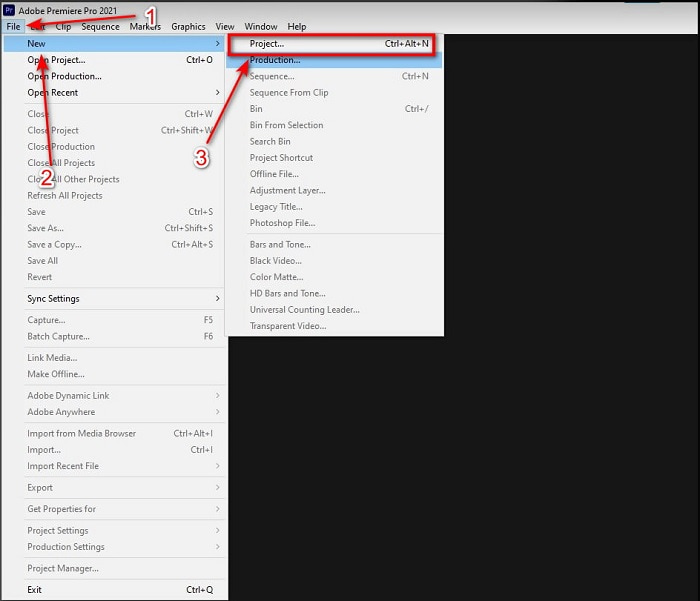
步骤 2. 点击File(文件),接着选择New(新建)和Project(项目),等待弹出类似这样的界面后,点击OK继续。打开文件夹找到视频文件,将其拖拽到Media Browser(媒体浏览器)中,再将其放到Timeline(时间轴)旁边。
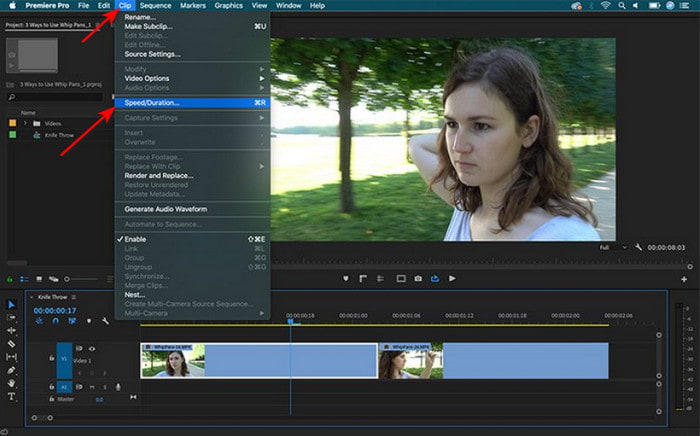
步骤 3. 点击你已插入到时间轴上的视频,在顶部点击Clip(剪辑)。然后选择其下的Speed/Duration(速度/持续时间)并点击。根据你的需要调整速度百分比,点击OK保存加速设置。最后点击Export(导出)按钮保存文件。
第 2 部分。 2 加速视频的最佳 Premiere Pro 替代方案
1. Video Converter Ultimate
如果你正在为如何加速视频而烦恼,那么这款工具就是解决方案——向你隆重推荐 Video Converter Ultimate。与一般的视频编辑器不同,这款强大的工具集视频编辑、格式转换、GIF 制作、增强、倒放、加速等多种功能于一身。很多用户已经非常喜欢这款软件,因为它提供了类似 Adobe Premiere Pro 的高级功能,却以更简化的形式呈现。除此之外,我们几乎找不到另一款既拥有高级功能又如此易用的工具。基本上,没有任何软件能完全比得上 Video Converter Ultimate。虽然它是付费软件,但绝对物超所值,而且价格相当便宜。所以,现在如果你想了解如何通过 Premiere Pro 的替代方案来加速视频,请按照下面的步骤操作。
借助 Video Converter Ultimate 加速视频的步骤:
步骤 1. 在电脑上下载这款软件,然后安装完成以继续。
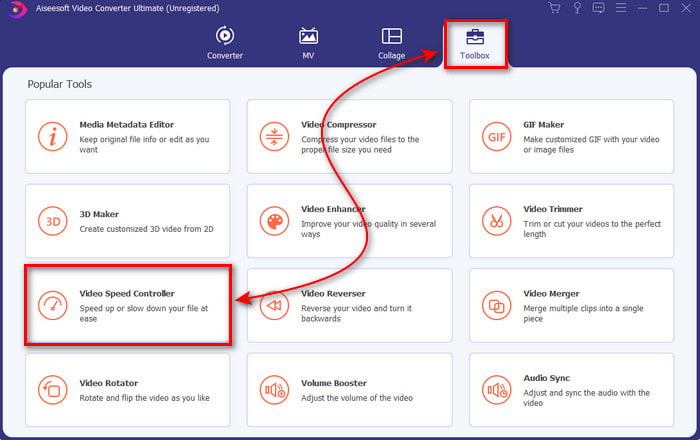
步骤 2. 启动软件,点击Toolbox(工具箱),找到“Video Speed Controller(视频变速器)”。
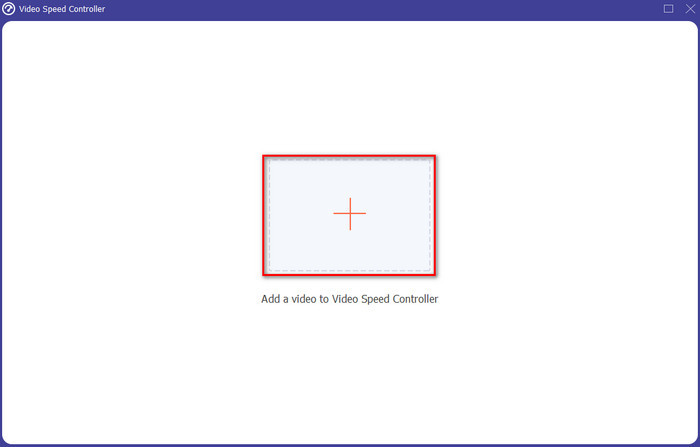
步骤 3. 要添加你想加速的视频,点击“+”按钮。然后在文件夹中找到该视频,点击Open(打开)将视频导入。
步骤 4. 通过点击各个倍率选项框来选择你希望的视频播放速度。如果你已经对加速后的视频速度感到满意,点击Export(导出)即可将其直接保存到电脑。
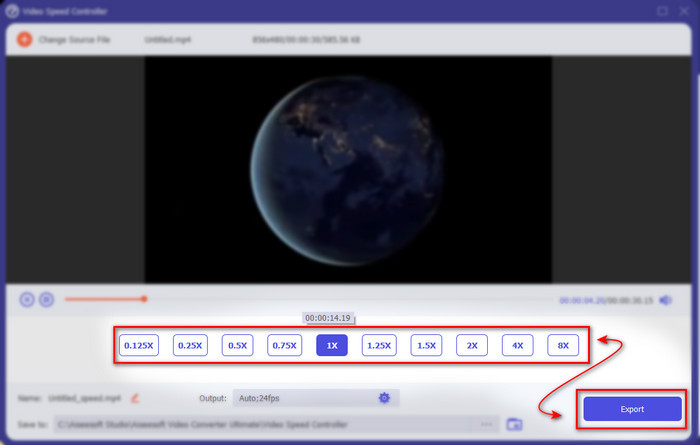
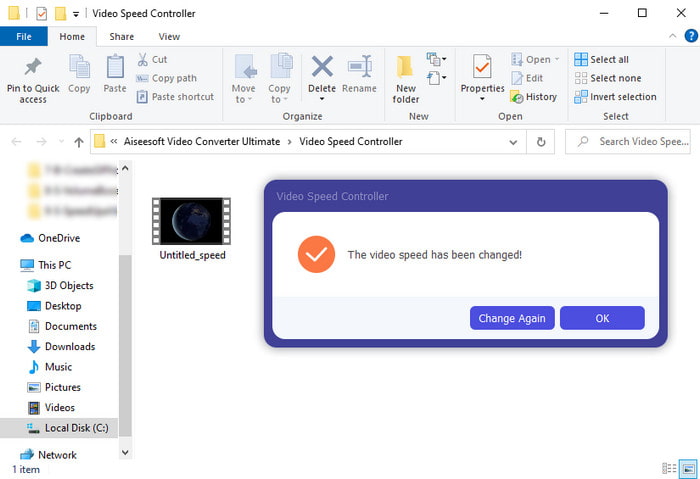
步骤 5. 当导出过程完成后,会自动弹出一个文件夹。点击刚才被加速的视频文件,你会惊喜地发现视频在加速后依然没有画质损失。
2. iMovie
如果你使用的是 Mac,那么这款工具是必备的,因为它在 Mac 上已经预装。iMovie 是一款非常受欢迎的视频编辑器,你一定会喜欢它所提供的免费功能。如果你是 Windows 用户,那就不要指望能使用这款工具,因为它并不支持 PC。尽管 iMovie 免费,但仍然存在一些不足,例如不少你可能想用的高级剪辑功能在这款软件中并不可用。不过,如果你的预算有限,那么对 Mac 用户来说它就是不错的选择。此外,如果你想实现类似Premiere Pro 加速视频的效果,可以参考下面的步骤。
如何在 iMovie 中加速视频:
步骤 1. 在 Mac 上打开 iMovie,点击File(文件),再选择Import Media(导入媒体),选中要导入的文件继续。
步骤 2. 将刚导入的视频拖动到Timeline(时间轴)。然后点击时间轴中的视频文件以便调整其速度。在右侧点击Speed(速度),再从下拉列表中选择你想应用的播放速度。
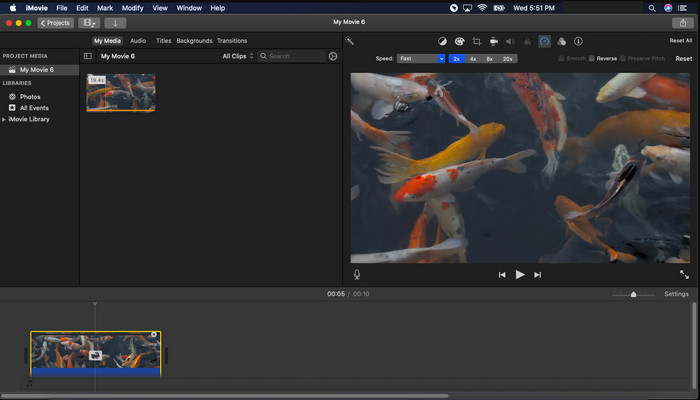
步骤 3. 应用加速效果后,点击Export(导出),再选择Export File(导出文件),即可保存加速后的视频版本。
第 3 部分。有关 Premiere Pro 加速的常见问题解答
我可以在 Premiere Pro 上放慢视频速度吗?
当然可以,只需按照我们前面介绍的相同步骤操作,只是将速度百分比调低到 100 以下,就可以让视频变慢。或者你也可以点击这里,详细了解如何减慢视频速度。
在 Premiere Pro 上设置视频的速度有多快?
您可以为视频速度设置的最大百分比为 10,000%。因此,如果您想知道它是否真实,请自行检查并将速度设置为10,000%。
Adobe Premiere Pro 是否有系统要求?
实际上是的,Adobe 软件需要有最低要求才能正确使用该工具。例如,在下面的列表中: GPU:Intel® i5-4590 / AMD FX 8350 等效或最新版本;内存:8GB 内存甚至更高;操作系统:Microsoft Windows 或 macOS;显示器应为 1920 x 1080 或更高。
结论
当我们接近尾声时,我们现在更清楚的是,即使是简单的加速也可以通过 Premiere Pro 来完成。但是,premiere pro 非常昂贵,因此我们列出了一些您愿意用来加速的负担得起的软件。喜欢 Video Converter Ultimate,因为即使您的计算机是低端计算机,该软件也提供高端编辑功能。因此,如果您想知道如何在 Premiere Pro 中轻松加速视频,请下载 Video Converter Ultimate 以体验相同的功能,但使用简单的版本。
-
 [4 种方法] 如何轻松加快在线视频速度
 你想加速在线视频吗?阅读这篇文章,您可以了解更多有关以不同方式加速视频的信息。
-
 加速 MP4 格式视频的更简单方法 [离线和在线]
 您想加速您的视频,但它是 MP4 格式吗?本文可能会帮助您了解如何在线或离线加速视频的差异。
-
 2021 年具有速度控制器的前 4 名视频播放器
 每次播放视频时,您没有注意到每个媒体播放器的播放速度吗?本文适合您全面了解带速度控制的视频播放器。
