


 视频转换大师
 屏幕录影大师
 视频修复
视频修复
 安全下载
安全下载如何删除设备上的 ManyCam 徽标的最简单方法
你想学习如何在 Windows 和 Mac 上去除 ManyCam 标志吗?如果是这样,本文将为你提供多种必须尝试的去除视频水印和标志的方法。播放带有水印或标志的喜爱视频多少有点烦人。你既无法好好欣赏视频,还会被分散注意力。有时甚至因为水印、图片、文字或标志而看不清视频的某些部分。好在你可以使用带有水印去除功能的优秀软件,把视频中这些不必要的对象去掉。
在这些应用程序的帮助下,您将永远不会再失望。如果您有兴趣了解删除 ManyCam 徽标的最佳方法,您最好的选择是阅读本文。

第 1 部分:如何通过激活订阅来删除 ManyCam 徽标
如果你想学习如何去除 ManyCam 的水印,那么你来对地方了。ManyCam 是一款同时支持 Windows 和 Mac 的直播软件。通过这款应用,你可以在各个平台上创建独特的直播内容、录制教程、商业演示、游戏直播等。此外,它还有许多实用功能可供使用,比如添加音乐、录屏、添加绿幕、直播游戏等。对内容创作者来说,ManyCam 非常有价值也很实用。它提供了他们所需的重要工具,如投屏和屏幕录制,使创作过程更加方便。
但是,每次创建或编辑视频时,视频的下部都会出现一个 manycam 标志,这很令人不安。幸运的是,您可以通过激活对 ManyCam 的订阅来删除此徽标。请按照以下步骤了解如何通过激活订阅来删除 manycam 徽标。
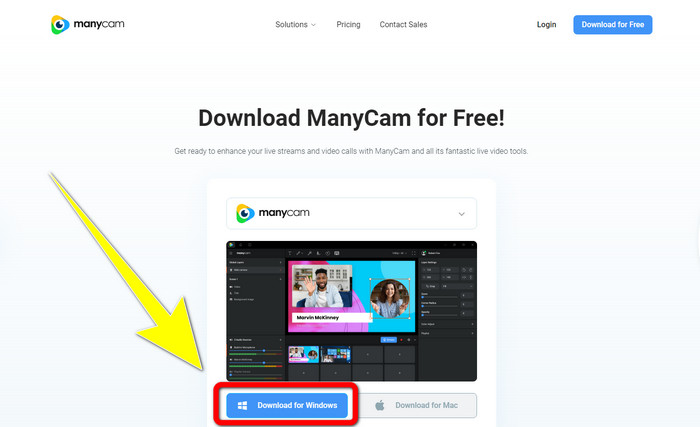
步骤 1: 要下载 ManyCam,点击Download for Windows(下载 Windows 版)按钮。然后继续完成安装过程。
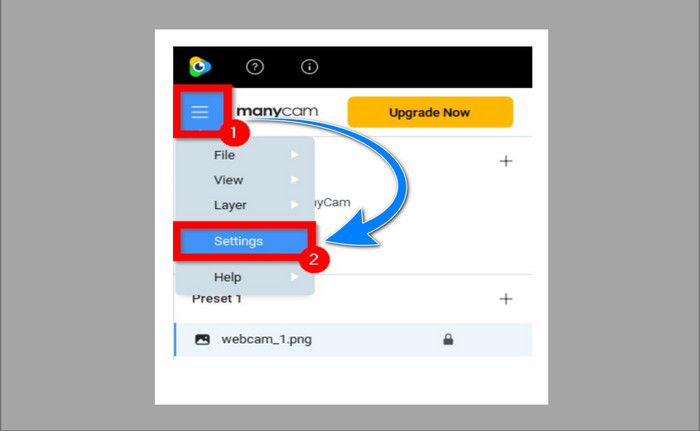
步骤 2: 在电脑上启动该程序,点击 ManyCam 的三横线图标,然后进入Settings > Account(设置 > 帐号),登录你在购买订阅后创建的账号。
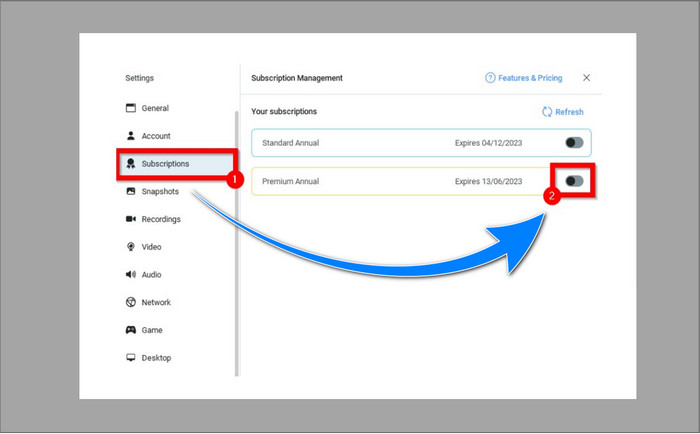
步骤 3: 进入Subscription(订阅)选项卡,确认订阅已启用。
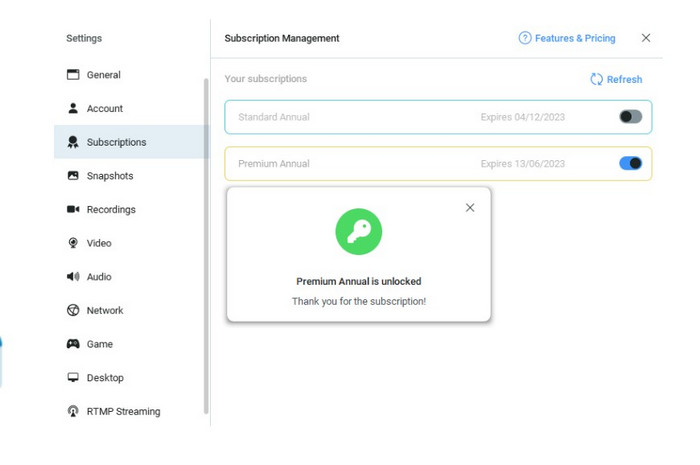
步骤 4: 如果订阅已经启用,会弹出Pop-up(弹窗)提示信息,此时就设置完成了。
如果您的 ManyCam 应用程序已激活,则视频上的水印或徽标将自动删除。您可以欣赏自己喜欢的视频,而不会遇到水印。
第 2 部分:如何在没有订阅的情况下删除 ManyCam 徽标
你想免费去除 ManyCam 的水印吗?除了 ManyCam 本身,你还可以使用其他软件来去除 ManyCam 的标志。其中最值得推荐的是Video Converter Ultimate。这款软件可以去除视频中不需要的对象,如文字、水印、标志等。此外,Video Converter Ultimate 还具备许多你可以使用的编辑工具,比如视频倍速调节、视频增强、添加和去除水印、色彩校正、音量增强等。使用 Video Converter Ultimate 去除水印,最合适的工具就是“视频水印去除器”(Video Watermark Remover)。
该工具将帮助您轻松消除水印。此外,此应用程序可在 Windows 和 Mac 上使用。此外,您不会很难使用此应用程序。它还支持多种音频和视频文件格式,如 MP4、FLV、MOV、MKV、MP3、AAC 等。如果您想使用 Video Converter Ultimate 删除 ManyCam 徽标,本文将向您展示两种方法。这些方法是使用视频裁剪器和视频水印去除器。
1. 使用视频裁剪器
步骤 1. 下载FVC Video Converter Ultimate,并完成安装过程。
步骤 2: 安装完成后,启动程序。点击Toolbox > Video Cropper(工具箱 > 视频裁剪)。
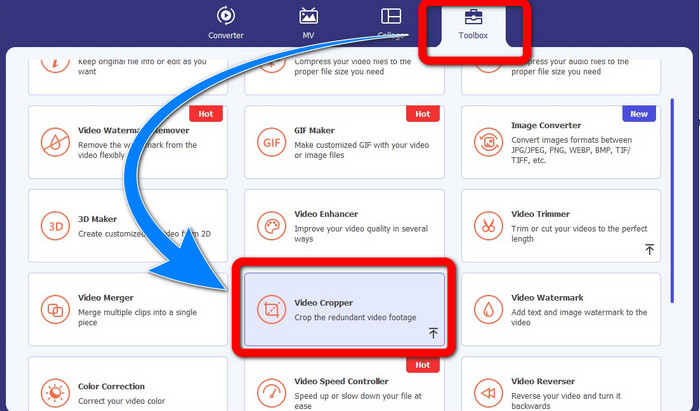
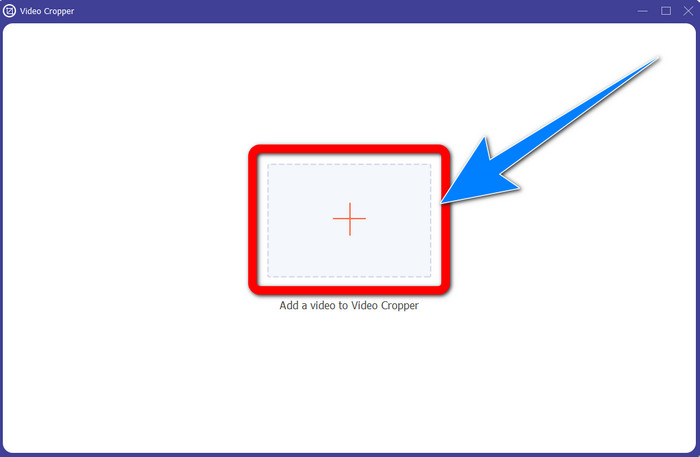
步骤 3: 点击Video Cropper(视频裁剪)后,会弹出新的界面。点击加号(Plus)按钮,导入带有 ManyCam 水印的视频。
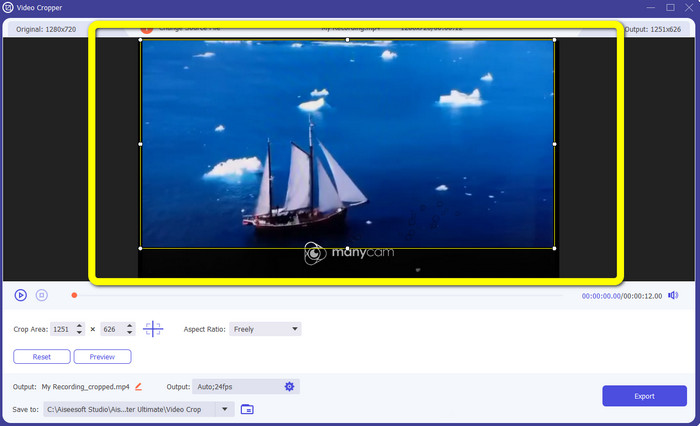
步骤 4: 文件添加完成后,你可以裁剪视频,从而去除水印。
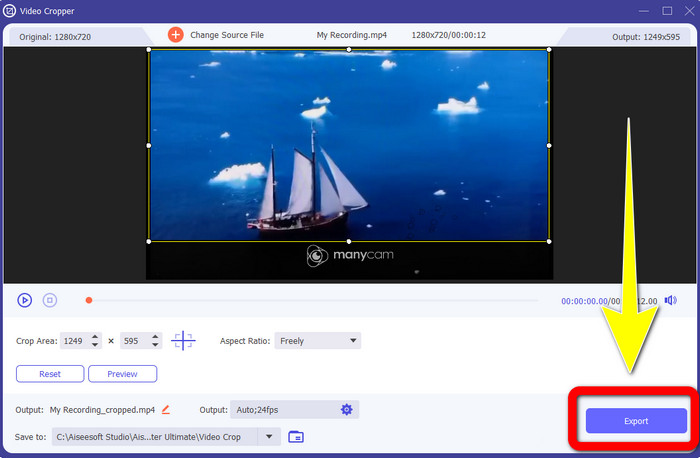
步骤 5: 当水印去除完成后,点击Export(导出)按钮保存最终成品。现在你就可以播放没有水印的喜爱视频了。
2.使用视频水印去除器
步骤 1: 打开该程序。进入Toolbox > Video Watermark Remover(工具箱 > 视频水印去除器)。
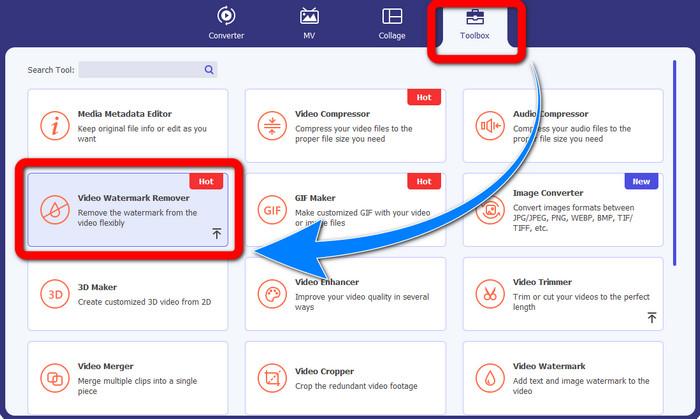
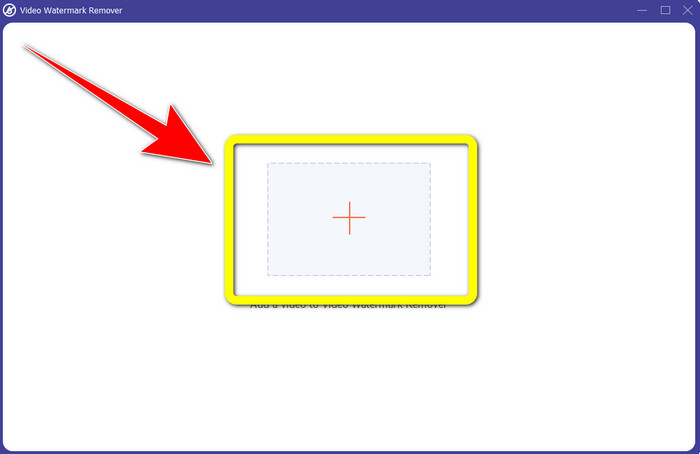
步骤 2: 点击Video Watermark Remover(视频水印去除器)后,会出现新的界面。点击加号(Plus)按钮,添加带有 ManyCam 水印的视频。
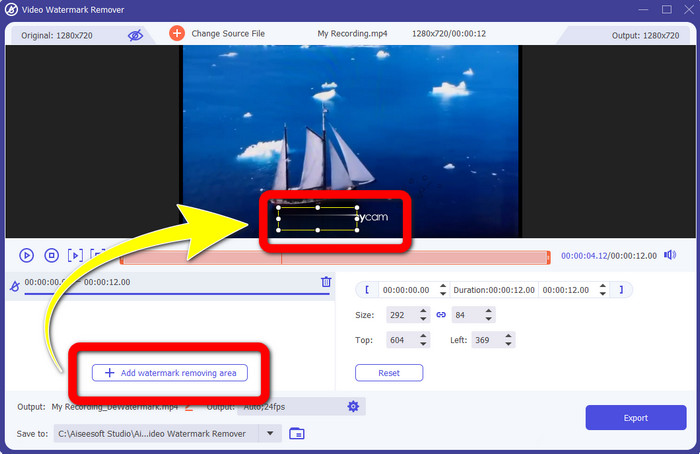
步骤 3: 添加好视频后,点击Add Watermark Removing Area(添加水印去除区域),随后视频上会出现一个方框(box)。将该方框拖动到水印位置,用它遮住水印。
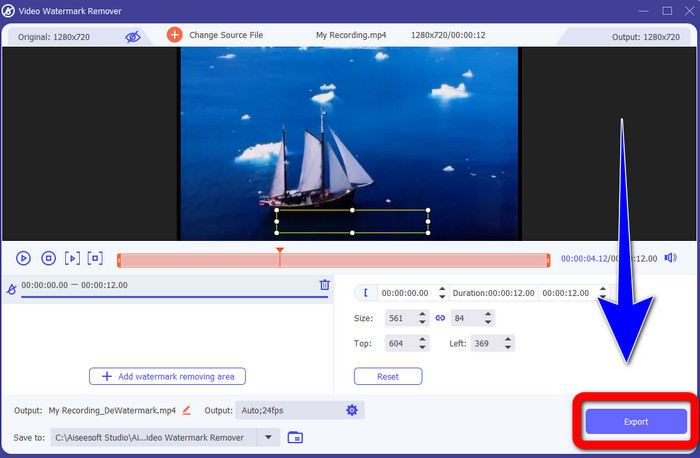
步骤 4: 当你完成视频水印的去除后,点击Export(导出)保存你的作品。这是免费去除 ManyCam 标志的最佳方法。
第 3 部分:有关删除 ManyCam 徽标的常见问题解答
去除标志需要多长时间?
您不必等待更长时间,因为徽标或任何不必要的对象的删除过程只需几秒钟。
我可以删除手机上的 ManyCam 标志吗?
是的!您可以使用带有水印去除器的不同软件应用程序去除 Android 或 iPhone 上的 ManyCam 徽标。在您的 Play 商店或应用商店中查找该应用程序,并尝试使用您可以在顶部结果中看到的那些应用程序。
有没有最好的方法来去除我的 Mac 上的水印?
当然可以!你可以使用带有水印去除功能的优秀软件在 Mac 上去除水印,这款软件就是Video Converter Ultimate。它在 Windows 和 Mac 上都非常适用。这款软件可以帮助你去除视频中不必要的对象,例如标志、水印、图片和文字。
我可以使用 ManyCam 应用程序中的裁剪工具来删除 ManyCam 徽标吗?
很遗憾,不行!使用裁剪工具来去除 ManyCam 标志并不有效。即使你尝试通过裁剪视频来移除标志,它仍然会出现。去除该标志的唯一解决方案是激活 ManyCam 的订阅。
除了 ManyCam,还有其他方法可以去除视频上的水印吗?
就在这里!除了 ManyCam,还有更多带有水印去除器的应用程序,您无需购买即可使用。 Video Converter Ultimate 是可用于删除视频水印的最佳应用程序之一。它简单易用,适合初学者。
结论
通过以上信息,你就能了解如何在 Windows 和 Mac 上去除 ManyCam 标志。你可以在激活订阅后,通过 ManyCam 程序轻松去除标志。此外,如果你想免费使用带水印去除功能的软件,就必须使用Video Converter Ultimate。在去除视频中多余对象方面,这款软件会为你提供极大的帮助。
-
 关于如何从照片中删除水印的最简单方法
 您是否对照片上的水印感到恼火?不用担心!本文将提供简单易行的方法来去除照片中的水印。
-
 如何使用 4 种有效方法去除 Powtoon 水印
 阅读本文以了解如何使用我们在此处提供的最佳工具和教程来删除 Powtoon 水印。
-
 Apowersoft Watermark Remover 评测 – 功能、优缺点和价格
 Apowersoft Watermark Remover是最好的水印去除器之一,支持在线和离线,点击了解更多!
