


 视频转换大师
 屏幕录影大师
 视频修复
视频修复
 安全下载
安全下载如何最终从 Renderforest 导出的视频中删除水印
Renderforest 是一个完整的优秀动画模板,用于介绍、结尾、标题、广告等。您可以从头开始,也可以使用此处的可用模板。即使您不是视频编辑方面的专家,您仍然可以通过使用此网络平台来克服它。由于其使用和最佳优势,如果您使用订阅,许多用户选择此平台来创建高质量、高效、兼容和可靠的设计。
因此,如果你注册账号,就可以在这里免费下载安装你编辑好的视频,但会带有水印。这个水印对我们许多已经在这里导出视频、却又无法负担该工具订阅费用的人来说,是个麻烦。下面我们将列出一些移除 Renderforest 水印的教学,使用的是我们在调查过程中收集到的最有价值的工具。如果你继续阅读本文接下来的部分,我们就能把这些方法分享给你。

第 1 部分。 如何从 Renderforest 视频中删除水印的 3 种有效方法
FVC Video Converter Ultimate
FVC Video Converter Ultimate 是一款出色的视频去水印工具,可以一步步教你如何去除 Renderforest 的水印。你可以依靠这款工具轻松删除视频中的水印。如果拿这款终极工具和其他工具相比,它具备 AI 技术支持,能够更强大地去除视频中的水印。不仅如此,无论你上传什么格式的视频,它都是去除水印的最佳选择。是什么让这款工具如此出色?你无需是技术达人,只要按照下面简单的说明和步骤操作,就能移除 Renderforest 添加到视频上的水印。
步骤 1. 请在桌面端下载该软件,点击适合你系统的下载按钮。双击下载的文件进行安装,然后点击“立即开始”以立即启动软件。
步骤 2. 启动软件后,打开工具箱,然后点击其中的视频去水印功能。
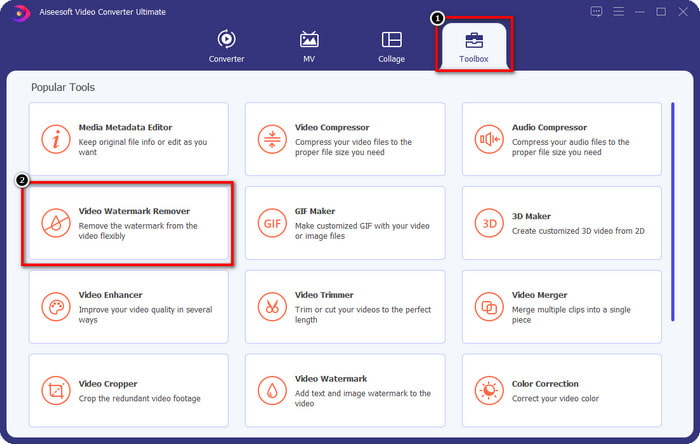
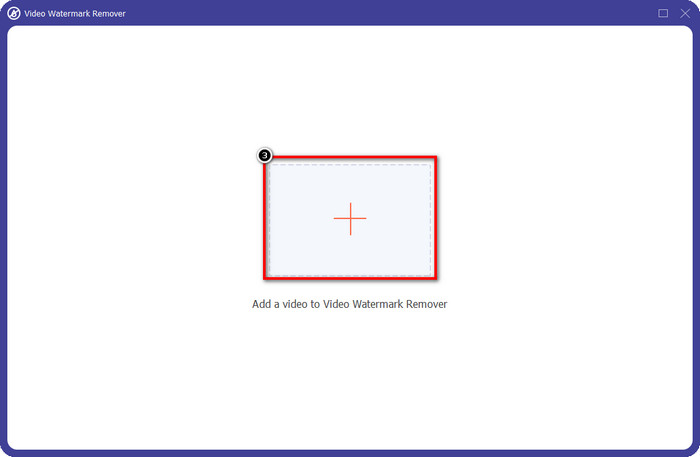
步骤 3. 点击屏幕上的+图标,上传你从 Renderforest 导出的、带有水印的视频。
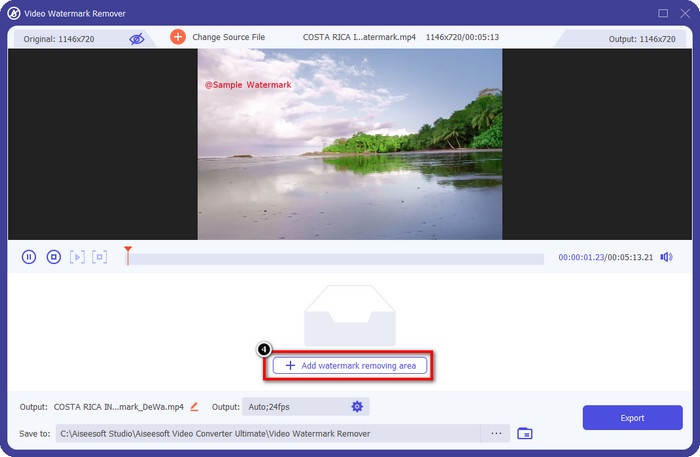
步骤 4. 按下添加去水印区域,开始移除 Renderforest 水印。
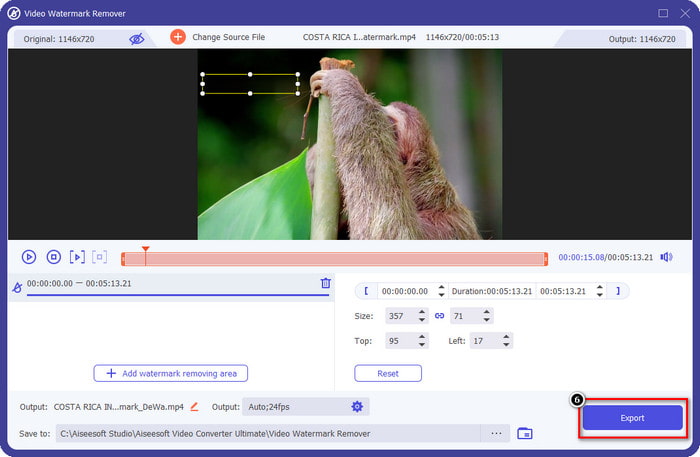
步骤 5. 在屏幕上弹出的新窗口中,拖动选框并让它刚好覆盖水印位置。如果需要,你可以自由调整选框的大小与位置。
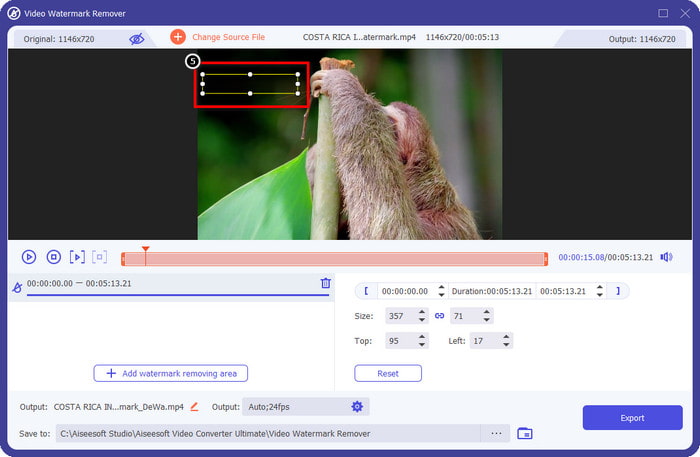
步骤 6. 当选框已经识别到视频中的水印后,点击导出,开始去除并保存无水印的视频。它会在很短时间内快速处理视频,然后你就可以使用没有恼人水印的视频了。
相关内容:
立即移除徽标
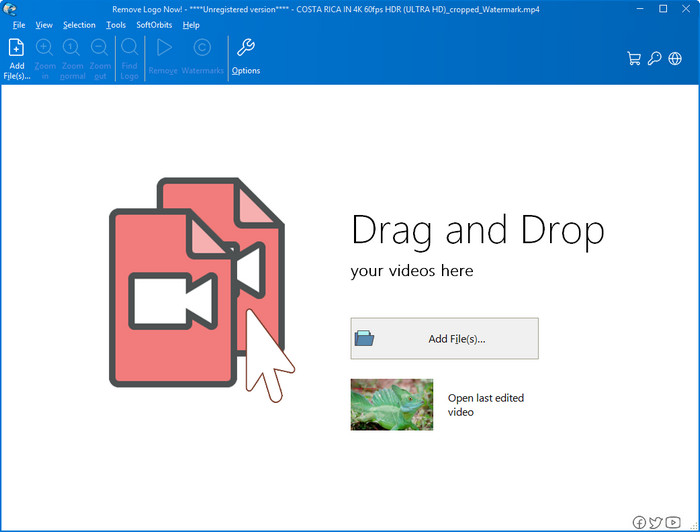
接下来要介绍的是 Remove Logo Now,它在 Windows 上去除叠加水印方面享有很好的口碑。有了这个工具,你无需任何专业技能,就能在电脑上去除 Renderforest 水印。去除之后,如果你仔细查看,可能会在水印原来的位置看到一些残留痕迹。但如果不刻意放大观察,一般很难在导出的视频中看出水印或残留。下面的教程会教你如何在 Windows 设备上去除视频中的水印。
步骤 1. 在桌面端下载并安装 Remove Logo Now,然后按照安装向导完成安装。
步骤 2. 启动软件,点击添加文件上传视频。为了更高效,你也可以直接拖放视频文件到软件中。
步骤 3. 选择你想用来标记水印的工具。选定后,高亮标记水印区域,然后点击移除。
步骤 4. 点击开始,执行该工具提供的去水印处理流程。
在线视频水印去除器

如果你不想在桌面上下载软件,但仍然想知道如何去除 Renderforest 水印,可以尝试使用在线视频去水印工具(Video Watermark Remover Online)。你可以用这个全自动的在线去水印工具,在无需下载安装的情况下,免费去除视频中的水印。和上面提到的工具一样,即使你是视频编辑或去水印的新手,也能在几分钟内上手掌握。你可以参考下面的教程来学习如何使用它。
步骤 1. 打开你常用的网页浏览器,搜索并进入该在线去水印网站。
步骤 2. 在网站主页上点击云上传图标,插入你从 Renderforest 导出的视频。
步骤 3. 等待上传过程完成,网站会自动帮你去除视频中的水印,然后点击下载,即可获取已经去除水印的视频。
第 2 部分。有关如何删除 Renderforst 水印的常见问题解答
Renderforest 的订阅费是多少?
Renderforest 支持您可以使用的三种不同类型的定价;每月 $ 14.99 用于 Lite,$24.99 用于 Pro,$29.99 用于 Business。这种定价确实有不同的目的;您可以访问其主要网站,查看您想要使用的订阅中可用的内容。
是否可以在没有工具的情况下从 Renderforest Video 中删除水印?
是的,您可以在不使用工具的情况下删除 Renderforest 中的水印,方法是购买软件的月费或年费。这样当您导出视频文件时,就不会添加水印了。
哪个是 Renderforest 的最佳计划;每月还是每年?
如果您想多次使用该工具,每月订阅是一个不错的选择,但如果您决定长时间使用该软件,最好使用年度计划,因为它的费用低于续订每个月。但是在您使用之前,您可以通过在此处登录您的帐户来免费使用 Renderforest,然后尝试使用它免费提供的其他模板。
结论
事实上,这篇文章提供了强有力的证据,证明可以使用您可以使用的三种最有用的水印去除器免费去除 Renderforest 水印。如果您是 Windows 用户并且想要移除桌面上的水印,您必须尝试使用立即移除徽标。但如果您不喜欢下载软件,则必须尝试使用 Video Watermark Remover Online,因为您可以使用此工具有效地去除水印。
但是,如果您是想要有效去除水印的 Windows 或 Mac 用户,那么毫无疑问,您可以使用的最佳水印去除器是 FVC Video Converter Ultimate。它是一款终极水印去除器,可用于高效、专业地去除困扰 Renderforest 视频的水印。
-
 2 快速删除 Windows 和 Mac 上的 VSDC 水印的方法
 您是否正在寻找一种方法来删除视频上的 VSDC 水印?在本文中,我们提供了可用于去除水印的工具。
-
 轻松有效地删除视频上的 Animoto 水印
 如何去除视频中的Animoto水印?继续阅读本文,因为我们提供了有关如何执行此操作的完整教程。
-
 如何使用 Final Cut Pro 从视频中删除水印 [完整指南]
 视频上的水印有问题吗?不多说了,因为我们提供了有关如何使用 Final Cut Pro 从视频中删除水印的教程。
