


 视频转换大师
 屏幕录影大师
 视频修复
视频修复
 安全下载
安全下载如何轻松有效地删除视频上的 Viva 视频水印
Viva Video 是一款视频编辑和视频制作应用程序,您可以将其下载到移动设备上,以创建其他视频编辑器无法实现的出色视频。有了这个,您可以使用它的免费版本或高级视频编辑来发挥您的优势。因此,用户在使用免费版时会遇到问题,因为它会留下水印,并且其他编辑功能与专业版不同。视频中嵌入的水印可能会妨碍视觉效果,最好将其去除。
不过,你可以在 Play 商店和 App Store 上找到一些去水印工具来移除水印,但哪一个最好呢?继续阅读本文,我们将为你提供可以用来去除水印的工具,并附上在你的视频中如何去除 Viva Video 水印的详细步骤。

第 1 部分。如何使用最佳水印去除应用程序删除 Viva 视频水印
视频橡皮擦 - 从视频中删除水印/徽标 [Android]
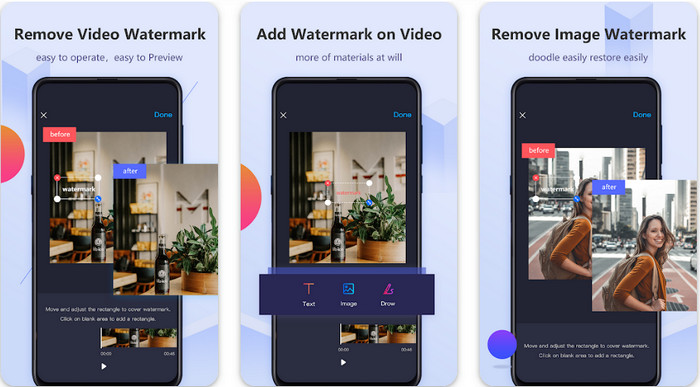
Video Eraser - Remove Watermark/Logo from Video 是一款功能强大的水印去除工具,你可以将它下载到安卓设备上,用于删除嵌入在视频中的水印。该应用可以帮助你移除视频中的各种水印,例如标志、文字、图章等。如果你想添加个性化的水印、裁剪、剪辑、倒放、压缩以及更改视频播放速度,它同样也能胜任。尽管功能丰富,你仍然可以免费下载安装这款工具。因此,如果你想在安卓设备上去除 Viva Video 的水印,可以按照下面的步骤操作。
步骤 1. 首先,在安卓设备上前往 Play 商店下载该应用,然后点击“下载”。
步骤 2. 打开去水印应用,点击Remove Watermark from Video(从视频中移除水印),允许该工具访问你的视频,然后上传带有水印的视频。
步骤 3. 将矩形框放到水印位置,使其完全覆盖水印。
步骤 4. 按下“完成”(Done)即可保存没有水印的视频。
相关内容:
视频橡皮擦 - 润饰去除 [iOS]
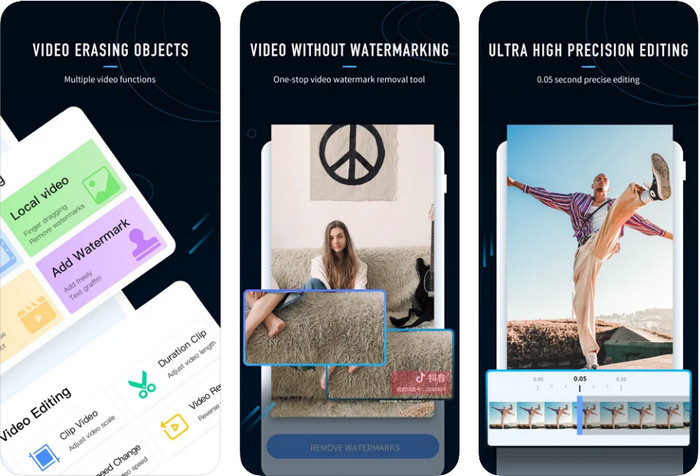
在 iOS 系统中,你可以在 App Store 下载 Video Eraser- Retouch Removal。它是可以免费下载安装的 Viva Video 水印去除工具之一,能够有效帮你去掉视频上的标记。与我们上文介绍的安卓去水印应用类似,它同样支持诸如视频升尺度、添加水印、剪切、裁剪、压缩和翻转等编辑功能,这些在这里都可以实现。尽管它与安卓版本在功能上大致相似,但具体使用方式仍有差别,而且在使用它来去除水印之前,你需要先购买相应功能。你可以参考下方步骤,学习如何去除你导出的 Viva Video 视频上的水印,按提示逐步操作即可。
步骤 1. 在 App Store 下载该应用,下载完成后打开。
步骤 2. 打开软件后,点击Local Video/GIF(本地视频/GIF)上传带有水印的视频。请确保允许应用访问你的“照片”库。
步骤 3. 轻触视频中带有水印的部分,屏幕上会出现一个矩形框。
步骤 4. 轻触“Eliminate Watermark(去除水印)”以导出视频,并保存为没有水印干扰的版本。
第 2 部分。如何在 Windows 和 Mac 上删除 Viva 视频水印 [终极软件]
如果你使用的是 Windows 或 Mac,就需要一款高效的软件,在不留下任何痕迹的前提下高质量地去除视频水印。FVC Video Converter Ultimate 能够教你如何免费去除 Viva Video 的水印,并在最终输出中呈现专业级效果。与可在安卓和 iOS 上下载的去水印应用相同,这款工具也支持更多你可以加以利用的功能和特性。它提供的能力远不止我们前面提到的两款去水印应用。
是什么让这个工具令人印象深刻?此工具支持的删除功能比您可以在视频上使用的其他水印去除器更好。因此,如果您使用它,您可以在此处将其删除后观看没有水印的视频。需要有关如何使用它的教程吗?接下来的详细信息将让您知道如何像 1-2-3 一样轻松使用此工具。
步骤 1. 若要下载这款旗舰软件,你可以点击下方下载按钮,然后在设备上安装。按照 WinRAR 的安装流程进行操作,完成后点击“立即开始”(Start Now)。
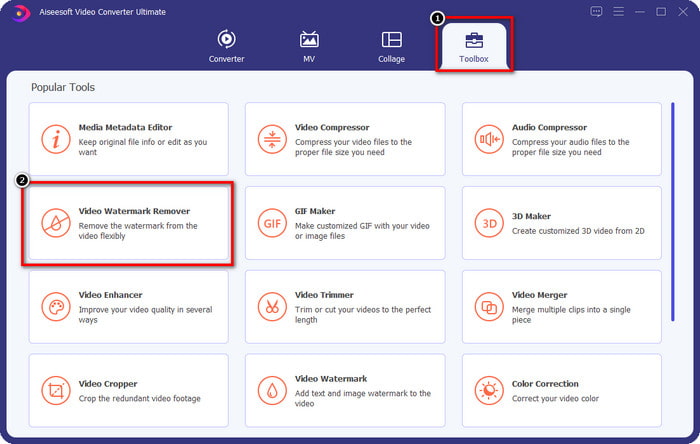
步骤 2. 进入工具箱(Toolbox),然后点击Video Watermark Remover(视频水印移除),开始使用这款工具强大的去水印功能。
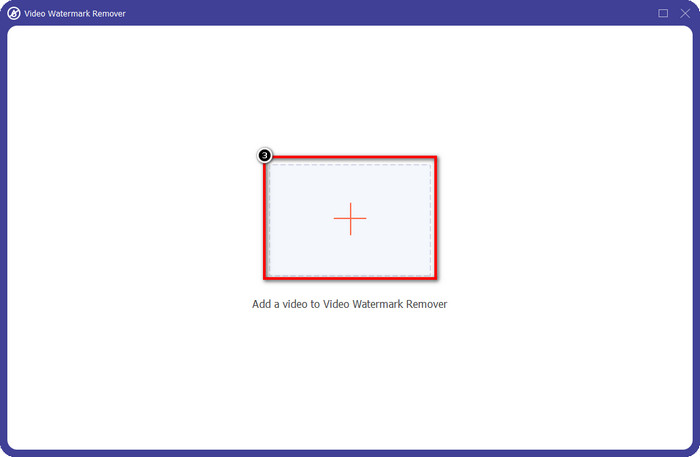
步骤 3. 点击“+”图标上传保存在桌面上的带有水印的 Viva Video 视频。在弹出的文件夹中找到视频文件,点击打开(Open),即可成功上传。
步骤 4. 点击Add Watermark Removing Area(添加去水印区域),开始使用去水印功能。
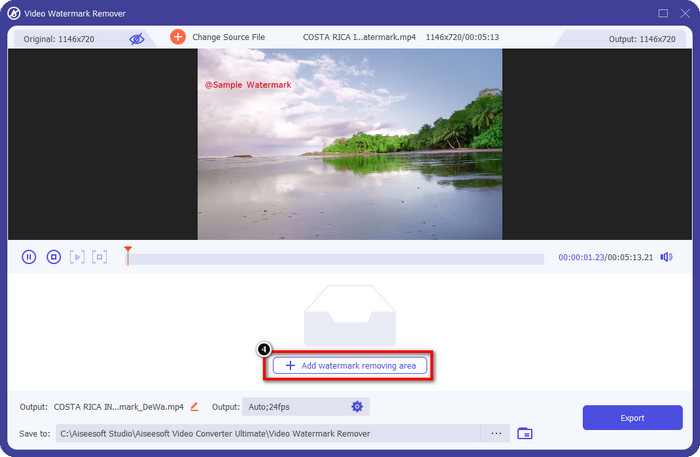
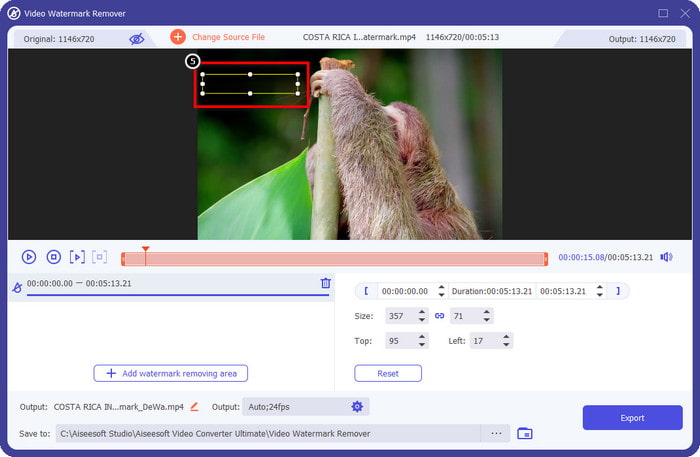
步骤 5. 拖动并放置矩形框到视频水印所在的位置,将其完全覆盖。务必确保水印区域全部被覆盖,否则会留下水印残影,你可以根据需要调整矩形框大小。
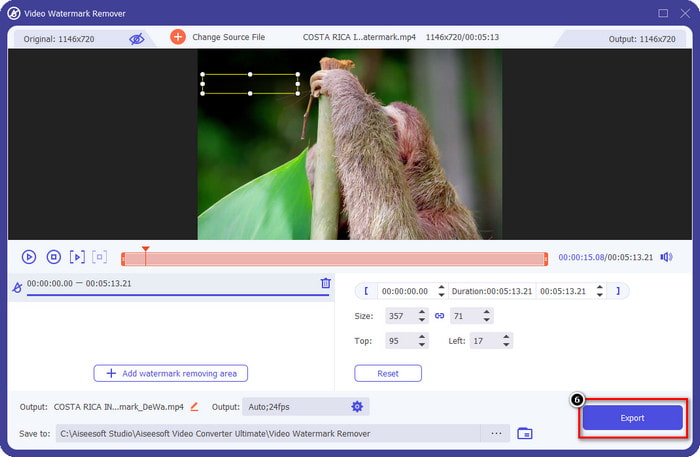
步骤 6. 完成上述操作后,点击导出(Export)即可保存没有水印的视频。是不是很简单?这正是这款旗舰工具的设计初衷——简单易用,却在各方面都十分高效。
第 3 部分。有关如何删除 Viva 视频水印的常见问题解答
我可以下载没有水印的 Viva Video 吗?
是的,您可以购买此工具的专业版,以便在导出您在此处编辑的视频时不会在视频上留下水印。此外,在您购买此工具的专业版后,您将使用此工具具有的其他高级功能,这些功能不是免费提供的。
Viva Video 有桌面版吗?
您只能在 Android 和 iOS 上下载 Viva Video 版本。因此,如果您想下载桌面版本,您将找不到任何版本,但您可以搜索视频编辑的最佳替代方案,例如 Viva Video 提供的。
Viva Video 有间谍软件吗?
2017 年,有关此应用的报道后来证实它存在恶意软件。因此,下载此软件的人在其设备上强行删除了此应用程序以避免进一步的后果。
结论
使用本文的 Viva Video 水印去除器,您可以消除 Viva Video 在导出的视频中嵌入的水印。您可以尝试使用上述应用程序并按照我们包含的有关如何删除水印的说明进行操作。但对于有 Viva Video 水印的 Windows 和 Mac 用户来说,最好使用终极软件快速有效地去除水印,并获得专业的效果。你在等什么?单击下载按钮立即在您的设备上删除最终水印,并按照上述步骤使用它。
-
 如何使用这些很棒的工具删除 Lomotif 水印
 您想了解如何从视频中删除 Lomotif 水印吗?阅读本文以了解最出色的在线和离线删除方法。
-
 如何使用水印去除剂从照片中去除游客
 如何从照片中删除游客?如果您想了解如何从照片中删除不需要的东西,这些工具将为您提供帮助。阅读本文以了解更多信息。
-
 123rf 水印去除器 – 彻底审查终极工具
 如果您想知道最出色的 123rf 水印去除器是什么,请仔细阅读本文。本文对这些工具进行了深入的回顾。
