


 视频转换大师
 屏幕录影大师
 视频修复
视频修复
 安全下载
安全下载如何使用 2 种可能的方式在 SmartDraw 中删除水印
如果你需要一种简单而强大的方式来创建图表、绘图和地图,并以企业级的品质呈现它们,那么可以使用 SmartDraw。你可以发挥想象力,并在 SmartDraw 的帮助下将其变为现实。这个工具是免费的吗?你可以使用它提供的 7 天免费试用,在试用期内可以免费使用该工具,但导出的文件上会带有水印。导出的文件带水印可能会让你很困扰。为此,我们撰写了这篇文章,只为向你推荐当前市面上在去除水印方面表现最出色、效率最高的工具。继续阅读下文内容,了解如何以两种有效方式去除 SmartDraw 的水印。

部分 1. 如何通过购买许可证密钥去除 Smart Draw 中的水印 [官方版]
如何从 SmartDraw 中删除水印?这是我们将向您介绍的第一种方式,即购买此工具的许可证密钥。该平台为您提供不同类型的计划,您可以获得这将有利于您的最终目的。此外,您无法购买此工具的一个月访问权限,因此如果您计划购买其许可证密钥,您将按月计费,但您将支付的总金额为其年度版本。如果您欣赏此工具的性能并想购买它,您可以按照我们在下面添加的步骤进行操作。
如何使用许可证密钥在 SmartDraw 中删除水印的步骤:
步骤 1. 打开 SmartDraw 的官方网站,确保你访问的是正确的网站,以保证交易安全。
步骤 2. 在官网页面上点击购买(Buy),查看可用的方案。
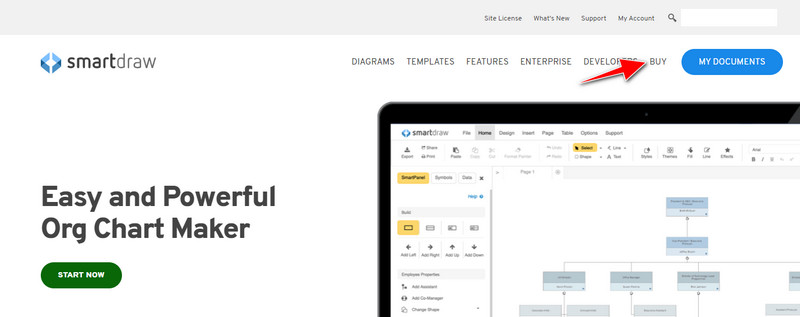
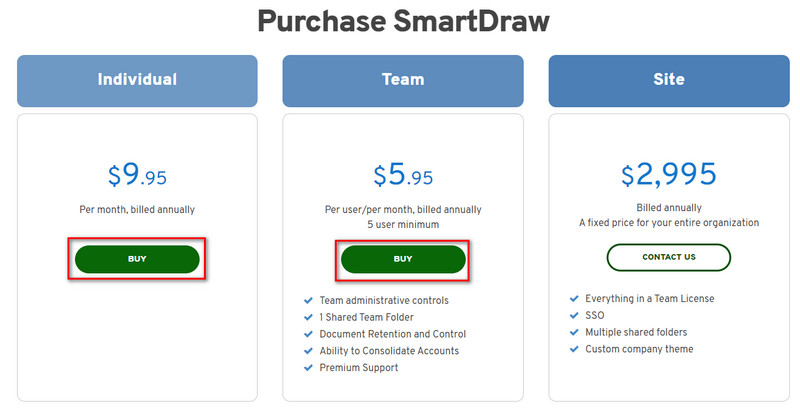
步骤 3. 你可以按个人版、团队版或站点版(Individual, Team, or Site)购买 SmartDraw。如果要购买个人版或团队版,点击“Buy Now(立即购买)”。
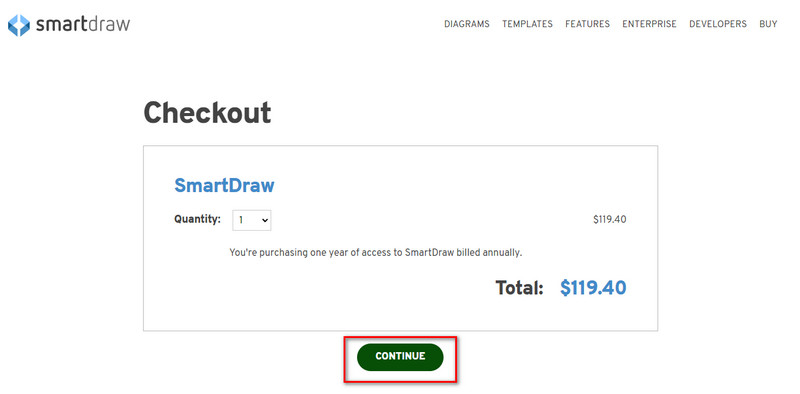
步骤 4. 在右侧你会看到该工具按年计费的总价;点击继续(Continue)进行下一步。
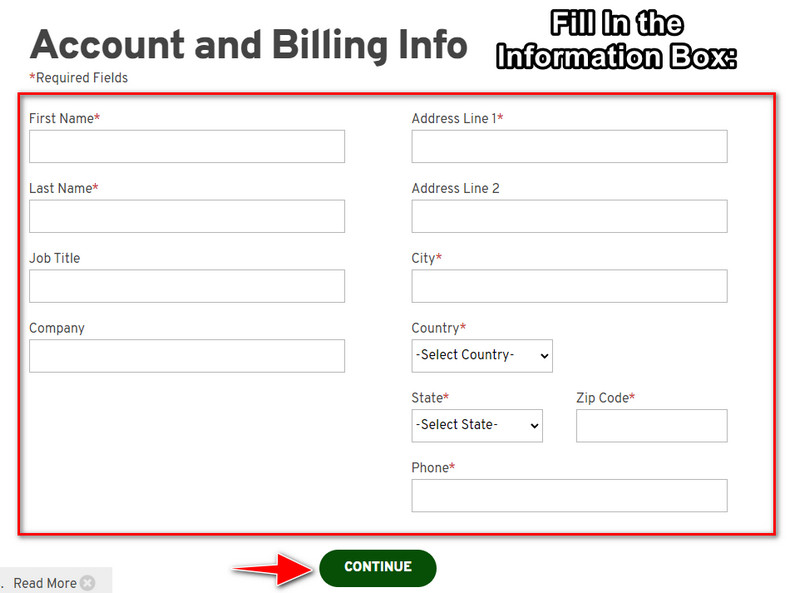
步骤 5. 填写你的账户及账单信息,然后按继续(Continue)以获取许可密钥(license key)。
部分 2. 如何使用 Web 服务免费去除 Smart Draw 中的水印 [免费]
不想购买就去除 SmartDraw 试用版水印该怎么办?那你就需要使用FVC 在线免费去水印工具。这个去水印工具已经为你准备就绪。你无需具备专业技能就能去除图片上的水印,因为使用这个工具并不繁琐。即便你是专家,也同样可以用它来去除图片上不需要的水印或物体。在这个去水印工具的帮助下,你的图片上几乎不会有它无法去掉的污点。想试试这款软件,而不是购买许可证密钥吗?如果是,请继续阅读我们在下文提供的教程,高效去除图片上的水印。
如何免费去除图形或图表上 SmartDraw 水印的步骤:
步骤 1. 你无需在浏览器中搜索这个网页工具,只需点击这个链接即可打开,它会在你的浏览器中新建一个标签页。
步骤 2. 使用鼠标拖放(drag and drop)你在 SmartDraw 中创建的图片、图表或示意图,将其上传。
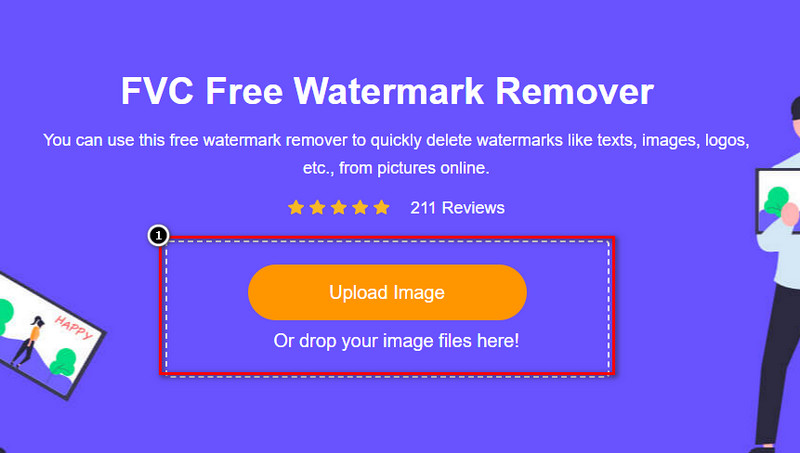
步骤 3. 现在在线去水印工具已经启动,选择你想用来框选图片中水印的工具。
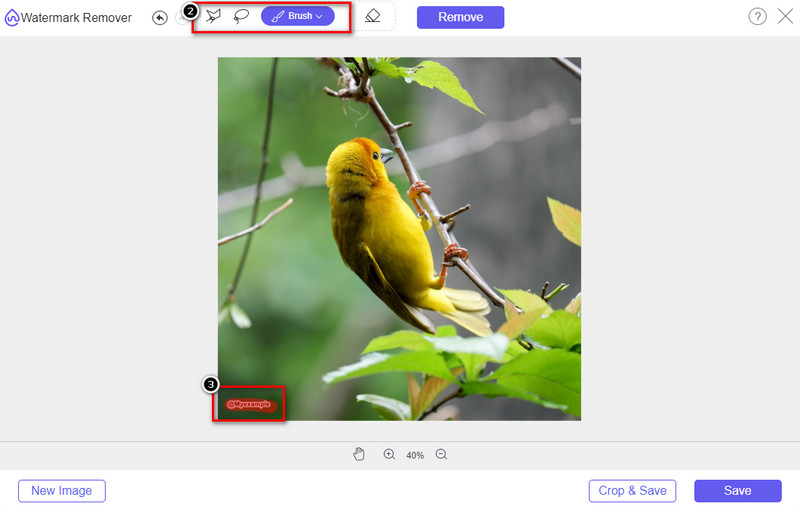
步骤 4. 在已上传的图片上框选水印或标志后,点击Remove(去除)。
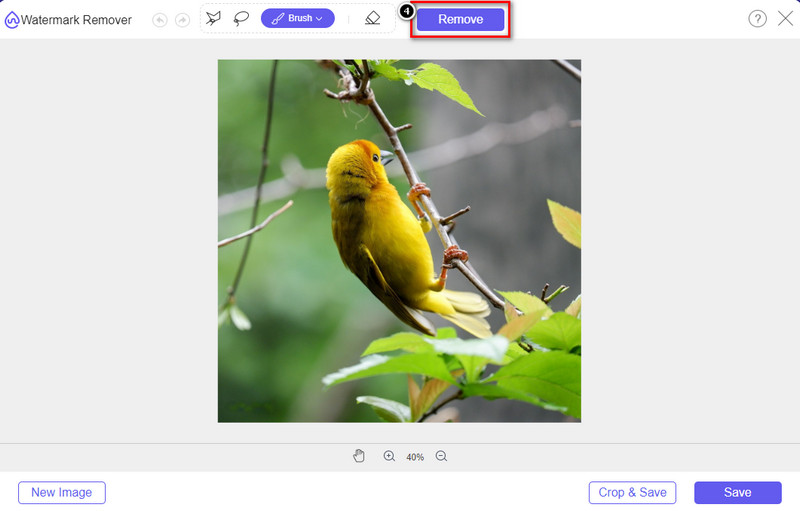
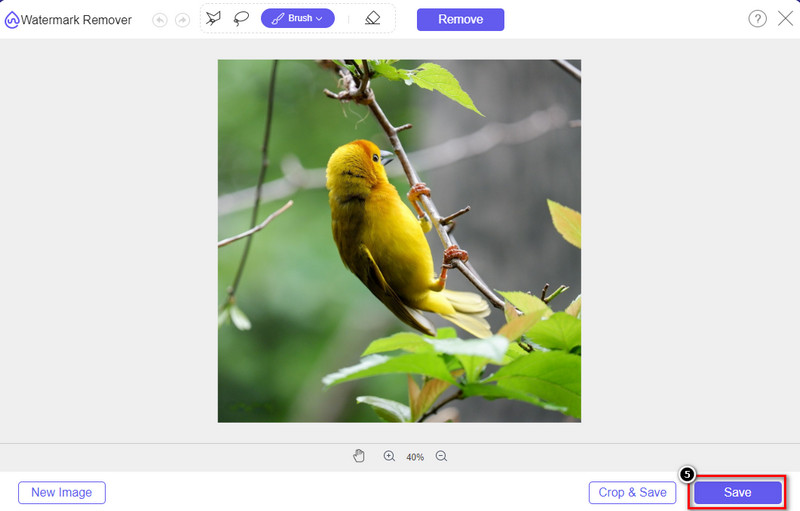
步骤 5. 等待去除水印的处理完成,然后点击保存(Save)下载你上传的图表或示意图。屏幕上会弹出一个文件夹窗口;现在查看你创建、且已经没有水印的图表或示意图。
使用 FVC 在线免费去水印工具的优点:
◆ 无需下载该应用程序,因为它可以在网络上获得。
◆ 支持图片范围广,可有效去除水印。
◆ 它是一种专用的水印去除器,可产生高质量的输出。
◆ 导出后不加水印。
◆ 不限制使用次数和文件大小。
第 3 部分。附加部分 - 如何在 SmartDraw 上制作图表、图形或图表,并提供详细步骤
前面的部分教你如何去除 SmartDraw 水印。在这一部分,我们将教你如何在 SmartDraw 的帮助下制作图表、图形和图表;您可以按照我们在下面添加的步骤来了解如何操作。
步骤 1. 进入其官方网站,开始创建图表、图形或流程图。
步骤 2. 打开官网后,点击立即开始(Start Now)并登录你的账户。
步骤 3. 在左侧选择你想要使用或创建的模板类型。
步骤 4. 在每个流程图中填入相应信息。网页左侧还会提供更多可用的附加选项。
步骤 5. 点击导出(Export)按钮,选择你想要导出的格式,然后点击开始处理。如果你使用的是免费版本,导出文件上会带有水印;你可以参考第 2 部分的步骤来去除水印。
延伸阅读:
第 4 部分。有关如何删除 SmartDraw 水印的常见问题解答
SmartDraw 可以导出 PNG 图像吗?
是的,您可以拥有 PNG 格式的透明图表。但是,如果您使用免费版本,它将添加水印。您可以购买正式版,因此导出的图像上会有水印。
SmartDraw 的价格是多少?
如果您要在 SmartDraw 上购买计划,您可以从 $ 5.95 开始购买计划。您可以在官方网站上查看它提供的其他价格。
购买高级版 SmartDraw 有什么好处?
您可以获得团队管理员控制、团队文件夹、高级支持以及为个人计划导出无水印图像。对于其他高级优势,您可以获得,访问官方网站,查看您可以获得哪些特性和功能。
结论
现在您已经知道如何使用我们添加的两种方式来保存没有水印的 SmartDraw。您要么购买它,要么使用工具去除导出文件上的水印。如果您不喜欢购买该工具,则必须使用它,因为它是消除水印的最有效的网络工具。如果您认为这篇文章确实帮助您解决了问题,那么您给我们评分 5 星。
-
 从 GIF 中删除水印的 4 种最佳方法 [在线和离线]
 需要从 GIF 中删除水印?使用本文中的工具,您将了解平台上可用的不同水印去除器的不同风格。
-
 删除任何媒体文件中元数据的 5 种最简单方法
 如何删除元数据?很难做到吗?我需要购买或使用免费工具来删除标签吗?所有这些问题在本文中都有答案。
-
 优秀的Photobucket水印去除器在线和离线
 了解如何使用这些神奇的 Photobucket 水印去除器从您的照片中去除 Photobucket 水印。阅读本文以了解方法。
