


 视频转换大师
 屏幕录影大师
 视频修复
视频修复您应该考虑的关于慢动作相机的大量选择
目前已经有多种应用程序、软件和在线工具可以用来制作慢动作视频。但如果你能直接用相机录制慢动作视频呢?这就是慢动作相机的用武之地,这类相机无需借助编辑器就能拍摄慢动作视频。如果你还拿不定主意该买哪一款相机,不妨继续阅读本文,了解选择时需要重点关注的具体参数和细节。

第 1 部分。什么是慢动作相机?
慢动作相机基本上是一种以比最终回放速度快得多的速度拍照的相机。时间似乎在缓慢移动,因为它需要每秒捕捉许多静止帧。当我们谈论慢动作时,我们指的是一种频繁的电影制作效果,其中视频的移动速度比平时慢。它以前只用于电影、广告和电视。然而,由于智能手机技术的巨大发展,现在即使是智能手机也可以拍摄慢动作。
以 Phantom HD 高速摄像机为例。该相机在高清拍摄时的最大帧速率为每秒 1,455 帧(而普通胶片通常以每秒 24 帧显示)。通过以每秒 24 帧的速度拍摄照片并以每秒 24 帧的速度回放它们,可以看到正常运动。如果您以高于该值的帧速率拍摄,例如每秒 1,455 帧,然后以每秒 24 帧的速度播放它们(慢动作效果),您会注意到动作会变慢。
第 2 部分。 3 最佳慢动作相机
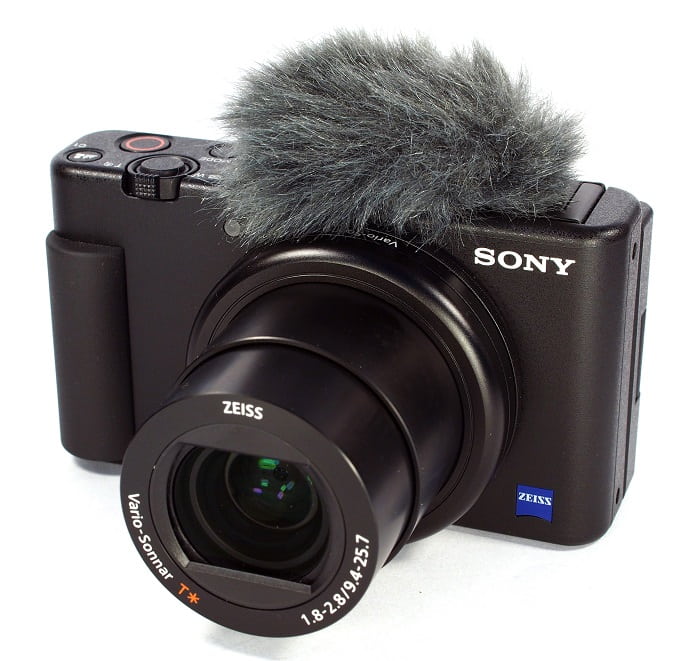
1. 索尼 ZV-1 相机
用于 4K 慢动作视频的最出色的相机之一是 Sony ZV-1。这款索尼设备非常适合视频博客,因为它可以在不同模式之间切换而不会失去焦点。如果您认为它是摄影的绝佳主题,请再考虑一下。索尼 ZV-1 可以做很多事情,但视频博客才是它的亮点。聚焦和散焦由系统处理。这是它采用的主要策略。在黑暗中使用它可能会导致您的工作出错。索尼 ZV-1 的自动对焦和图像稳定性优于同类摄像机。对于 YouTube 用户来说,这就是相机。但事情并不完美。该设备的价格令人望而却步。因为它的成本为 $700,您可能想知道它是否真的值得。索尼 ZV-1 的尺寸为 4.15 x 2.36 x 1.7 英寸,以 21MP 捕获图像,并以 2160p 录制视频。拥有像 Sony ZV-1 这样的相机的原因之一是出于上述所有原因。
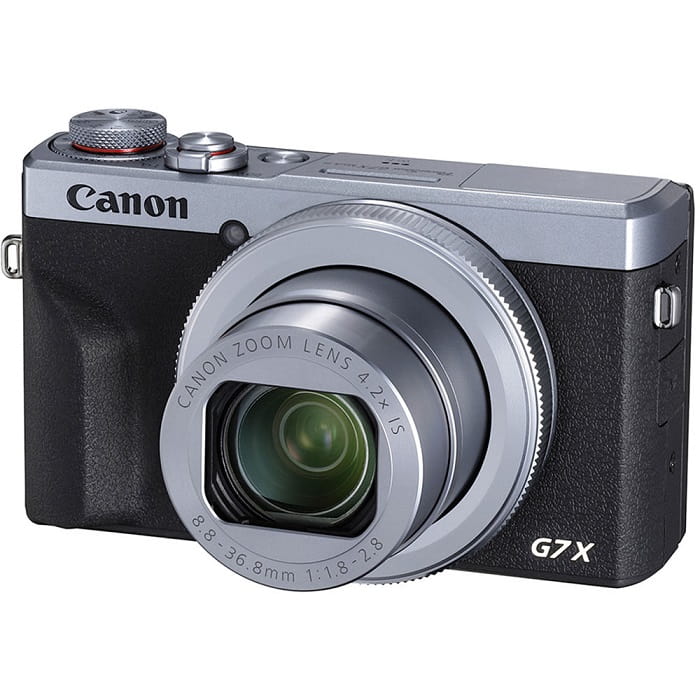
2. 佳能 PowerShot G7 X Mark III
与索尼 ZV-1 相比,佳能 PowerShot G7 X Mark III 是直播的绝佳选择。它对在室内制作视频的人很有用,比如在 YouTube 上制作视频的人。由于其未剪辑的 4K 视频质量和用于进行艺术自拍的出色 LCD,它被包含在本综述中。佳能 PowerShot G7 X Mark III 的照片和 4K 30p 视频的最大分辨率为 20.1 兆像素,但没有 4K 60p 选项。必须考虑到这一点。自拍相机拥有 180 度视野,快门速度范围为 1/25600 至 30 秒,以及光学图像稳定系统。更有可能的是,这款佳能 PowerShot G7 X Mark III 的成本约为 $750。
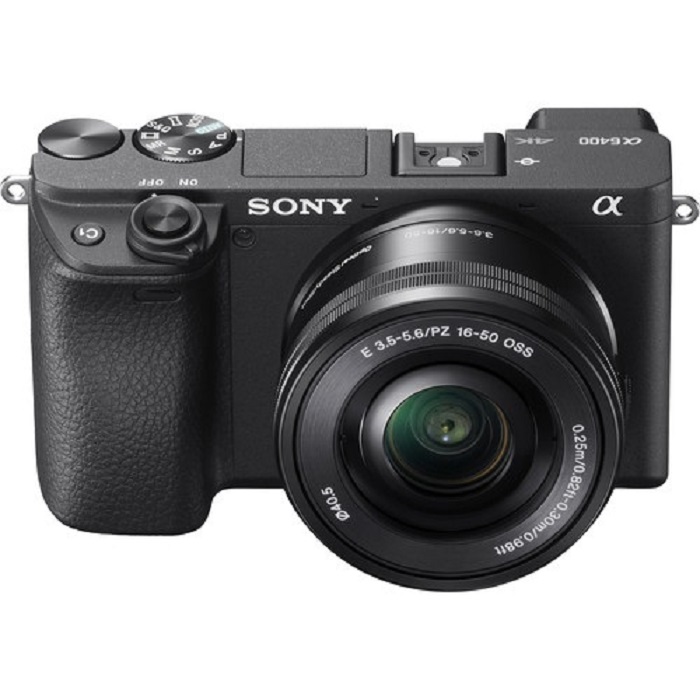
3.索尼A6400
另一方面,索尼 A6400 比以前的型号功能更强大。该设备的吸引力在于其卓越的多功能性,可用于专业摄像、个人视频博客和摄影。此外,索尼 A6400 可以慢动作和延时拍摄,让您可以选择在电影中使用这些效果。由于相机的 24 MP 分辨率,图像质量非常好,照片清晰、清晰且没有颜色拖尾。不过这款相机在三者中的价格实在是太贵了,大概要$1299。
第 3 部分。如果我没有慢动作相机怎么办?
上文列出的这些相机在慢动作视频方面都能提供极为出色、优秀的画面效果,因为慢动作功能是内置的,而且就是为慢动作拍摄而设计的。唯一的不足是,慢动作相机价格昂贵,而且操作复杂,要完成一段慢动作视频并不轻松。如果你没有慢动作相机,我们推荐使用Video Converter Ultimate作为最佳替代方案。与慢动作相机不同,这款软件可以免费下载,而且所有用户都能轻松上手。
它的一项特色工具视频变速器(Video Speed Controller),可以把普通速度的视频变成你理想中的高质量慢动作视频。每一步基本都只需点击一次,你就能在不使用昂贵相机的情况下,以慢动作效果欣赏你的视频。想更详细地了解这款软件,请参考以下操作步骤:
步骤 1: 在使用软件前,必须先完成下载。为此,请点击“包含”按钮下方的免费下载(Free Download)链接。下载完成后,将其保存到桌面,然后点击立即开始(Start Now)按钮即可开始安装。
步骤 2: 完成安装后,你就能在软件主界面上看到转换处理的相关功能。然后,通过工具箱(Toolbox)功能,你可以精确找到制作慢动作视频所需的工具。在查看可用工具列表时,如果你想调节视频速度或只是单纯让视频变成慢动作,请选择视频变速器(Video Speed Controller)。
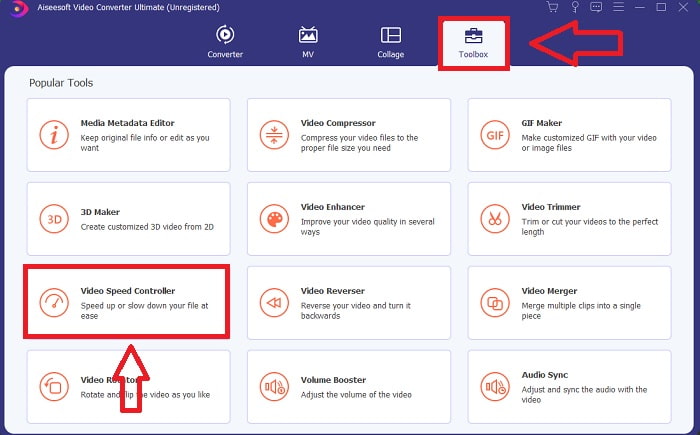
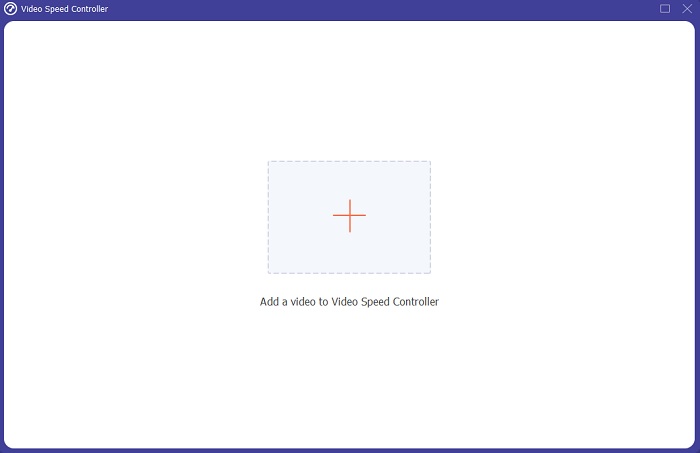
步骤 3: 选择继续后,你的电脑屏幕上会弹出一个新窗口。点击加号+,即可开始导入并编辑视频。
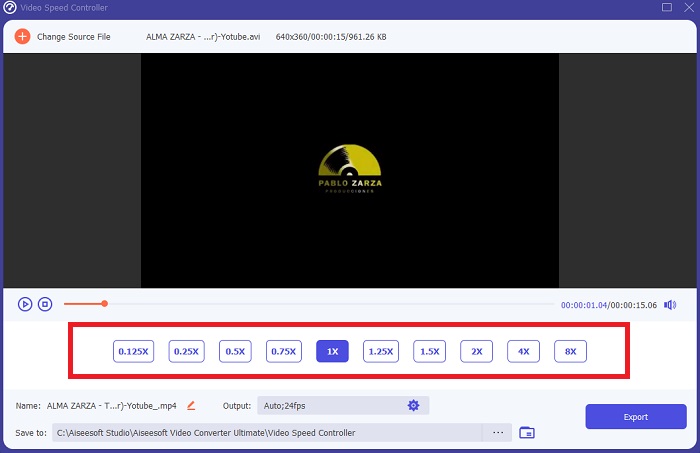
步骤 4: 先从视频的播放倍速入手,选择在播放时将速度提高或降低多少倍,以决定视频变快还是变慢;这也将决定你为视频添加多少慢动作效果。因为你是在用软件替代慢动作相机,所以需要降低播放速度,选择低于正常速度的倍速;这样就能为视频应用慢动作效果。
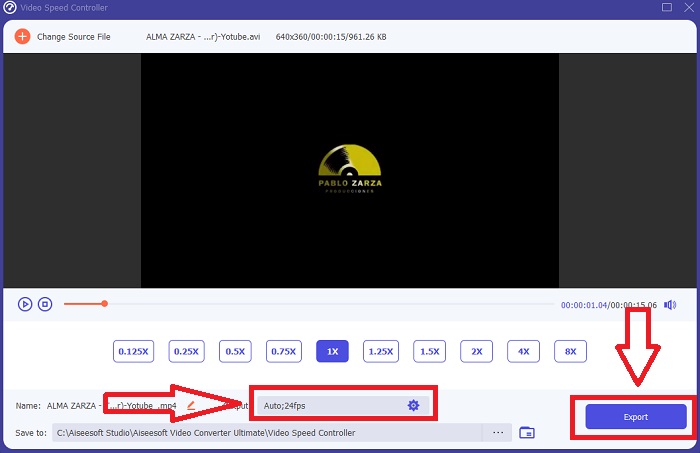
步骤 5: 如果你已经对视频的播放速度感到满意,就可以进一步通过调整格式、分辨率、帧率以及其他参数来微调画质。你还可以为输出视频重新命名。完成设置后,点击导出(Export),并在电脑文件系统中选择保存位置即可。
相关内容
如何在 Windows Media Player 中加速播放视频
第 4 部分。 关于慢动作相机的常见问题解答
慢动作相机的成本是多少?
如果您想要高质量的慢动作效果,请选择具有高帧率的相机。它给我们的印象是,如果相机具有高帧率或中帧率,则没有视频会生涩或卡顿。要考虑的另一件事是您的预算。慢动作镜头不需要购买昂贵的装备。此类相机的起步约为 $350,最高可达 $4,000。仅使用具有这两个功能的相机即可拍摄令人惊叹的自由帧素材。
什么是帧率?
通常以每秒帧数定义,帧速率是指连续图像在屏幕上显示的频率 (fps)。无论是用于描述电影或摄像机、计算机图形还是运动捕捉系统,短语帧速率都是指同一事物。 SMPTE(电影电视编辑协会)为电影和电视帧速率 (SMPTE) 设定了行业标准。
有没有慢动作相机应用程序?
是的,Android 和 iOS 操作系统中有很多慢动作应用程序可用。 iOS版有iMotion、SloPro、SlowCam等,安卓版有Slow Motion Video FX、Efectum、Coach's Eye等。
结论
总的来说,慢动作相机在技术和专业要求上都比较高,一方面价格不菲,另一方面要熟练掌握这类相机也需要不少经验。多亏有了这款全新的软件Video Converter Ultimate,它可以在很大程度上替代慢动作相机的功能,因为其中的一个工具就能将普通速度的视频免费转换成慢动作效果。
-
 [简单] 如何修复不同步的音频和视频
 假设您'要安排明天的流,但是当您检查设置时,音频和视频不同步。阅读这篇文章,您可以了解更多有关此问题的信息。
-
 解决 OBS 音频延迟问题的 7 个简单步骤 [已解决]
 使用 OBS Studio 时,您是否因为音频延迟而在录制后难以观看视频片段?阅读下面的文章,了解如何有效修复不同步的音频。
-
 可能的好方法|如何修复 VLC 音频延迟 [2021]
 由于音频的不确定性,您是否很难在 VLC 媒体播放器上观看您最喜爱的电影?继续阅读本文以了解修复 VLC 音频延迟的所有可能方法。
