


 視頻轉換大師
 屏幕錄影大師
 影片修復
影片修復
 安全下載
安全下載反向 GIF:快速完整的教學和工具概述
您想讓 GIF 變得更有趣嗎?扭轉它。因此,如果您正在尋找一種出色且富有創意的方式來創建有趣或循環的 GIF、為 GIF 影片增添趣味或添加創意,您應該嘗試反轉 GIF。使用我們的全面指南以及快速應用程式概述和逐步流程,發現編輯和反轉 GIF 檔案的不同平台和有效方法。

以下是每種工具和軟體的缺點和優點的快速概述。
| 應用程式 | 優點 | 缺點 |
| 卡普切特 | ◆ 並且可以在Android 上輕鬆存取。 ◆有大量的功能、模板、貼紙和濾鏡可供選擇。 | ◆ 您必須先下載它。 ◆ 相當複雜的反轉過程 |
| GIF Maker – 影片轉 GIF | ◆ 它提供了有用的工具。 ◆ Android 用戶免費且可使用。 | ◆ 有一些彈出廣告。 ◆ 您必須手動選擇要反轉的GIF 訊框。 |
| 視頻轉換大師 | ◆ 流程高效率、快速。 ◆ 相容於Windows 和Mac。 ◆ 無浮水印。 ◆ 高品質的輸出。 | ◆您必須先下載它才能使用其工具和功能。 |
| 簡單的 GIF 動畫製作器 | ◆ 反轉過程快速、簡單。 ◆ 易於導航。 | ◆ 僅適用於Windows ◆ 僅限前20 次使用。 ◆ 它有一個古老的經典介面。 |
| 在線 GIF 工具 | ◆ 上傳後自動反轉您的GIF。 ◆ 提供有價值的工具來增強GIF。 | ◆ 您不能同時使用多個工具。 |
| EZGIF | ◆ 流程快速、簡單 ◆ 一個免費的線上編輯GIF 的平台。 | ◆有些工具可能需要澄清,特別是對於不熟悉編輯的人。 |
| GIF 動圖 | ◆ 快速反轉GIF。 ◆ 具有許多實用功能的高效能工具。 ◆ 讓您在任何社群媒體平台上分享您的影片輸出。 | ◆您不能同時使用多個工具。 |
第 1 部分:如何在桌面上反轉 GIF
1. Video Converter Ultimate
使用 Video Converter Ultimate 來建立反轉 GIF。它是一款集影片轉檔與剪輯於一身的全能工具,具備多種進階功能與工具,能讓你的影片剪輯過程快速又無煩惱。以下是如何使用 Video Converter Ultimate 來反轉 GIF。
步驟 1. 下載並安裝 Video Converter Ultimate
點擊下方的 免費下載 按鈕下載 Video Converter Ultimate,然後執行安裝程式。
步驟 2. 前往影片反轉工具
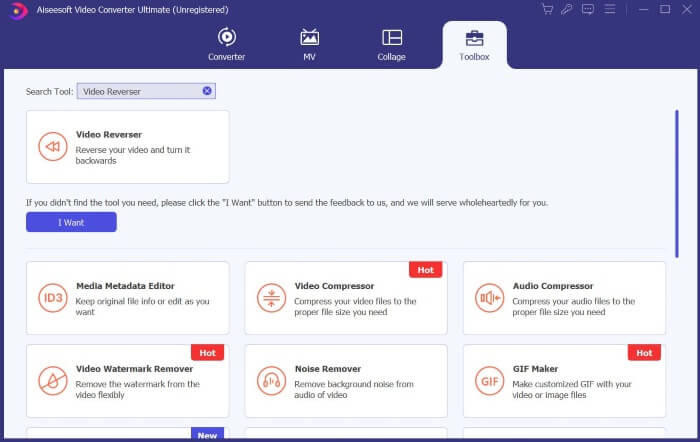
開啟 Video Converter Ultimate,找到並點擊 工具箱。在搜尋框中搜尋 影片反轉,然後點擊它。
步驟 3. 反轉影片
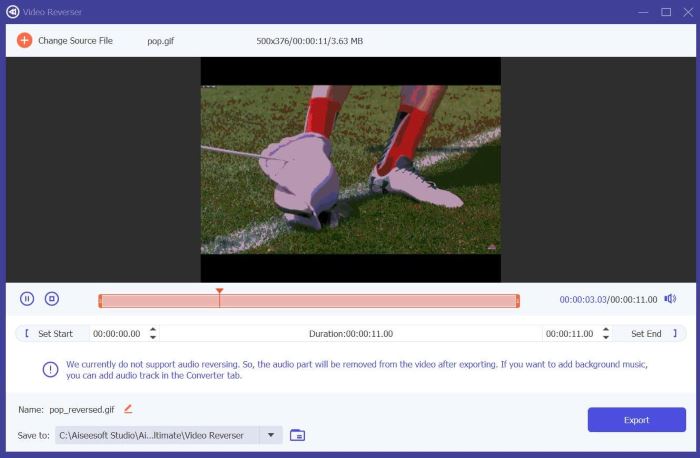
點擊 加號 圖示,選取並上傳你想要反轉的檔案。
步驟 4. 匯出反轉後的 GIF
檔案載入完成後,點擊 匯出,Video Converter Ultimate 會將反轉後的 GIF 儲存到你的預設資料夾中。
2.簡單的GIF動畫製作器
Easy GIF Animator 是一個易於使用的工具,可讓您建立和編輯 GIF。它為用戶提供了先進的工具和高效的功能來提升他們的 GIF 影片。其中之一是能夠反轉 GIF 的動畫。以下是如何使用 Easy GIF Animator 反轉 GIF。
步驟 1. 使用你偏好的瀏覽器搜尋 Easy GIF Animator,然後點選最上方的連結。在首頁找到並點擊下載,接著執行安裝程式並安裝軟體。
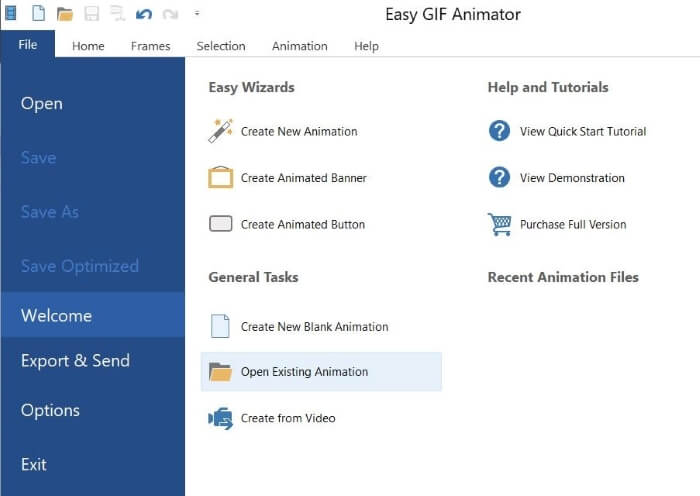
步驟 2. 開啟 Easy GIF Animator,前往 檔案,點選 開啟現有動畫,選取你想要反轉的 GIF 檔案。
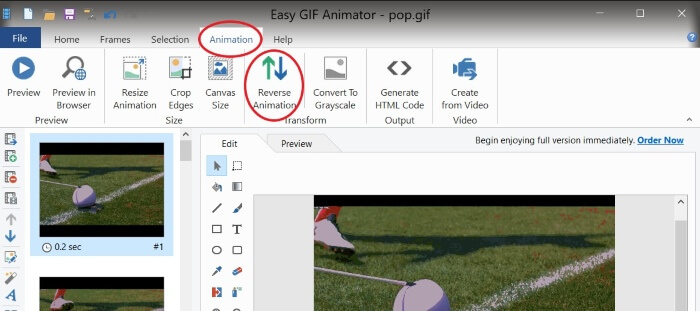
步驟 3. 檔案載入完成後,前往 動畫,然後按下 反轉動畫。
步驟 4. 若要儲存反轉後的 GIF,前往 檔案 並點擊 另存新檔。
第 2 部分. 如何在 Android 上反轉 GIF
1. 帽切
Capcut 是一款深受 Android 用戶喜愛的影片編輯平台。從視訊效果到貼紙和模板,Capcut 提供各種工具來提升您的升級並增強您的影片。其中之一是反轉視訊文件,例如 GIF。以下是如何在 Capcut 上反轉 GIF。
步驟 1. 透過 Google Play 商店在手機上下載 Capcut。
步驟 2. 在手機上開啟 Capcut 並點擊 新專案。從相簿中選取你的 GIF 檔案;請注意,你會在「照片」分類中看到 GIF 檔案。點擊 匯出,因為 Capcut 不支援直接將 GIF 檔案原樣反轉。
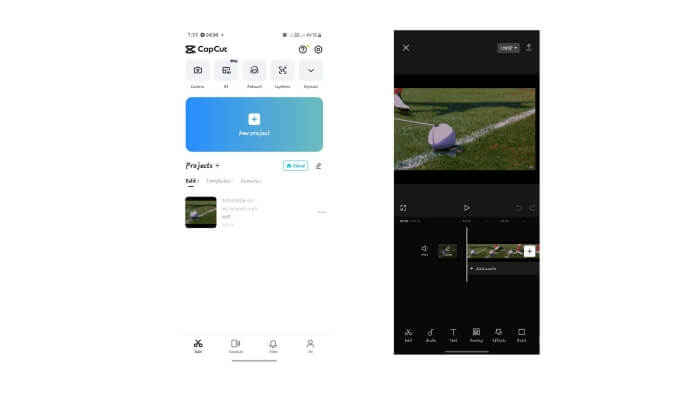
步驟 3. 建立一個 新專案,並選取你剛匯出的檔案。點擊影片片段以顯示剪輯工具,然後找到並按下 反轉,之後再點擊 匯出。
步驟 4. 使用影音轉 GIF 轉檔工具,將你的檔案重新轉回 GIF。
2. GIF Maker - 影片轉GIF
GIF Maker - Video To GIF 是一款多功能行動應用程序,可將您的 GIF 轉換為可愛、時尚、有趣的 GIF 視頻,並提供貼紙、濾鏡和編輯工具來增強您的 GIF 體驗。另外,它也可以用於反轉 GIF,具體方法如下。
步驟 1. 前往手機上的 Google Play 商店並下載「GIF Maker - Video to GIF」。
步驟 2. 在手機上開啟 GIF Maker,點擊 編輯 GIF。從相簿中選取你想反轉的 GIF。
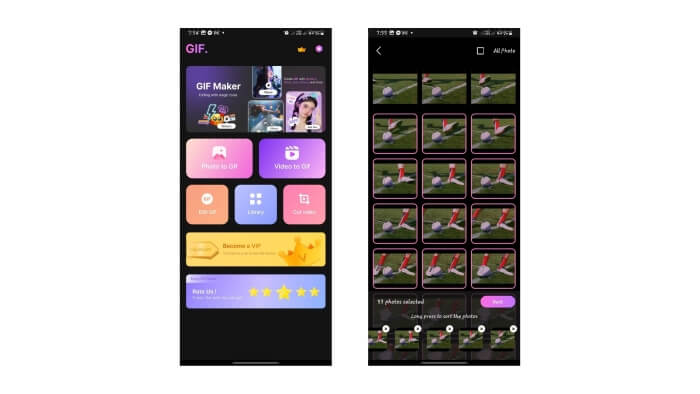
步驟 4. 檢視 GIF 的預覽畫面,確認已經完成反轉。若沒問題,點擊 下一步 並選擇 儲存。
第 3 部分. 如何在線上反轉 GIF
1. 線上 GIF 工具
Online GIF Tools 是一個提供一系列 GIF 編輯實用程式的平台,其中一個工具就是反轉動畫 GIF。以下是使用該工具的一些指南。
步驟 1. 使用你偏好的瀏覽器搜尋 Online GIF Tools,並在搜尋結果中選擇最上方的連結。
步驟 2. 在 Online GIF Tools 的首頁中,手動或使用搜尋框尋找 Reverse a GIF Animation(反轉 GIF 動畫),然後點擊它。
步驟 3. 上傳你的檔案,Online GIF Tool 會自動將其反轉。
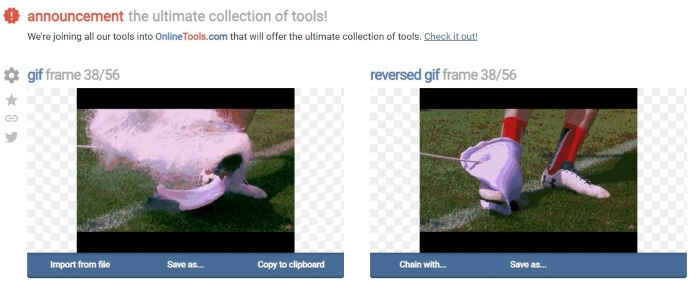
步驟 4. 點擊「Save As」與「Download」以儲存反轉後的 GIF 檔案。
2.EZ動圖
使用 EZGIF 在線反轉 GIF! EZGIF 是一個用於編輯和優化 GIF 的優秀平台。它具有許多對 GIF 編輯和自訂有用的可用功能。以下是如何使用 EZGIF 反轉 GIF。
步驟 1. 使用你喜愛的瀏覽器搜尋 EZGIF,然後選擇最上方的連結。
步驟 2. 在選單列中點擊 Effects。接著找到並點擊 Reverse GIF。
步驟 3. 按下 Choose Files 選取 GIF 檔案,然後點擊 Upload。向下捲動,勾選 Reverse 核取方塊,並點擊 Submit。
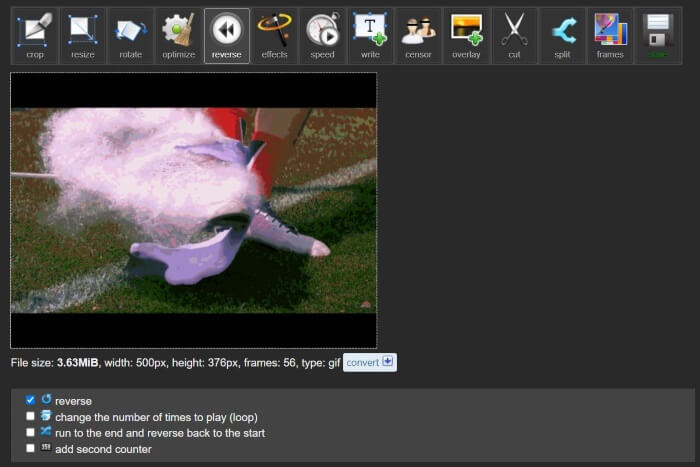
步驟 4. 向下捲動即可看到反轉後 GIF 的預覽,滿意結果後,點擊 Save 下載檔案。
3. GIF 動圖
使用 GIFGIF 使 GIF 反轉。這是一個提供免費 GIF 動畫和編輯工具的平台。如果您正在尋找一種快速、直接的方法來反轉 GIF,GIFGIFs 是正確的工具。以下是只需點擊幾下即可反轉 GIF 的方法。
步驟 1. 使用你選擇的瀏覽器搜尋 GIFGIFs,然後點擊最上方的連結。
步驟 2. 在工具列表中找到並點擊 GIF Reverser。
步驟 3. 按下 Upload 以上傳你的 GIF 檔案。你也可以選擇將 GIF 水平或垂直翻轉。
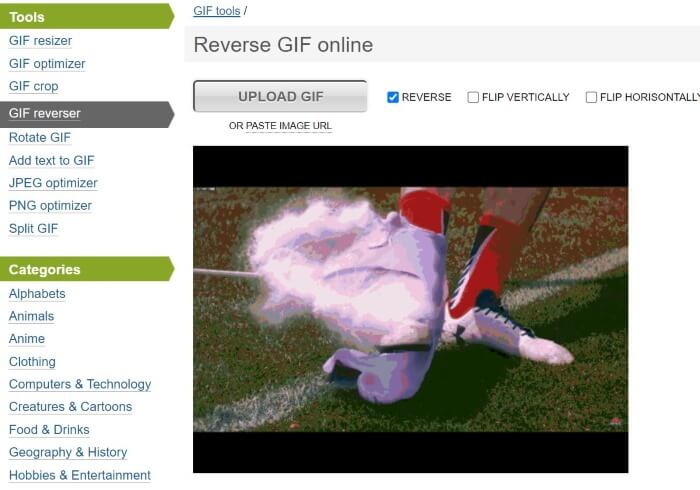
步驟 4. 向下捲動並點擊 Reverse。在反轉後 GIF 的預覽下方,按下 Download the Result,即可將反轉後的 GIF 儲存到電腦。
延伸閱讀:
第 4 部分:有關反轉 GIF 的常見問題解答
iPhone 可以使用預設應用程式反轉 GIF 嗎?
通常,要反轉 GIF,需要具有 GIF 編輯和反轉功能的應用程式和第三方平台。
可以在 After Effects 中反轉 GIF 嗎?
是的,您可以在 After Effects 中反轉動畫
反轉 GIF 會影響其品質嗎?
最初,如果您使用 GIF 反轉平台並選擇提高輸出的視訊質量,反轉 GIF 會影響其品質。
GIF 反轉是如何運作的?
當我們反轉 GIF 時,我們會以相反的順序重新排列其幀,從而使其看起來像是動畫正在向後播放。
我可以控制反轉GIF的速度嗎?
是的,許多 GIF 編輯軟體和平台都允許您編輯 GIF 的速度。
結論
總結來說,反轉 GIF 能為你的動態 GIF 增添趣味與獨特風格,而且有許多好用的工具能協助你快速反轉 GIF。無論是線上、桌面端,還是手機上,利用這些工具都能讓你在編輯與反轉 GIF 時事半功倍、輕鬆完成。選擇最符合你需求與偏好的方案即可。
-
 適合桌面和在線用戶的 10 款最佳 GIF 壓縮器
 在這篇文章中,您將了解最好的 GIF 壓縮器,以幫助您解決大型 GIF 檔案的問題。檢查它們並獲得最好的見解。
-
 推出桌面、在線和移動設備的頂級工具
 了解 GIF 編輯器必須提供的功能,並了解可用來製作令人印象深刻且富有創意的 GIF 並準備在線上傳的最佳工具。
-
 將 GIF 轉換為 APNG:將 GIF 轉換為 APNG 格式的高效工具
 正在尋找將 GIF 轉換為 APNG 的方法嗎?我們'可以滿足您的需求!透過我們簡單易懂的指南,了解將 GIF 轉換為 APNG 的各種方法。
