


 視頻轉換大師
 屏幕錄影大師
 影片修復
影片修復離線和在線將 RMVB 轉換為 MOV 的不同方法
由於網路上充斥著各式各樣令人困惑的影片檔案格式,許多使用者在面對手邊的影片時,常常不知道該選擇哪一款媒體播放器來播放。信不信由你,播放影片並不總是像下載影片那麼簡單。有些格式只限定在其原始開發者的平台上使用,也有一些格式幾乎可以在任何地方播放。不過,了解你現有播放器所支援的影片檔案格式是非常重要的。但我們也不應只滿足於此,學會如何轉換那些你平常不常遇到的檔案格式才是最佳做法。因此,我們為你整理出所有可行的方法,方便你將 RMVB 轉換成 MOV。
第 1 部分。概述:RMVB 和 MOV
RMVB 和 MOV 是另外兩家開發它們的公司的兩種不同的視頻格式。您應該了解 RMVB 文件,它是 RealMedia Variable Bitrate 的縮寫,它是 RealNetworks 開發的 RealMedia 多媒體數字容器格式的可變比特率擴展。有些人將 RMVB 用於本地保存的多媒體資料。因為它們具有更小的文件大小和更低的比特率,但具有更出色的質量,RMVB 文件已成為動漫和亞洲電影標題的流行格式。文件擴展名“.rmvb”用於此格式。
另一方面,MOV 是 Apple 開發的一種以 QuickTime 文件格式 (QTFF) 保存的多媒體容器文件格式。容器格式可以處理各種媒體格式,以促進跨設備、操作系統和應用程序的多媒體傳輸。 QTFF 多媒體文件存儲 .mov 文件。但是,它們也可以另存為 .qt 文件。
| 文件擴展名 | RMVB | 影片 |
| 文件類型 | RealMedia 可變比特率文件 | 蘋果 QuickTime 電影 |
| 開發者 | 實網絡 | 蘋果 |
| 好處 | RMVB 是一種用於存儲和共享多媒體信息的格式。它以發行亞洲內容而聞名,例如中國電視劇和電影。 | MOV 文件可能包括許多數據軌道,每個軌道包含一個數字媒體流或與另一個文件中的流相關。因此,您可以簡單地更改文件,而不必事後重做數據。 |
| 缺點 | 它們並不普遍,因為它們與其他媒體播放器不兼容。 | 每個 MOV 文件都可能包含幾種不同的編解碼器中的任何一種,這使得播放具有挑戰性。 |
| 程序支持文件 | RealPlayer VLC 媒體播放器 iOrgSoft 視頻轉換器 | Microsoft Windows Media Player Apple QuickTime Player VideoLAN VLC 媒體播放器 |
第 2 部分。將 RMVB 轉換為 MOV 的可訪問和最佳方法 [離線]
有時需要在意外的時間和日期將視頻從 RMVB 轉換為 MOV。整個過程主要需要互聯網連接,但在任何地方並不總是可用。因此,如果您想將視頻轉換為適合您所處情況的格式,Video Converter Ultimate 是您的不二之選。它甚至可以讓您同時轉換多個視頻,從而省去重複過程的麻煩。它甚至為您提供了各種選項,例如為您的視頻選擇特定的分辨率、幀速率和比特率。命名一個分辨率,Video Converter Ultimate 將為您提供。
步驟一: 前往該網站後,你會看到寫有「Free Download」及「For Mac OS」的按鈕。點擊它以下載 .exe 檔。你需要安裝此軟體,並耐心等待安裝完成。完成後,開啟該檔案以繼續後續的安裝流程。
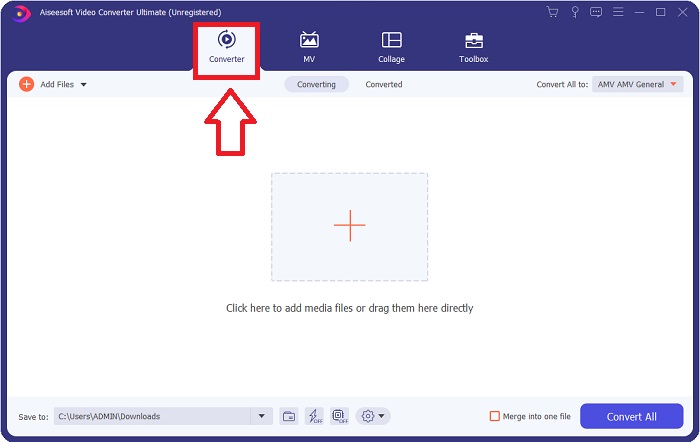
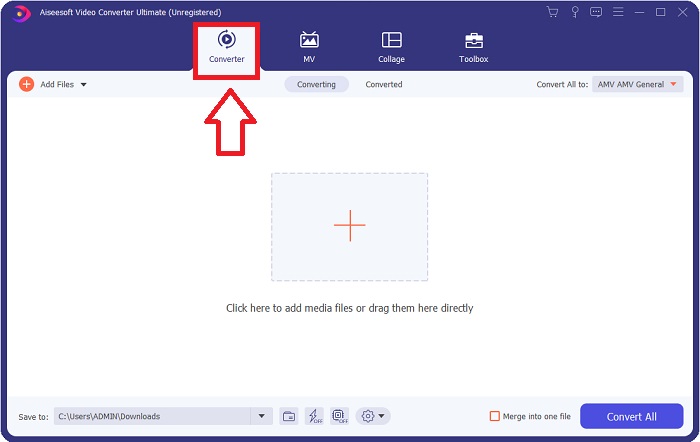
步驟二: 完成安裝後,啟動軟體,畫面會跳出一個視窗。你會看到上方有多個分頁標籤的介面。預設情況下,你會位於 Converter(轉檔)分頁,如果不是,請手動點選該分頁。
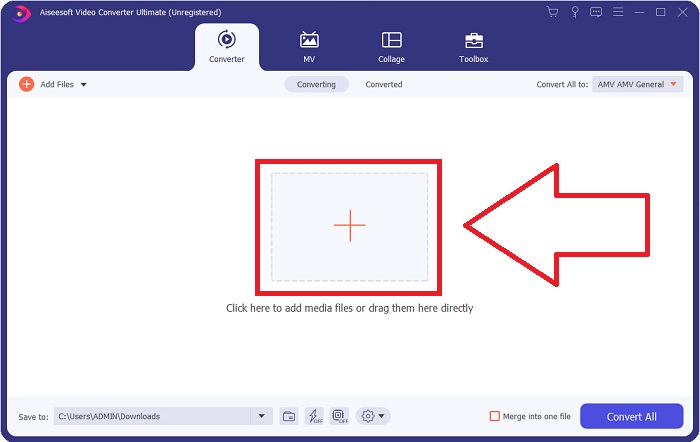
步驟三: 在介面中,你會看到一個中間帶有 + 圖示的方形按鈕。點擊它以匯入你想要轉換的影片檔案,或者也可以直接拖曳檔案到介面中,輕鬆完成匯入。
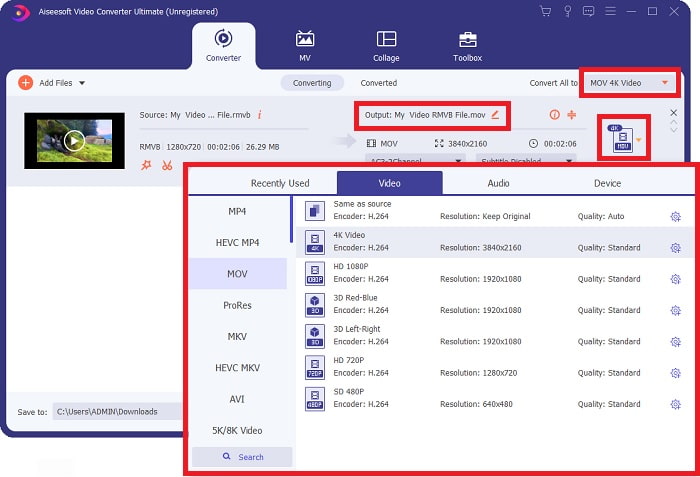
步驟四: 會出現一個新介面,顯示所有可供你編輯影片的選項。畫面最右側是選擇轉檔後影片格式的地方。只要點擊下拉箭頭,就會顯示所有可用的格式。
在本例中,請選擇 MOV。此外,你也可以點選解析度旁邊的齒輪圖示,來調整影片的影格率,以及音訊的取樣率等設定。完成調整後,點選 Create New 以保存變更。
步驟五: 當你已完成所有影片設定與修改後,就可以按下視窗右下角的 Convert All 按鈕,開始進行轉檔流程。
第 3 部分。另一種將 RMVB 轉換為 MOV 的好方法 [在線]
如果你不想在桌上型電腦下載與安裝軟體,而且只需要偶爾幫影片做一次性轉檔,那麼這裡有一個完全線上的選項可以嘗試。FVC Free Video Converter Online 是一款網頁工具,可提供各種影片與音訊設定選項,同時省去安裝軟體的時間。整個流程只需要三個簡單步驟即可完成:
步驟一: 首先,前往該網站,你會在頁面中央看到一個黃色按鈕,上面寫著 Add Files to Convert。點擊此按鈕,匯入你想要轉換的影片檔案。
下載桌面版以批次轉換檔案。
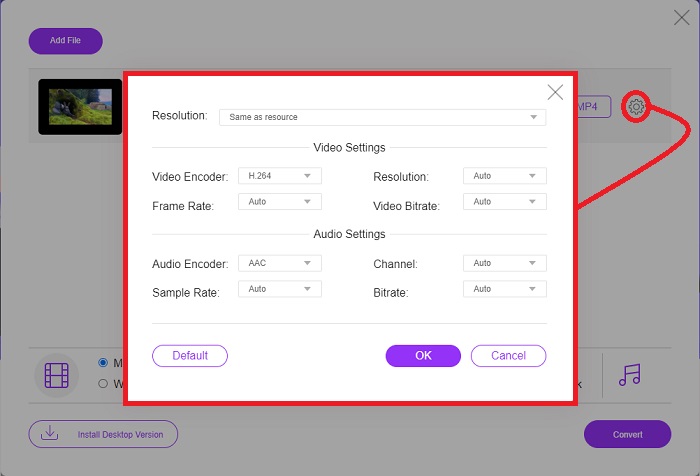
步驟二: 接著會跳出一個視窗,上方顯示你已匯入的影片檔案,下方則列出所有可用的格式。由於你想將 RMVB 轉換成 MOV,請選擇 MOV。若要使用進階選項,可點擊最右側的齒輪圖示,調整影片與音訊設定。完成後點選 OK 以保存變更。
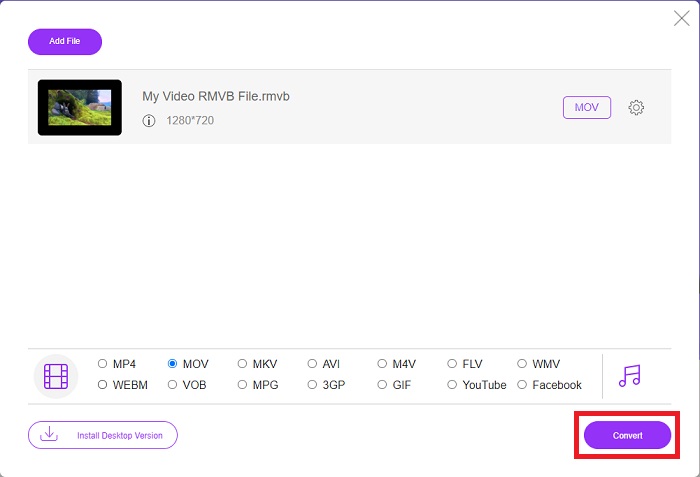
步驟三: 若你對所有設定與變更都感到滿意,就可以點擊視窗右下角的 Convert 按鈕,開始轉檔。選擇你希望存放已完成轉檔檔案的資料夾,然後等待轉檔完成即可。
RMVB 與 MOV
第 4 部分。 有關 RMVB 到 MOV 轉換的常見問題解答
RMVB 文件究竟是什麼?
任何 RMVB 文件都是使用針對視頻內容優化的可變比特率壓縮的 Real Media 視頻文件。它是基本 Real Media (.RM) 文件格式的較新版本,可提供更好的壓縮。
什麼可以播放RMVB文件?
由於不同的應用程式會因各自目的而使用附檔名為 RMVB 的檔案,你需要使用與你要開啟之檔案相容的軟體。RealNetworks RealPlayer(Windows)、VLC media player(多平台)及 GRETSCH GOM Player(Windows)都是可以播放 RMVB 檔案的免費媒體播放器。
.rmvb 文件是否可能有任何錯誤?
如果您沒有 Real Media Player 或任何其他合適的文件打開工具,當 .rmvb 文件由於硬盤驅動器上的錯誤扇區或錯誤下載而損壞時,您可能無法打開 .rmvb 文件。如果存儲 .rmvb 文件的文件關聯信息的 Windows 系統註冊表出現問題,則可能會出現第三個錯誤。
結論
選擇是保留軟件還是只使用在線工具來轉換視頻,不必擔心是否應該使用 FVC。該軟件及其在線版本都為您的轉換需求提供了最佳選擇。但是,我們強烈建議您下載 Video Converter Ultimate 以獲得它為您提供的附加工具箱,以便在為您的視頻進行除單獨轉換之外的進一步編輯時。您永遠不知道何時需要適合初學者的軟件,因此最好始終將其放在您的計算機上。
-
 在Windows / Mac上如何將RMVB轉換為MP4的指南(3種免費方法)
 是否要將RMVB轉換為MP4,以便在計算機或手機上輕鬆播放?在本指南中,您將找到將RMVB文件轉換為MP4的簡單方法。
-
 桌面或在線前 4 個免費 RMVB 到 FLV 轉換器應用程序
 本文將告訴您可以將 RMVB(RealMedia 可變比特率)文件轉換為 FLV 視頻的最佳 RMVB 到 FLV 轉換器軟件和網絡應用程序。
-
 如何在Mac / PC /在線上將MP4轉換為MOV
 如何在Mac上將MP4轉換為MOV?有沒有免費的方法可以將MP4轉換為MOV而不會造成質量損失?這篇文章分享了4種簡單的方法來幫助您在Mac,Windows PC和在線上將視頻從MP4轉換為MOV。

