


 視頻轉換大師
 屏幕錄影大師
 影片修復
影片修復關於如何將 WebM 文件轉換為 Windows/Mac/在線的 FLV 的提示和技巧
Are you having trouble playing videos under the file extension of WebM? Maybe you are currently looking for the best solution via converting the file into a playable format on your device. If that is the case, you are lucky because this article will discuss two of the best WebM converters you can use online or offline. Let's jump into the WebM to FLV converter for free you can use on your desktop and learn how to convert WebM hands-on.

第 1 部分。Windows 和 Mac 上的頂級 WebM 到 FLV 轉換器
First on the list is the phenomenal WebM to FLV converter you can download on your desktop to aid your problem. FVC Video Converter Ultimate is the best converter choice to achieve a 100% success rate on your conversion. It is used explicitly on converting your video and audio format into a compatible one with the 200+ format of your choice. It is even more refined, as it offers a simple conversion with the super high-speed converting process without altering its quality. This converter takes the conversion to the next level, want to experience it? In that case, let's learn how to use this tool by following the detailed steps below.
Steps on How to Convert WebM Files to FLV format with the FVC Video Converter Ultimate:
Step 1. Click the download button presented below and follow the installation prompts.
Step 2. To add your WebM files, click the Add Files at the top-left corner of the interface. Then choose the .webm file on your folder and click Open.
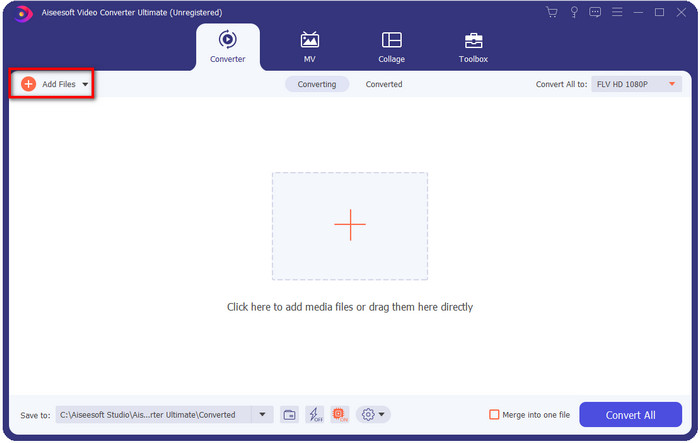
如果要添加多個WebM文件或任何其他文件進行批量轉換,您可以在界面上拖放文件。
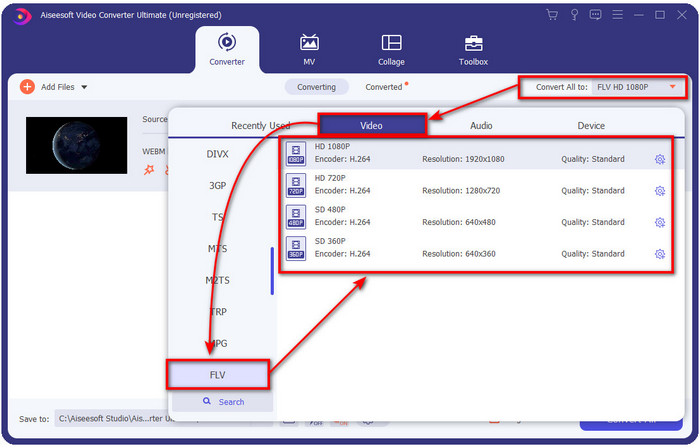
Step 3. Click the Convert All to option at the top-right corner of the interface and choose the FLV format.
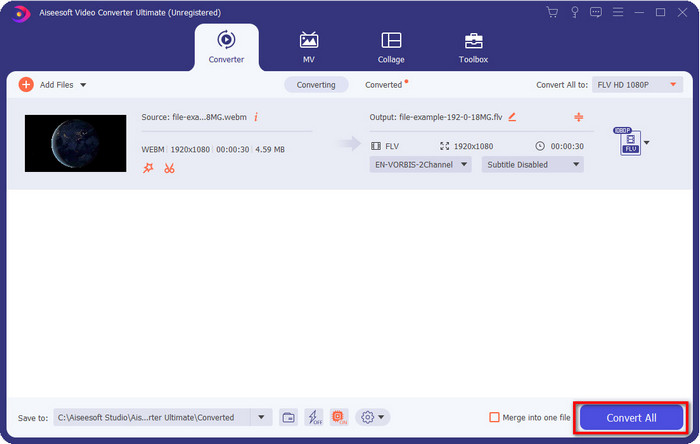
Step 4. Click Convert All to start and convert WebM to FLV. After the process, a folder will show on your screen with the newly converted FLV file.
優點
- 它支持您可以選擇的無數格式配置文件。
- 支持硬件加速和快速轉換以實現更快的轉換過程。
- 它提供了多種高級編輯功能,例如剪切、合併、裁剪、添加效果等等。
- 批量轉換您的 WebM 文件。
- 適用於所有操作系統,如 Windows 和 Mac。
缺點
- 將其下載到您的桌面上。
- 付費轉換器。
第 2 部分。免費在線將 WebM 轉換為 FLV
FVC Free Video Converter Online offers you a powerful WebM to FLV converter online. This converter is available in all of the search engines of your choice. Instead of downloading a converter on your desktop, why don't you use this web tool as an alternative? Aside from being free, it is also ads and malware-free. However, many functions aren't in here that the FVC Video Converter Ultimate has significantly the scope of format supported. Want to know how to use this web converter? Then follow the steps provided below.
Steps on How to Convert WebM files to FLV Format Online with the FVC Free Video Converter Online:
Step 1. Click this FVC Free Video Converter Online to open the converters website.
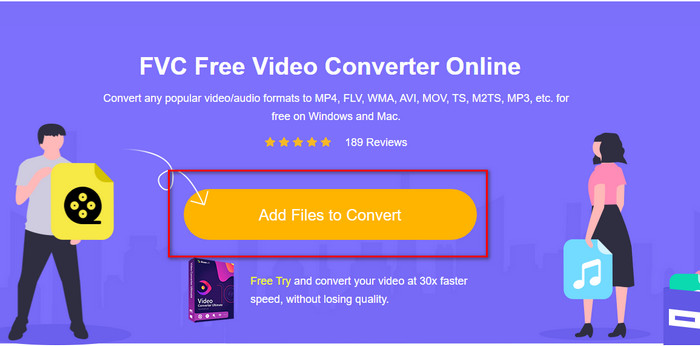
Step 2. On the converters website, click Add Files to Convert to install the launcher of the web tool. Tap it again, and a folder will open, search the .webm file and click Open.
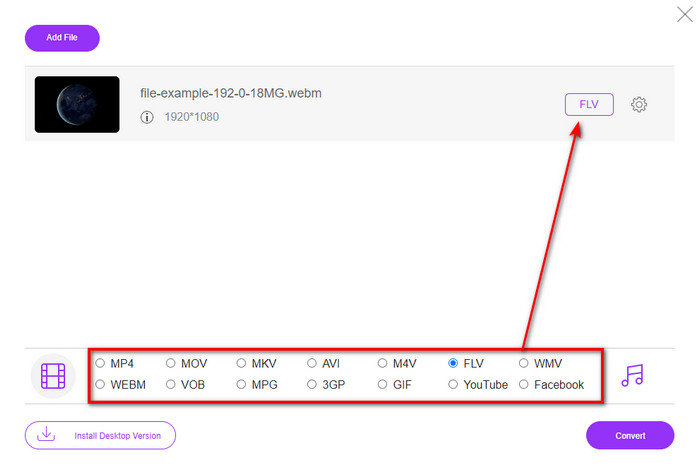
Step 3. Set the format to FLV by choosing it under the setlist.
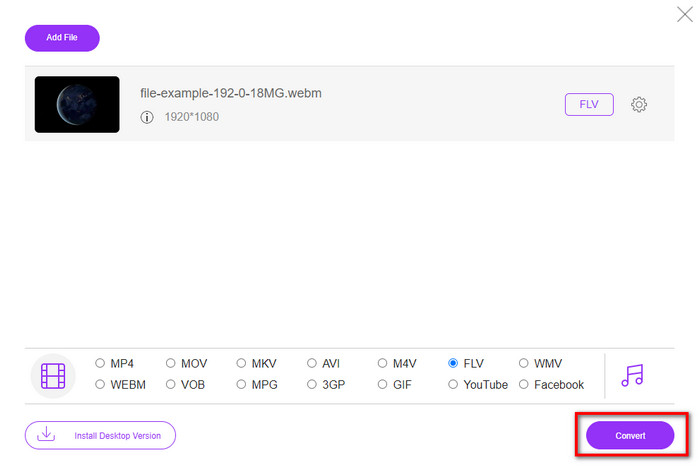
Step 4. To convert the file, click Convert.
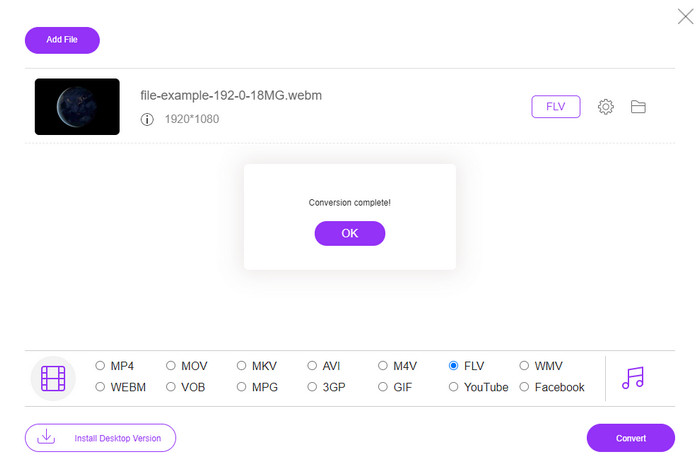
Step 5. Once the conversion is complete, a folder will show on your screen.
優點
- 可在所有網絡瀏覽器中免費訪問。
- 沒有煩人的廣告,並且沒有惡意軟件。
- 它支持中等格式。
缺點
- 需要互聯網連接。
- 此轉換器不提供特殊功能。
第 3 部分。WebM 與 FLV
WebM 可在大多數 HTML5 下的瀏覽器中播放。此格式的目的是免版稅,並可在所有網絡瀏覽器中播放視頻和音頻。此外,它可以適應用戶擁有的任何帶寬情況。它主要播放視頻和音頻而不影響質量,即使用戶的互聯網連接很糟糕。這種格式的另一個奇妙功能是在視頻和音頻流上使用單獨的編解碼器。雖然這種格式可以包含高質量的視頻,但一些智能手機和媒體播放器無法播放這種格式的視頻。無法播放文件的原因有很多,其中之一是您的操作系統版本已過時。
與 WebM 不同,FLV 的目的是使用 Adobe Flash Player 或 Adobe Air 在 Internet 上提供視頻內容。此外,這種格式不僅可以包含視頻內容,還可以包含元數據、短標頭、音頻和視頻流等元素。儘管該格式具有插件,但您不需要它來在媒體播放器上播放文件或將其存儲在手機上。與 WebM 一樣,這種格式也使用單獨的視頻和音頻壓縮編解碼器。
要使您的 WebM 文件兼容,您需要將 WebM 轉換為 FLV。即使您可以在您的設備上存儲 WebM 文件,但如果您不能使用它仍然是一種存儲浪費。此外,將您的 WebM 文件轉換為可播放的格式將使您有機會在多個設備上查看該文件。
第 4 部分。有關 WebM 到 FLV 轉換的常見問題解答
VLC 是否支持 WebM 格式?
VLC is one of the multi-purpose media players that you can download on your Windows, Mac, and even your smartphones. It can support various video and audio playback, including .webm files. But if you want to watch your WebM files into a better media player, read this article to know more about the five best software to play WebM files.
如何將 WebM 轉換為 GIF?
Converting your WebM files into an animated GIF can be done within a minute. Want to know how to convert WebM to GIF? If so, click this link to learn more.
我可以壓縮我的 WebM 文件嗎?
Absolutely Yes, you can make your WebM file more diminutive in size to send it through e-mail or save some space to your drive. If you don't have software of your choice, you are lucky as we sift out the 2 free WebM compressors you can use.
結論
Now that we know how to convert our WebM files into an FLV format, it is time to select the converter you should use. Although these two WebM converters presented here can guarantee your success, they still have different capabilities. For example, suppose you want to convert your WebM thru online without limitation and ads at all. In that case, you must go with the FVC Free Video Converter Online. But if you want to do more than convert files, your pick must be the FVC Video Converter Ultimate. Are you still doubting the ultimate converter abilities? If so, you must download it right now on your desktop to experience the full functionality of the converter.
-
 將 WebM 轉換為 MP3 而不損失音質的 3 種方法
 有問題,因為 WebM 文件不能用於播放您保存的音頻?然後閱讀本文,因為我們通過將 WebM 轉換為 MP3 提供了有效的幫助。
-
 3 用於將 WebM 文件轉換為 AVI 格式的令人驚嘆的軟件
 不知道如何將 WebM 轉換為 AVI?那麼讓我們開始閱讀這篇文章。正如我們在 WebM 上指定的所有詳細信息以及您可以用來轉換的三個轉換器。
-
 關於如何將 WEBM 轉換為 MOV 的易於遵循的方法
 您是否覺得safari無法播放您的WebM視頻很困難,又不想切換到支持這種格式的瀏覽器?閱讀本文以了解如何輕鬆將 WebM 更改為 MOV。
