


 視頻轉換大師
 屏幕錄影大師
 影片修復
影片修復在線和離線轉換過程:SWF 到 WMV
SWF is a legacy file format created by Adobe for the Shockwave Flash player. Flash is no longer supported by many browsers, was never supported by iOS devices, and the SWF file format is seldom used these days due to performance and security problems. On the other hand, WMV is a set of video compression codecs created for early internet video streaming and physical media such as HD-DVD and Blu-Ray. Video in this file format is natively viewable on Windows devices, so you may wish to convert SWF files to WMV because Flash players are becoming more unsupported, and you can no longer play SWF files. Hence, we provide you with two options to convert your SWF to WMV.

第 1 部分。如何在 Windows 和 Mac 上輕鬆地將 SWF 轉換為 WMV
Video Converter Ultimate is a multimedia converter that converts practically all major video and audio files to your desired output format. It can convert video files in batches, making it more potent than it seems. It does not stop at converting; it also enables users to modify their videos with the help of helpful editing tools. Furthermore, this video converter supports various formats, including the most widely used nowadays. More significantly, it converts at a faster rate than comparable software. To use this particular software, follow these simple steps:
Step 1: Click the Free Download button to download the .exe file you will need to install the software. Wait for it to finish, open it, and follow the installation process promptly. Click Start Now and launch the software.
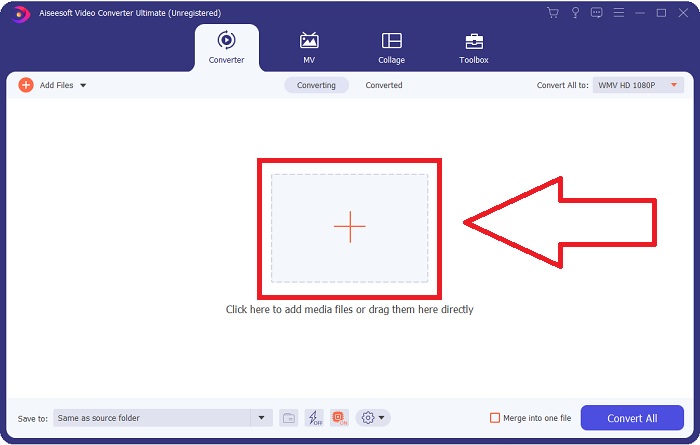
Step 2: Upload the video file you wish to convert by clicking the + button in the middle of the interface. Alternatively, drag the file from your desktop and drop it on the interface, and it will automatically import.
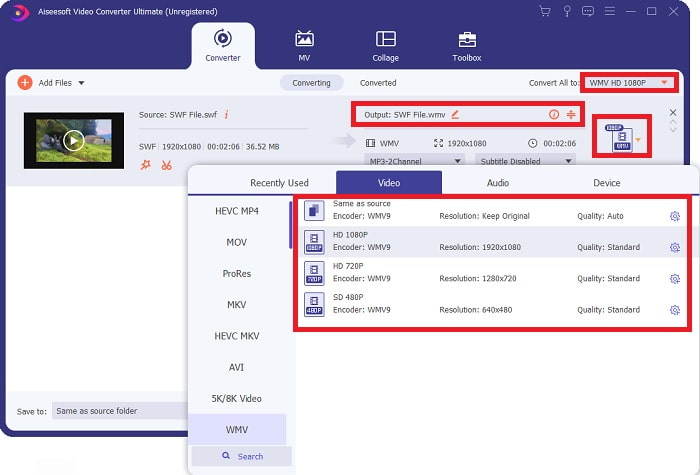
Step 3: Click the drop-down arrow on the right in which you will see the current format your video is in, and it will show you all the available formats to choose. In this case, scroll down and select WMV or just type it in the search bar. All video qualities are also available to choose from on the right panel.
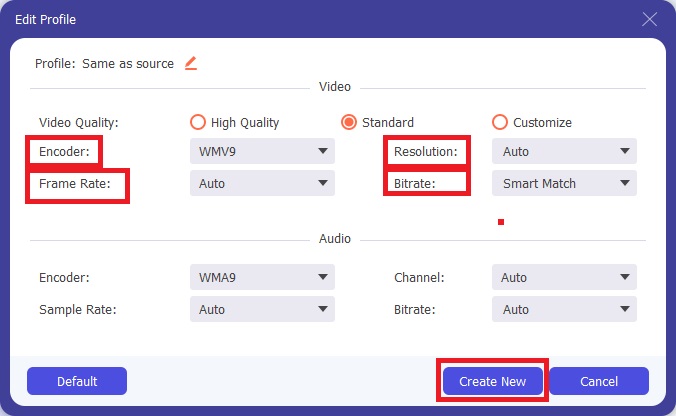
Step 4: To further edit your video, click on the gear icon on the right to show all the handy editing tools. From there, you can make all the necessary adjustments that best suit your needs. Just click the Create New button once you are finished.
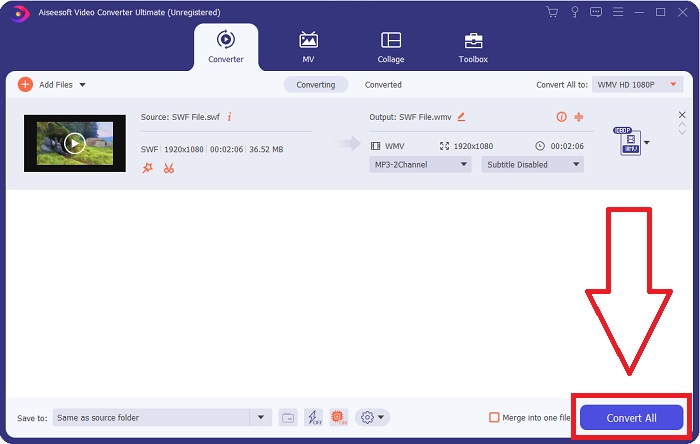
Step 5: Finish the conversion process by finally clicking the Convert All button on the window's bottom right corner and waiting for it to finish.
第 2 部分。 在線將 SWF 轉換為 WMV 的另一個技巧
FVC Free Video Converter 始終免費,無需註冊。一些免費的在線視頻轉換器會限制轉換時間範圍或文件大小。如果您已用完所有免費轉換時間或文件太大,即使您很少轉換視頻,也需要購買計劃。但是FVC Free Video Converter沒有這樣的限制,可以隨時轉換視頻。
此外,此服務不需要註冊即可轉換更大的文件,不像大多數在線視頻轉換器需要註冊才能轉換大於 1GB 的視頻。以下是使用此出色工具所需執行的步驟:
Step 1: To go to the website, click this link. Then, download the launcher quickly by clicking the Add Files to Convert button and waiting for it to finish.
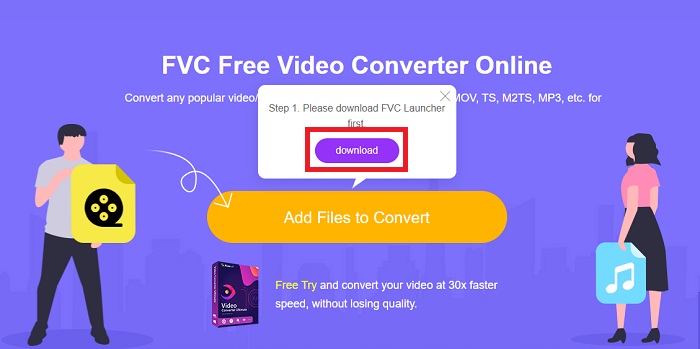
Step 2: Click the said button again, and this time, it will allow you to upload the video file you wish to convert. After that, select WMV among all the available formats.
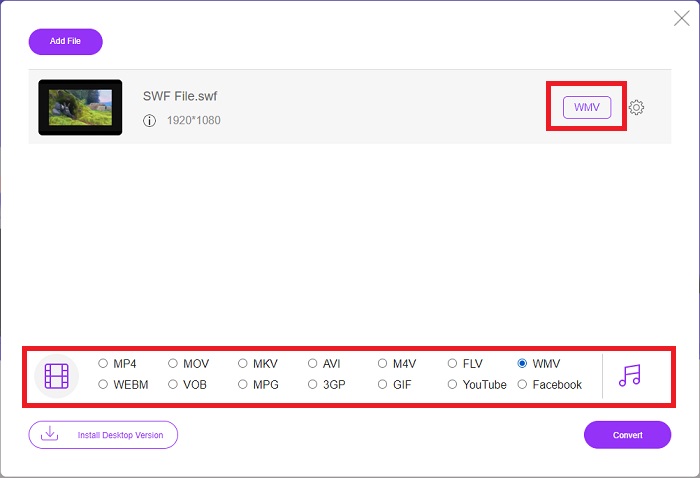
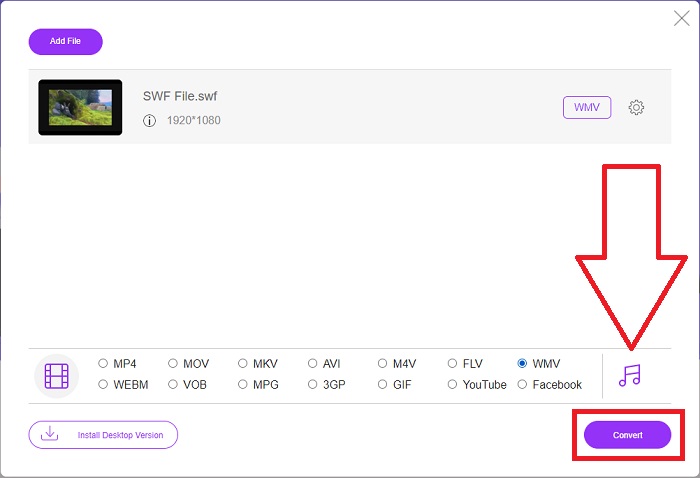
Step 3: You can still use handy editing tools like the software itself. Just click the gear icon, and it will show you all the adjustments you can make. To save the changes made, click OK and once you finish adjusting, click Convert to start the process.
相關閱讀:
第 3 部分。關於 SWF 和 WMV 格式的廣泛知識
如果您想進一步了解這兩種格式,請繼續閱讀本文。我們提供您可能需要的所有必要和基本信息作為背景信息。
Adobe 使用 SWF 文件格式來存儲影片和基於矢量的動畫。 Small Web Format 是縮寫;但是,它也稱為 ShockWave 格式。它通常用於通過互聯網播放視頻,尤其是基於瀏覽器的遊戲。不幸的是,由於性能和安全問題,Adobe 表示將在 2020 年底停止支持 Flash 格式。
另一方面,WMV 文件是一種 Windows Media Video 文件,可以使用一種或多種 Microsoft 的視頻壓縮格式進行壓縮。它是 Windows 中一種流行的視頻存儲格式,這就是某些第三方應用程序將其用於短動畫等內容的原因。它旨在與 Windows Media Player 和 Movies & TV 等 Microsoft 媒體播放器配合使用。為了與數字版權管理 (DRM) 系統一起使用,WMV 文件可能會被加密。
| 小型網頁格式 | 視窗媒體視頻 | |
| 文件擴展名 | .swf | .wmv |
| 開發者 | Adobe 系統公司 | 微軟 |
| 支持計劃 | ◆ Adobe Flash Player ◆ Adobe Flash ◆ 專業抄送 ◆ GOM 播放器 ◆ Adobe Dreamweaver 2020 | ◆ VLC 媒體播放器 ◆ MPlayer ◆ 媒體播放器經典 ◆ 視窗媒體播放器 |
第 4 部分。有關轉換 SWF 和 WMV 的常見問題解答
WMV 文件有什麼用?
WMV 視頻文件是在線或通過 HD DVD 和藍光光盤銷售視頻材料的最佳格式。
SWF文件有什麼用?
Flash 文件或 SWF 文件通常用於在 Internet 上有效分發多媒體信息。
可以編輯 SWF 文件嗎?
Adobe Flash 是 Adobe 使用的一種文件格式。與其他多媒體文件不同,SWF 文件需要 Flash Player 插件才能在 Web 瀏覽器中查看。此外,用戶不能直接編輯 SWF 文件。
結論
如果您是新手或只是視頻轉換的業餘愛好者,FVC Video Converter Ultimate 是您的完美選擇。您不會非常頻繁地轉換視頻格式。它的優點,例如恆定的視頻格式轉換,與同類程序相比快速的視頻文件轉換,操作簡單,支持各種格式等,幫助它成為最好的視頻轉換器。在視頻轉換方面,Video Converter Ultimate 及其在線同類產品是最可接受的選擇。
-
 [2 解決方案] 如何輕鬆免費將 SWF 文件轉換為 GIF 文件
 當您通過Flash軟件導出GIF格式失敗時,您可以先嘗試將文件保存為SWF格式。然後,您可以從本文中學習 2 種將 SWF 轉換為 GIF 文件的簡單方法。
-
 頂級 5 最佳免費 SWF 到 AVI 轉換器 [基於 Web 和桌面]
 您想知道如何將您的 SWF 文件轉換為 AVI 格式嗎?因此,如果沒有,請閱讀本文,因為我們提供了有關 SWF 問題轉換的解決方案。
-
 [免費和簡單] 用於將 SWF 轉換為 MOV 的特殊工具
 您是否嘗試過將 SWF 轉換為 MOV,因為您無法編輯視頻?誰是您的視頻編輯器's 不兼容的罪魁禍首?繼續閱讀您的解決方案。
