


 視頻轉換大師
 屏幕錄影大師
 影片修復
影片修復在 Mac/Windows/Linux 上將 M4V 轉換為 MKV 且不損失質量的 3 種有效方法
我需要打開我在 iTunes 上下載的 M4V 視頻。知道如何在 Mac 上將 M4V 轉換為 MKV,然後在我的電視上使用它嗎?
This problem is widespread, especially on M4V videos downloaded on iTunes because this format is under Apple's Fair Play Policy, and it is protected. Therefore, you can't play the .m4v videos instantly on other devices without converting them. This article will provide facts about the converters you can use and succeed in converting the M4V format. Without any more delays, let's start to learn the efficient method of changing M4V to MKV on Mac or Windows.

第 1 部分。在 Mac 和 Windows 上將 iTunes M4V 轉換為 MKV [最受歡迎]
There are many free M4V to MKV converters on the market that you can download, and one of them is the FVC Video Converter Ultimate. But this ultimate tool provides a more effective conversion than the other converters due to its lightning speed conversion, unlimited upload to convert, and intuitive interface. Are you amazed at the ultimate converters? Or do you want to know more about the converter? In that case, here below are the key features you will see if you attain this converter.

FVC Video Converter Ultimate
2,999,368+ 次下載- 它可以將多個 iTunes M4V 轉換為 MKV 或 200 多種媒體格式,如 MOV、AVI、MP4 等。
- 通過超快速轉換,您的 M4V 轉換過程瞬間完成
- 高級編輯功能可讓您的視頻更加出色。
- 在工具箱下設置壓縮、調整大小、GIF 製作器等驚人的功能。
所有這些功能都可以在一個工具上使用,這不是很神奇嗎?讓我們不要再浪費時間,按照以下步驟確定此工具如何有效地將您的 iTunes M4V 轉換為 MKV。
Step 1. First, download the ultimate converter on your drive by clicking the download button below. Choose the platform you are currently using, follow the installation process, press Start Now to proceed. Remember, you will need to be more familiarized with the tool's interface to avoid difficulties.
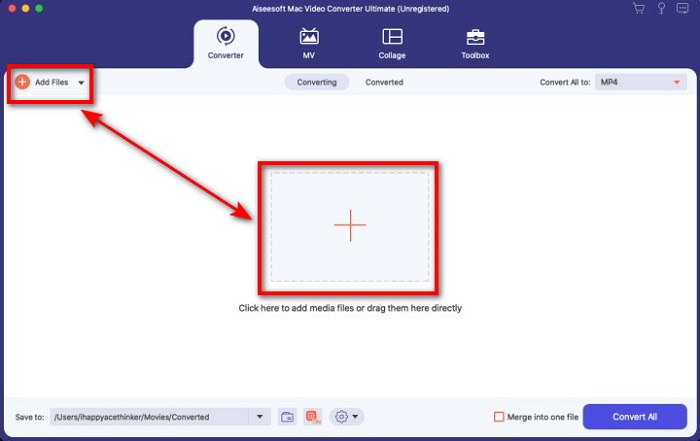
Step 2. Upload the M4V File on the interface by clicking the Add Files or the + button. After that, a computer folder will open on your screen, browse the .m4v File, and press Open.
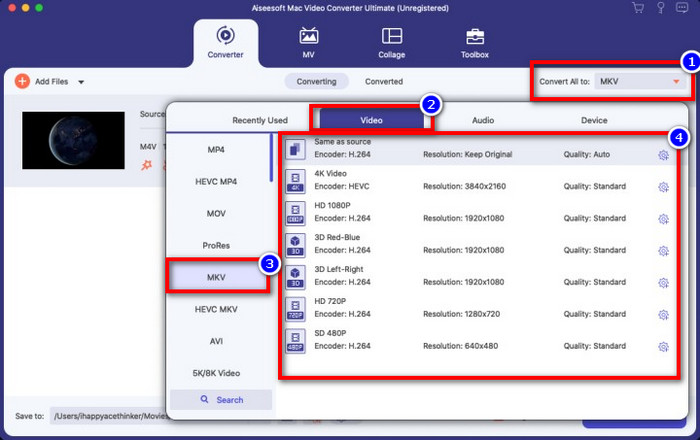
Step 3. Pick out the MKV format under the Convert All to and click it.
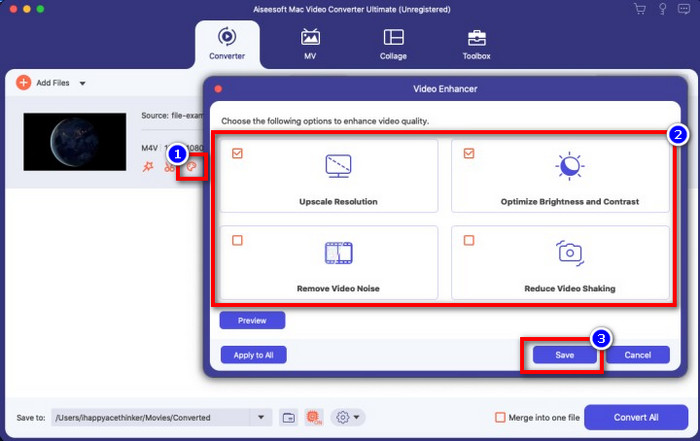
Optional. The effectiveness of this is, without a doubt doing great so far. But did you know that this tool also offers video enhancers? If you click the enhance video option, a dialog box will display; tick the box you want to improve on your video, and to apply it click Save.
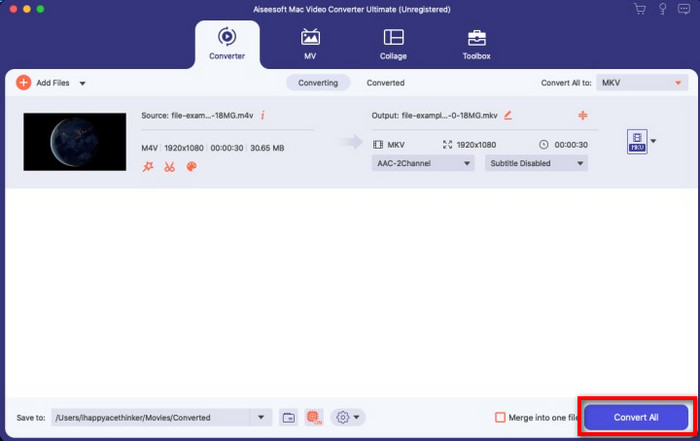
Step 4. By clicking the Convert All button, converting will begin within a short period. Here it is; with that, the file extension of your video is now .mkv.
第 2 部分。 在線將 M4V 轉換為 MKV
Doesn't want to pay to convert M4V files; instead, want to convert M4V to MKV online? If that is the case, FVC Free Video Converter Online is an online converter that guarantees your converting process efficiency even on the web. A converter can finish the job without purchasing the converter itself or even downloading it. Also, there are no ads or even registration needed to use this. Even though the converter is free, the features presented here only focus on converting. Unlike the ultimate tool, it provides wide-scale and amazing features. Furthermore, if you need to convert your M4V files online, use this converter and copy the steps below.
Step 1. Kindly click this link to open the FVC Free Video Converter Online.
Step 2. Press Add Files to Convert option to launch and upload the M4V File you need to convert.
Download the Desktop Version to convert files in batch.
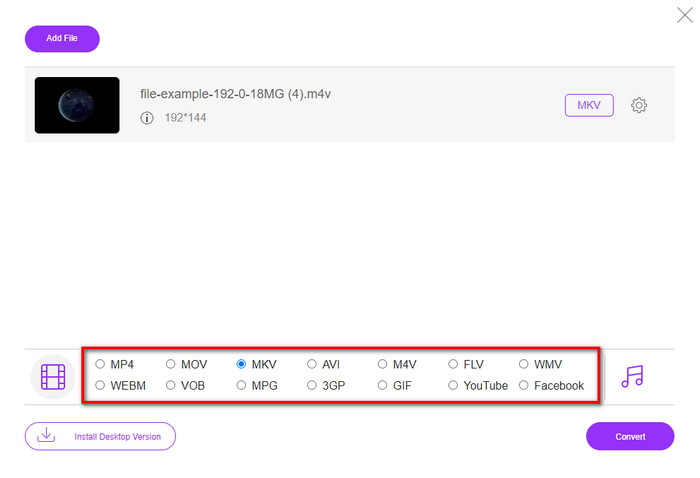
Step 3. Select the MKV format below or the other format you want to have.
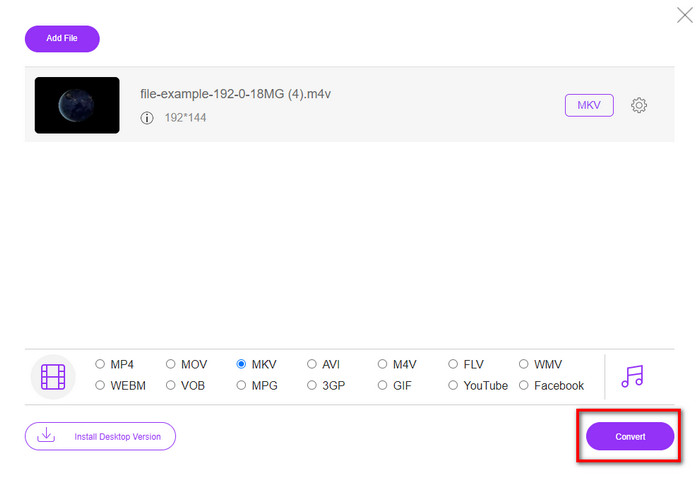
Step 4. Hit Convert for the process to begin.
第 3 部分。免費將 M4V 轉換為 MKV
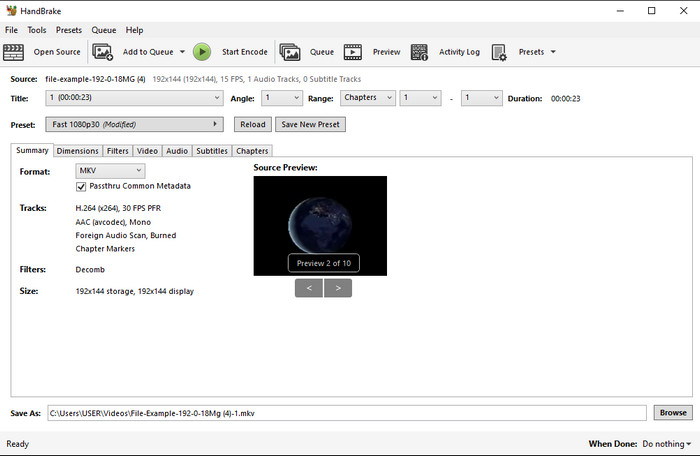
Handbrake provides a swift and efficient converting process like the other converter presented here. However, the format this tool supports is limited, which means you have no less choice option of choosing which format you want it to be. But if you want to use and convert M4V to MKV in Handbrake, apply the steps below.
Step 1. Download the Handbrake on your desktop. Upload the .m4v file by dragging and dropping it on the interface. You can also click File, locate the file on the computer folder, and press Open.
Step 2. Click Format and choose MKV.
Step 3. Click Start Encode for converting the process to begin.
第 4 部分。 M4V 和 MKV 之間有什麼異同
在我們比較 M4V 和 MKV 之前,讓我們弄清楚這兩種格式之間的相似之處。 M4V 和 MKV 都是媒體內容和元素的容器。此外,眾所周知,這兩種格式可以存儲最佳視頻質量之一,例如高清視頻或 4k。而且它們對於包含元數據等元素也很大。此外,下面的後續細節是兩種格式之間的區別。
M4V 與 MP4 格式非常相似;但是,這種格式受 DRM 複製保護,這意味著您不能隨意使用它。但並非所有 M4V 文件都有 Apple 保護,因為一些可下載的 M4V 具有未經授權的許可證,因此請確保您在 iTunes 上下載 .m4v 文件以避免感染您系統的惡意病毒。雖然格式有限制,但您仍然可以在多個媒體播放器上使用此格式來觀看您在 iTunes 上下載的視頻。此外,如果您在 Mac 上需要受保護的設計,這種格式是最佳選擇。
相反,MKV 特定於在一個文件中包含多個媒體內容和元素。此功能僅在 MKV 上可用,因為此格式可以免費使用,並且比 M4V 更靈活。此外,在 Mac 或 Windows 上將 M4V 更改為 MKV 的原因有很多,其中之一就是使視頻文件不受限制。
M4V 與 MKV
第 5 部分。關於 M4V 到 MKV 轉換的常見問題解答
哪個更適合編輯,M4V 還是 MOV?
The two said format is one of the Apple formats, so you will notice that there is no significant gap between M4V and MOV. However, MOV is much better at editing because this format often contains a series of video playback that is the best choice for professional editing. Maybe you think you should make your M4V into a MOV for editing purposes. If so, click this link to know more about converting M4V to MOV with a comprehensive understanding of it.
M4V 和 MP4 一樣嗎?
M4V 和 MP4 在結構感和視頻質量上非常一致。但由於 Apple Plays 保護,M4V 的支持範圍很小,您不能只播放視頻或在 .m4v 擴展名中進行編輯。
支持 M4V 的媒體播放器有哪些?
Not many media players support this type of format because of the DRM protection. So if you are looking for an MKV player, you will spend a lot of time and test it out, which consumes a lot of time. But if you read this article, you can download or use the top 5 MKV media players available on all platforms.
結論
The three tools presented in this article will surely give you the effective conversion you want to have by following the steps. Although the converters have a lot in common, they still have a lot of differences as well. If you read the details we presented above, you will know many about the three tools. Suppose you want to have an excellent conversion in a one-go and still achieve the efficiency of the conversion, we would recommend the FVC Video Converter Ultimate. Sounds unbelievable? Indeed it is, so download it on your desktop to try it yourself.
-
 M4V到MP3轉換器–從M4V文件提取MP3的4種最佳方法
 如果您想輕鬆地從M4V視頻中提取MP3音頻,則可以了解有關4種最佳M4V到MP3轉換器的更多信息,以從文章中獲取所需的音頻文件。
-
 [指南] 如何在 Windows/Mac 上將 M4V 視頻轉換為動畫 GIF
 如果您想從您最喜歡的 M4V 視頻製作動畫 GIF 文件,您可以了解 2 種簡單有效的方法,通過自定義設置將 M4V 視頻轉換為 GIF。
-
 3 視頻轉換器程序用於在 Mac 上將 iTunes M4V 轉換為 AVI
 不知道如何將 MKV 轉換為 AVI 格式?隨著我們繼續閱讀本文,我們將了解可以幫助您轉換此文件格式的 3 種工具。

