


 視頻轉換大師
 屏幕錄影大師
 影片修復
影片修復
 安全下載
安全下載如何免費將任何視頻轉換為MP4
在影片格式方面,毫無疑問,MP4 是現今最通用的格式之一。它不僅可以包含影片,還能同時容納音訊與字幕。現今許多人都會使用 MP4 來備份自己的影片和電影。因此,把影片轉檔並儲存為 MP4 檔案是相當常見的做法。此外,幾乎所有播放器與裝置都能播放 MP4 影片,這也讓我們更有理由去將影片轉成 MP4。
因此,在這篇文章中,我們將一起了解如何把其他影片格式轉換成 MP4。另外,我們也會學習如何將線上影片下載到你的電腦。

第1部分。如何將本地視頻文件轉換為MP4
可以通過將文件擴展名更改為MP4來更改文件類型來偷工減料。但是,這可能會引起麻煩–設備無法識別已更改的文件。因此,您最好使用專業的視頻轉換器來更改文件類型。
1.在線MP4視頻轉換器
如果你需要把儲存在電腦中的影片在線轉換成 MP4,你可以直接使用一款實用的轉檔工具——FVC Free Online Video Converter。
這款影片轉檔工具可以輕鬆完成轉檔作業。你可以輕鬆將任何影片和電影轉成 MP4,並保留原始畫質。你甚至可以依照需求調整影片的解析度、影格率和位元率,或是進行像 WMV 轉 MP3 這類的格式轉換。
步驟一: 前往其官方網站。點擊Add Files to Convert,然後再按Download。啟動器會被下載到你的電腦上,請安裝它。
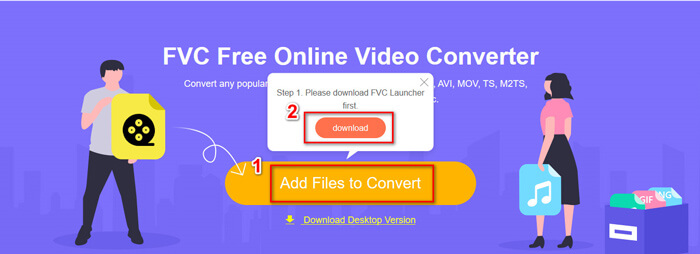
步驟二: 安裝完成後,你會看到Open Window 視窗,在這裡你可以選擇想要轉檔的影片。
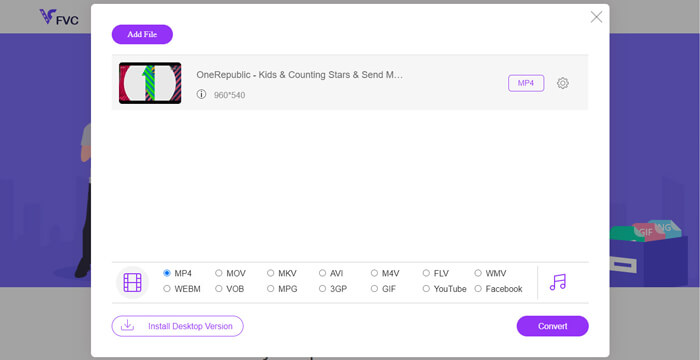
步驟三: 接著在開始轉檔前,將輸出格式選擇為MP4。點選Convert 並選擇儲存位置。完成後,你很快就能取得 MP4 影片。
2. VLC媒體播放器
您可能會對VLC Media Player也可以轉換視頻感到驚訝。但這確實可以用作MP4視頻轉換器。如果您的計算機上已經裝有VLC,則可以嘗試一下。
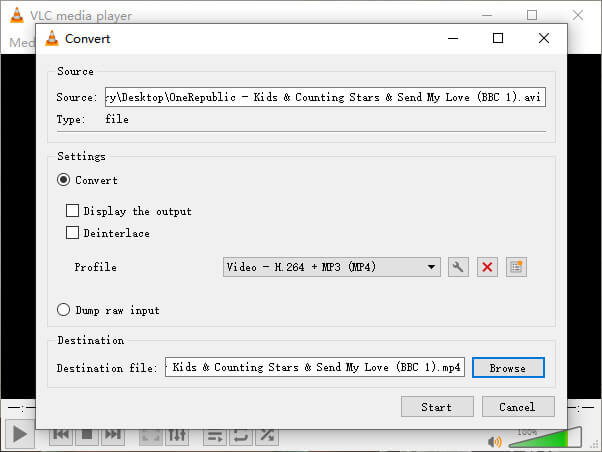
步驟一: 開啟 VLC 播放器。進入Media 功能表,然後選擇Convert/Save…。
步驟二: 將影片加入 VLC,然後點選下方的Convert / Save 按鈕。
步驟三: 接著確認輸出格式為 MP4。選擇儲存位置,然後Start 開始轉檔。
第2部分。如何將流視頻下載到MP4
如今,世界各地的人們都喜歡觀看在線視頻。在觀看這些視頻時,您可能會發現它們很有趣,並希望將它們保存到計算機中以供以後觀看。但是,大多數在線流媒體視頻無法直接下載,有些甚至可能具有自己的格式,這是主流播放器難以識別的。
那麼,如何在計算機上下載在線視頻並將其轉換為更流行的格式,例如MP4?
FVC Free Screen Recorder 的錄影功能可以幫你做到這一點。你可以依照需求,高畫質錄製任何 YouTube、Vimeo 等網站上的線上影片。而且它是 100% 免費使用。請按照以下步驟錄製串流影片。
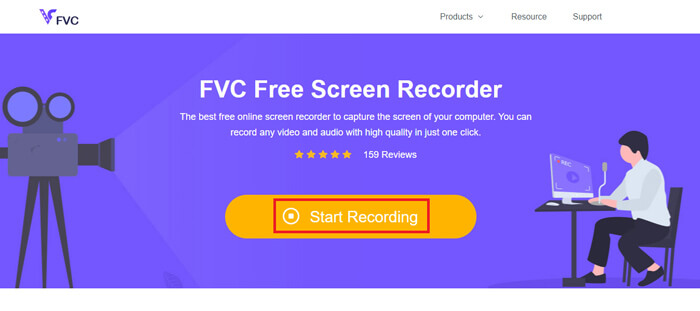
步驟一: 點擊上方連結並選擇Start Recording。如果你尚未安裝啟動器,就需要先下載並安裝到電腦中。
步驟二: 調整錄製區域到合適大小。然後開啟Speaker。如果你想加入旁白,也可以開啟Microphone。點選REC 開始錄製。
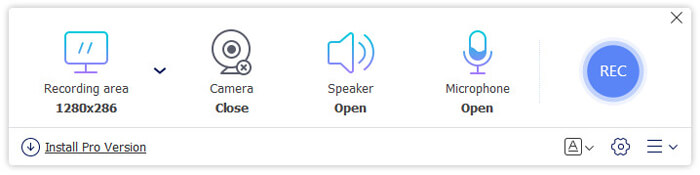
步驟三: 錄製完成後,點擊Stop 圖示結束錄製。影片會預設儲存到你的電腦。
第3部分。將視頻轉換為MP4的常見問題解答
1.將視頻轉換為MP4需要多長時間?
通常,只需幾分鐘即可將視頻轉換為MP4。但是,如果視頻大小太大或網絡速度很慢,則可能需要更多時間才能完成轉換。
2.如果轉換後的MP4文件太大而無法共享怎麼辦?
接著你需要將這支 MP4 影片壓縮到更小的檔案大小。其實,利用 FVC Free Online Video Converter,你就能輕鬆減少檔案容量。只要在啟動錄影程式後,點擊檔案旁邊的設定圖示,將解析度調低即可。轉檔完成後,你會發現影片體積比原本小得多。
另一種做法是使用功能強大的影片壓縮工具,例如 FVC Free Video Compressor,它能在極短時間內,以高品質大幅減小影片大小。
3.是否可以將YouTube或Facebook視頻轉換為MP4?
如果您是 YouTube Premium 用戶,您可以下載 YouTube 視頻並使用視頻轉換器將其轉換為 MP4。
結論
偏好線上工具嗎?那就放心使用FVC Free Online Video Converter 吧。你的電腦已經安裝 VLC 了嗎?也可以試試它內建的轉檔功能。
現在你已經了解將影片轉成 MP4 格式 的所有相關資訊。希望你已經找到最適合自己需求的轉檔工具。歡迎隨時留下你的留言,你寶貴的回饋將幫助我們不斷改進。
-
 在Windows / Mac上將AVI更改為MP4的3種免費方法
 有時,當我們在手機上觀看電影時,我們使用的播放器會提示視頻無法播放,因為它不支持AVI格式。那麼,如何在不損失質量的情況下將AVI快速轉換為MP4?您可以嘗試以下幾種免費方法。
-
 如何在Windows / Mac上將MKV轉換為MP4
 無法播放MKV視頻?是否想在不支持MKV的設備上觀看MKV視頻?這裡有2種免費的方法可以將MKV轉換為MP4,而不會降低質量。
-
 的4種免費方式將MP4轉換為MOV
 如何在Mac上將MP4轉換為MOV?有沒有免費的方法可以將MP4轉換為MOV而不會造成質量損失?這篇文章分享了4種簡單的方法來幫助您在Mac,Windows PC和在線上將視頻從MP4轉換為MOV。
