


 視頻轉換大師
 屏幕錄影大師
 影片修復
影片修復
 安全下載
安全下載MKV與MP4:有什麼區別以及如何轉換
MP4 and MKV are two of the most frequently-used video file formats, also called container formats. Containers are a collection of files containing all the components of a video including streams, metadata information such as the title, copyright holder, and creation date, and more. As a container format, they are both popular and have good quality. So, MKV vs MP4, which is better? What are the differences between MKV and MP4? To get the answers to the above questions, you can read this post about the comparison of MKV vs MP4.

什麼是MKV?
MKV,也稱為Matroska(Matroska多媒體容器),由Steve Lhomme於2002年開發。它是一種免費且開放標準的容器格式,不需要任何許可證要求。 Matroska能夠包含視頻,多個軌道,圖像,字幕等,因此您可以在Matroska視頻文件,Matroska音頻文件,Matroska字幕文件和Matroska立體/ 3D視頻文件中找到Matroska。此外,WebM文件是Matroska的主要子集。
Matroska具有一般的加密功能,因此可以用於DRM。 MKV容器使用面向塊的結構,因此軟件可以加密受DRM保護的文件的結構並對其執行操作。如果您打算使用視頻容器格式進行長期保留,那麼MKV格式將是一個更好的選擇。
什麼是MP4?
帶有MP4文件擴展名的文件是MPEG-4視頻文件的縮寫,該文件由運動圖像專家組(MPEG)在1998年末創建,作為標準的視頻編碼格式。由於其用途廣泛且變化多樣,它成為最受歡迎的容器格式之一,可以在單個文件中保存視頻,音頻和字幕圖像以及章節。與MKV相似,它還可以存儲高級內容,例如3D圖形,菜單和用戶交互性。
許多編解碼器已正式註冊用於MP4,如H.264(與MPEG-4,第10部分相同)和H.265。可以下載其他編解碼器並將其添加到軟件中。同樣,MP4文件可以包含DRM。這意味著軟件可以有效地識別其內容。
現在,您可以轉到下一部分,了解MKV和MP4之間的區別。
MKV和MP4之間的區別
MKV與MP4:質量
比較MP4的MKV質量,哪個更好?實際上,決定質量的是編解碼器,而不是容器。儘管MKV的大小比MP4大,但這並不意味著MP4的質量比MKV低。 MKV和MP4都可以封裝相同的視頻和音頻,並保留幾乎所有原始質量。
MKV和MP4:大小
鑑於其與其他功能,多個音軌和字幕的兼容性,MKV比MP4大。 MP4視頻具有出色的壓縮效果,因此文件大小比其他視頻格式小得多。這也使MP4成為可移植且網絡友好的視頻格式。
MKV與MP4:兼容性和用法
在視頻編輯和播放方面,MP4具有比MKV更好的兼容性。您可以輕鬆地在媒體播放器,iPhone,iPad,Android手機等許多設備上播放MP4視頻。但是對於播放MKV,通常預安裝的媒體播放器無法播放MKV文件。您需要使用第三方工具來執行此操作。
如何在線之間轉換MKV和MP4
To convert videos from MKV to MP4 or from MP4 to MKV, you can use an online video converter to help you easily make the video conversion in a few clicks. FVC Free Online Video Converter, an easy-to-use video converter that allows you to convert any popular video files, including MKV, MP4, MOV, WMV, AVI and more with high quality. You can also use it to change MP4 to AVI, export TS to AVI, and more.
它是基於Web的工具,因此您可以從任何瀏覽器在線進行視頻轉換。在這裡,我以從MKV到MP4的轉換為例,向您展示進行轉換的詳細步驟。
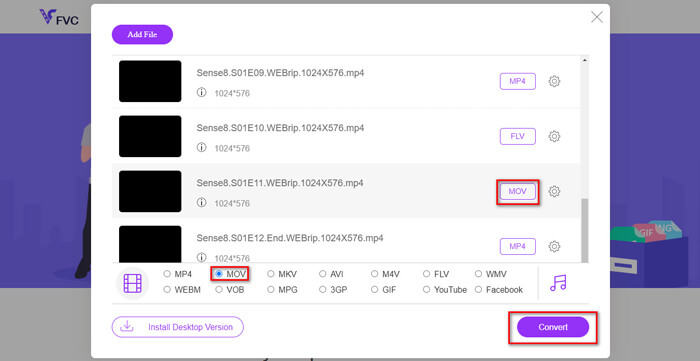
Step 1. Open https://www.free-videoconverter.net/free-online-video-converter/ and then click the Add Files to Convert button to download and activate the Launcher.

Step 2. When the installation is over, you will see the Open File window. Here, choose the MKV video you’d like to change. You can add multiple MKV files to this program to make a batch conversion for saving time.
Step 3. Next, select the MP4 as the output format, and then click the Convert button to start the conversion.
MKV vs MP4的常見問題
1.什麼播放器將播放MKV文件?
對於播放MKV文件和其他格式,我建議您使用VLC Media Player,它可以免費播放幾乎所有格式。
2.我可以使用VLC Media Player將MKV轉換為MP4嗎?
是。您可以使用VLC Media Player將MKV文件轉換為MP4格式。如果您的計算機上已經裝有VLC,則可以嘗試一下。
3. MKV文件大於MP4文件嗎?
通常,由於支持附加功能,多個音頻軌道和字幕軌道,因此MKV的文件大小大於MP4視頻。
結論
通過以上MKV與MP4的比較,您可能對MKV和MP4之間的差異有一個大概的了解。至於應該選擇哪種格式,很大程度上取決於您的實際需求。如果您有任何相關問題,請隨時與我們聯繫。
-
 如何將MTS文件轉換為MP4
 不知道如何將MTS文件轉換為MP4?在本指南中,您將找到6種免費且簡便的方法,可以在Windows或Mac上將MTS格式更改為MP4,而不會降低質量。
-
 如何在Windows / Mac上將MKV轉換為MP4
 無法播放MKV視頻?是否想在不支持MKV的設備上觀看MKV視頻?這裡有2種免費的方法可以將MKV轉換為MP4,而不會降低質量。
-
 WTV到MP4轉換器:如何將WTV轉換成MP4
 怎麼把WTV轉換成MP4?這裡有2個免費的WTV到MP4轉換器,您可以使用它們將Windows錄製的WTV文件轉換為在線和桌面上免費的MP4視頻。
